Einführung
This manual provides essential information for the safe and efficient use of your SUPVAN T50M Pro Label Maker. Please read these instructions carefully before operating the device and retain them for future reference.
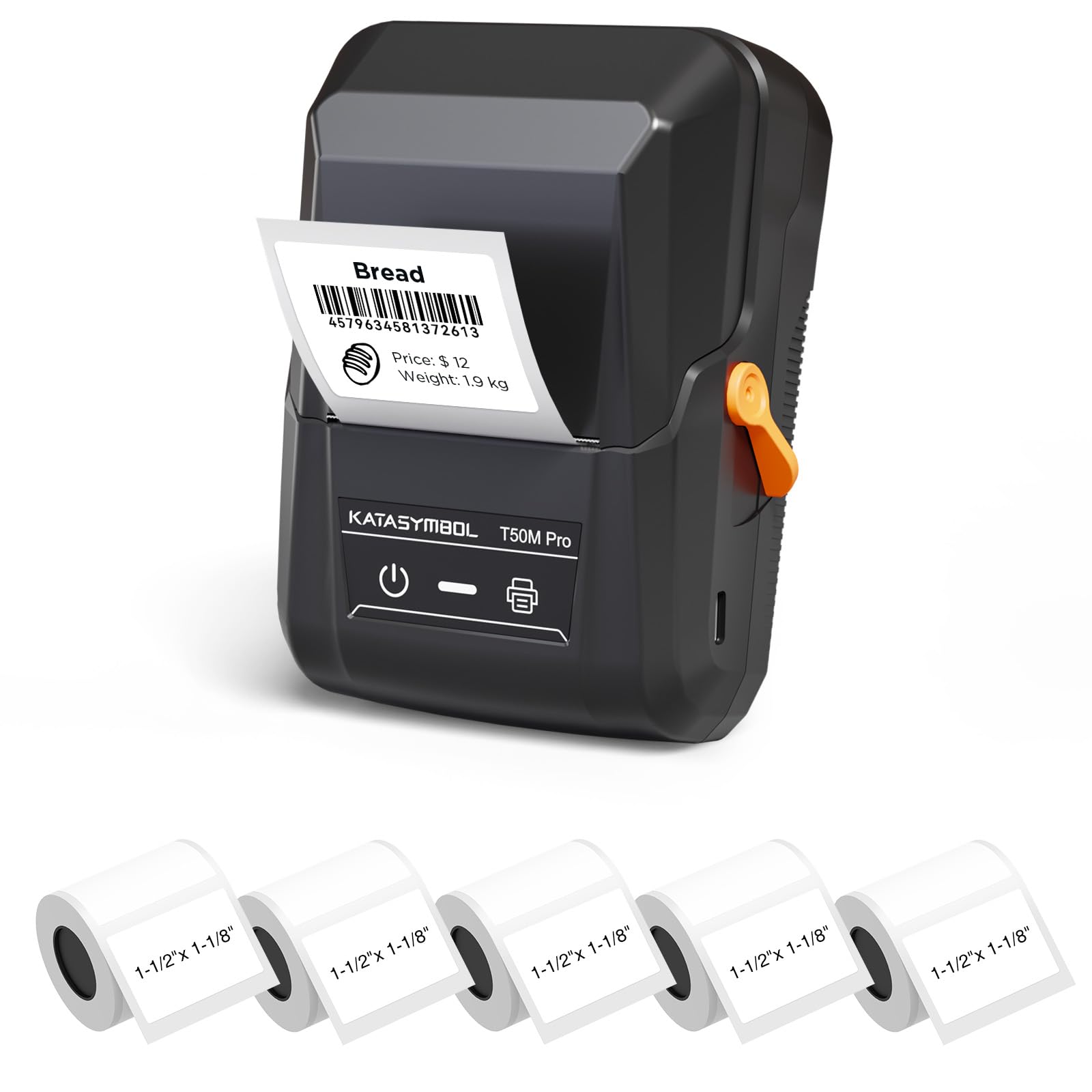
Image: The SUPVAN T50M Pro Label Maker, a compact thermal printer.
Packungsinhalt
Überprüfen Sie, ob alle Artikel in Ihrem Paket vorhanden sind:
- SUPVAN T50M Pro Etikettendrucker
- 5 rolls of 1.57'' × 1.18'' (40mm × 30mm) white labels (250 labels/roll)
- USB-Kabel (zum Laden und für die Verbindung)
- Benutzerhandbuch (dieses Dokument)
Installationshandbuch
1. Aufladen des Geräts
Before first use, fully charge the label maker using the provided USB cable. The device features a 1200 mAh built-in rechargeable battery, offering extended use on a single charge.
2. Einsetzen der Etikettenrolle
The T50M Pro uses thermal paper, eliminating the need for ink or toner. Follow these steps to install a label roll:
- Öffnen Sie den Deckel des Etikettenfachs.
- Legen Sie die Etikettenrolle mit der bedruckbaren Seite nach oben ein.
- Ensure the label edge is aligned with the printer's feed mechanism.
- Close the cover. The device's Smart RFID Auto-Detection will recognize the label size automatically.

Image: Illustration of loading thermal paper into the label maker. The device uses thermal printing technology, requiring no ink or toner.
3. App-Installation und Verbindung
Download the official SUPVAN app from your device's app store. The app provides all editing functions and is free to use.
- Schalten Sie den Etikettendrucker ein.
- Open the SUPVAN app on your smartphone or tablet.
- Follow the in-app instructions to connect to your T50M Pro via Bluetooth or USB.
Bedienungsanleitung
1. Erstellen von Etiketten mit der App
The SUPVAN app offers a comprehensive suite of editing tools:
- Textbearbeitung: Wählen Sie aus über 40 Schriftarten.
- Image & Picture Integration: Add custom images and logos.
- Vorlagen: Access over 140 free, constantly updated templates for various uses.
- Automatische Etikettengrößenerkennung: The app automatically detects the loaded label size, reducing errors.

Image: The SUPVAN app's editing interface, demonstrating font choices, image integration, and automatic label size detection.

Image: A selection of over 140 free templates available within the SUPVAN app, suitable for diverse labeling needs.
2. Etiketten drucken
After designing your label in the app, select the "Print" option. Ensure the label maker is connected and has sufficient battery. The T50M Pro supports various label styles and sizes, printing 3/4 to 2-inch wide labels.

Bild: Examples of labels created with the T50M Pro, including address labels, price tags, and decorative labels, demonstrating support for various styles.

Image: A visual comparison highlighting the high-quality image output from the SUPVAN T50M Pro's app compared to other label makers.
3. Häufige Anwendungen
The SUPVAN T50M Pro is suitable for a wide range of labeling tasks:
- Kleinunternehmen: Shipping addresses, product information, QR codes, brand logos.
- Büro & Schule: Name tags, folder labels, documentation, asset taging.
- Haushaltsorganisation: Pantry labels, storage bins, personal items.

Image: Demonstrates diverse uses for the label maker, such as labeling containers in a pantry, creating product labels, printing shipping labels, and organizing school supplies.
Wartung
1. Reinigung des Druckkopfes
Um eine optimale Druckqualität zu gewährleisten, reinigen Sie den Thermodruckkopf regelmäßig. Verwenden Sie dazu ein weiches, fusselfreies Tuch und wischen Sie ihn vorsichtig ab.ampened with isopropyl alcohol. Do not use abrasive cleaners or sharp objects.
2. Batteriepflege
Recharge the device when the battery indicator is low. Avoid fully discharging the battery frequently to prolong its lifespan. Store the device in a cool, dry place when not in use for extended periods.
3. Etikettenaufbewahrung
Etikettenrollen sollten an einem kühlen, trockenen Ort, fern von direkter Sonneneinstrahlung und Hitze, gelagert werden, um eine Zersetzung des Wärmeleitmaterials zu verhindern.
Fehlerbehebung
1. Gerät lässt sich nicht einschalten
- Stellen Sie sicher, dass das Gerät vollständig aufgeladen ist. Verbinden Sie es mit dem USB-Kabel mit einer Stromquelle.
- Halten Sie die Einschalttaste einige Sekunden lang gedrückt.
2. Printing Issues (Blank or Faint Prints)
- Check if the label roll is installed correctly with the printing surface facing up.
- Ensure the label roll is not empty.
- Reinigen Sie den Druckkopf wie im Abschnitt Wartung beschrieben.
- Verify that the label type is compatible with the T50M Pro.
3. Probleme mit der App-Verbindung
- Stellen Sie sicher, dass Bluetooth auf Ihrem Mobilgerät aktiviert ist.
- Make sure the label maker is turned on and within range.
- Restart both the label maker and the app.
- Sollten die Probleme weiterhin bestehen, versuchen Sie, die App neu zu installieren.
4. Label Misalignment
- Stellen Sie sicher, dass die Etikettenrolle richtig im Fach sitzt und ausgerichtet ist.
- The Smart RFID Auto-Detection should prevent most misalignment issues; if not, try re-seating the roll.
Technische Daten
| Besonderheit | Detail |
|---|---|
| Modellname | T50M Pro |
| Marke | SUPVAN |
| Drucktechnologie | Thermal |
| Konnektivitätstechnologie | USB, Bluetooth |
| Hardware-Schnittstelle | USB |
| Druckerausgabe | Monochrome (Black Ink Color) |
| Maximale Mediengröße | 1.57'' × 1.18'' (40mm × 30mm) - 3/4 to 2-inch wide labels supported |
| Besonderheit | Portable, Smart RFID Auto-Detection, BPA-free labels |
| Batterie | Eingebauter 1200 mAh-Akku |
| Maße | Ca. 5" x 3.7" x 2.3" |
| Gewicht | Ca. 0.6 lb. |
| Im Lieferumfang enthaltene Komponenten | Label Maker, Labels, USB Cable |

Image: The compact design of the T50M Pro, highlighting its portability, lightweight nature, and 1200 mAh rechargeable battery.
Garantie und Support
Garantieinformationen
For detailed warranty information, please refer to the warranty card included with your product or visit the official SUPVAN webDie Garantiebedingungen können je nach Region und Händler variieren.
Kundenservice
If you encounter any issues or have questions regarding your SUPVAN T50M Pro Label Maker, please contact SUPVAN customer support through their official webWebsite oder den Händler, bei dem das Produkt gekauft wurde.
Besuchen Sie auch die SUPVAN Store auf Amazon Für weitere Produktinformationen und Supportressourcen.


