1. Produktüberschreitungview
The SIMO Solis Hero is a versatile 2-in-1 device designed to provide reliable global Wi-Fi connectivity and serve as a portable power bank. It offers seamless internet access in over 140 countries without the need for a SIM card or contract, automatically connecting to the strongest available network. Its robust design is suitable for various travel and remote work scenarios.
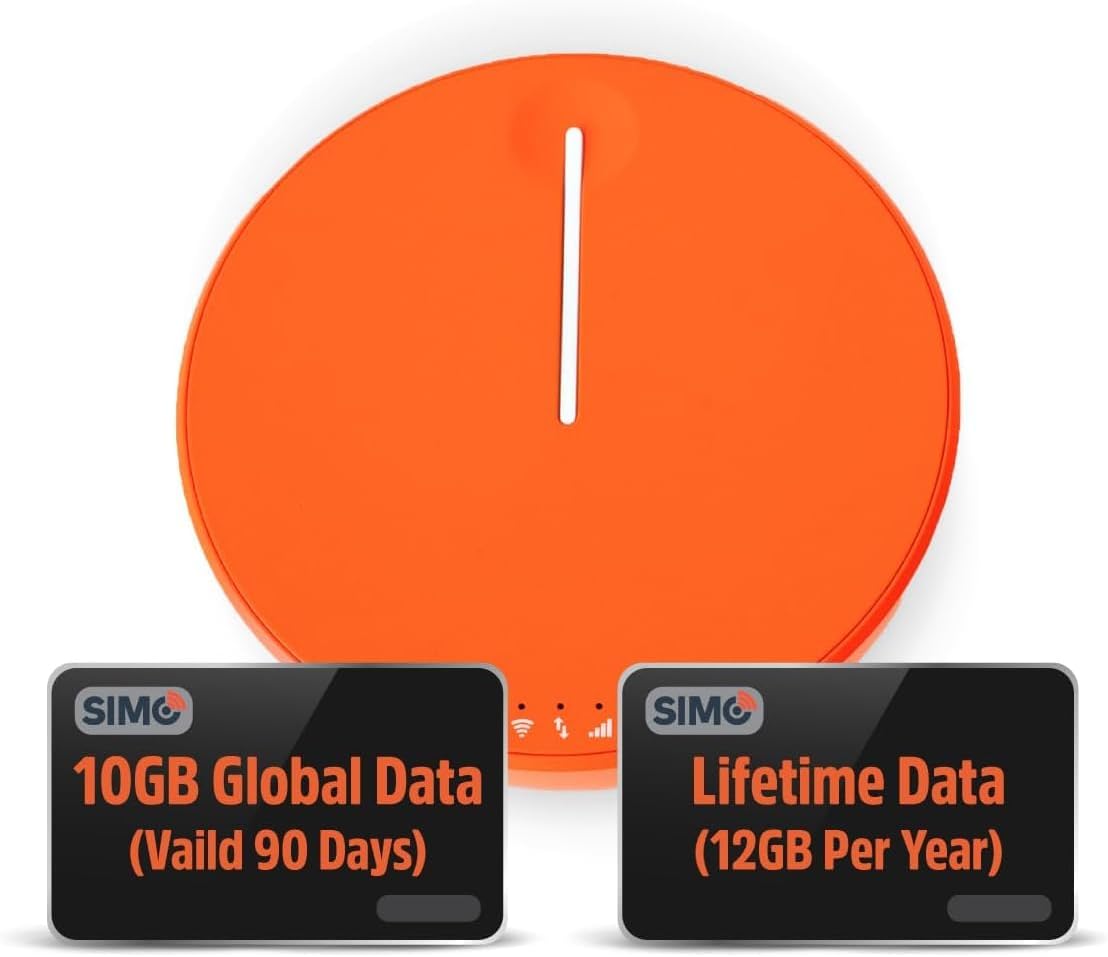
Figure 1.1: SIMO Solis Hero 4G LTE Portable Mobile Hotspot device.
Hauptmerkmale:
- 2-in-1-Gerät: Functions as a mobile hotspot and a 5250mAh power bank.
- Globale Vernetzung: Access to 300+ mobile networks in 140+ countries with SignalScan technology.
- No SIM Card or Contract: Utilizes virtual SIM technology for hassle-free connection.
- Lifetime Data Plan: Includes 1GB of global data every month for the life of the device.
- Langlebiges Design: IP68-rated for dust, water, and drop protection.
- Unterstützung mehrerer Geräte: Verbindet bis zu 10 Geräte gleichzeitig.

Abbildung 1.2: Überview of Solis Hero key features.
2. Was ist im Lieferumfang enthalten?
Upon opening your SIMO Solis Hero package, you will find the following components:
- SIMO Solis Hero Hotspot Device
- Tragetasche
- USB-C-Ladekabel
- Kurzanleitung
- Registration & Support Card
Video 2.1: Official unboxing and setup guide for the SIMO Solis Hero. This video demonstrates the contents of the box and initial steps to get started.

Figure 2.1: Visual representation of the Solis Hero components and initial setup steps.
3. Installationsanleitung
3.1 Erste Geräteaktivierung
- Laden Sie das Gerät auf: Before first use, fully charge your Solis Hero using the provided USB-C charging cable. Connect the cable to the device and a compatible USB power adapter (not included).
- Einschalten: Halten Sie den Ein-/Ausschalter am Gerät gedrückt, bis die Kontrollleuchten aufleuchten.
- Laden Sie die Solis-App herunter: Scan the QR code on the Registration & Support Card or search for 'Solis Wi-Fi' in your device's app store (available for iOS and Android).
- Registrieren Sie Ihr Gerät: Open the Solis app and follow the on-screen instructions to create an account and register your Solis Hero using its serial number. This step is crucial for activating your Lifetime Data plan and any included global data.
3.2 Mit WLAN verbinden
- Locate Wi-Fi Network: On your smartphone, tablet, or laptop, go to your Wi-Fi settings.
- Select Solis Hero Network: Find the Wi-Fi network name (SSID) broadcast by your Solis Hero device. The SSID and password are typically found on a sticker on the device or in the Quick Start Guide.
- Passwort eingeben: Geben Sie das WLAN-Passwort ein, wenn Sie dazu aufgefordert werden.
- Verbinden: Your device should now be connected to the Solis Hero's Wi-Fi network.
4. Bedienungsanleitung
4.1 WLAN-Konnektivität
- The Solis Hero automatically connects to the strongest 4G LTE network available in your location using SignalScan technology.
- You can manage connected devices and monitor data usage through the Solis app.
4.2 Powerbank-Funktionalität
- The built-in 5250mAh battery allows you to charge other devices.
- Connect your device to the Solis Hero using a compatible charging cable.
- The Solis Hero can provide over 16 hours of battery life for its own operation, or it can be used to charge external devices.
4.3 Data Plans and Management
Your Solis Hero comes with a Lifetime Data plan (1GB per month) and an additional 10GB of global data (valid for 90 days). Additional data can be purchased as needed via the Solis app.

Figure 4.1: Flexible data plans are available through the Solis app to suit various usage needs.
5. Wartung und Pflege
- Reinigung: Verwenden Sie ein weiches, trockenes Tuch, um das Gerät zu reinigen. Vermeiden Sie scheuernde Reiniger oder Lösungsmittel.
- Lagerung: Bewahren Sie das Gerät an einem kühlen, trockenen Ort fern von direkter Sonneneinstrahlung und extremen Temperaturen auf.
- Batteriepflege: Um die Akkulaufzeit zu verlängern, vermeiden Sie häufiges vollständiges Entladen des Geräts. Laden Sie es regelmäßig auf, auch wenn es längere Zeit nicht benutzt wird.
- Wasser- und Staubbeständigkeit: While IP68-rated, avoid intentional submersion or exposure to harsh environments to maintain device integrity.
6. Fehlerbehebung bei häufigen Problemen
| Problem | Mögliche Ursache | Lösung |
|---|---|---|
| Keine Internetverbindung | No data plan active or data exhausted. Weak signal. Device not powered on. | Check data plan status in Solis app. Move to an area with better signal. Ensure device is powered on and fully charged. |
| Gerät lädt nicht | Defektes Kabel oder Netzteil. Ladeanschluss blockiert. | Versuchen Sie es mit einem anderen USB-C-Kabel und Netzteil. Prüfen Sie den Ladeanschluss auf Verschmutzungen. |
| Langsame Internetgeschwindigkeit | Congested network. Data throttling after high usage. Too many connected devices. | Move to a less congested area. Check data plan details for speed limitations. Disconnect unused devices. |
| Keine Verbindung zum WLAN-Netzwerk möglich | Incorrect Wi-Fi password. Device too far from hotspot. | Verify Wi-Fi password. Move closer to the Solis Hero device. |
7. Technische Daten
| Besonderheit | Detail |
|---|---|
| Modellnummer | SolHero24 |
| Batteriekapazität | 5250 mAh Lithium-Ionen-Akku (im Lieferumfang enthalten) |
| Maße | 4.41 x 4.37 x 2.05 Zoll |
| Artikelgewicht | 9.7 Unzen |
| Konnektivität | 4G LTE, Wi-Fi (connects to 300+ mobile networks) |
| Max. verbundene Geräte | 10 |
| Haltbarkeitsbewertung | IP68 (Dust, Water, Drop Protection) |
8. Garantie und Kundendienst
SIMO products are backed by responsive customer service. For any inquiries, technical assistance, or warranty claims, please refer to the contact information provided on your Registration & Support Card or visit the official SIMO webWebsite.
Besuchen Sie auch die SIMO Store on Amazon für weitere Informationen und Supportressourcen.