1. Einleitung
Thank you for choosing the Pro Breeze 40L Smart Dehumidifier. This manual provides important information regarding the safe operation, installation, use, and maintenance of your appliance. Please read this manual thoroughly before use and retain it for future reference.
This dehumidifier is designed to efficiently remove excess moisture from the air, helping to prevent mold, mildew, and condensation in spaces up to 50 m².
2. Wichtige Sicherheitshinweise
Beachten Sie beim Gebrauch elektrischer Geräte stets die grundlegenden Sicherheitsvorkehrungen, um das Risiko von Bränden, Stromschlägen und Verletzungen zu verringern.
- Lesen Sie alle Anweisungen sorgfältig durch, bevor Sie das Gerät in Betrieb nehmen.
- Stellen Sie sicher, dass die LautstärketagDie auf dem Typenschild angegebene Lautstärke entspricht der Lautstärke Ihres Netzgeräts.tage.
- Das Gerät, das Netzkabel und der Stecker dürfen nicht in Wasser oder andere Flüssigkeiten getaucht werden.
- Betreiben Sie das Gerät nicht mit einem beschädigten Kabel oder Stecker, oder nachdem es Fehlfunktionen aufweist oder heruntergefallen oder auf irgendeine Weise beschädigt wurde.
- Bewahren Sie das Gerät außerhalb der Reichweite von Kindern und Haustieren auf.
- Always unplug the appliance when not in use, before cleaning, or before moving.
- Stellen Sie sicher, dass das Gerät auf einer stabilen, ebenen Oberfläche steht.
- Lufteinlässe und -auslässe dürfen nicht blockiert werden. Halten Sie einen Mindestabstand von 20 cm um das Gerät herum ein.
- Dieses Gerät ist nur für den Gebrauch in Innenräumen bestimmt.
- Do not use in bathrooms or other excessively humid environments where water may splash onto the unit.
3. Produktüberschreitungview
3.1 Komponenten
The Pro Breeze 40L Smart Dehumidifier features a compact design with integrated controls and a water tank. It includes a continuous drainage option and mobility wheels for easy placement.
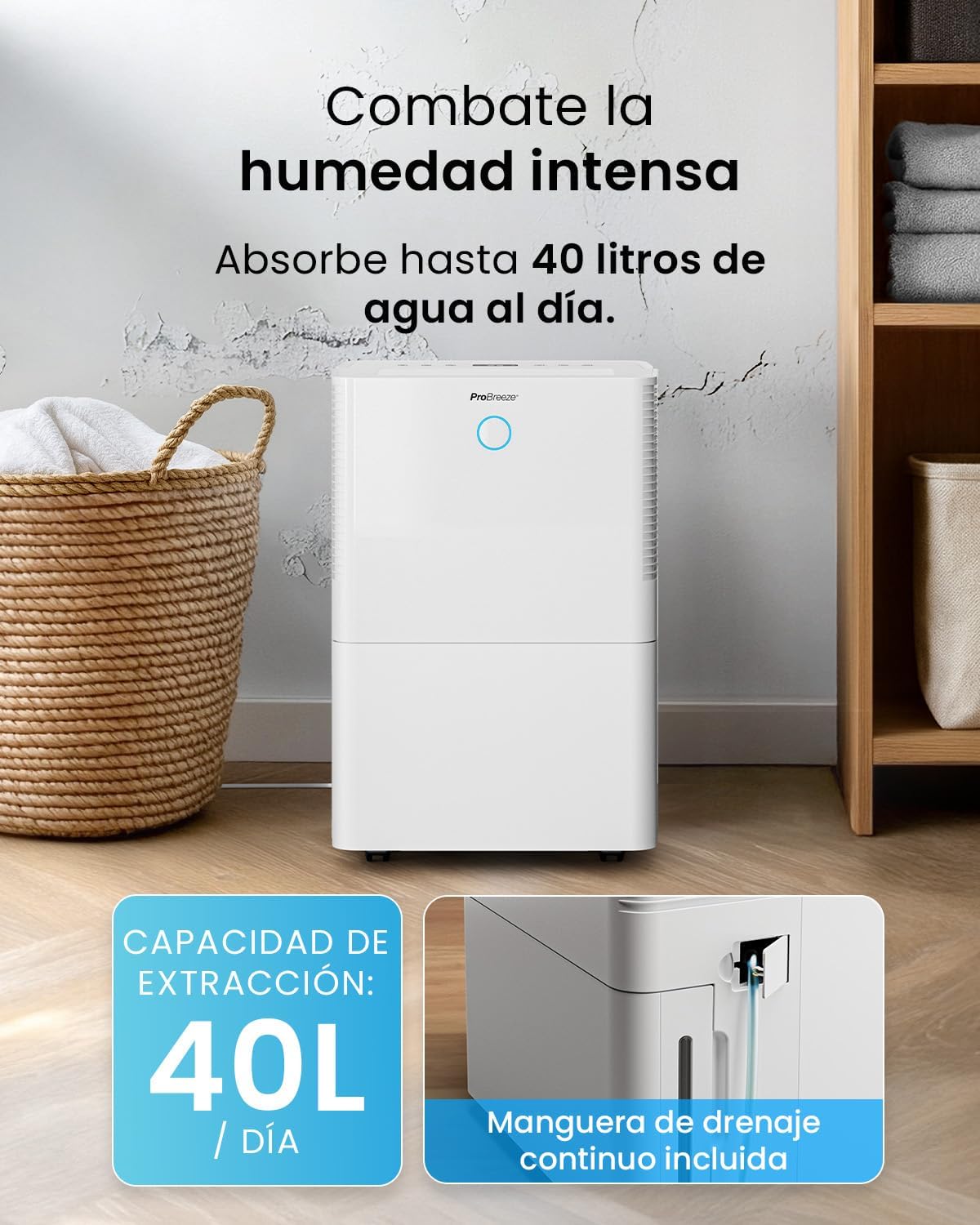
Bild: Vorderseite view of the Pro Breeze 40L Smart Dehumidifier, highlighting its dimensions (52cm height, 28cm depth, 35.5cm width) and key features like smart app control, laundry mode, 5.5L tank, and low energy consumption.
3.2 Bedienfeld und Display
The dehumidifier is equipped with an intuitive touch control panel and an LED display for easy operation and monitoring of humidity levels.

Image: A hand interacting with the touch control panel of the dehumidifier, showing the digital display and various function buttons.
4. Einrichtung
4.1 Auspacken
- Nehmen Sie den Luftentfeuchter vorsichtig aus der Verpackung.
- Entfernen Sie sämtliches Verpackungsmaterial, einschließlich Schutzfolien oder Klebebänder.
- Prüfen Sie das Gerät auf Beschädigungen. Beschädigte Geräte dürfen nicht in Betrieb genommen werden. Wenden Sie sich in diesem Fall bitte an den Kundendienst.
4.2 Platzierung
Place the dehumidifier on a firm, level surface in the desired room. Ensure there is at least 20 cm of clear space around all sides of the unit to allow for proper airflow.

Image: A person easily moving the dehumidifier across a wooden floor in a living room, demonstrating its portability with four swivel wheels.
4.3 Stromanschluss
Stecken Sie das Netzkabel in eine geerdete Steckdose. Stellen Sie sicher, dass die Steckdose die in der Rubrik „Technische Daten“ angegebenen Leistungsanforderungen erfüllt.
4.4 Kontinuierliche Entwässerung (optional)
For continuous operation without needing to empty the water tank, attach the included drainage hose. Connect one end to the drainage port on the back of the unit and the other end to a suitable drain or container that is lower than the drainage port.

Bild: Nahaufnahme view of the dehumidifier's side, showing the continuous drainage hose connected and leading to a floor drain.
5. Bedienungsanleitung
5.1 Ein-/Ausschalten
Drücken Sie die Leistung Taste auf dem Bedienfeld zum Ein- und Ausschalten des Geräts.
5.2 Einstellen der gewünschten Luftfeuchtigkeit
The dehumidifier features an automatic sensor that continuously measures room humidity. Use the Luftfeuchtigkeit Tasten zur Einstellung der gewünschten Luftfeuchtigkeit zwischen 30 % und 80 %.

Image: A family relaxing in a living room with the dehumidifier operating. An overlay illustrates the humidity indicator lights: Blue for >50% (Low), Green for 50-70% (Medium), and Red for <70% (High).
5.3-Betriebsmodi
- Automatik-Modus: The unit will automatically adjust its operation to maintain the set humidity level.
- Kontinuierlicher Modus: The dehumidifier will operate continuously regardless of the humidity level, ideal for very damp Bedingungen.
- Wäschemodus: This mode is designed to accelerate the drying of clothes indoors by running at maximum fan speed and continuous dehumidification.
- Schlafmodus: Reduces fan speed and dims the display for quiet operation during the night.

Image: A woman smiling while placing clothes on a drying rack next to the dehumidifier, illustrating the accelerated laundry drying feature.

Image: A family watching television in a dimly lit living room, with the dehumidifier operating quietly in the foreground, indicating its silent operation and night mode features.
5.4 Timer-Funktion
Verwenden Sie die Timer button to set a 24-hour timer for automatic power on or off. This allows you to schedule operation according to your needs.

Image: A close-up of a smartphone screen displaying the Pro Breeze app's 24-hour timer function, allowing users to schedule the dehumidifier's operation.
6. WLAN-Konnektivität und App-Steuerung
The Pro Breeze 40L Smart Dehumidifier can be controlled remotely via the free Pro Breeze app, compatible with both Alexa and Google Home.
6.1 App-Installation und -Kopplung
- Download the Pro Breeze app from your smartphone's app store.
- Follow the in-app instructions to create an account and pair your dehumidifier.
- Ensure your dehumidifier is powered on and your smartphone is connected to a 2.4GHz Wi-Fi network during the pairing process.
6.2 Fernbedienungsfunktionen
Über die App können Sie:
- Den Luftentfeuchter ein-/ausschalten.
- Adjust humidity settings.
- Select operating modes (Auto, Continuous, Laundry, Sleep).
- Set and manage the 24-hour timer.
- Überwachen Sie die aktuelle Luftfeuchtigkeit im Raum.

Image: A woman using a smartphone to control the dehumidifier, with icons for Amazon Alexa and Google Home indicating voice control compatibility.
7. Wartung
Regelmäßige Wartung gewährleistet optimale Leistung und Langlebigkeit Ihres Luftentfeuchters.
7.1 Reinigung des Luftfilters
Der Luftfilter sollte je nach Nutzung und Luftqualität alle zwei Wochen oder auch häufiger gereinigt werden.
- Schalten Sie den Luftentfeuchter aus und ziehen Sie den Netzstecker.
- Nehmen Sie den Luftfilter von der Rückseite des Geräts ab.
- Waschen Sie den Filter mit warmem Seifenwasser. Spülen Sie ihn gründlich aus und lassen Sie ihn vollständig an der Luft trocknen, bevor Sie ihn wieder einsetzen.
- Do not operate the dehumidifier without the filter installed.
7.2 Entleeren und Reinigen des Wassertanks
When the water tank is full, the unit will automatically shut off and an indicator light will illuminate. Empty the tank and clean it regularly to prevent mold and bacteria growth.
- Ziehen Sie den Wassertank vorsichtig von der Vorderseite des Geräts heraus.
- Das aufgefangene Wasser ausgießen.
- Clean the tank with mild detergent and water. Rinse thoroughly.
- Reinsert the dry tank firmly into the dehumidifier.

Image: The dehumidifier in operation, with an overlay indicating its 40L/day extraction capacity and the continuous drainage hose option.
7.3 Äußere Reinigung
Wischen Sie die Außenseite des Luftentfeuchters mit einem weichen,amp Tuch. Keine Scheuer- oder Lösungsmittel verwenden.
8. Fehlerbehebung
Sollten Sie Probleme mit Ihrem Luftentfeuchter haben, konsultieren Sie bitte die folgende Tabelle, bevor Sie sich an den Kundendienst wenden.
| Problem | Mögliche Ursache | Lösung |
|---|---|---|
| Der Luftentfeuchter schaltet sich nicht ein. | No power; Power cord not plugged in; Water tank full or not correctly inserted. | Stromversorgung prüfen; Netzkabel anschließen; Wassertank entleeren und korrekt wieder einsetzen. |
| Es wurde kein Wasser gesammelt. | Room humidity too low; Temperature too low; Air filter blocked; Continuous drainage hose connected. | Increase desired humidity setting; Ensure room temperature is above 5°C; Clean air filter; Disconnect continuous drainage hose if collecting water in tank. |
| Das Gerät ist laut. | Unit not on a level surface; Air filter blocked; Fan obstruction. | Place on a flat, stable surface; Clean air filter; Check for obstructions in fan area. |
| Probleme mit der WLAN-Verbindung. | Incorrect Wi-Fi password; Not connected to 2.4GHz network; Router too far. | Verify password; Connect to 2.4GHz Wi-Fi; Move unit closer to router or use a Wi-Fi extender. |
9. Spezifikationen
- Marke: Pro Breeze
- Modellname: PB-D-32W-W
- Moisture Extraction: Bis zu 40 Liter/Tag
- Fassungsvermögen Wassertank: 5.3 Liter
- Empfohlene Zimmergröße: Bis zu 50 m² (538 Quadratfuß)
- Abmessungen (L x B x H): 27.5 x 35.5 x 52.2 cm
- Gewicht: 16.36 kg
- Anzahl der Geschwindigkeiten: 3
- Besondere Merkmale: Smart App Control, Automatic Humidity Sensor, Automatic Shut-off, 24-hour Timer, Laundry Mode, Sleep Mode, Continuous Drainage
- Geräuschpegel: <49 dB
10. Garantie und Support
For warranty information and customer support, please refer to the documentation included with your purchase or visit the official Pro Breeze website. Ensure you have your model number (PB-D-32W-W) and proof of purchase available when contacting support.
Hersteller: Eine Einzelhandelsgruppe


