1. Produktüberschreitungview
The THINKKEEN Socket Fan Light is a versatile 2-in-1 device combining a powerful fan with bright LED lighting. Designed for easy installation into standard E26/E27 light bulb sockets, it offers customizable illumination and airflow for various indoor spaces. This unit features a quiet DC motor, three adjustable wind speeds, and dimmable LED lights with three color temperature options (3000K warm white, 4500K natural white, and 6500K cold white). A multifunctional remote control provides convenient operation of all features, including a 2/4-hour timer function.
2. Packungsinhalt
- 1x Socket Fan Light (18.11" × 6.29")
- 1x Fernbedienung (Batterien nicht enthalten)
- Bedienungsanleitung
3. Sicherheitshinweise
- Vor Installation oder Wartungsarbeiten muss die Stromzufuhr am Sicherungsautomaten abgeschaltet werden.
- Der Ventilator darf nicht in Betrieb genommen werden, wenn irgendein Teil beschädigt ist.
- Keep fingers and other objects away from moving fan blades.
- Dieses Produkt ist nur für die Verwendung in Innenräumen bestimmt.
- Use only with E26/E27 compatible light bulb sockets.
4. Einrichtung und Installation
The THINKKEEN Socket Fan Light is designed for tool-free installation, making it as simple as screwing in a light bulb. It is compatible with standard E26/E27 light bulb sockets.
- Ausschalten: Vor Beginn der Arbeiten muss sichergestellt werden, dass die Stromzufuhr zur Leuchte am Sicherungsautomaten abgeschaltet ist, um einen Stromschlag zu vermeiden.
- Ventilatorflügel anbringen: Gently attach the five fan blades to the main unit. Each blade slides into a designated slot until it clicks securely into place.
- In die Fassung einschrauben: Carefully screw the fan light unit into an existing E26 or E27 light bulb socket. Turn clockwise until it is snug. Do not overtighten.
- Strom wiederherstellen: Schalten Sie den Strom am Leistungsschalter wieder ein.
- Testfunktionalität: Use the remote control to test the light and fan functions.
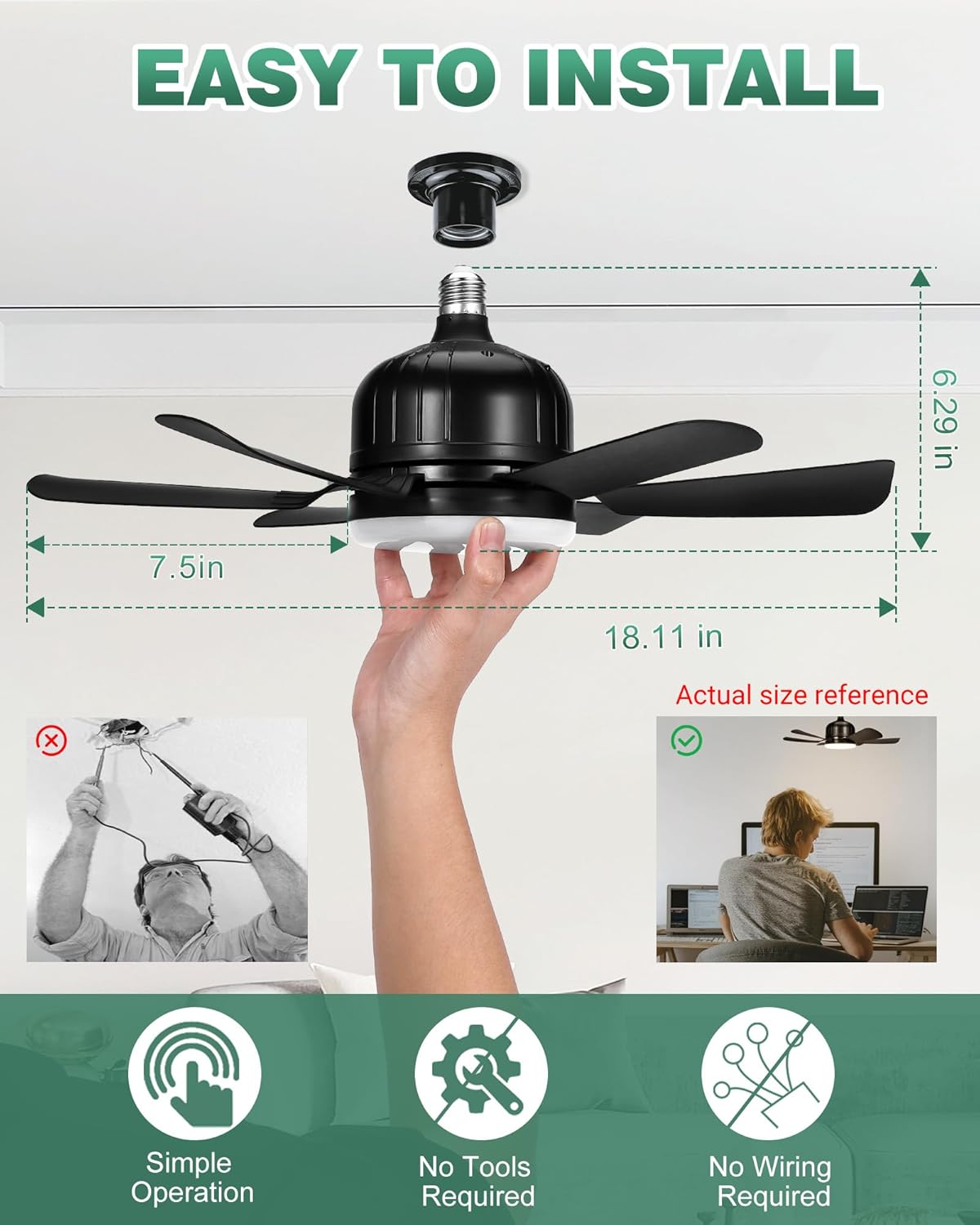
Image: Easy installation process for the THINKKEEN Socket Fan Light. The image highlights the product's dimensions (18.11 inches wide, 6.29 inches high) and emphasizes that no tools or complex wiring are required, making it a simple screw-in solution.
Video: This video demonstrates the unboxing, assembly of the fan blades, and the simple screw-in installation of the THINKKEEN Socket Fan Light into a standard light socket. It also briefly shows the remote control in action.
5. Bedienungsanleitung
The fan light is operated using the included remote control. Ensure batteries are inserted correctly into the remote (batteries not included).
5.1 Lichtsteuerung
- Ein-/Ausschalten: Drücken Sie die Taste „LICHT EIN/AUS“, um das Licht ein- oder auszuschalten.
- Anpassung der Farbtemperatur: Use the "CCT+" and "CCT-" buttons to cycle through the three color temperatures: 3000K (warm white), 4500K (natural white), and 6500K (cold white).
- Helligkeitsanpassung: Use the "Brightness +" and "Brightness -" buttons to dim or brighten the light from 10% to 100%.

Image: The fan light offers adjustable color temperatures (3000K warm, 4500K neutral, 6500K white) and smooth dimming capabilities, allowing users to customize the lighting to their preference.
5.2 Lüftergeschwindigkeitssteuerung
- Lüfter ein/aus: Drücken Sie die Taste "LÜFTER EIN/AUS", um den Lüfter ein- oder auszuschalten.
- Geschwindigkeitsanpassung: Use the "Fan Speed +" and "Fan Speed -" buttons to select one of the three available wind speeds.
5.3 Timer-Funktion
- Timer einstellen: Press the "2H" or "4H" button on the remote to set the fan and/or light to automatically turn off after 2 or 4 hours, respectively.

Image: The remote control provides comprehensive command over the fan light's functions, including power, light color temperature, brightness, fan speed, and timer settings.

Image: This image highlights the fan's quiet operation, with noise levels as low as 10dB, and its convenient 2-hour and 4-hour timer settings, ideal for use during sleep.
Video: This video demonstrates the remote control functionality of the socket fan light, showcasing how to adjust light settings (on/off, color temperature, brightness) and fan speeds.
6. Wartung
Regular maintenance ensures optimal performance and longevity of your fan light.
- Reinigung: Before cleaning, ensure the power is off. Use a soft, dry cloth to wipe down the fan blades and light housing. Do not use abrasive cleaners or solvents.
- Klingeninspektion: Periodically check the fan blades for any dust buildup or damage. Clean as necessary.
- Socket Connection: Ensure the fan light remains securely screwed into the socket.
7. Fehlerbehebung
If you encounter issues with your THINKKEEN Socket Fan Light, refer to the following common troubleshooting steps:
- Fan/Light Not Turning On:
- Prüfen Sie, ob der Strom am Sicherungsautomaten eingeschaltet ist.
- Ensure the fan light is securely screwed into the E26/E27 socket.
- Vergewissern Sie sich, dass die Batterien der Fernbedienung korrekt eingelegt und nicht leer sind.
- Fernbedienung reagiert nicht:
- Ersetzen Sie die Batterien der Fernbedienung.
- Ensure there are no obstructions between the remote and the fan light.
- Lüftergeräusch:
- Ensure all fan blades are securely attached.
- Verify the fan light is tightly screwed into the socket.
8. Spezifikationen
| Besonderheit | Spezifikation |
|---|---|
| Marke | DENKEN |
| Modellnummer | ZYJ-520FSD01 |
| Technische Daten | 18.11" × 6.29" (46 cm x 16.51 cm x 11.99 cm) |
| Gewicht | 621 g |
| Material | Plastik |
| Farbe | Dunkelschwarz |
| Lichtart | Dimmbare LED |
| Farbtemperaturen | 3000K (Warmweiß), 4500K (Neutralweiß), 6500K (Kaltweiß) |
| Helligkeit | Up to 1200 Lumens (Dimmable 10%-100%) |
| Lüftergeschwindigkeiten | 3 Windgeschwindigkeiten |
| Timerfunktion | 2H / 4H Automatic Shut-off |
| Socket-Kompatibilität | E26/E27 |
| Stromquelle | Wechselstrom/Gleichstrom |
| Zimmertyp | Bedroom, Living Room, Kitchen, Garage, Office |
9. Garantie und Support
For warranty information or technical support, please refer to the contact details provided on the product packaging or visit the official THINKKEEN webWebsite. Bewahren Sie Ihren Kaufbeleg für Garantieansprüche auf.