1. Einleitung
Vielen Dank für Ihren Einkauf.asing the SENCOR SPT 3907 Bluetooth Radio Player. This compact and versatile device offers multiple audio playback options, including CD, Bluetooth, USB, and FM radio. This manual provides essential information for safe and efficient use of your new player. Please read it thoroughly before operation and retain it for future reference.
2. Sicherheitshinweise
- Energiequelle: Stellen Sie sicher, dass die Stromversorgungslautstärketage matches the rating indicated on the unit. Use only the provided power cable.
- Wasser und Feuchtigkeit: Das Gerät darf weder Regen noch Feuchtigkeit oder tropfenden/spritzenden Flüssigkeiten ausgesetzt werden. Stellen Sie keine mit Flüssigkeiten gefüllten Gegenstände, wie z. B. Vasen, auf das Gerät.
- Belüftung: Blockieren Sie keine Lüftungsöffnungen. Sorgen Sie für ausreichend Platz um das Gerät herum, um eine ordnungsgemäße Luftzirkulation zu gewährleisten.
- Hitze: Halten Sie das Gerät von Wärmequellen wie Heizkörpern, Heizlüftern, Öfen oder anderen Geräten (einschließlich) fern. ampKonverter (Lüfter), die Wärme erzeugen.
- Reinigung: Ziehen Sie vor der Reinigung den Netzstecker. Verwenden Sie ein weiches, trockenes Tuch. Verwenden Sie keine flüssigen oder Aerosol-Reinigungsmittel.
- Wartung: Versuchen Sie nicht, dieses Produkt selbst zu warten. Überlassen Sie alle Wartungsarbeiten qualifiziertem Servicepersonal.
- Batterien: When using batteries, ensure correct polarity. Do not mix old and new batteries, or different types of batteries. Remove batteries if the unit is not used for extended periods.
3. Packungsinhalt
Überprüfen Sie, ob alle Artikel im Paket vorhanden sind:
- SENCOR SPT 3907 Radio Player
- Fernbedienung
- Netzkabel
- Dokumentation (dieses Handbuch)
4. Produktmerkmale
The SENCOR SPT 3907 is designed for versatile audio entertainment:
- Ausgangsleistung: 4W RMS for clear sound.
- CD-Spieler: Supports CD-R/RW discs with programmable playback for up to 20 songs.
- Bluetooth-Konnektivität: Bluetooth V2.1 + EDR for wireless audio streaming from compatible devices.
- USB-Wiedergabe: USB connection for MP3 file playback with programmable playback for up to 99 songs.
- FM Radio: Stereo FM radio receiver with digital tuning and 30 station presets.
- AUX-IN: 3.5-mm-Aux-Eingang zum Anschluss externer Audioquellen.
- Anzeige: Backlight LCD display for easy navigation.
- Fernbedienung: Vollfunktionsfernbedienung für komfortable Bedienung.
- Energieoptionen: Operates on AC 100-240V or D/LR20 batteries for portability.
- Zusätzliche Funktionen: Repeat and random playback modes.
5. Bedienelemente und Funktionen
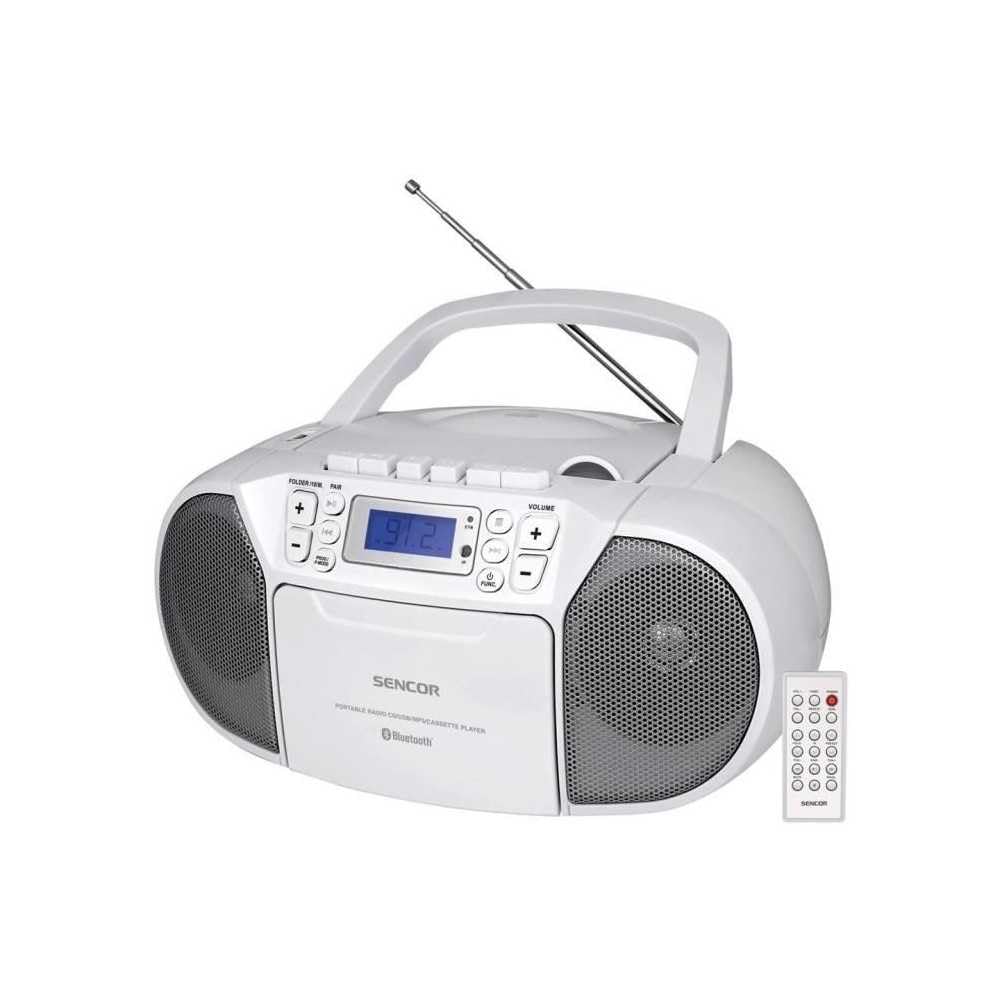
Front view of the SENCOR SPT 3907 unit, highlighting the control buttons, LCD screen, CD tray, and speakers. The remote control is also visible.
Bedienelemente auf der Vorderseite:
- POWER-Taste: Schaltet das Gerät ein oder aus.
- MODE-Taste: Switches between CD, Bluetooth, USB, FM Radio, and AUX-IN modes.
- Lautstärke +/- Tasten: Passt den Audioausgabepegel an.
- PLAY/PAUSE (►/▮▮) Button: Starts or pauses playback in CD, Bluetooth, or USB mode.
- SKIP (◀◀ / ►►) Buttons: Springt zum vorherigen oder nächsten Titel/Sender.
- STOP (■)-Taste: Stoppt die Wiedergabe.
- FOLDER / PAIR Button: Navigates folders in USB mode; initiates Bluetooth pairing.
- FUNC-Taste: Accesses additional functions (e.g., program, repeat, random).
- LCD Anzeige: Zeigt den aktuellen Modus, die Titelnummer, die Frequenz und weitere Informationen an.
- CD-Fach: Zum Einlegen von Audio-CDs.
- USB-Anschluss: Zum Anschließen von USB-Speichergeräten.
- AUX-IN-Buchse: Zum Anschluss externer Audiogeräte.
- Kopfhörerausgang: Zum privaten Hören.
Bedienelemente auf der Rückseite:
- Wechselstromeingang: Schließt das Netzkabel an.
- FM-Antenne: Ausziehbare Teleskopantenne für FM-Empfang.
Fernbedienung:
The remote control duplicates most of the front panel functions for convenient operation from a distance. Refer to the remote control diagram in the included documentation for specific button layouts.
6. Einrichtung
6.1 Stromanschluss
The SENCOR SPT 3907 can be powered by AC mains or batteries.
Wechselstromversorgung:
- Stellen Sie sicher, dass das Gerät ausgeschaltet ist.
- Connect the supplied AC power cable to the AC input jack on the rear of the unit.
- Stecken Sie das andere Ende des Netzkabels in eine normale Wandsteckdose (Wechselstrom 100-240 V, 50/60 Hz).
Batterieleistung:
- Öffnen Sie den Batteriefachdeckel an der Unterseite des Geräts.
- Insert 6 x D/LR20 size batteries (not included), ensuring correct polarity (+/-) as indicated inside the compartment.
- Schließen Sie den Batteriefachdeckel fest.
Note: When the AC power cable is connected, battery power is automatically disconnected. Remove batteries if the unit will not be used for an extended period to prevent leakage.
6.2 Antenneneinrichtung
For optimal FM radio reception, fully extend the telescopic FM antenna located on the rear of the unit. Adjust its position for the best signal.
7. Bedienungsanleitung
7.1 Ein-/Ausschalten und Modusauswahl
- Drücken Sie die LEISTUNG button to turn the unit on. The LCD display will light up.
- Drücken Sie die MODUS button repeatedly to cycle through available modes: CD, Bluetooth, USB, FM Radio, AUX-IN. The selected mode will be shown on the LCD display.
- Drücken Sie die LEISTUNG Drücken Sie die Taste erneut, um das Gerät auszuschalten.
7.2 CD-Wiedergabe
- Drücken Sie die MODUS um den CD-Modus auszuwählen.
- Öffnen Sie die Abdeckung des CD-Fachs.
- Place a CD (CD-R/RW compatible) with the label side facing up onto the spindle.
- Close the CD compartment cover. The unit will read the disc, and the total number of tracks will appear on the display.
- Drücken Sie die WIEDERGABE/PAUSE Taste, um die Wiedergabe zu starten.
- Verwenden Sie die ÜBERSPRINGEN (◀◀ / ►►) Tasten zum Überspringen von Titeln.
- Drücken Sie die STOP (■) Taste, um die Wiedergabe zu stoppen.
- Programmwiedergabe: While in STOP mode, press the FUNK Taste zum Aufrufen des Programmiermodus. Verwenden Sie ÜBERSPRINGEN buttons to select tracks and FUNK again to confirm. Up to 20 CD songs can be programmed.
7.3 Bluetooth-Betrieb
- Drücken Sie die MODUS Mit dieser Taste wählen Sie den Bluetooth-Modus aus. Das Display zeigt „BT“ an und blinkt, um anzuzeigen, dass sich das Gerät im Kopplungsmodus befindet.
- Aktivieren Sie Bluetooth auf Ihrem Bluetooth-fähigen Gerät (z. B. Smartphone, Tablet) und suchen Sie nach verfügbaren Geräten.
- Select 'SPT 3907' from the list of devices. Once paired, the 'BT' indicator on the display will stop flashing and remain solid.
- Start playing audio on your connected device. The sound will be streamed through the SENCOR SPT 3907.
- Verwenden Sie die WIEDERGABE/PAUSE Und ÜBERSPRINGEN buttons on the unit or remote control to manage playback.
7.4 USB-Wiedergabe
- Insert a USB flash drive (containing MP3 files) in den USB-Anschluss.
- Drücken Sie die MODUS button to select USB mode. The unit will automatically read the files.
- Drücken Sie die WIEDERGABE/PAUSE Taste, um die Wiedergabe zu starten.
- Verwenden Sie die ÜBERSPRINGEN (◀◀ / ►►) Tasten zum Überspringen von Titeln.
- Drücken Sie die FOLDER button to navigate between folders on the USB drive.
- Programmwiedergabe: While in STOP mode, press the FUNK Taste zum Aufrufen des Programmiermodus. Verwenden Sie ÜBERSPRINGEN buttons to select tracks and FUNK again to confirm. Up to 99 MP3 songs can be programmed.
7.5 FM-Radiobetrieb
- Drücken Sie die MODUS button to select FM Radio mode. The current frequency will appear on the display.
- Für besseren Empfang die Teleskopantenne ausziehen.
- Automatische Sendereinstellung: Halten Sie die ÜBERSPRINGEN (◀◀ / ►►) Drücken Sie die Tasten einige Sekunden lang, um automatisch nach dem nächsten verfügbaren Sender zu suchen.
- Manuelle Abstimmung: Drücken Sie kurz die ÜBERSPRINGEN (◀◀ / ►►) buttons to fine-tune the frequency step-by-step.
- Voreingestellte Sender: To save a station, tune to the desired frequency, then press the FUNK Taste. Benutzen ÜBERSPRINGEN Tasten zum Auswählen einer voreingestellten Nummer (P01-P30), dann drücken FUNK zur Bestätigung erneut.
- Um einen voreingestellten Sender aufzurufen, drücken Sie die Taste FUNK Drücken Sie die Taste wiederholt, um durch die gespeicherten Sender zu blättern.
7.6 AUX-IN-Anschluss
- Connect one end of a 3.5mm audio cable (not included) to the AUX-IN jack on the SENCOR SPT 3907.
- Verbinden Sie das andere Ende des Kabels mit der Kopfhörerbuchse oder dem Audioausgang Ihres externen Audiogeräts (z. B. MP3-Player, Smartphone).
- Drücken Sie die MODUS Taste, um den AUX-IN-Modus auszuwählen.
- Start playback on your external device. The audio will be played through the SENCOR SPT 3907.
- Stellen Sie die Lautstärke mit den BAND +/- buttons on the unit or remote control, and also on your external device.
8. Wartung
8.1 Reinigung des Geräts
Wipe the exterior of the unit with a soft, dry cloth. Do not use abrasive cleaners, waxes, or solvents as they may damage the finish. Ensure the unit is unplugged from the power source before cleaning.
8.2 CD Linsenpflege
If the CD player experiences reading errors, the lens may need cleaning. Use a commercially available CD lens cleaner disc. Do not touch the lens directly.
8.3 Batteriewechsel
When the unit operates on batteries and the sound becomes distorted or the unit stops functioning, replace all batteries with new D/LR20 batteries, ensuring correct polarity.
9. Fehlerbehebung
| Problem | Mögliche Ursache | Lösung |
|---|---|---|
| Kein Strom | Netzkabel nicht angeschlossen; Batterien leer oder falsch eingelegt. | Check AC power connection; Replace batteries, ensuring correct polarity. |
| Kein Ton | Lautstärke zu niedrig; Falscher Modus ausgewählt; Kopfhörer angeschlossen. | Increase volume; Select correct mode (CD, BT, USB, FM, AUX); Disconnect headphones. |
| CD spielt nicht / überspringt | CD dirty or scratched; CD inserted incorrectly; CD lens dirty. | Clean or replace CD; Insert CD with label side up; Use a CD lens cleaner. |
| Bluetooth stellt keine Verbindung her | Unit not in pairing mode; Device too far; Bluetooth not enabled on external device. | Ensure unit is in BT pairing mode; Move device closer; Enable Bluetooth on your device. |
| Schlechter UKW-Empfang | Antenne nicht ausgefahren oder richtig positioniert; schwaches Signal. | Die Teleskopantenne vollständig ausziehen und einstellen; Versuchen Sie, das Gerät an einem anderen Standort aufzustellen. |
10. Spezifikationen
| Besonderheit | Spezifikation |
|---|---|
| Modell | SPT3907 |
| Ausgangsleistung | 4 W RMS |
| Unterstützte Medien | CD-R, CD-RW, Bluetooth, MP3, USB |
| Bluetooth-Version | V2.1 + EDR |
| UKW-Radio-Voreinstellungen | 30 Stationen |
| Konnektivität | Aux-Anschluss (3.5 mm), USB |
| Stromquelle | AC 100-240V, 50/60Hz; 6 x D/LR20 batteries |
| Artikelgewicht | 1 kg 960 g |
| Maße | (Not specified in provided data) |
11. Garantie und Support
SENCOR products are manufactured to high-quality standards and are warranted against manufacturing defects. For specific warranty terms and conditions, please refer to the warranty card included with your purchase or visit the official SENCOR website. For technical support, service, or inquiries, please contact your local SENCOR distributor or authorized service center.


