1. Einleitung
This manual provides detailed instructions for setting up, operating, and maintaining your LEFFOT RK3518 Android 14.0 4K Ultra HD Streaming Device. Please read this manual thoroughly before use to ensure proper functionality and to maximize your entertainment experience.
Packungsinhalt
Bitte überprüfen Sie beim Auspacken, ob alle unten aufgeführten Artikel vorhanden sind:
- LEFFOT RK3518 Android 14.0 4K Ultra HD Streaming Device
- Sprachfernbedienung
- HDMI-Kabel
- Netzteil (5 V/2 A)
- Benutzerhandbuch (dieses Dokument)

Image 1.1: Contents of the LEFFOT RK3518 package, including the streaming device, remote, cables, and manual.
2. Produktüberschreitungview
The LEFFOT RK3518 is a high-performance Android 14.0 TV Box designed to deliver a cinematic 4K streaming experience. It features a powerful Rockchip RK3518 Quad-Core A53 processor, 2GB RAM, and 16GB ROM, ensuring smooth operation and ample storage for applications. Advanced connectivity options include dual-band WiFi 6 (2.4G & 5G), Bluetooth 5.4, and USB 3.0.
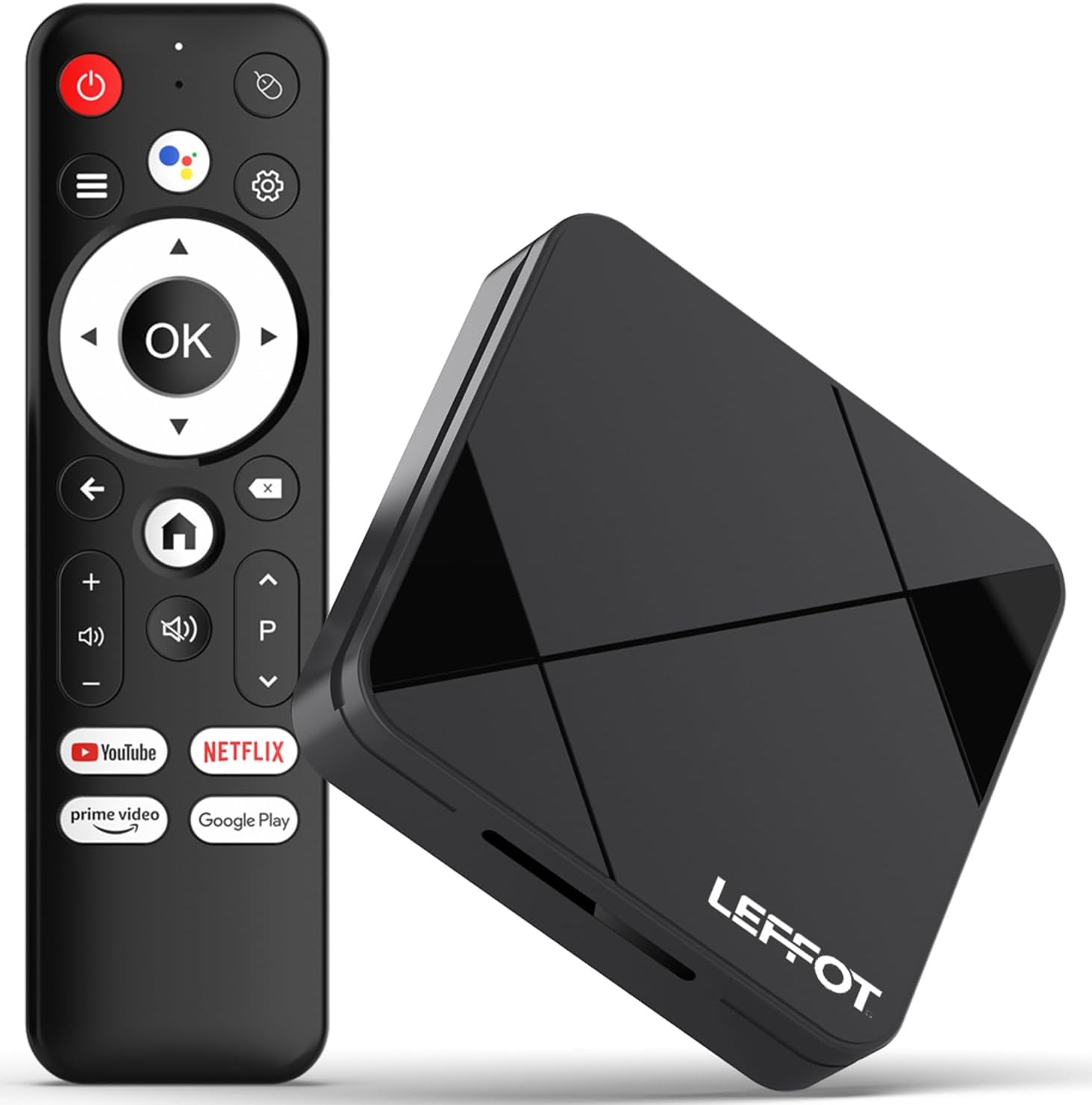
Image 2.1: The LEFFOT RK3518 streaming device and its accompanying voice remote control.
Hauptmerkmale:
- 4K-Ultra-HD-Auflösung: Supports 4K@60fps and HDR10 for vibrant colors and sharp details.
- Leistungsstarker Prozessor: Rockchip RK3518 Quad-Core A53 with Mali-450 GPU for smooth performance.
- Erweiterte Konnektivität: Dual-band WiFi 6 (2.4G & 5G), Bluetooth 5.4, USB 3.0, and Ethernet.
- Sprachfernbedienung: Intuitive navigation and hands-free control with built-in voice assistant.
- Android 14.0-Ökosystem: Access to thousands of apps via Google Play.
- Bildschirmspiegelung: Supports AirPlay, DLNA, and WiFi Display for sharing content from mobile devices.
3. Einrichtung
3.1 Anschließen des Geräts
- Anschluss an den Fernseher: Insert one end of the provided HDMI cable into the HDMI port on the LEFFOT RK3518 device and the other end into an available HDMI input on your television.
- An die Stromversorgung anschließen: Plug the power adapter into the DC 5V/2A port on the device, then plug the adapter into a wall outlet.
- Internetverbindung herstellen (optional):
- Kabelverbindung: For a stable connection, connect an Ethernet cable from your router to the Ethernet port on the device.
- Drahtlose Verbindung: The device supports 2.4G and 5G WiFi 6. You will configure this after initial power-on.

Image 3.1: Diagram showing the various ports on the LEFFOT RK3518 device, including TF card slot, USB, USB 3.0, AV, HDMI, Ethernet, and DC 5V/2A power input.
3.2 Ersteinrichtungs- und Installationsassistent
- Schalten Sie Ihren Fernseher ein und wählen Sie die richtige HDMI-Eingangsquelle.
- The LEFFOT RK3518 device will automatically power on and display the boot-up screen.
- Follow the on-screen instructions of the Android setup wizard to:
- Wählen Sie Ihre Sprache.
- Stellen Sie eine Verbindung zu einem WLAN-Netzwerk her (falls Sie kein Ethernet verwenden).
- Sign in with your Google account to access Google Play Store and other services.
- Ich akzeptiere die Allgemeinen Geschäftsbedingungen.
3.3 Fernbedienungskopplung
The included voice remote control is typically pre-paired. If the remote does not respond, ensure batteries are correctly inserted. If issues persist, follow these steps to re-pair:
- Stellen Sie sicher, dass das Gerät eingeschaltet ist.
- Halten Sie die OK und die Lautstärke verringern button simultaneously for a few seconds until a pairing indicator appears on the screen or the remote's LED flashes.
- Release the buttons. The remote should now be paired.
4. Bedienungsanleitung
4.1 Navigation auf der Benutzeroberfläche
Use the directional pad (up, down, left, right) on the remote control to navigate through menus and select items. The OK Die Schaltfläche bestätigt die Auswahl, und die Zurück button returns to the previous screen. The Heim button takes you directly to the main home screen.
4.2 Sprachsteuerung
The LEFFOT RK3518 features a voice-enabled remote control for convenient hands-free operation.
- Drücken Sie die Google Assistant button (usually a microphone icon) on your remote.
- Speak clearly into the remote's microphone. You can ask to search for content, open applications, check weather, or control smart home devices.
- The device will process your command and display results or perform the requested action.

Image 4.1: Illustration of using the voice remote control to interact with the LEFFOT RK3518 streaming device.
4.3 Installation und Verwaltung von Anwendungen
Your device comes with the Google Play Store pre-installed, allowing access to a vast library of applications.
- From the home screen, navigate to the Google Play Store icon and select it.
- Durchsuchen oder suchen Sie nach den gewünschten Anwendungen.
- Wählen Sie eine App aus und wählen Sie Installieren.
- To manage installed apps, go to Einstellungen > Apps.
4.4 Screen Mirroring (AirPlay, DLNA, WiFi Display)
The device supports various screen mirroring protocols to cast content from your smartphone or tablet to your TV.
- Ensure your mobile device and the LEFFOT RK3518 are connected to the same Wi-Fi network.
- On your mobile device, open the screen mirroring feature (e.g., AirPlay for iOS, Smart View/Screen Cast for Android).
- Select the LEFFOT RK3518 device from the list of available devices.
- Your mobile device's screen will now be mirrored on your TV.
5. Wartung
5.1 Gerät reinigen
To clean the exterior of the device, use a soft, dry, lint-free cloth. Do not use liquid cleaners, aerosols, or abrasive materials, as these can damage the finish or internal components.
5.2 Softwareaktualisierungen
The LEFFOT RK3518 may receive periodic software updates to improve performance, add features, or enhance security. It is recommended to keep your device's software up to date.
- Navigieren Sie zu Einstellungen > Gerätepräferenzen > Info > Systemaktualisierung.
- If an update is available, follow the on-screen prompts to download and install it. Ensure the device remains powered on during the update process.
5.3 Speicherverwaltung
Periodically check the device's storage to ensure optimal performance. You can uninstall unused apps or clear cache data to free up space.
- Gehe zu Einstellungen > Apps to manage individual applications.
- Gehe zu Einstellungen > Gerätepräferenzen > Speicher Zu view storage usage and manage external storage (TF card).
6. Fehlerbehebung
If you encounter issues with your LEFFOT RK3518 device, refer to the following common problems and solutions:
| Problem | Mögliche Ursache/Lösung |
|---|---|
| Kein Strom / Gerät schaltet sich nicht ein. | Vergewissern Sie sich, dass das Netzteil fest mit dem Gerät und einer funktionierenden Steckdose verbunden ist. Versuchen Sie es mit einer anderen Steckdose. |
| No signal on TV. | Verify the HDMI cable is securely connected to both the device and the TV. Ensure your TV is set to the correct HDMI input source. Try a different HDMI port or cable. |
| Fernbedienung reagiert nicht. | Check the batteries in the remote control and replace if necessary. Re-pair the remote control as described in Section 3.3. |
| Probleme mit der WLAN-Verbindung. | Ensure your Wi-Fi router is on and functioning. Check Wi-Fi settings on the device (Settings > Network & Internet). Try restarting your router and the streaming device. Ensure you are within range of your Wi-Fi network. |
| Anwendungen sind langsam oder stürzen ab. | Close unused applications. Clear the cache of problematic apps (Settings > Apps > [App Name] > Clear cache). Ensure sufficient storage space is available. Restart the device. |
| Schlechte Videoqualität (nicht 4K). | Ensure your TV supports 4K resolution. Verify the content being streamed is 4K. Check your internet speed; 4K streaming requires a stable, high-speed connection. Ensure HDMI cable is 4K compatible. |
7. Spezifikationen
Below are the technical specifications for the LEFFOT RK3518 Android 14.0 4K Ultra HD Streaming Device:
| Besonderheit | Spezifikation |
|---|---|
| Modellname | RK3518 |
| Betriebssystem | Android 14.0 |
| Prozessor | Rockchip RK3518 Quad-Core A53 |
| Grafikkarte | Mali-450 MP2 |
| RAM | 2 GB |
| Interner Speicher (ROM) | 16GB (expandable via TF card) |
| Videoausgang | HDMI 2.0 (4K@60fps, HDR10) |
| Konnektivität | 2.4G & 5G WiFi 6 (802.11 a/b/g/n/ac/ax), Bluetooth 5.4, 100M Ethernet |
| Häfen | HDMI, USB 3.0, USB 2.0, LAN, TF Card Slot, AV, DC 5V/2A |
| Unterstützte Internetdienste | Netflix, Prime Video, YouTube, and more via Google Play |
| Maße | 3.2 x 3.2 x 0.67 Zoll (ca. 90 x 90 x 18.8 mm) |
| Gewicht | 3.25 Unzen |
8. Garantie und Support
8.1 Garantieinformationen
Your LEFFOT RK3518 Android 14.0 4K Ultra HD Streaming Device is covered by a manufacturer's warranty against defects in materials and workmanship. The specific terms and duration of the warranty may vary by region and retailer. Please retain your proof of purchase for warranty claims.
8.2 Kundendienst
For technical assistance, troubleshooting beyond this manual, or warranty inquiries, please contact LEFFOT customer support through the retailer where the product was purchased or refer to the official LEFFOT webWebsite für Kontaktinformationen.


