Einführung
This manual provides detailed instructions for the setup, operation, and maintenance of your bemi Smartwatch Fitness Tracker. Please read this manual thoroughly before using the device to ensure proper functionality and to maximize your user experience.
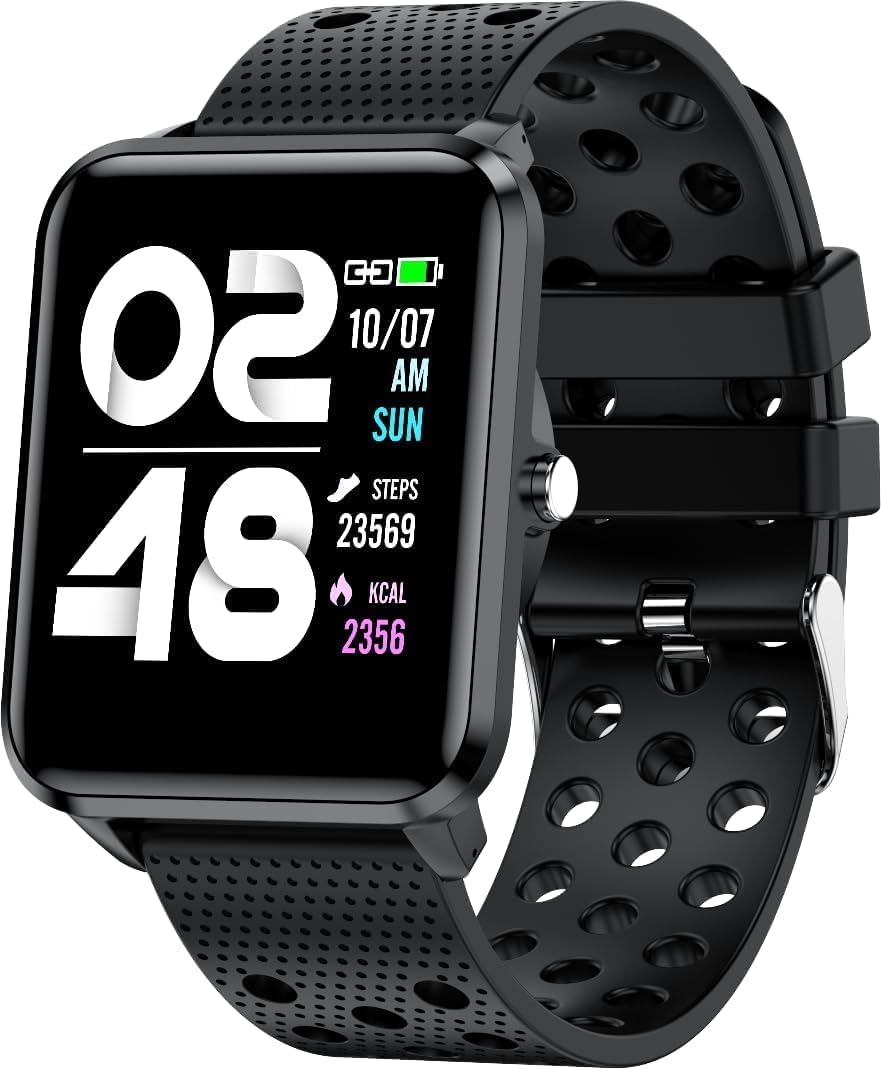
Bild: Vorderseite view of the bemi Smartwatch, showing the digital display with time, date, steps, and calories burned. The watch has a black perforated silicone band.
Lieferumfang
- Kix-m Smartwatch
- USB Cable (Charging Cable)
- Benutzerhandbuch
- Geschenkbox
Aufstellen
1. Aufladen der Smartwatch
Before first use, fully charge your smartwatch. Connect the provided USB charging cable to the magnetic charging points on the back of the watch and to a USB power source. The watch display will indicate charging status.

Bild: Rückseite view of the bemi Smartwatch, highlighting the magnetic charging contacts and the optical heart rate sensor.
2. Installation der Begleit-App
The smartwatch operates with the "H Band" application. Download the app from the App Store (for iOS devices) or Google Play Store (for Android devices).
- Suchen nach "H Band" in your device's app store.
- Laden Sie die Anwendung herunter und installieren Sie sie.
- Stellen Sie sicher, dass Bluetooth auf Ihrem Smartphone aktiviert ist.
3. Pairing the Smartwatch with Your Phone
- Open the "H Band" app on your smartphone.
- Folgen Sie den Anweisungen auf dem Bildschirm, um ein Konto zu erstellen oder sich anzumelden.
- Navigieren Sie in der App zum Abschnitt „Gerätekopplung“.
- Select your bemi Smartwatch from the list of available devices. The app will guide you through the pairing process.
- Bestätigen Sie die Kopplungsanfrage gegebenenfalls sowohl auf Ihrem Smartphone als auch auf der Smartwatch.
Note: The smartwatch is compatible with Android (4.4 or newer) and iOS (8.0 or newer) operating systems.
Bedienungsanleitung
Grundlegende Navigation
- Touch-Screen: Durch Wischen nach links/rechts oder nach oben/unten navigieren Sie durch Menüs und Funktionen. Zum Auswählen tippen.
- Seitentaste: Press to wake the screen, return to the home screen, or confirm selections.
Wichtige Merkmale und Funktionen
Anpassbare Zifferblätter
Choose from 24 clock faces available in the "H Band" application. You can also set a photo from your phone as the watch face.

Image: The smartwatch screen showing different digital and analog watch face designs, indicating customization options available through the app.
Aktivitätsverfolgung
The smartwatch monitors your steps, distance, and calories burned. All activity data is recorded and can be viewed in the "H Band" app.

Image: A person running outdoors with the bemi Smartwatch visible on their wrist, showing the step tracking interface with current steps, distance, and calories.
Heart Rate and Blood Oxygen Monitoring
The watch provides 24-hour monitoring of pulse and blood oxygen levels. View Echtzeitdaten auf der Uhr oder detaillierte historische Daten in der App.

Image: A close-up of the smartwatch screen showing heart rate (BPM) and blood pressure (mmHg) readings with a graph of historical data.
Schlafüberwachung
Track your sleep patterns, including deep sleep, light sleep, and awake times. The app provides detailed analysis of your sleep quality.

Image: The "H Band" app interface displaying sleep quality data, including total sleep duration, deep sleep, light sleep, and awake times, with a corresponding graph.
Musikwiedergabe
The KIX-M features a built-in audio player with 512MB of internal memory. You can store music directly on the watch and connect Bluetooth headphones or speakers for wireless listening.

Image: The bemi Smartwatch showing its music player interface with play/pause and skip controls, alongside a pair of wireless earbuds, demonstrating its audio capabilities.
Benachrichtigungen
Receive notifications for calls, messages, and various applications directly on your smartwatch. Configure notification settings within the "H Band" app.

Image: The smartwatch screen showing an incoming message notification, with icons for various social media and communication apps like SMS, Twitter, WeChat, Skype, YouTube, Facebook, Google+, Instagram und LinkedIn.
Weitere intelligente Funktionen
- 10 Sportmodi: Track specific workouts like running, cycling, and more.
- Bewegungserinnerung: Lassen Sie sich benachrichtigen, wenn Sie zu lange gesessen haben und sich nicht bewegt haben.
- Special Mode for Women: Track menstrual cycles and ovulation.
- Kamerasteuerung: Steuern Sie die Kamera Ihres Telefons aus der Ferne.
- Alarm: Wecker können direkt über die Uhr oder die App gestellt werden.
- Stoppuhr & Timer: Grundlegende Zeiterfassungsfunktionen.
- Telefon finden: Suchen Sie Ihr gekoppeltes Smartphone.
- GPS Position Tracking: Requires carrying your phone with you for GPS data.

Image: The "H Band" app interface displaying the female health tracking calendar, allowing users to log menstrual periods and predict ovulation.
Wartung
Reinigung Ihrer Smartwatch
Reinigen Sie Ihre Smartwatch und Ihr Armband regelmäßig, um Hautirritationen vorzubeugen und die Leistungsfähigkeit des Geräts zu erhalten.
- Reinigen Sie den Bildschirm und das Gehäuse der Uhr mit einem weichen, fusselfreien Tuch.
- Bei hartnäckigen Flecken, dampBefeuchten Sie das Tuch leicht mit Wasser. Vermeiden Sie die Verwendung von scharfen Chemikalien oder scheuernden Materialien.
- Reinigen Sie die Ladekontakte regelmäßig, um eine gute Verbindung zu gewährleisten.
Wasserbeständigkeit (IP68)
The smartwatch is IP68 waterproof, meaning it is resistant to dust and can withstand immersion in water up to 1.5 meters for up to 30 minutes. It is suitable for daily use, hand washing, and light rain. Avoid hot water, steam, or prolonged immersion in water, especially saltwater.

Image: The bemi Smartwatch with water splashing over its screen and band, illustrating its IP68 water resistance rating.
Batteriepflege
- Laden Sie den Akku vor dem ersten Gebrauch vollständig auf.
- Vermeiden Sie es, den Akku häufig vollständig zu entladen.
- Bewahren Sie das Gerät an einem kühlen, trockenen Ort auf, wenn es längere Zeit nicht benutzt wird.
Fehlerbehebung
| Problem | Mögliche Ursache | Lösung |
|---|---|---|
| Uhr lässt sich nicht einschalten | Schwache Batterie | Laden Sie die Uhr mindestens 30 Minuten lang auf. |
| Kopplung mit dem Telefon nicht möglich | Bluetooth off, app not open, watch not discoverable, phone OS not compatible | Ensure Bluetooth is on. Open "H Band" app. Restart watch and phone. Check OS compatibility (Android 4.4+/iOS 8.0+). |
| Inaccurate health data (HR, SpO2) | Improper fit, sensor obstruction, movement during measurement | Ensure watch is snug but comfortable on wrist. Clean sensor. Remain still during measurement. |
| Nicht erhaltene Benachrichtigungen | App permissions, notification settings, Bluetooth disconnected | Check app permissions for notifications. Verify notification settings in "H Band" app. Ensure watch is connected via Bluetooth. |
| Bildschirm reagiert nicht | Software glitch, low battery | Restart the watch (if possible). Charge the watch. |
Technische Daten
| Besonderheit | Detail |
|---|---|
| Modell | KIX-M |
| Bildschirmgröße | 1.5 Zoll |
| Anzeigetyp | Touch-Screen |
| Wasserbeständigkeit | IP68 |
| Konnektivität | Bluetooth (Dual Bluetooth module) |
| Interner Speicher | 512 MB (for music storage) |
| Batteriekapazität | 200 Milliamp Stunden (mAh) |
| Betriebssystem | ROTS |
| Kompatibles Betriebssystem | Android 4.4+ / iOS 8.0+ |
| Sensoren | Herzfrequenzmesser, Blutsauerstoffsensor, Beschleunigungsmesser |
| Merkmale | Activity Tracker, Sleep Tracking, Pedometer, Calorie Tracker, Music Player, Notifications, Gesture Control, 10 Sport Modes, Female Health Tracking, Camera Control, Alarm, Stopwatch, Timer, Find Phone, GPS via Smartphone |
| Artikelgewicht | 4.4 Unzen |
| Maße | 5.35 x 2.64 x 2.44 Zoll (Verpackungsmaße) |
Garantie und Support
For warranty information and technical support, please refer to the contact details provided with your purchase or visit the official bemi webBewahren Sie Ihren Kaufbeleg für eventuelle Garantieansprüche auf.
Note: The manufacturer is Minrek.


