1. Einleitung
This manual provides detailed instructions for the safe and effective use of the CEM ILDM-150 Laser Distance Measure. The ILDM-150 is a precision instrument designed for accurate distance, area, and volume measurements, featuring Bluetooth connectivity for data transfer and management via the Meterbox Pro application. Please read this manual thoroughly before operating the device to ensure proper functionality and safety.

Figure 1.1: CEM ILDM-150 Laser Distance Measure and included accessories.
2. Produktmerkmale
The CEM ILDM-150 Laser Distance Measure offers a range of features designed for efficiency and accuracy:
- Hohe Genauigkeit: Utilizes a Class II Laser with 1mW output, providing accuracy up to ±1/16 inch (1.5mm) over a measuring range of up to 229 feet (70 meters).
- Mehrere Messmodi: Supports single distance, continuous measurement, area, volume, and Pythagorean (three-point) calculations.
- Einheitenwechsel: Einfacher Wechsel zwischen Metern (M), Zoll (In) und Fuß (Ft).
- Bluetooth 4.0-Konnektivität: Seamlessly transfer measured data to a smartphone or tablet using the Meterbox Pro application for analysis and sharing.
- Datenspeicherung: Stores up to 99 groups of measurement data, with manual deletion capability.
- LCD-Hintergrundbeleuchtung: Large backlit screen for improved visibility in low-light conditions.
- Stummschaltung: Option to turn the measurement beep on or off for use in quiet environments.
- Langlebiges Design: IP54 rated for water and dust resistance, featuring a hard rubber body for enhanced grip and protection.
- Energiesparen: Automatic shut-down after 150 seconds of inactivity to conserve battery life.
- Anzeige für niedrigen Batteriestand: Benachrichtigt den Benutzer, wenn die Batterien ausgetauscht werden müssen.

Abbildung 2.1: Überview of CEM ILDM-150 key features.
3. Sicherheitshinweise
The CEM ILDM-150 is a Class II laser product. Adhere to the following safety guidelines:
- Blicken Sie nicht direkt in den Laserstrahl.
- Richten Sie den Laserstrahl nicht auf Menschen oder Tiere.
- Vermeiden Sie die Verwendung optischer Instrumente (z. B. Ferngläser, Teleskope), view der Laserstrahl.
- Bewahren Sie das Gerät außerhalb der Reichweite von Kindern auf.
- Versuchen Sie nicht, das Gerät zu modifizieren oder zu zerlegen.
- Verwenden Sie nur die angegebenen Batterien.
4. Erste Schritte (Einrichtung)
4.1 Packungsinhalt
Prüfen Sie nach dem Öffnen der Verpackung, ob alle Artikel vorhanden sind:
- CEM ILDM-150 Laser Distance Measure
- 1.5V AAA Batteries (Note: While typically included, please check the packaging upon receipt as specifications may vary.)
- Tragbare Tasche
- Bedienungsanleitung
- Handschlaufe
- Paketbox
4.2 Einlegen der Batterie
The ILDM-150 requires 1.5V AAA batteries for operation.
- Suchen Sie die Abdeckung des Batteriefachs auf der Rückseite des Geräts.
- Schieben Sie die Abdeckung in Pfeilrichtung auf.
- Insert the AAA batteries, ensuring correct polarity (+/-) as marked inside the compartment.
- Schließen Sie den Batteriefachdeckel fest.
4.3 Ein-/Ausschalten
- So schalten Sie das Gerät ein: Drücken Sie die MESS Drücken Sie die Taste. Das Display leuchtet auf.
- So schalten Sie das Gerät aus: Halten Sie die CLR/OFF button for approximately 2 seconds. The device will also automatically shut down after 150 seconds of inactivity.
5. Bedienungsanleitung
5.1 Grundlegende Messung
Um eine einzelne Distanzmessung durchzuführen:
- Richten Sie den Laser auf die Zieloberfläche.
- Drücken Sie die MESS Einmal drücken. Der Laser wird aktiviert.
- Drücken Sie die MESS Drücken Sie erneut die Taste, um die Messung durchzuführen. Das Ergebnis wird auf dem Bildschirm angezeigt.
5.2 Einheitenumschaltung
To change the measurement unit (M/In/Ft):
- Drücken Sie die Einheit Drücken Sie die Taste so lange, bis die gewünschte Einheit angezeigt wird.
5.3 Backlight and Mute Settings
- The backlight automatically activates when the device is in use.
- To toggle the measurement beep (mute/unmute), refer to the specific button or menu option in your device's interface, typically indicated by a speaker icon.
5.4 Erweiterte Messmodi
The ILDM-150 supports various measurement functions:
- Flächenmessung: Press the Area/Volume button once. Follow the on-screen prompts to measure length and width. The device will calculate and display the area.
- Volumenmessung: Press the Area/Volume button twice. Follow the on-screen prompts to measure length, width, and height. The device will calculate and display the volume.
- Pythagoreische Messung (indirekte Messung): Use this mode to calculate distances indirectly (e.g., height of a building). Press the Pythagorean button. Follow the on-screen prompts to take the required measurements (e.g., hypotenuse and one leg). The device will calculate the unknown side.
- Kontinuierliche Messung (Verfolgung): Drücken Sie die MESS button and hold it down. The device will continuously measure and display the distance as you move it, showing real-time minimum and maximum values. Release the button to stop.
- Addition und Subtraktion: After taking a measurement, use the '+' or '-' buttons to add or subtract subsequent measurements from the current total.

Figure 5.1: Multiple measurement modes supported by the ILDM-150.
5.5 Tailstock Function
The multi-functional tailstock allows for measurements from corners or edges, ensuring accuracy when the device cannot be placed flush against a surface.

Figure 5.2: Multi-functional use of the tailstock.
6. Bluetooth-Konnektivität & App
The ILDM-150 features Bluetooth 4.0 for seamless data transfer to your smartphone or tablet via the Meterbox Pro application.
6.1 Installing Meterbox Pro
- Suchen nach "Meterbox Pro" in your device's app store (iOS App Store or Google Play Store).
- Laden Sie die Anwendung herunter und installieren Sie sie.
6.2 Koppeln des Geräts
- Stellen Sie sicher, dass Bluetooth auf Ihrem Smartphone/Tablet aktiviert ist.
- Power on the ILDM-150.
- Open the Meterbox Pro application. The app should automatically detect and connect to the ILDM-150.
- A Bluetooth icon on the ILDM-150's display will indicate a successful connection.

Figure 6.1: Bluetooth connectivity with Meterbox Pro app.
6.3 Datenübertragung und -verwaltung
Once connected, measurements taken with the ILDM-150 can be transferred to the Meterbox Pro app. The app allows you to:
- View and organize measurement data.
- Create reports or charts.
- Share data via email, social media, or other applications.

Figure 6.2: Convenient data analysis and sharing via Meterbox Pro.
6.4 Data Storage on Device
The device can store up to 99 groups of historical data values.
- Daten abrufen: Use the memory buttons (e.g., up/down arrows) to scroll through stored measurements.
- Daten löschen: Drücken Sie die CLR button to manually delete the currently displayed data.
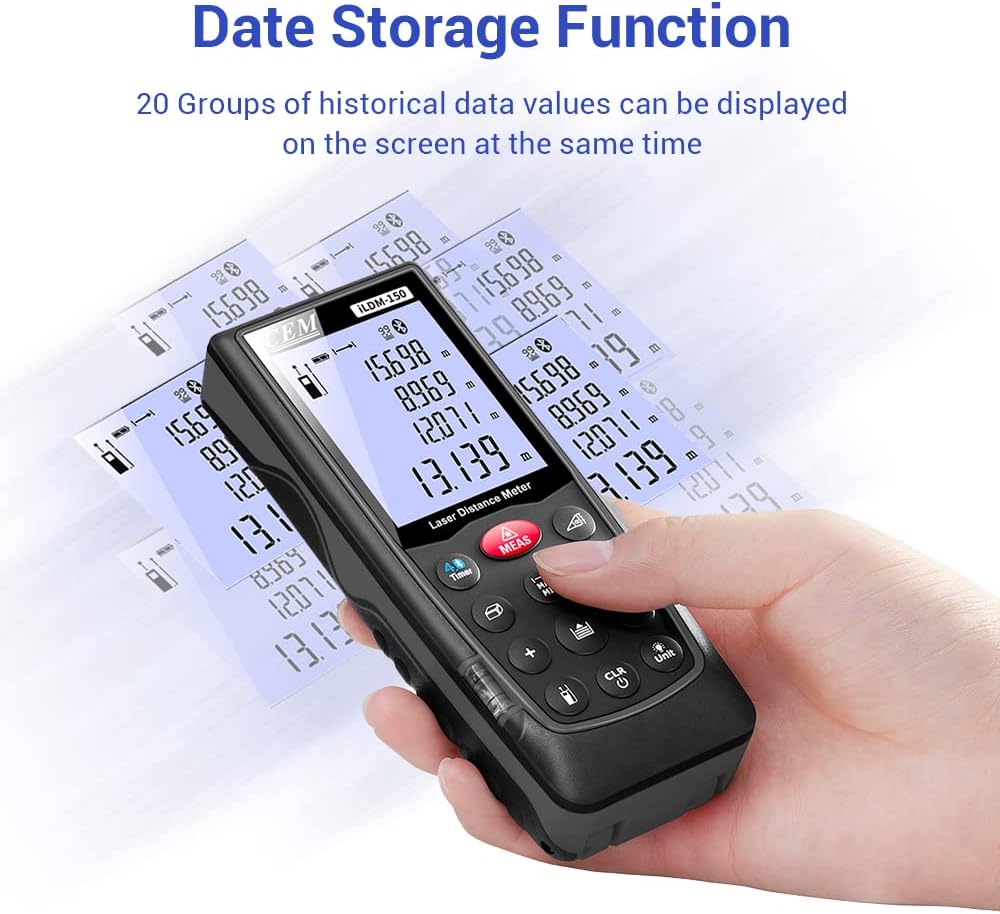
Figure 6.3: On-device data storage and display.
7. Wartung und Pflege
Proper maintenance ensures the longevity and accuracy of your ILDM-150.
- Reinigung: Verwenden Sie ein weiches,amp cloth to clean the device. Do not use abrasive cleaners or solvents. Pay special attention to the laser lens, cleaning it gently with a lens cloth if necessary.
- Lagerung: Bewahren Sie das Gerät bei Nichtgebrauch in der mitgelieferten Tragetasche an einem kühlen, trockenen Ort auf. Vermeiden Sie extreme Temperaturen und direkte Sonneneinstrahlung.
- Batteriepflege: Wenn das Gerät längere Zeit nicht verwendet wird, entfernen Sie die Batterien, um ein Auslaufen zu verhindern.
- Aufprallschutz: Das Gerät ist zwar robust, sollte aber nicht fallen gelassen oder starken Stößen ausgesetzt werden.

Figure 7.1: The ILDM-150 features IP54 water and dust protection.
8. Fehlerbehebung
If you encounter issues with your CEM ILDM-150, refer to the following table for common problems and solutions:
| Problem | Mögliche Ursache | Lösung |
|---|---|---|
| Gerät lässt sich nicht einschalten. | Niedrige oder leere Batteriekapazität; Falscher Batterieeinbau. | Batterien austauschen; auf die richtige Polarität achten. |
| Ungenaue Messungen. | Laser lens dirty; Unstable measurement surface; Device not held steady; Measurement taken over reflective or transparent surfaces. | Clean laser lens; Ensure stable placement; Use a target plate for difficult surfaces. |
| Die Bluetooth-Verbindung schlägt fehl. | Bluetooth off on smartphone; Device out of range; App not running. | Enable Bluetooth; Ensure device is within 10m range; Restart Meterbox Pro app. |
| Das Display ist dunkel oder unleserlich. | Low battery; Extreme temperature. | Replace batteries; Operate within specified temperature range. |
| Das Gerät schaltet sich unerwartet ab. | Auto-off feature activated; Low battery. | This is normal after 150 seconds of inactivity; Replace batteries if low battery indicator is on. |
9. Technische Daten
Detailed specifications for the CEM ILDM-150 Laser Distance Measure:
| Spezifikation | Wert |
|---|---|
| Marke | CEM |
| Modellname | ILDM-150 |
| Teilenummer | CEM ILDM-150 |
| Farbe | schwarz 1 |
| Messbereich | 229 Fuß oder 70 Meter |
| Genauigkeit | ±1/16 Zoll (1.5 mm) |
| Laserklasse | Klasse II, <1 mW |
| Internationale Schutzbewertung | IP54 (wasserdicht, staubdicht) |
| Material | Double Injection Molding Machine, Plastic |
| Artikelgewicht | 203 Gramm |
| Akku-Typ | Alkalisch (AAA) |
| Automatische Abschaltung | 150 Sekunden (ca.) |
| Datenspeicher | 99 Gruppen |
| Bluetooth-Version | 4.0 |
| Artikelabmessungen (L x B x H) | 5.31 x 2.09 x 1.18 Zoll |
| UPC | 887327150034 |
| Hersteller | Shenzhen Everbest Machinery Industry Co.,Ltd. |
| Datum der ersten Verfügbarkeit | 9. Juli 2018 |

Figure 9.1: Dimensions of the ILDM-150.
10. Garantie und Support
10.1 Garantieinformationen
The CEM ILDM-150 Laser Distance Measure comes with a 12 Monate Garantie Diese Garantie gilt ab Kaufdatum und deckt Material- und Verarbeitungsfehler bei normalem Gebrauch ab. Sie deckt keine Schäden ab, die durch Missbrauch, Unfälle, unbefugte Änderungen oder unsachgemäße Wartung verursacht wurden.
10.2 Kundendienst
For technical assistance, warranty claims, or further inquiries, please contact CEM customer support through their official website or the contact information provided with your purchase documentation. Please have your model number (ILDM-150) and purchase date ready when contacting support.


