1. Einführung und Endeview
Thank you for choosing the OHAYO A7 Clip-On Open Ear Headphones. These headphones are designed to provide a comfortable and immersive audio experience while keeping you aware of your surroundings. Featuring Bluetooth 5.4 connectivity, a lightweight clip-on design, and extended battery life, the A7 is suitable for various activities, from daily commutes to workouts.
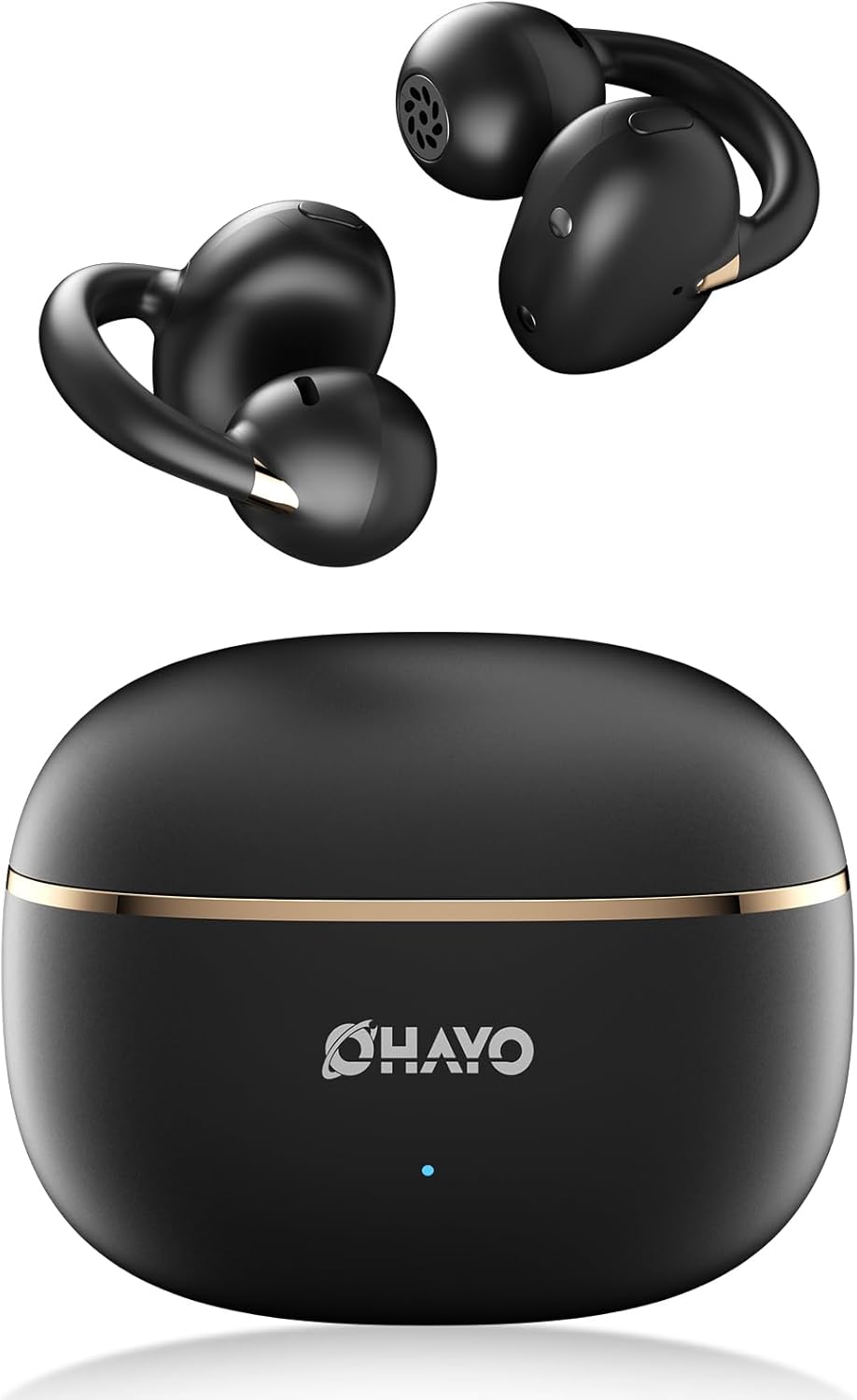
Image 1.1: The OHAYO A7 Clip-On Open Ear Headphones and their charging case. The earbuds feature a black finish with gold accents, designed for an open-ear fit. The compact charging case is also black with a gold stripe and the OHAYO logo.
Zu den Hauptmerkmalen gehören:
- Offenes Ohr-Design: Allows you to hear your audio while remaining aware of ambient sounds.
- Ultraleicht: Each earbud weighs approximately 4.7g for comfortable, extended wear.
- Bluetooth 5.4: Provides stable and efficient wireless connectivity with low latency.
- 12-mm-Dynamische Treiber: Liefert klaren Klang mit verstärktem Bass.
- Erweiterte Spielzeit: Bis zu 6.5 Stunden Akkulaufzeit mit einer einzigen Ladung, insgesamt 40 Stunden mit dem Ladecase.
- IPX6 Wasserbeständigkeit: Protects against sweat and splashes, suitable for active use.
2. Lieferumfang
Bitte überprüfen Sie den Packungsinhalt, um sicherzustellen, dass alle Artikel vorhanden sind:
- OHAYO A7 Clip-On Open Ear Headphones (Left and Right)
- Kabelloses Ladecase
- USB-C-Ladekabel
- Bedienungsanleitung

Image 2.1: The package contents for the OHAYO A7 headphones, including the earbuds, charging case, USB-C cable, and user manual.
3. Produktdiagramm
Familiarize yourself with the components of your OHAYO A7 headphones:

Bild 3.1: Eine Nahaufnahme view of a single OHAYO A7 earbud, highlighting its clip-on design and speaker grille.

Image 3.2: The OHAYO A7 earbuds placed inside their open charging case, showing the charging contacts and the compact design.
4. Einrichtung
4.1 Aufladen der Kopfhörer
Vor dem ersten Gebrauch die Kopfhörer und das Ladecase vollständig aufladen.
- Connect the provided USB-C charging cable to the charging port on the case and to a USB power source.
- Die Kontrollleuchte am Gehäuse zeigt den Ladestatus an. Eine vollständige Aufladung des Gehäuses dauert etwa 1.5 Stunden.
- Legen Sie die Ohrhörer in das Ladecase. Der Ladevorgang startet automatisch.

Image 4.1: The OHAYO A7 charging case with a USB-C cable inserted, indicating the charging process. The image also shows the earbuds and charging times.
A 10-minute quick charge can provide up to 2 hours of playtime.
4.2 Bluetooth-Kopplung
To connect your OHAYO A7 headphones to a device:
- Stellen Sie sicher, dass die Ohrhörer aufgeladen sind und sich im Ladecase befinden.
- Open the charging case. The earbuds will automatically enter pairing mode, indicated by a flashing LED light (if applicable).
- Gehen Sie auf Ihrem Gerät (Smartphone, Tablet, Laptop) zu den Bluetooth-Einstellungen und schalten Sie Bluetooth ein.
- Suchen nach available devices and select "OHAYO A7" from the list.
- Once connected, the LED indicator on the earbuds will turn off or show a solid light, and you will hear a confirmation tone.

Image 4.2: A smartphone screen displaying Bluetooth settings, with "OHAYO A7" listed as an available device for pairing.
The OHAYO A7 uses Bluetooth 5.4 for a stable connection up to 20 meters.
5. Tragehinweise
Für optimale Klangqualität und Tragekomfort achten Sie bitte darauf, dass die Ohrhörer korrekt getragen werden.
- Identifizieren Sie den linken (L) und rechten (R) Ohrhörer.
- Gently clip each earbud onto the corresponding ear, positioning the open-ring joint horizontally.
- Adjust the earbud slightly until it feels secure and comfortable, ensuring the speaker is aligned with your ear canal for the best sound delivery.

Image 5.1: A visual guide demonstrating the correct way to wear the OHAYO A7 clip-on earbuds, contrasting it with unstable, misaligned, and reversed fits.
The ergonomic C-shaped design and lightweight construction (4.7g per earbud) are engineered for comfort and stability, even for users with glasses or sensitive ears.
6. Operating Instructions (Button Controls)
The OHAYO A7 headphones feature physical buttons for easy control of various functions:

Image 6.1: A detailed diagram illustrating the various button controls on the OHAYO A7 earbuds for music playback, calls, and other functions.
| Aktion | Funktion |
|---|---|
| Single tap (L or R) | Musik abspielen/pausieren, Anruf annehmen/beenden |
| Press and hold 1.5s (L) | Vorheriger Titel |
| Press and hold 1.5s (R) | Nächster Titel |
| Doppeltippen (L) | Lautstärke - |
| Doppeltippen (R) | Volume + |
| Dreifach tippen (R) | Sprachassistent aktivieren |
| Dreifach tippen (L) | Spielmodus Ein/Aus |
| Press and hold (L or R) during incoming call | Anruf ablehnen |
7. Spezifikationen
Detailed technical specifications for the OHAYO A7 Clip-On Open Ear Headphones:
| Besonderheit | Detail |
|---|---|
| Modellname | A7 |
| Konnektivitätstechnologie | Kabellos (Bluetooth 5.4) |
| Bluetooth-Reichweite | Bis zu 20 Meter |
| Größe des Audiotreibers | 12 mm dynamischer Treiber |
| Frequenzgang | 20 KHz (Upper limit provided) |
| Empfindlichkeit | 85 dB |
| Impedanz | 32 Ohm |
| Audio-Latenz | 6 Milliseconds (35ms in pro-gaming mode) |
| Lärmschutz | Adaptive Geräuschunterdrückung (ENC für Anrufe) |
| Ohrhörer-Spielzeit | 6.5 - 8 Hours (single charge) |
| Gesamtspielzeit (mit Hülle) | Bis zu 40 Stunden |
| Ladezeit (Case) | 1.5 Stunden |
| Kapazität des Ladegehäuses | 500 mAh |
| Wasserbeständigkeit | IPX6 (Waterproof/Sweatproof) |
| Ohrhörergewicht | 4.7 Gramm (jeweils) |
| Gehäuseabmessungen | 2.4 x 1.96 x 1.18 Zoll |
| Material | ABS, Kunststoff |
| Kompatible Geräte | Cellphones, Desktops, Laptops |
8. Wartung
Proper care will extend the lifespan of your OHAYO A7 headphones:
- Reinigung: Reinigen Sie die Ohrhörer und das Ladecase regelmäßig mit einem weichen, trockenen und fusselfreien Tuch. Vermeiden Sie die Verwendung von Scheuermitteln oder aggressiven Chemikalien.
- Lagerung: Bewahren Sie die Kopfhörer bei Nichtgebrauch im Ladeetui auf, um sie vor Staub und Beschädigungen zu schützen.
- Wassereinwirkung: While the headphones are IPX6 water-resistant, avoid submerging them in water. Dry them thoroughly if they get wet from sweat or splashes before placing them back in the charging case.

Image 8.1: The OHAYO A7 earbuds shown with water droplets, demonstrating their IPX6 waterproof and splashproof capabilities.
9. Fehlerbehebung
If you encounter issues with your OHAYO A7 headphones, refer to the following common solutions:
- Kein Ton:
- Stellen Sie sicher, dass die Kopfhörer ordnungsgemäß gekoppelt und mit Ihrem Gerät verbunden sind.
- Überprüfen Sie die Lautstärke sowohl an den Kopfhörern als auch an Ihrem angeschlossenen Gerät.
- Make sure the earbuds are correctly seated in your ears.
- Kopplung fehlgeschlagen:
- Stellen Sie sicher, dass Bluetooth auf Ihrem Gerät aktiviert ist.
- Place the earbuds back in the charging case, close the lid, wait a few seconds, then open it again to re-enter pairing mode.
- Try forgetting "OHAYO A7" from your device's Bluetooth list and re-pairing.
- Stellen Sie sicher, dass die Ohrhörer aufgeladen sind.
- Ladeprobleme:
- Vergewissern Sie sich, dass das Ladekabel sowohl mit dem Gehäuse als auch mit der Stromquelle fest verbunden ist.
- Stellen Sie sicher, dass die Ladekontakte an den Ohrhörern und im Inneren des Ladecase sauber und frei von Verunreinigungen sind.
- Versuchen Sie es mit einem anderen USB-C-Kabel oder Netzteil.
- Intermittierende Verbindung:
- Verringern Sie den Abstand zwischen den Kopfhörern und Ihrem Gerät.
- Avoid environments with significant wireless interference (e.g., near Wi-Fi routers, microwaves).
- Stellen Sie sicher, dass sich keine physischen Hindernisse zwischen den Kopfhörern und Ihrem Gerät befinden.
10. Garantie und Support
OHAYO provides a 1-Year Care Plan for your A7 Clip-On Open Ear Headphones. This includes:
- Industry-leading 24/7 customer support.
- Lifetime technical updates.
For warranty claims, technical assistance, or any other inquiries, please contact OHAYO customer support through the official channels provided at the time of purchase or on the OHAYO webWebsite.
Image 10.1: An illustration highlighting the 1-Year Care Plan offered by OHAYO, alongside the product packaging and accessories.


