1. Einleitung
This manual provides essential information for the installation, operation, and maintenance of your GIGABYTE GeForce RTX 5060 WINDFORCE MAX OC 8G Graphics Card. This high-performance graphics card is powered by the NVIDIA Blackwell architecture and DLSS 4, featuring 8GB of 128-bit GDDR7 memory and a PCIe 5.0 interface. It incorporates the WINDFORCE cooling system, a Hawk fan, server-grade thermal conductive gel, and a reinforced structure for optimal performance and durability. Please read this manual thoroughly before installation and use.
2. Sicherheitshinweise
- Always disconnect the power supply from your computer before installing or removing any hardware components.
- Wear an anti-static wrist strap or frequently touch a grounded metal object to prevent electrostatic discharge (ESD) damage to the graphics card and other components.
- Fassen Sie die Grafikkarte an den Kanten an, um eine Berührung empfindlicher Bauteile zu vermeiden.
- Sorgen Sie für ausreichende Belüftung im Computergehäuse, um eine Überhitzung zu vermeiden.
- Do not attempt to repair the graphics card yourself. Refer to qualified service personnel for assistance.
3. Packungsinhalt
Überprüfen Sie, ob alle Artikel in Ihrem Paket vorhanden sind:
- GIGABYTE GeForce RTX 5060 WINDFORCE MAX OC 8G Graphics Card
- Bedienungsanleitung
Note: Additional accessories may vary by region or retailer.
4. Einrichtung (Installation)
4.1 Hardware-Installation
Before proceeding, ensure your system meets the minimum requirements, including a 450W power supply and a compatible PCI Express graphics slot.
- Bereiten Sie Ihr System vor: Schalten Sie Ihren Computer aus und trennen Sie das Netzkabel von der Steckdose. Öffnen Sie das Computergehäuse.
- PCI-Express-Steckplatz finden: Suchen Sie einen freien PCI Express 5.0 x8-Steckplatz auf Ihrem Motherboard.
- Steckplatzabdeckungen entfernen: Remove the metal slot covers from the back of your computer case corresponding to the graphics card's size.
- Grafikkarte installieren: Carefully align the graphics card with the PCI Express slot and press it firmly until it is securely seated. Ensure the retention clip on the motherboard clicks into place.
- Sichere Grafikkarte: Befestigen Sie die Grafikkarte mit Schrauben am Computergehäuse.
- Strom anschließen: Connect the required 1x 8-pin PCIe power connector from your power supply to the graphics card.
- Fall abschließen: Schließen Sie das Computergehäuse und schließen Sie das Netzkabel wieder an.

Abbildung 1: Vorderseite view of the GIGABYTE GeForce RTX 5060 WINDFORCE MAX OC 8G Graphics Card.

Abbildung 2: Seite view of the GIGABYTE GeForce RTX 5060 WINDFORCE MAX OC 8G Graphics Card, showing the heatsink and power connector.
4.2 Treiberinstallation
After hardware installation, you need to install the latest drivers for optimal performance.
- Einschalten: Schalten Sie Ihren Computer ein.
- Treiber herunterladen: Besuchen Sie die offizielle GIGABYTE-Website. webSeite? ˅ (www.gigabyte.comoder NVIDIA webSeite? ˅ (www.nvidia.com) to download the latest drivers for your GeForce RTX 5060 graphics card.
- Treiber installieren: Follow the on-screen instructions to install the drivers. Restart your computer if prompted.
4.3 Visuelle Übersichtview und Unboxing
Watch this official GIGABYTE video for a visual overview of the RTX 50 Series graphics cards and an unboxing experience.
Video 1: GIGABYTE GeForce RTX 50 Series - Official Trailer. This video provides a general overview of the RTX 50 series, highlighting key features and design elements.
Video 2: Gigabyte RTX 5060 8gb OC unboxing review by 'Remember This Tech'. This video demonstrates the unboxing process and initial impressions of the Gigabyte RTX 5060 graphics card, including its physical appearance and included accessories.
5. Betrieb
5.1 Anschließen von Displays
The GIGABYTE GeForce RTX 5060 graphics card supports multiple display outputs for a versatile setup.
- DisplayPort: Connect up to three DisplayPort 2.1 compatible monitors using DisplayPort cables.
- HDMI: Connect one HDMI 2.1 compatible monitor or TV using an HDMI cable.
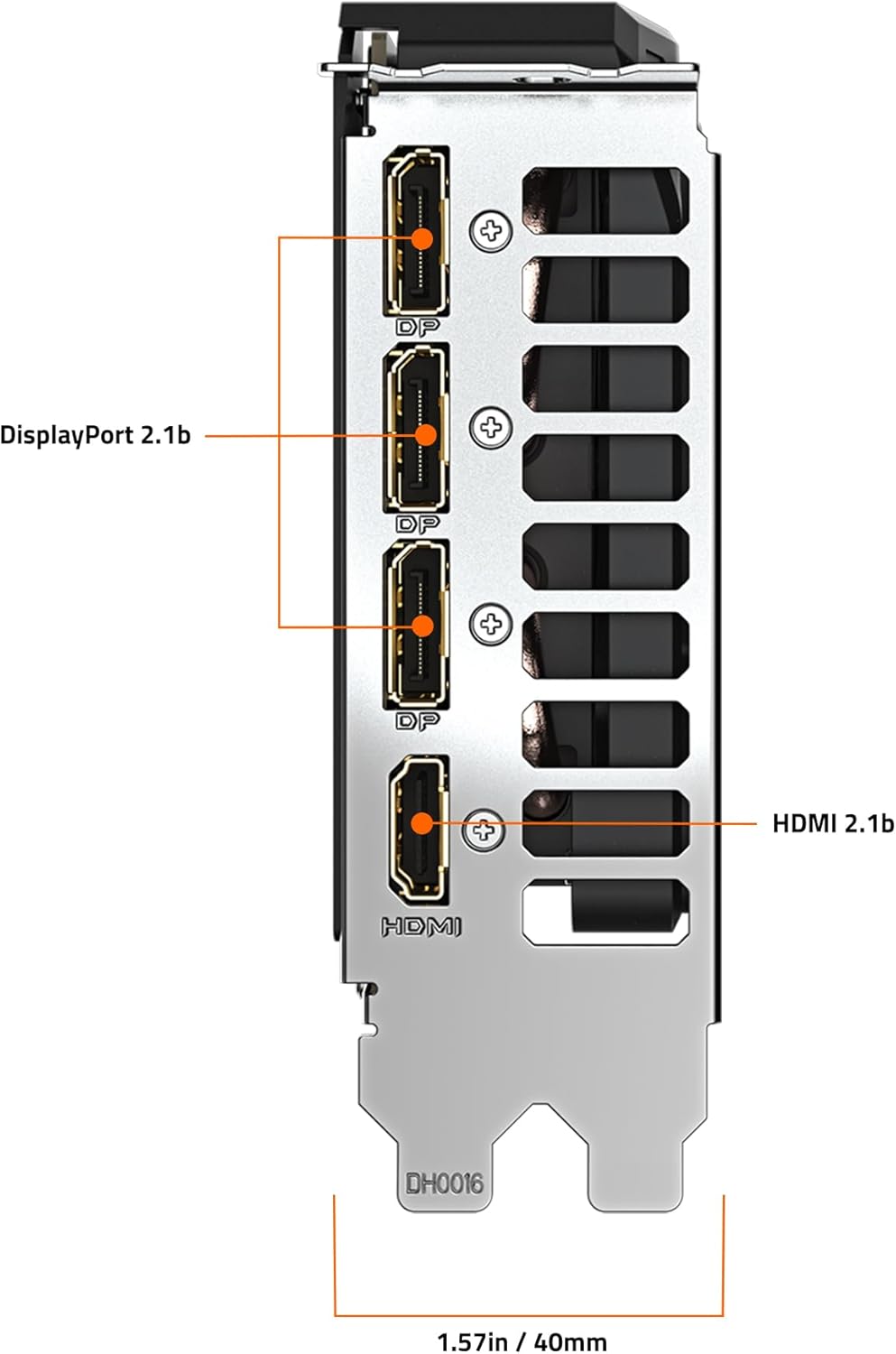
Abbildung 3: Rückseite view of the GIGABYTE GeForce RTX 5060 WINDFORCE MAX OC 8G Graphics Card, highlighting the DisplayPort and HDMI output connectors.
5.2 Software-Dienstprogramme
Utilize GIGABYTE and NVIDIA software for enhanced control and customization:
- GIGABYTE Kontrollzentrum: Download from the GIGABYTE website to monitor GPU status, adjust fan speeds, and customize RGB lighting (if applicable).
- NVIDIA-Systemsteuerung: Access advanced display settings, manage 3D settings, and configure features like DLSS and Ray Tracing.
6. Wartung
6.1 Reinigung
Regelmäßige Reinigung trägt zur Aufrechterhaltung einer optimalen Leistung bei und verlängert die Lebensdauer Ihrer Grafikkarte.
- Ausschalten: Vor der Reinigung sollten Sie Ihren Computer immer ausschalten und vom Stromnetz trennen.
- Staubentfernung: Use compressed air to gently blow dust from the fans, heatsink fins, and other components. Hold the fans in place to prevent over-spinning.
- Oberflächenreinigung: Benutzen Sie ein weiches, fusselfreies Tuch, dampened with isopropyl alcohol to clean the exterior surfaces of the card. Avoid harsh chemicals.
6.2 Treiberaktualisierungen
Keep your graphics drivers updated to ensure compatibility with the latest games and applications, and to benefit from performance improvements and bug fixes.
- Periodically check the GIGABYTE or NVIDIA website for new driver releases.
- Follow the provided instructions for driver installation.
7. Fehlerbehebung
Sollten Sie Probleme mit Ihrer Grafikkarte haben, beachten Sie bitte die folgenden häufig auftretenden Probleme und Lösungen:
| Problem | Mögliche Ursache | Lösung |
|---|---|---|
| Kein Bild auf dem Monitor | Incorrect cable connection, loose card, power issue, driver problem. | Ensure display cables are securely connected. Re-seat the graphics card. Verify power connectors are attached. Reinstall or update drivers. |
| Geringe Leistung in Spielen/Anwendungen | Outdated drivers, incorrect settings, insufficient power. | Update graphics drivers. Adjust in-game graphics settings. Ensure adequate power supply. Check for background applications consuming resources. |
| Overheating or loud fan noise | Dust accumulation, poor case airflow, high load. | Clean fans and heatsink. Improve case airflow. Monitor temperatures with GIGABYTE Control Center. Adjust fan curves if necessary. |
| System instability or crashes | Driver conflicts, overheating, faulty hardware. | Perform a clean driver installation. Monitor temperatures. Check other system components. |
8. Spezifikationen
| Besonderheit | Detail |
|---|---|
| Grafikprozessor | NVIDIA GeForce RTX 5060 (Blackwell architecture) |
| Videospeicher | 8 GB GDDR7 |
| Speicherschnittstelle | 128-Bit |
| Speichergeschwindigkeit | 28000 MHz |
| GPU-Taktfrequenz | 2512 MHz (Boost-Takt) |
| PCI Express | PCIe 5.0 x8 |
| Kühlsystem | WINDFORCE cooling system with Hawk fan |
| Videoausgangsschnittstelle | 3x DisplayPort 2.1, 1x HDMI 2.1 |
| Maximale Bildschirmauflösung | 3840 x 2160 |
| Stromanschluss | 1x 8-polig |
| Empfohlenes Netzteil | 450W or higher |
| Abmessungen (LxBxH) | 7.83 x 4.57 x 1.57 Zoll (199 x 116 x 40 mm) |
| Artikelgewicht | 1.1 Pfund |
| Hauptmerkmale | DLSS 4, AI Cores, 4th Gen Ray Tracing Cores, Reinforced structure, Server-grade Thermal conductive gel |
9. Garantie und Support
GIGABYTE products are covered by a limited warranty. For detailed warranty information, technical support, and service inquiries, please visit the official GIGABYTE support webWebsite:
GIGABYTE-Support: https://www.gigabyte.com/Support
Bitte bewahren Sie Ihren Kaufbeleg für Garantieansprüche auf.


