1. Einleitung
Thank you for choosing the HARDELL Mini Cordless Rotary Tool. This versatile and compact tool is designed for various light-duty tasks such as sanding, polishing, drilling, carving, and engraving. Its cordless design and multiple speed settings provide flexibility and precision for your DIY projects and crafts. Please read this manual thoroughly before use to ensure safe and optimal operation.
2. Sicherheitshinweise
- Tragen Sie während der Arbeit stets geeignete persönliche Schutzausrüstung, einschließlich einer Schutzbrille.
- Halten Sie den Arbeitsbereich sauber und gut beleuchtet. Unordnung oder dunkle Bereiche führen zu Unfällen.
- Betreiben Sie Elektrowerkzeuge nicht in explosionsgefährdeten Bereichen, in denen sich beispielsweise brennbare Flüssigkeiten, Gase oder Staub befinden.
- Halten Sie Kinder und andere Personen während der Benutzung des Elektrowerkzeugs fern. Durch Ablenkung können Sie die Kontrolle verlieren.
- Avoid accidental starting. Ensure the switch is in the off-position before connecting to a battery pack, picking up or carrying the tool.
- Überlasten Sie das Elektrowerkzeug nicht. Verwenden Sie für Ihre Anwendung das dafür geeignete Elektrowerkzeug.
- Trennen Sie den Akku vom Elektrowerkzeug, bevor Sie Einstellungen vornehmen, Zubehörteile wechseln oder Elektrowerkzeuge lagern.
- Bewahren Sie unbenutzte Elektrowerkzeuge außerhalb der Reichweite von Kindern auf. Lassen Sie das Elektrowerkzeug nicht von Personen benutzen, die mit diesem nicht vertraut sind oder diese Anweisungen nicht gelesen haben.
- Warten Sie Elektrowerkzeuge und Zubehör sorgfältig. Achten Sie auf Fehlausrichtung oder Festfressen beweglicher Teile, Bruchstellen oder andere Zustände, die die Funktion des Elektrowerkzeugs beeinträchtigen können.
- Verwenden Sie das Elektrowerkzeug, das Zubehör und die Werkzeugeinsätze gemäß dieser Anleitung und unter Berücksichtigung der Arbeitsbedingungen und der auszuführenden Arbeiten.
- This rotary tool is not designed for heavy-duty tasks.
3. Packungsinhalt
The HARDELL Mini Cordless Rotary Tool kit includes the following items:
- HARDELL Mini Cordless Rotary Tool (Orange)
- USB-C-Ladekabel
- Assorted Accessories (35 pieces), including:
- Schleifbänder
- Polierpads
- Grinding heads
- Bohrer
- Engraving tips
- Räder schneiden
- Collets (various sizes)
- Wrench for accessory changes

Image: The HARDELL Mini Cordless Rotary Tool shown with its included USB-C charging cable and various accessories, such as sanding bands, cutting discs, drill bits, and grinding heads.
4. Produktüberschreitungview
Familiarize yourself with the components of your HARDELL Mini Cordless Rotary Tool:

Image: Diagram showing the key parts of the rotary tool, including the Locking Collar, Spindle Lock Button, On/Off Button, Speed Control Button, Unique Cooling Device, and Type-C Charging Port.
- Verriegelungshalsband: Firmly fixes accessories in place.
- Spindelsperrtaste: Quick collet lock for fast accessory changes. Caution: Do not press this button when the device is running.
- Ein-/Aus-Taste: Schaltet das Werkzeug ein oder aus.
- Speed Control Buttons (+/-): Adjusts the rotational speed. The "+" button increases speed, and the "-" button decreases speed.
- LED-Licht: Illuminates the work area for enhanced precision and visibility.
- Typ-C-Ladeanschluss: For convenient charging using a USB-C cable.
- Unique Cooling Device: Entwickelt, um die Wärme während des Betriebs abzuleiten.
Geschwindigkeitseinstellungen
The tool features 5-speed settings for various applications:
- Geschwindigkeit 1: 5000 RPM (Recommended for polishing)
- Geschwindigkeit 2: 8000 RPM (Recommended for sanding)
- Geschwindigkeit 3: 11000 RPM (Recommended for carving)
- Geschwindigkeit 4: 14000 RPM (Recommended for grinding)
- Geschwindigkeit 5: 18000 RPM (Recommended for drilling)
5. Einrichtung und Installation des Zubehörs
Proper installation of accessories is crucial for safe and effective operation.
General Accessory Installation
- Drücken Sie den Spindelarretierungsknopf nach unten und schrauben Sie die Mutter ab.
- Choose the suitable collet and insert it into the tool. Then, place the black nut over the collet. Install the accessory you need to use.
- Press the spindle lock button again, then tighten the nut to secure the accessory.

Image: Visual guide demonstrating the four steps to install various accessories into the rotary tool's collet.
Installing a Sanding Band
- Insert the sanding drum into the collet and tighten the nut.
- Loosen the screw of the sanding drum.
- Montieren Sie das Schleifband an der Trommel.
- Drücken Sie den Spindelarretierungsknopf herunter und ziehen Sie die Schraube der Schleiftrommel mit dem mitgelieferten Schraubenschlüssel fest.

Image: Visual instructions for attaching a sanding band to the rotary tool, showing the drum, band, and tightening process.
Installing an HSS Cutting Disc or Sanding Paper
- Setzen Sie den Raddorn in die Spannzange ein und ziehen Sie die Mutter fest.
- Die Schraube des Raddorns demontieren.
- Montieren Sie den Raddorn und setzen Sie die HSS-Trennscheibe oder das Schleifpapier ein.
- Drücken Sie den Spindelarretierungsknopf herunter und ziehen Sie die Schraube des Raddorns mit dem mitgelieferten Schraubenschlüssel fest.
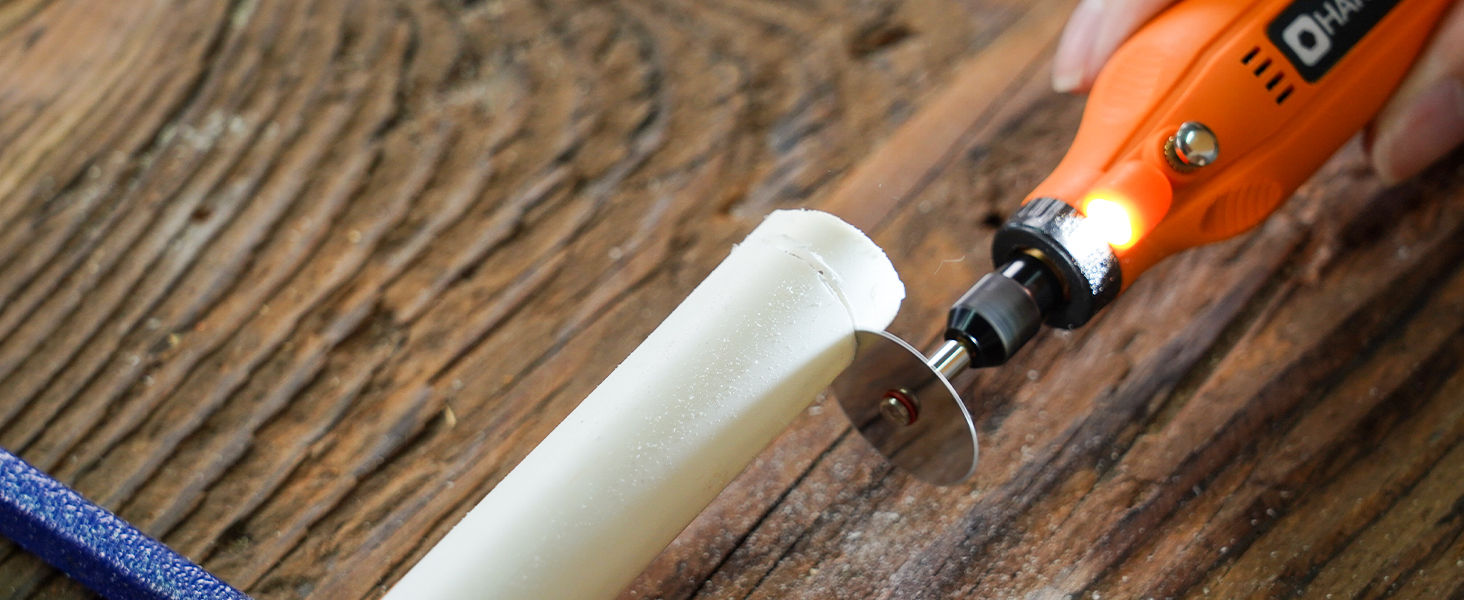
Image: Visual instructions for attaching an HSS cutting disc or sanding paper to the rotary tool, detailing the mandrel and securing steps.
6. Bedienungsanleitung
- Ein-/Ausschalten: Press the On/Off button to turn the tool on or off.
- Geschwindigkeit anpassen: Use the '+' and '-' buttons to cycle through the 5 available speed settings (5000 RPM to 18000 RPM). The LED indicators will show the current speed level.
- LED-Licht: The integrated LED light automatically illuminates when the tool is powered on, providing visibility for detailed work.
- Betrieb: Hold the tool firmly and apply gentle pressure to the workpiece. Allow the tool to do the work; excessive force can lead to poor results or damage to the tool/workpiece.

Image: A person using the HARDELL Mini Cordless Rotary Tool for carving a wooden piece, demonstrating its ergonomic design and precision.

Bild: Eine Nahaufnahme view of the rotary tool in action, with its LED light brightly illuminating the precise point of contact on a workpiece, highlighting its utility in detailed tasks.
7. Anwendungen
The HARDELL Mini Cordless Rotary Tool is ideal for a variety of light-duty projects, including but not limited to:
- Engraving on various materials
- Sanding small surfaces or edges
- Carving intricate designs
- Drilling small holes
- Grinding for shaping or smoothing
- Polishing for a smooth finish
- Trimming excess material

Bild: Eine Collage zeigtasing the multi-purpose capabilities of the rotary tool, including sanding wood, carving glass, polishing beads, grinding metal, drilling shells, and cutting plastic.
8. Wartung
Aufladen des Werkzeugs
- Connect the provided USB-C charging cable to the charging port at the base of the tool.
- Plug the other end of the USB-C cable into a compatible power source (e.g., computer, car charger, power bank).
- The LED indicators will show the charging status. A full charge provides up to 100 minutes of continuous use under no-load conditions.
Reinigung und Lagerung
- After each use, disconnect any accessories and gently wipe the tool body with a clean, dry cloth.
- Remove any dust or debris from the collet and spindle area.
- Store the tool and its accessories in a dry, clean place, preferably in its original carrying case, away from direct sunlight and extreme temperatures.
9. Fehlerbehebung
- Das Gerät lässt sich nicht einschalten: Ensure the tool is fully charged. If the battery is low, connect it to a power source using the USB-C cable.
- Verminderte Leistung: Check if the accessory is securely installed. Ensure the battery is adequately charged. The tool is designed for light-duty tasks; avoid using it for heavy-duty applications that may exceed its capacity.
- Übermäßige Vibrationen oder Geräusche: Ensure the accessory is correctly inserted and tightened. A loose or damaged accessory can cause vibration. Replace any worn or damaged accessories.
- Überhitzung: If the tool feels excessively hot, discontinue use and allow it to cool down. Ensure the cooling vents are not obstructed.
10. Spezifikationen
| Besonderheit | Spezifikation |
|---|---|
| Marke | HARDELL |
| Modellnummer | DM12405ORANGEH-2 |
| Stromquelle | Batteriebetrieben (3.7V Lithium-Ionen) |
| Geschwindigkeitseinstellungen | 5-Speed (5000-18000 RPM) |
| Ladeart | USB-C |
| Artikelgewicht | 0.3 lbs (7.4 ounces / 0.21 Kilograms) |
| Besondere Merkmale | Compact, LED Light |
| Im Lieferumfang enthaltene Komponenten | 35 Accessories, USB-C Cable |
11. Garantie und Support
For warranty information, technical support, or any questions regarding your HARDELL Mini Cordless Rotary Tool, please refer to the documentation included in your product packaging or contact HARDELL customer service directly. Contact details can typically be found on the manufacturer's webauf der Website oder auf der Produktverpackung.


