Einführung
Welcome to the user manual for your Raycon Essential Open Earbuds. These true wireless open-ear Bluetooth headphones are designed for comfort and awareness, allowing you to enjoy high-quality audio while staying connected to your surroundings. Featuring an ultra-lightweight design, comfort hook, IPX5 water resistance, and up to 36 hours of battery life, these earbuds are perfect for an active lifestyle.

Figure 1: Raycon Essential Open Earbuds (Black)
Packungsinhalt
Bitte vergewissern Sie sich, dass alle Artikel in Ihrem Paket vorhanden sind:
- Raycon Essential Open Earbuds (Left and Right)
- Ladeetui
- USB-Ladekabel
- Benutzerhandbuch (dieses Dokument)

Abbildung 2: Ohrhörer im Ladecase
Hauptmerkmale
- Offenes Ohr-Design: Experience crystal-clear sound while staying fully aware of your surroundings. The open-ear design delivers high-quality audio without blocking your environment — perfect for workouts, outdoor runs, or multitasking throughout the day.

Figure 3: Open-Ear Design for Environmental Awareness
- Featherlight Fit: The Essential Open Earbuds are so lightweight and comfortable, you might forget you're even wearing them. The minimalist, ear-hugging design ensures a secure fit that won’t budge during intense movement, all while keeping you stylish and streamlined.

Figure 4: Ultra-Lightweight Design (13.3g)
- Built for On-The-Go (IPX5 Water Resistant): Sweat-resistant and made for motion, these wireless earbuds are ideal for gym sessions, cycling, and daily hustle. They’re pocket-sized and portable – the perfect essential earbuds that fit into your life with zero bulk. The IPX5 rating means they are resistant to splashes and sweat.

Abbildung 5: IPX5-Wasserbeständigkeit
- Long Battery Life + Easy Charging: Stay powered through your day with all-day battery life and a sleek charging case that fits in the palm of your hand. Fast charging means less downtime and more freedom to move. Enjoy up to 8 hours of non-stop playback and a total of 36 hours with the charging case.

Abbildung 6: Verlängerte Akkulaufzeit
- Flexibler Ohrhaken: The ergonomic ear hook bends to fit the shape of any ear, ensuring a secure and comfortable fit.

Figure 7: Flexible Ear Hook Design
- Kompaktes Design: Slide in your pocket or toss in your bag. Portable, fun-sized, and ready for any adventure.

Abbildung 8: Kompaktes und tragbares Design
- Mehrpunktverbindung: Connect to two devices and switch between them seamlessly — without the juggling.

Figure 9: Multipoint Connection Capability
Installationshandbuch
1. Aufladen Ihrer Ohrhörer
Before first use, fully charge your Raycon Essential Open Earbuds and their charging case.
- Legen Sie beide Ohrhörer in das Ladecase. Achten Sie darauf, dass sie richtig sitzen.
- Connect the provided USB charging cable to the charging port on the case and plug the other end into a USB power source (e.g., wall adapter, computer USB port).
- Die Kontrollleuchte am Ladecase zeigt den Ladestatus an. Sobald der Akku vollständig geladen ist, ändert sich die Leuchte oder erlischt.
Video 1: Demonstrates charging the earbuds and case, as well as wearing them. This video is provided by the seller and is relevant for setup and operation.
2. Koppeln mit Ihrem Gerät
The earbuds will automatically enter pairing mode when taken out of the case for the first time.
- Öffnen Sie das Ladecase und entnehmen Sie beide Ohrhörer. Sie schalten sich automatisch ein und wechseln in den Kopplungsmodus.
- Gehen Sie auf Ihrem Gerät (Smartphone, Tablet, Computer) zu den Bluetooth-Einstellungen.
- Suchen nach "Raycon Essential Open Earbuds" in the list of available devices.
- Select the earbuds to connect. You will hear an audible confirmation once connected.
For subsequent connections, the earbuds will automatically connect to the last paired device when removed from the case, if Bluetooth is enabled on the device.
Bedienungsanleitung
Tragen der Ohrhörer
Gently loop the ear hook over your ear and position the earbud speaker near your ear canal. Adjust for a comfortable and secure fit.
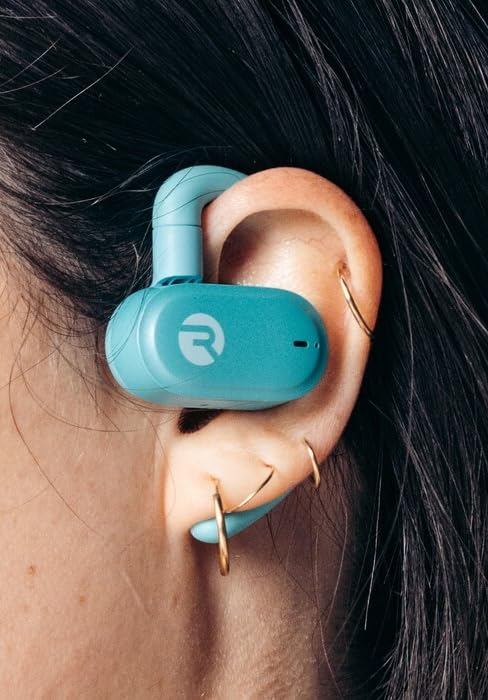
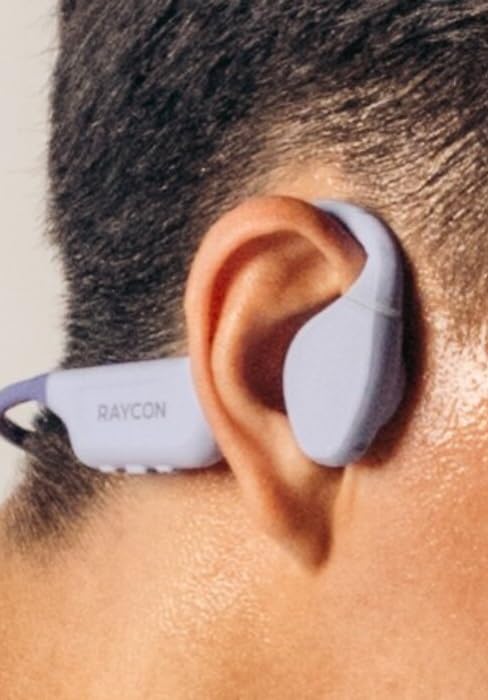
Figure 10: Proper Wearing of Essential Open Earbuds
Touch-Bedienelemente
The Essential Open Earbuds feature touch controls for various functions. Please note that the touch controls are sensitive. Refer to the quick start guide or the Raycon app for a full list of touch control functions, as specific actions (e.g., play/pause, skip track, answer call) are typically managed via taps on the earbud surface.
| Aktion | Funktion |
|---|---|
| Einmaliges Tippen | Musik abspielen/pausieren, Anruf annehmen/beenden |
| Doppeltippen (rechter Ohrhörer) | Nächster Titel |
| Doppeltippen (linker Ohrhörer) | Vorheriger Titel |
| Langes Drücken | Sprachassistent aktivieren |
Note: Specific touch control gestures may vary. Consult the official Raycon support resources for the most accurate and up-to-date information.
Wartung
Reinigung
Um optimale Leistung und Hygiene zu gewährleisten, reinigen Sie Ihre Ohrhörer und das Ladecase regelmäßig.
- Verwenden Sie ein weiches, trockenes, fusselfreies Tuch, um die Ohrhörer und das Ladecase abzuwischen.
- Bei hartnäckigen Verschmutzungen leicht dampBefeuchten Sie das Tuch mit Wasser. Vermeiden Sie übermäßige Feuchtigkeit.
- Verwenden Sie keine Scheuermittel, Lösungsmittel oder Aerosolsprays.
- Vor dem Aufladen sicherstellen, dass die Ladekontakte sowohl an den Ohrhörern als auch am Ladecase sauber und trocken sind.
Lagerung
Bewahren Sie Ihre Ohrhörer bei Nichtgebrauch im Ladecase auf, um sie zu schützen und geladen zu halten.
- An einem kühlen, trockenen Ort lagern, vor extremen Temperaturen und direkter Sonneneinstrahlung schützen.
- Vermeiden Sie die Lagerung in feuchter Umgebung.
Batteriepflege
So verlängern Sie die Akkulaufzeit:
- Vermeiden Sie es, den Akku häufig vollständig zu entladen.
- Charge the earbuds regularly, even if not used for extended periods.
- Verwenden Sie ausschließlich das mitgelieferte Ladekabel oder ein zertifiziertes gleichwertiges Kabel.
Fehlerbehebung
If you encounter issues with your Raycon Essential Open Earbuds, try the following solutions:
| Problem | Mögliche Lösung |
|---|---|
| Die Ohrhörer lassen sich nicht einschalten. | Ensure the earbuds and charging case are fully charged. Place earbuds in the case, close it, then open it again. |
| Die Ohrhörer lassen sich nicht mit dem Gerät koppeln. |
|
| Sound breaks up or is intermittent. |
|
| Touch controls are too sensitive or unresponsive. |
|
| Ein Ohrhörer gibt keinen Ton von sich. |
|
Technische Daten
| Besonderheit | Detail |
|---|---|
| Modellname | Raycon Essential Open Ohrhörer |
| Modellnummer | RBO715 |
| Konnektivitätstechnologie | Kabellos (Bluetooth 6.0) |
| Platzierung des Ohrs | Offenes Ohr |
| Formfaktor | Over Ear (with hook design) |
| Steuerungstyp | Touch-Steuerung |
| Wasserbeständigkeit | IPX5 (wasserbeständig) |
| Akkulaufzeit (Ohrhörer) | Bis zu 8 Stunden |
| Gesamte Akkulaufzeit (mit Hülle) | Bis zu 36 Stunden |
| Artikelgewicht | 5 Unzen (Ohrhörer + Ladecase) |
| Ohrhörergewicht | Ca. 13.3 g pro Ohrhörer |
| Hersteller | Raycon Global |
| ASIN | B0FHJ7G4WF |
| UPC | 811162032989 |
Garantie und Support
Garantieinformationen
Raycon products typically come with a limited manufacturer's warranty. Please refer to the official Raycon website or the warranty card included with your product for specific terms, conditions, and duration of the warranty.
Kundenservice
For further assistance, technical support, or warranty claims, please contact Raycon customer support:
- WebWebsite: Visit the official Raycon website for FAQs, support articles, and contact options. (www.rayconglobal.com)
- E-Mail/Telefon: Specific contact details can usually be found on the support section of their webWebsite.
Please have your product model number (RBO715) and purchase information ready when contacting support.


