1. Einleitung
This manual provides detailed instructions for the installation, operation, and maintenance of your Thermalright TL-H12-X28-S CPU Fan. This 120mm ARGB performance fan is designed for efficient computer case cooling, offering high airflow and quiet operation for CPU cooling and chassis ventilation.

Image 1.1: Thermalright TL-H12-X28-S 120mm ARGB Performance Fan. This fan features a 28mm thickness, 3-phase 6-pole motor, durable S-FDB V2 bearing, and PWM/ARGB sharing connectors.
2. Produktmerkmale
- High Speed & Airflow: Operates at 2150 RPM with an airflow of 80.45 CFM (MAX) for effective heat dissipation.
- Leiser Betrieb: Features 7 noise-reducing fan blades and a noise level of ≤29.4 dBA.
- Durable Bearing: Equipped with S-FDB V2 bearing for long-term, stable, and trouble-free operation.
- Enhanced Thickness: 28mm fan thickness provides stability and optimizes performance with large fan blades.
- ARGB-Beleuchtung: Integrated 5V 3PIN ARGB lighting interface for customizable illumination.
- PWM-Steuerung: 4-pin PWM power connector for precise fan speed control.
- Einfache Installation: 120mm size compatible with most cases, includes self-tapping screws for mounting.

Bild 2.1: Nahaufnahme view of the fan highlighting dual-side soft-touch rubber pads for vibration absorption and the S-FDB (Stably-FDB) Bearing V2 with magnetic design for stable fan blade motion.

Abbildung 2.2: Intern view of the fan's 3-phase 6-pole motor, designed for smoother operation and reduced power consumption.
3. Spezifikationen
| Besonderheit | Spezifikation |
|---|---|
| Modellnummer | TL-H12-X28-S |
| Maße | 120 mm (L) x 120 mm (B) x 28 mm (H) |
| Drehzahl | 2150 U/min ±10% (MAX) |
| Geräuschpegel | ≤29.4 dBA |
| Luftstromkapazität | 80.45 CFM (MAX) |
| Luftdruck | 2.65 mm H2O (MAX) |
| Stromanschluss | 4-Pin PWM |
| Beleuchtungsschnittstelle | 5 V 3-PIN ARGB |
| Aktuell | 0.25 A |
| Bandtage | 12 Volt (DC) |
| Lagertyp | S-FDB V2 |
| Material | Plastik |
| Kompatible Geräte | Desktop (PC Cases, Air Coolers, Water Cooling Radiators) |

Image 3.1: Diagram showing the fan dimensions: 120mm length, 120mm width, and 28mm thickness. Note that this fan supports 5V 3PIN ARGB, not 12V 4PIN RGB.
4. Packungsinhalt
Das Paket enthält die folgenden Artikel:
- 1x Thermalright TL-H12-X28-S CPU Fan
- 4x Self-tapping screws for installation
- PWM sharing connector cable
- ARGB sharing connector cable
5. Einrichtung und Installation
Follow these steps to properly install your Thermalright TL-H12-X28-S fan:
5.1. Fan Connection (PWM)
- Locate the 4-pin PWM fan power connector on your fan.
- Connect this 4-pin PWM connector to an available 4-pin fan header on your motherboard (e.g., CHA_FAN1, CHA_FAN2).
- If installing multiple fans and wishing to sync their speeds, use the provided PWM sharing connector. Connect the additional fan's PWM cable to the sharing connector, then connect the sharing connector to the motherboard fan header.
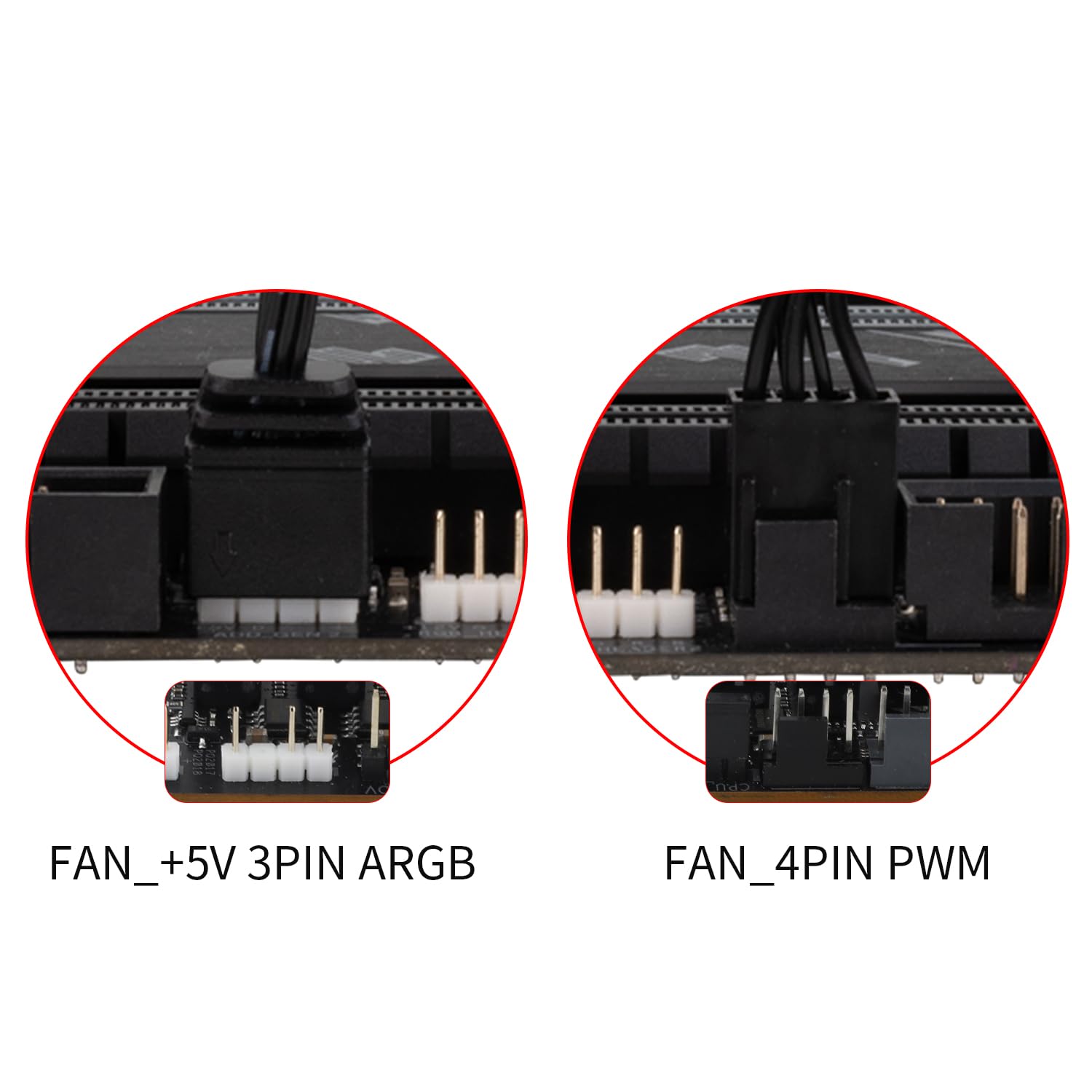
Image 5.1: Illustration of the FAN_+5V 3PIN ARGB and FAN_4PIN PWM connectors for motherboard connection.
5.2. ARGB-Beleuchtungsanschluss
- Identify the 3-pin 5V addressable RGB (ARGB) connector on your fan.
- Connect this ARGB connector to a compatible +5V ARGB header on your motherboard (do not connect to a 12V RGB header).
- To synchronize ARGB lighting effects across multiple fans, use the provided ARGB sharing connector. Connect additional fan ARGB cables to the sharing connector, then connect the sharing connector to the motherboard ARGB header.
5.3. Luftstromrichtung
Proper airflow is crucial for effective cooling. For normal airflow design fans, the blade side typically intakes air, and the frame side exhausts air. Install the fan according to your case's desired airflow direction.

Image 5.2: The fan's blade side acts as the intake, and the frame side acts as the exhaust. A diagram of the PWM fan speed sync connector is also shown.
5.4. Physische Installation
- Position the fan in the desired mounting location within your PC case, air cooler, or water cooling radiator.
- Align the fan's screw holes with the mounting points.
- Use the included self-tapping screws to secure the fan. Tighten screws firmly but do not overtighten.

Abbildung 5.3: Beispielample of the fan installed as a case fan, demonstrating proper mounting.

Image 5.4: The fan can be used for case airflow, air coolers, and water cooling radiators.
5.5. Installation Video Tutorial
For a visual guide on fan installation and connection interfaces, please refer to the official tutorial video below:
Video 5.1: Official tutorial demonstrating the installation and connection of Thermalright case fans, including PWM and ARGB setup.
6. Bedienungsanleitung
Once installed and connected, the Thermalright TL-H12-X28-S fan operates automatically based on your motherboard's fan control settings.
- Lüfterdrehzahlregelung (PWM): The 4-pin PWM connector allows your motherboard to dynamically adjust the fan speed based on CPU temperature or other system parameters. You can typically configure fan curves in your motherboard's BIOS/UEFI settings or through manufacturer-provided software.
- ARGB-Beleuchtungssteuerung: The 5V 3PIN ARGB lighting can be controlled via your motherboard's ARGB software (e.g., ASUS Aura Sync, MSI Mystic Light Sync, Gigabyte RGB Fusion, ASRock Polychrome Sync) or a dedicated ARGB controller (not included). Ensure your motherboard's ARGB header is enabled and configured correctly in its software.
7. Wartung
Regelmäßige Wartung gewährleistet optimale Leistung und Langlebigkeit Ihres Ventilators.
- Reinigung: Periodically clean the fan blades and frame to remove dust buildup. Use a soft brush or compressed air. Ensure the fan is powered off before cleaning.
- Inspektion: Prüfen Sie, ob es Hindernisse im Bereich der Lüfterflügel gibt oder ob während des Betriebs ungewöhnliche Geräusche auftreten.
- Lager: The S-FDB V2 bearing is designed for long-lasting, maintenance-free operation. Do not attempt to disassemble the fan for lubrication.
8. Fehlerbehebung
Sollten Sie Probleme mit Ihrem Lüfter haben, beachten Sie bitte die folgenden gängigen Schritte zur Fehlerbehebung:
| Problem | Mögliche Ursache/Lösung |
|---|---|
| Lüfter dreht sich nicht |
|
| ARGB-Beleuchtung funktioniert nicht |
|
| Der Lüfter ist zu laut |
|
| Schlechte Kühlleistung |
|
9. Garantie und Support
Thermalright products are manufactured to high-quality standards. For warranty information, technical support, or service inquiries, please contact Thermalright customer support directly or visit their official webBewahren Sie Ihren Kaufbeleg für Garantieansprüche auf.
Manufacturer: Thermalright
Model Number: TL-H12-X28-S


