1. Einleitung
This manual provides essential information for the safe and efficient operation of your TOPTRO Quadra Projector. Please read this manual thoroughly before using the projector and retain it for future reference. The TOPTRO Quadra Projector is designed to deliver a high-quality visual and audio experience with its advanced features and smart capabilities.
2. Sicherheitshinweise
- Die Lüftungsöffnungen dürfen nicht blockiert werden. Sorgen Sie für ausreichende Luftzirkulation um den Projektor herum, um eine Überhitzung zu vermeiden.
- Setzen Sie den Projektor weder Regen noch Feuchtigkeit aus, um Stromschläge oder Brände zu vermeiden.
- Verwenden Sie ausschließlich das mit dem Projektor gelieferte Netzteil.
- Vermeiden Sie, direkt in die Projektorlinse zu blicken, wenn das lamp ist eingeschaltet, da das helle Licht Augenschäden verursachen kann.
- Stellen Sie den Projektor auf eine stabile, ebene Fläche, um zu verhindern, dass er herunterfällt.
- Versuchen Sie nicht, den Projektor selbst zu zerlegen oder zu reparieren. Überlassen Sie alle Wartungsarbeiten qualifiziertem Fachpersonal.
3. Packungsinhalt
Überprüfen Sie, ob alle Artikel im Paket vorhanden sind:
- 1 x TOPTRO Quadra Projector
- 1 x HDMI-Kabel
- 1 x Benutzerhandbuch
- 1 x Fernbedienung
4. Produktüberschreitungview
Familiarize yourself with the main components and interfaces of your TOPTRO Quadra Projector.
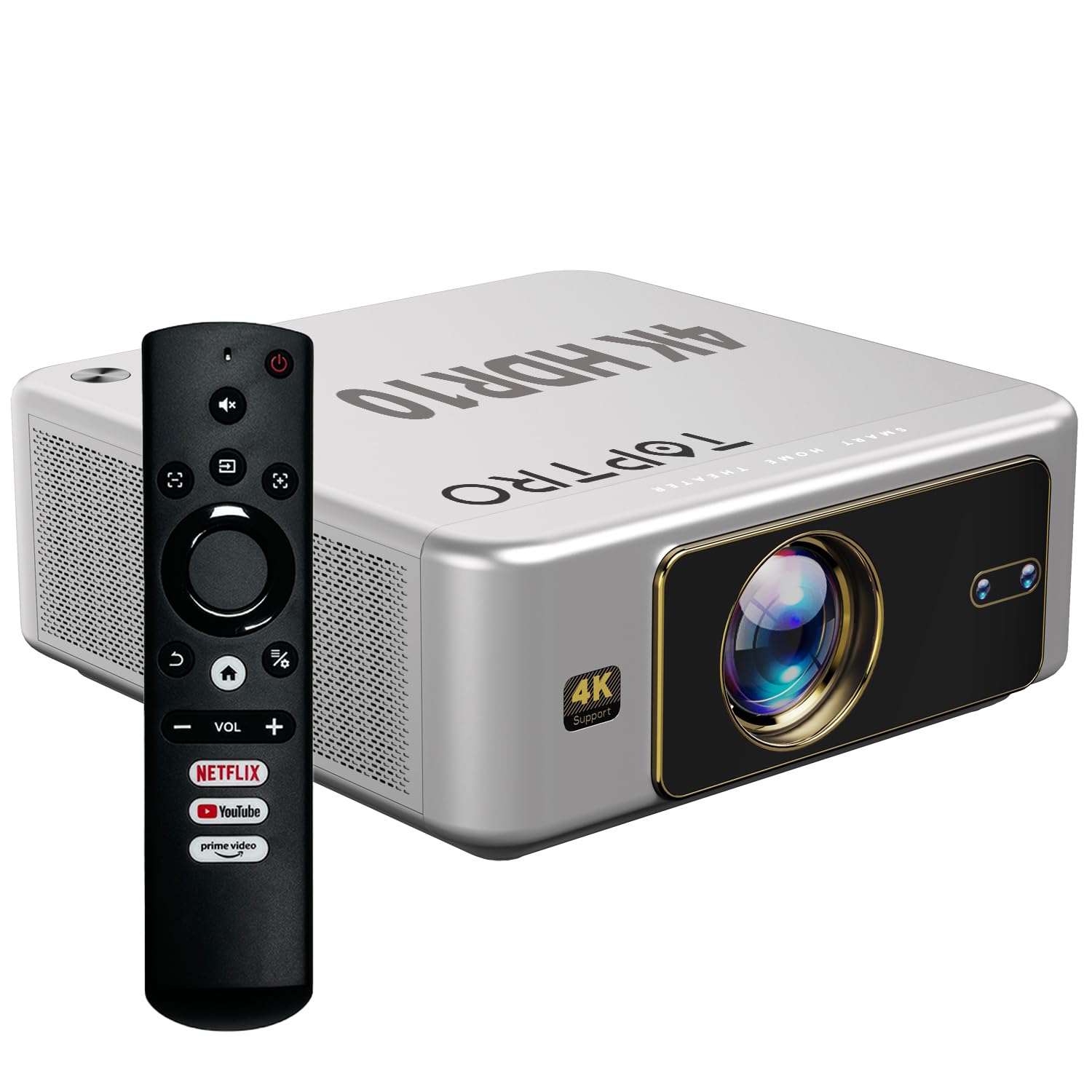
Abbildung 4.1: Vorderseite view of the TOPTRO Quadra Projector with included remote control.

Figure 4.2: Rear panel of the projector displaying the power input, audio jack, HDMI ports, and USB ports.
5. Einrichtung
5.1 Platzierung und Projektionsgröße
Position the projector on a stable surface. The TOPTRO Quadra Projector supports a maximum screen size of 300 inches. Adjust the distance from the wall or screen to achieve your desired image size.

Abbildung 5.1: Empfohlene Projektionsabstände für verschiedene Bildschirmgrößen.
5.2 Stromanschluss
- Schließen Sie das Netzkabel an den Stromeingang des Projektors an.
- Stecken Sie das andere Ende des Stromkabels in eine geeignete Steckdose.
5.3 Erstes Einschalten und Grundeinstellungen
- Drücken Sie die Einschalttaste am Projektor oder auf der Fernbedienung, um ihn einzuschalten.
- Upon first use, the projector may guide you through initial setup steps, including language selection and network connection.
5.4 Fokus- und Trapezkorrektur
The TOPTRO Quadra Projector features AI-powered automatic focus and keystone correction. This system automatically adjusts the image for optimal clarity and shape.
- Autofokus: The projector will automatically adjust the image sharpness.
- Automatische Trapezverzerrung: The projector will automatically correct trapezoidal distortion to ensure a rectangular image.
- Auto Obstacle Avoidance & Screen Fit: The projector can detect obstacles and adjust the image to fit the screen area.
If automatic adjustments are not satisfactory, manual adjustments can be made through the settings menu. Navigate to the 'Display & Sound' settings to access these options.

Figure 5.2: Automatic image correction features.
6. Bedienung
6.1 Benutzeroberfläche und Navigation
The TOPTRO Quadra Projector runs on a Net-Flix Certified Linux OS, providing a user-friendly interface. Use the remote control to navigate through menus and select applications.

Figure 6.1: Home screen with pre-installed streaming applications.
6.2 Konnektivität
The projector offers various connectivity options for external devices.
- HDMI: Connect your laptop, MacBook, Blu-ray player, TV sticks, TV boxes, or gaming consoles (e.g., PS4) using the dual HDMI ports. The projector supports HDMI CEC and HDMI EARC for enhanced audio return channel functionality.
- USB: Two USB ports are available for connecting pendrives or hard disks to play media files direkt.
- 3.5-mm-Audioausgang: Connect external headphones or speakers for a personalized audio experience.
- W-lan: Utilize the 6th Gen Dual Band Wi-Fi (2.4 GHz + 5 GHz) for internet access and streaming.
- Bluetooth 5.2: Connect Bluetooth speakers, headphones, or other compatible audio devices. The projector also supports two-way Bluetooth, allowing it to function as a Bluetooth speaker.
- Miracast: Wirelessly mirror your screen from compatible devices.

Abbildung 6.2: Anschlussmöglichkeiten für externe Geräte.
6.3 Anzeigeeinstellungen
Adjust image quality and display features through the 'Display & Sound' menu.
- Bildmodus: Select from various preset picture modes (e.g., Vivid) or customize settings like brightness, contrast, and color.
- 4K HDR10+ Support: The projector plays true 4K resolution HDR10+ videos, offering enhanced contrast and color depth.
- MEMC (Bewegungsschätzung, Bewegungskompensation): This technology improves video smoothness and clarity, especially for fast-moving scenes, by interpolating frames.

Figure 6.3: MEMC technology for smoother visuals.
6.4 Audioeinstellungen
Manage audio output and formats via the 'Display & Sound' menu.
- Dolby Atmos & Dolby Digital Plus: The projector supports these advanced audio technologies for immersive sound.
- eARC-Modus: Enable eARC for high-quality audio return from compatible devices.
- Ausgabeformat: Select the appropriate audio output format (e.g., Auto, PCM, Passthrough, Dolby Digital, Dolby Digital Plus) based on your connected audio system.

Figure 6.4: Immersive audio with Dolby Atmos support.
7. Wartung
Durch die richtige Wartung wird die Langlebigkeit und optimale Leistung Ihres Projektors gewährleistet.
- Linsenreinigung: Reinigen Sie die Projektorlinse vorsichtig mit einem weichen, fusselfreien Tuch, das speziell für optische Oberflächen geeignet ist. Vermeiden Sie scheuernde Materialien oder aggressive Chemikalien.
- Außenreinigung: Verwenden Sie ein weiches, trockenes Tuch, um die Außenseite des Projektors zu reinigen.
- Staubschutz: The TOPTRO Quadra Projector features a fully sealed optical engine, which helps prevent dust, dirt, and moisture from entering the light path. This design reduces the need for frequent internal cleaning and maintains consistent image quality.
8. Fehlerbehebung
Sollten Sie Probleme mit Ihrem Projektor haben, beachten Sie bitte die folgenden häufig auftretenden Probleme und Lösungen:
| Problem | Mögliche Ursache | Lösung |
|---|---|---|
| Kein Bild angezeigt | Incorrect input source selected; loose HDMI/USB connection; power issue. | Verify input source in settings; check cable connections; ensure projector is powered on. |
| Kein Ton | Volume too low or muted; incorrect audio output setting; external audio device not connected properly. | Adjust volume; check 'Sound output' settings; ensure external speakers are connected and powered. |
| Das Bild ist unscharf oder verzerrt. | Focus or keystone correction issues; projector not placed correctly. | Allow auto-focus/keystone to complete. If issues persist, manually adjust focus and keystone in 'Display & Sound' settings. Ensure the projector is perpendicular to the screen. |
| Fernbedienung funktioniert nicht | Batteries are low or depleted; remote not pointed at IR receiver; obstruction. | Batterien austauschen; freie Sichtlinie zum Infrarotempfänger des Projektors sicherstellen. |
| Das Lüftergeräusch ist deutlich wahrnehmbar. | Normal operation; projector is working hard; ventilation blocked. | Ensure adequate ventilation around the projector. Fan noise is a normal part of projector operation, especially during high-performance tasks. |
9. Spezifikationen
Key technical specifications of the TOPTRO Quadra Projector:
| Besonderheit | Detail |
|---|---|
| Marke | TOPTRO |
| Modellname | TOPTRO Quadra Projector 4K HDR10+ Dolby |
| Technische Daten | 24 x 20 x 10 cm |
| Artikelgewicht | 2 kg |
| Hardware-Schnittstelle | 3.5mm Audio, Bluetooth 5.2, Dual HDMI (CEC, EARC), Dual USB |
| Kompatible Geräte | Gaming Console, Laptop, Smartphone, Speaker, Television |
| Besondere Merkmale | Dolby Atmos - Dolby Digital Plus, 4K HDR 10+/HLG, Net-Flix Certified Linux OS, 2GB RAM, 32GB ROM, Auto Focus & Keystone, Native 1080p Full HD & True 4K Support, 32000 Lumens Brightness (2600 ANSI), 15W Big Speakers, HDMI ARC, Dual HDMI, Built-in Apps, Dual 5G & 2.4G WiFi 6, Bluetooth, WiFi Display, Electronic Focus & 6D Electronic correction, Fully Sealed Optical Engine, MEMC |
| Display-Technologie | LCD |
| Bildhelligkeit | 32000 Lumen (2600 ANSI) |
| Bildkontrastverhältnis | 22000:1 |
| Seitenverhältnis | 16:9 |
| Native Screen Resolution | 1920 x 1080 (Full HD) |
| Unterstützte Auflösung | Bis zu 3840 x 2160 Pixel (4K) |
| Bildwiederholrate | 60 Hz |
| Lamp Leben | 50000 Stunden |
| Formfaktor | Tragbar |
| Montagetyp | Deckenmontage |
| Ursprungsland | China |
10. Garantie und Support
For warranty information, technical support, or service inquiries, please contact TOPTRO Projectors India using the details below:
- E-Mail: support@toptro.in or sreeprojectors@gmail.com
- Whatsapp: 8341888860
- WebWebsite: toptro.in
Please have your product model number (Quadra 4K HDR10+ Dolby) and purchase details ready when contacting support.


