Einführung
Thank you for choosing the Bigben Karaoke Microphone. This all-in-one portable karaoke system combines a stereo microphone with a powerful 15W Bluetooth speaker and dynamic light effects, designed to enhance your singing and music listening experience. This manual provides essential information for safe and optimal use of your device.
Sicherheitshinweise
- Lesen Sie alle Anweisungen, bevor Sie das Gerät verwenden.
- Halten Sie das Gerät von Wasser und Feuchtigkeit fern.
- Setzen Sie es keinen extremen Temperaturen oder direkter Sonneneinstrahlung aus.
- Versuchen Sie nicht, das Gerät selbst zu zerlegen oder zu reparieren. Wenden Sie sich an qualifiziertes Servicepersonal.
- Verwenden Sie ausschließlich das dafür vorgesehene Ladezubehör.
- Außerhalb der Reichweite von Kindern aufbewahren.
Packungsinhalt
Bitte überprüfen Sie, ob alle Artikel im Paket vorhanden sind:
- Bigben Karaoke Microphone (Model PARTYBTMIC2WH)
- Ladekabel (USB)
- Benutzerhandbuch (dieses Dokument)
- Front Glass (as an included component, likely pre-installed or a protective cover)

Bild 1: The Bigben Karaoke Microphone shown in its retail packaging. The packaging highlights features such as Bluetooth connectivity, 4 vocal effects, and wireless speaker functionality.
Produkt überview
The Bigben Karaoke Microphone features an integrated speaker and various controls for an interactive experience.
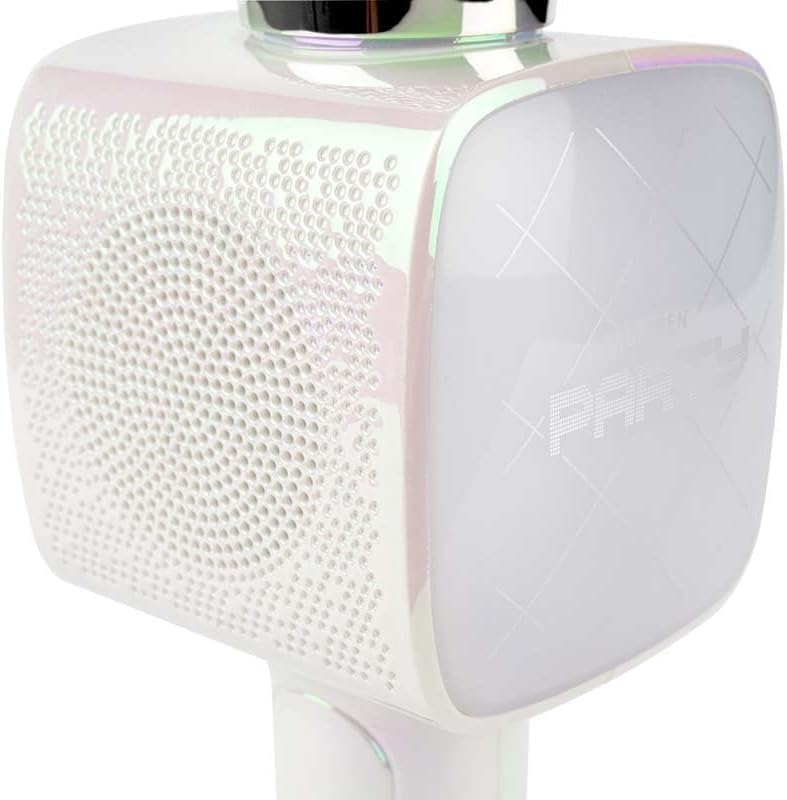
Bild 2: Eine Nahaufnahme view of the Bigben Karaoke Microphone, focusing on the speaker grille and the light-up panel. The panel displays "PARTY" and shows dynamic light effects.
Hauptmerkmale:
- Bluetooth 5.0: For stable wireless connection to your devices.
- Integrierter Lautsprecher: 15W output for clear and powerful sound.
- Lichteffekte: Dynamic lighting to enhance the karaoke experience.
- Soundeffekte: 4 different vocal effects and an echo effect.
- Mehrere Eingänge: USB, Micro SD, and 3.5mm headphone jack.
Aufstellen
1. Aufladen des Mikrofons
- Connect the provided USB charging cable to the microphone's charging port.
- Verbinden Sie das andere Ende des USB-Kabels mit einem kompatiblen USB-Netzteil (nicht im Lieferumfang enthalten) oder einem USB-Anschluss Ihres Computers.
- Die Ladeanzeige leuchtet auf. Sobald der Akku vollständig geladen ist, kann die Farbe der Anzeige wechseln oder sie erlöschen.
2. Ein-/Ausschalten
- To power on, press and hold the Power button for a few seconds until the indicator light illuminates and you hear an audible prompt.
- Zum Ausschalten die Ein-/Aus-Taste erneut gedrückt halten, bis die Kontrollleuchte erlischt.
3. Bluetooth-Kopplung
- Ensure the microphone is powered on and in Bluetooth pairing mode (usually indicated by a flashing light).
- Gehen Sie auf Ihrem Smartphone, Tablet oder einem anderen Bluetooth-fähigen Gerät zu den Bluetooth-Einstellungen.
- Suchen nach available devices and select "Bigben Karaoke Mic" (or similar name) from the list.
- Once paired, you will hear a confirmation sound, and the indicator light will stop flashing.
Bedienungsanleitung
1. Musik abspielen
- Über Bluetooth: After successful pairing, play music from your connected device. The sound will output through the microphone's speaker.
- Via USB/Micro SD: Insert a USB drive or Micro SD card (with music files) into the respective port. The microphone will automatically detect and play music.
- Über ein 3.5-mm-Audiokabel: Connect an external audio source using a 3.5mm audio cable (not included) to the headphone input.
2. Verwendung des Mikrofons
- Speak or sing directly into the microphone grille.
- Adjust the microphone volume using the dedicated controls on the device.
3. Soundeffekte
- Gesangseffekte: The microphone offers 4 different vocal effects. Press the "Effect" button (or similar labeled button) to cycle through these effects.
- Echo-Effekt: Activate or adjust the echo effect using its dedicated control.
4. Lichteffekte
The microphone features dynamic light effects. These lights typically activate automatically when the device is on and can often be toggled or changed using a dedicated light button, if available.
Wartung
- Reinigung: Reinigen Sie das Mikrofon mit einem weichen, trockenen Tuch. Verwenden Sie keine Scheuermittel oder Lösungsmittel.
- Lagerung: Bewahren Sie das Gerät bei Nichtgebrauch an einem kühlen, trockenen Ort ohne direkte Sonneneinstrahlung auf.
- Batteriepflege: For optimal battery life, charge the device regularly, even if not used frequently.
Fehlerbehebung
| Problem | Mögliche Ursache | Lösung |
|---|---|---|
| Kein Strom | Batterie ist leer. | Laden Sie das Mikrofon vollständig auf. |
| Kein Ton vom Lautsprecher | Die Lautstärke ist zu niedrig; Gerät nicht angeschlossen; falscher Eingangsmodus. | Increase volume; ensure Bluetooth is paired or cable is connected; check USB/Micro SD insertion. |
| Mikrofon funktioniert nicht | Microphone volume is too low; microphone function is off. | Increase microphone volume; ensure microphone is active. |
| Bluetooth-Verbindung instabil | Device is too far from the microphone; interference. | Move devices closer; avoid obstacles; disconnect and re-pair. |
Technische Daten
| Besonderheit | Detail |
|---|---|
| Marke | Bigben |
| Modellnummer | PARTYBTMIC2WH |
| Konnektivität | Bluetooth 5.0, USB, Micro SD, 3.5mm Headphone Jack |
| Lautsprecherausgang | 15 W |
| Soundeffekte | 4 Vocal Effects, Echo Effect |
| Produktabmessungen (L x B x H) | 20 x 15 x 10 cm |
| Artikelgewicht | 300 Gramm |
| Farbe | Weiß |
| Anzahl der Kanäle | 2 |
| Batterien erforderlich | Yes (type unknown, likely integrated rechargeable) |
Garantie und Support
For warranty information and customer support, please refer to the documentation provided with your purchase or visit the official Bigben webBewahren Sie Ihren Kaufbeleg für Garantieansprüche auf.
For technical assistance or further inquiries, please contact Bigben customer service through their official channels.


