1. Einleitung
Thank you for choosing the ProtoArc XKM01 Foldable Wireless Keyboard and Mouse Combo. This manual provides detailed instructions for setting up, operating, and maintaining your device. Please read this manual thoroughly before use to ensure optimal performance and longevity of your product.
2. Packungsinhalt
The ProtoArc XKM01 combo includes the following items:
- ProtoArc XKM01 Foldable Wireless Keyboard
- ProtoArc Kabellose Maus
- Hartschalenkoffer
- Foldable Stand (for 4-11” devices)
- USB-C-Ladekabel
- USB-Empfänger (im Mausgehäuse untergebracht)
- Bedienungsanleitung

Figure 1: ProtoArc XKM01 Package Contents

Figure 2: Quality Portable Hard Case for ProtoArc XKM01
3. Produktüberschreitungview
3.1 Tastaturfunktionen
- Layout in voller Größe: 105-key design with dedicated function and number pads for comprehensive input.
- Faltbares Design: Ultraflacher Profifile with a simple fold-and-go mechanism, featuring internal aluminum hinges tested for over 10,000 folds.
- Leises Tippen: Equipped with whisper-quiet scissor switches and low-profile Tasten.
- Multimedia-Funktionstasten: Dedicated keys for various multimedia controls.

Figure 3: Keyboard Durable Hinges
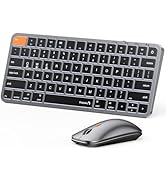
Figure 4: Keyboard Multimedia Function Keys
3.2 Mausfunktionen
- Ultraschlankes Design: Portable and compact for easy transport.
- Einstellbare DPI: 3 modes (1000/1600/2400) for precision control.
- Leises Klicken: 25dB micro-switches for silent operation.
- Konnektivität mehrerer Geräte: Supports 2.4G wireless, Bluetooth 1, and Bluetooth 2 connections.

Figure 5: Slim and Portable Mouse

Figure 6: Mouse Component Diagram
4. Einrichtung und Konnektivität
4.1 Keyboard Setup
- Klappen Sie die Tastatur aus: Gently unfold the keyboard until it lies flat.
- Einschalten: Locate the power switch (usually on the side or back) and slide it to the 'ON' position.
- Verbindungsmodus auswählen: The keyboard supports 2.4G wireless and two Bluetooth channels (BT1, BT2).
- 2.4-GHz-Funk: Insert the USB receiver (found in the mouse's battery compartment) into your device's USB port. The keyboard should connect automatically.
- Bluetooth Verbindung: Press and hold the 'Fn' key along with 'BT1' or 'BT2' key for 3 seconds until the indicator light flashes, indicating pairing mode. On your device, search for 'ProtoArc XKM01' in Bluetooth settings and connect.
- Schaltgeräte: To switch between connected devices, simply press 'Fn' + 'BT1', 'Fn' + 'BT2', or 'Fn' + '2.4G' (if applicable).
4.2 Mouse Setup
- Einschalten: Schieben Sie den Netzschalter an der Unterseite der Maus in die Position „EIN“.
- Verbindungsmodus auswählen: The mouse supports 2.4G wireless and two Bluetooth channels (BT1, BT2).
- 2.4-GHz-Funk: Ensure the USB receiver is plugged into your device. The mouse will connect automatically.
- Bluetooth Verbindung: Press the mode switch button on the bottom of the mouse to cycle between BT1 and BT2. Hold the desired BT button for 3 seconds until the indicator light flashes. On your device, search for 'ProtoArc Mouse' in Bluetooth settings and connect.
- Schaltgeräte: Press the mode switch button on the bottom of the mouse to switch between connected devices.

Abbildung 7: Konnektivität mehrerer Geräte überview
5. Bedienungsanleitung
5.1 Tastaturnutzung
- Funktionstasten: The top row of keys (F1-F12) can be used as standard function keys or multimedia keys. Press Fn + Esc to toggle between these modes.
- Betriebssystemkompatibilität: The keyboard is compatible with Windows, macOS, Chrome OS, iPadOS, and Android. Specific key functions may vary slightly depending on the operating system.
5.2 Mausnutzung
- DPI-Anpassung: Press the DPI switch button (usually near the scroll wheel) to cycle through 1000, 1600, and 2400 DPI settings.
- Leiser Betrieb: The mouse is designed for quiet clicking, suitable for various work environments.

Figure 8: Quiet Operation of Keyboard and Mouse
6. Aufladen
Both the keyboard and mouse are rechargeable via USB-C.
- Ladeanschluss: Verbinden Sie das mitgelieferte USB-C-Kabel mit dem Ladeanschluss des Geräts und mit einer USB-Stromquelle.
- Ladeanzeige: The indicator light will show charging status. It typically takes 2-3 hours for a full charge.
- Akkulaufzeit: A full charge provides approximately 150-200 days of standby time.

Figure 9: Type-C Charging for Keyboard and Mouse
7. Wartung
- Reinigung: Reinigen Sie die Oberflächen von Tastatur und Maus mit einem weichen, trockenen Tuch. Bei hartnäckigem Schmutz kann ein leicht feuchtes Tuch hilfreich sein.amp Man kann ein Tuch verwenden, um sicherzustellen, dass keine Feuchtigkeit in das Gerät eindringt.
- Lagerung: When not in use, fold the keyboard and store it along with the mouse in the provided hard case to protect it from dust and damage.
- Vermeiden Sie extreme Bedingungen: Setzen Sie die Geräte keinen extremen Temperaturen, direkter Sonneneinstrahlung oder hoher Luftfeuchtigkeit aus.
8. Fehlerbehebung
8.1 Verbindungsprobleme
- Gerät verbindet sich nicht: Ensure both the keyboard and mouse are powered on and in the correct pairing mode (2.4G or Bluetooth). Check your device's Bluetooth settings to confirm it's discoverable and try re-pairing.
- Intermittierende Verbindung: Ensure there are no obstructions between the devices and your computer. Move closer to your computer. Check battery levels.
8.2 Typing/Clicking Issues
- Tasten reagieren nicht: Check battery level. Ensure the keyboard is properly connected. Try restarting the keyboard and your device.
- Mouse Cursor Erratic: Clean the mouse sensor. Ensure the mouse is on a suitable surface. Adjust DPI settings if the cursor is too fast or slow.
9. Spezifikationen
| Modellnummer | XKM01 |
| Konnektivitätstechnologie | Bluetooth, 2.4-GHz-USB |
| Kompatible Geräte | Laptop, PC, Smartphone, Tablet |
| Besondere Merkmale | Lightweight, Portable, Rechargeable, Tri-Fold |
| Artikelgewicht | 1.96 Pfund (ca. 0.89 kg) |
| Verpackungsabmessungen | 12.99 x 6.42 x 2.13 Zoll (ca. 33 x 16.3 x 5.4 cm) |

Abbildung 10: Produktabmessungen
10. Garantie und Support
ProtoArc products come with a standard manufacturer's warranty. For detailed warranty information, product support, or technical assistance, please visit the official ProtoArc website or contact customer service using the information provided in the product packaging.
Rückgaberecht: This product is eligible for a refund/replacement within 30 days of purchase, as per Amazon's return policy.
11. Produktüberschreitungview Video
Video 1: ProtoArc XKM01 Foldable Keyboard and Mouse Combo Overview. This video demonstrates the product's features, including its foldable design, multi-device connectivity, and portability.