1. Wichtige Sicherheitshinweise
Please read all instructions carefully before using the Defy DBF300 Bladeless Fan. Retain this manual for future reference.
- Stellen Sie stets sicher, dass der Ventilator auf einer stabilen, ebenen Fläche steht, um ein Umkippen zu verhindern.
- Betreiben Sie den Ventilator nicht mit einem beschädigten Kabel oder Stecker. Ist das Kabel beschädigt, muss es vom Hersteller, dessen Kundendienst oder einer ähnlich qualifizierten Person ausgetauscht werden, um Gefahren zu vermeiden.
- Keep hands, fingers, hair, and loose clothing away from the fan's air inlet and outlet openings.
- Do not immerse the fan, cord, or plug in water or other liquids.
- Ziehen Sie den Netzstecker des Ventilators, wenn er nicht benutzt wird, bevor Sie ihn reinigen oder bevor Sie ihn bewegen.
- Dieses Gerät ist nicht für den Gebrauch durch Personen (einschließlich Kinder) mit eingeschränkten physischen, sensorischen oder geistigen Fähigkeiten oder Mangel an Erfahrung und Wissen bestimmt, es sei denn, sie werden von einer für ihre Sicherheit verantwortlichen Person beaufsichtigt oder erhalten Anweisungen zur Verwendung des Geräts.
- Kinder sollten beaufsichtigt werden, um sicherzustellen, dass sie nicht mit dem Gerät spielen.
- Do not use the fan outdoors or in wet conditions.
- Do not block air openings or operate near curtains or other objects that could block airflow.
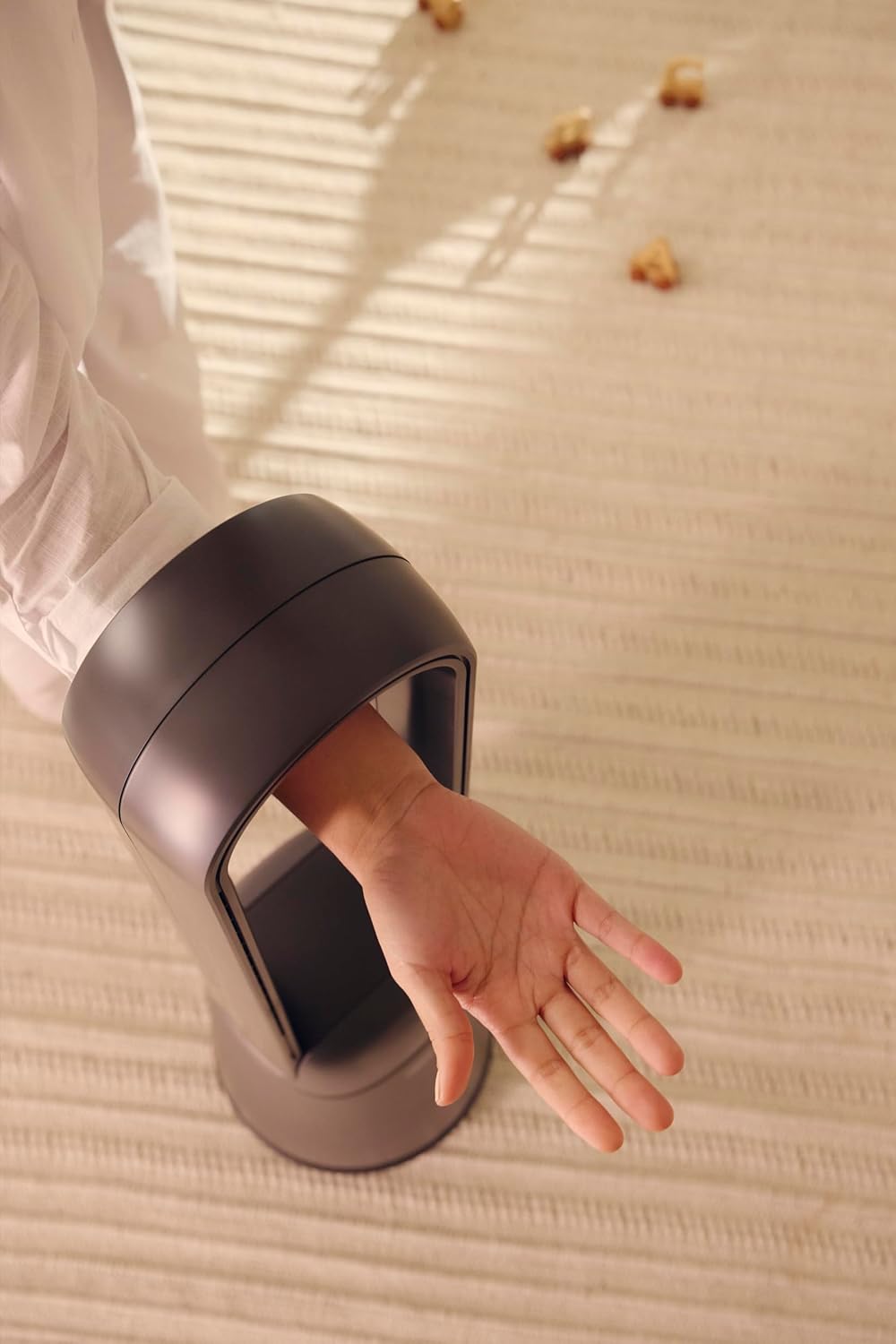
Figure 1: The bladeless design ensures safety, allowing a hand to pass through the air loop without obstruction.
2. Produktüberschreitungview
The Defy DBF300 is a bladeless fan designed for efficient and quiet air circulation. It features multiple speed settings, various wind modes, and convenient remote control operation.

Abbildung 2: Vorderseite view of the Defy DBF300 Bladeless Fan.
Hauptmerkmale:
- Bladeless design for enhanced safety and easy cleaning.
- Up to 20 wind speed settings for precise airflow control.
- Multiple wind modes: Strong, Natural, Sleep, and Smart adaptive wind.
- Oscillation function with 4 modes for wide area coverage.
- Wireless remote control for convenient operation.
- Integrated touch-sensitive control panel on the unit.
- Timer function for automatic shut-off, adjustable up to 8 hours.
- Flüsterleiser Betrieb.
3. Einrichtung
3.1 Auspacken
- Nehmen Sie den Ventilator vorsichtig aus der Verpackung.
- Prüfen Sie das Gerät auf Transportschäden. Im Schadensfall nicht in Betrieb nehmen und den Kundendienst kontaktieren.
- Ensure all components are present: the main fan unit and the remote control.
3.2 Platzierung
- Stellen Sie den Ventilator auf eine feste, ebene und stabile Oberfläche.
- Ensure there is adequate space around the fan for optimal airflow, avoiding obstructions like walls, furniture, or curtains.
- Do not place the fan in direct sunlight or near heat sources.
- Keep the fan away from areas where it might be exposed to water or high humidity.
3.3 Stromanschluss
- Before plugging in, ensure the power supply voltage entspricht dem Bewertungsetikett auf dem Ventilator.
- Insert the power plug firmly into a suitable electrical outlet.
4. Bedienungsanleitung
The Defy DBF300 Bladeless Fan can be operated using the touch control panel on the unit or the provided remote control.
4.1 Bedienfeld vorbeiview

Figure 3: The fan's touch control panel and digital display.
- Ein-/Ausschalter (①): Turns the fan On or Off.
- Speed Adjustment (②): Increases or decreases wind speed.
- Mode Selection (③): Cycles through Strong, Natural, Sleep, and Smart adaptive wind modes.
- Oscillation (④): Activates or deactivates the oscillation function.
- Timer (⑤): Sets the auto shut-off timer.
- Digitalanzeige: Shows current speed, mode, or timer setting.
4.2-Fernbedienung

Figure 4: The remote control for the Defy DBF300 Bladeless Fan.
The remote control duplicates all functions available on the fan's control panel. Ensure the remote has working batteries (typically 2x AAA, not included) and is pointed towards the fan's receiver for optimal operation.
- Netzschalter: Turns the fan On or Off.
- Geschwindigkeitstasten +/-: Adjusts the wind speed (1-20).
- Modustaste: Cycles through Strong, Natural, Sleep, and Smart modes.
- Oszillationstaste: Toggles oscillation On/Off.
- Timer-Taste: Sets the auto shut-off timer (1-8 hours).
4.3 Allgemeine Bedienung
- Ein-/Ausschalten: Press the Power button on the control panel or remote. The digital display will illuminate.
- Anpassen der Windgeschwindigkeit: Use the Speed adjustment buttons on the control panel or the +/- buttons on the remote. The display will show the current speed level (1-20).
- Selecting Wind Mode: Press the Mode button to cycle through the available modes:
- Starker Modus: Provides a consistent, powerful airflow.
- Natürlicher Modus: Simulates natural breezes by varying wind speed.
- Schlafmodus: Operates at a lower, quieter speed, gradually decreasing über einen längeren Zeitraum für einen erholsamen Schlaf.
- Smart Adaptive Wind: Adjusts airflow based on ambient conditions (if sensor equipped, otherwise maintains a gentle flow).
- Aktivierung der Schwingung: Press the Oscillation button. The fan will begin to rotate horizontally. Press again to stop oscillation. There are 4 oscillation modes, which can be cycled through by repeatedly pressing the oscillation button.
- Einstellen des Timers: Press the Timer button. Each press will increase the timer setting by 1 hour, up to a maximum of 8 hours. The fan will automatically turn off after the set time. To cancel the timer, cycle through until '00' or 'OFF' is displayed, or turn the fan off.
5. Wartung
Regular cleaning and proper storage will ensure the longevity and optimal performance of your Defy DBF300 Bladeless Fan.
5.1 Reinigung
- Den Ventilator immer vom Stromnetz trennen. Vor der Reinigung vom Stromnetz trennen.
- Wischen Sie die Außenflächen des Ventilators mit einem weichen, fusselfreien Tuch ab.amp Tuch. Keine Scheuer- oder Lösungsmittel verwenden.
- For the air inlet and outlet, use a soft brush or a vacuum cleaner with a brush attachment to remove dust and debris. The bladeless design makes these areas easily accessible for cleaning.
- Ensure no water or liquid enters the internal components of the fan.
- Lassen Sie den Ventilator vollständig trocknen, bevor Sie ihn wieder anschließen und in Betrieb nehmen.
5.2 Speicherung
- If storing the fan for an extended period, clean it thoroughly as per the instructions above.
- Bewahren Sie den Ventilator in seiner Originalverpackung auf oder decken Sie ihn ab, um ihn vor Staub zu schützen.
- Keep the fan in a cool, dry place, away from direct sunlight and extreme temperatures.
6. Fehlerbehebung
Bevor Sie sich an den Kundendienst wenden, konsultieren Sie bitte die folgende Anleitung zur Fehlerbehebung für häufig auftretende Probleme.
| Problem | Mögliche Ursache | Lösung |
|---|---|---|
| Der Ventilator schaltet sich nicht ein. | Keine Stromversorgung. Netzkabel nicht richtig eingesteckt. | Stellen Sie sicher, dass der Ventilator an eine funktionierende Steckdose angeschlossen ist. Überprüfen Sie den Netzkabelanschluss. |
| Schwacher oder kein Luftstrom. | Lufteinlass/Luftauslass blockiert. Die Lüfterdrehzahl ist zu niedrig eingestellt. | Check for obstructions and clear them. Erhöhen Sie die Lüftergeschwindigkeit. |
| Fernbedienung funktioniert nicht. | Die Batterien sind leer oder falsch eingelegt. Hindernis zwischen Fernbedienung und Ventilator. | Batterien (2x AAA) austauschen. Auf die richtige Polarität achten. Remove any objects blocking the signal path. Point remote directly at the fan. |
| Der Ventilator macht ungewöhnliche Geräusche. | Der Ventilator steht nicht auf einer ebenen Fläche. Innere Verstopfung oder Beschädigung. | Stellen Sie den Ventilator auf eine stabile, ebene Fläche. Sollten die Geräusche weiterhin auftreten, stellen Sie die Nutzung ein und kontaktieren Sie den Kundendienst. |
7. Spezifikationen
| Modell | DBF300 |
| Marke | Trotzen |
| Farbe | Metallic Grau |
| Leistung / Wattage | 36 Watt |
| Produktabmessungen (T x B x H) | 28T x 25B x 97H Zentimeter |
| Artikelgewicht | 6.7 kg |
| Besonderheit | Bladeless, Oscillation, Remote Control, Timer |
| Stromquelle | Kabelgebundene Elektrik |
8. Garantie und Support
For detailed warranty information, please refer to the warranty card included with your product or visit the official Defy webBewahren Sie Ihren Kaufbeleg für eventuelle Garantieansprüche auf.
If you encounter any issues not covered in this manual or require further assistance, please contact Defy customer support. Contact details can typically be found on the Defy webWebsite oder Ihre Produktverpackung.
You can visit the Defy Store for more information: Defy Store on Amazon.


