1. Einleitung
This manual provides detailed instructions for setting up, operating, maintaining, and troubleshooting your AWOW AK10 Pro Mini PC. Please read this manual thoroughly before using the device to ensure proper functionality and to maximize your user experience.
2. Lieferumfang
Prüfen Sie nach dem Öffnen des Pakets, ob alle unten aufgeführten Artikel vorhanden und in gutem Zustand sind:
- AWOW AK10 Pro Mini PC
- Netzteil
- HDMI-Kabel
- Screws for internal drive installation
- Benutzerhandbuch (dieses Dokument)
3. Produktüberschreitungview
The AWOW AK10 Pro is a compact and efficient mini PC designed for various applications, including home, office, and educational use. It features an Intel N100 processor, 8GB RAM, and a 256GB PCIe 3.0 SSD, supporting 4K display output and multiple connectivity options.
3.1 Hauptmerkmale
- Prozessor: Intel N100 Quad-Core (bis zu 3.4 GHz)
- Erinnerung: 8GB DDR4 RAM (3200MHz)
- Lagerung: 256GB PCIe 3.0 SSD (expandable up to 4TB with M.2 SSD + 2.5" SATA drive)
- Grafik: Intel UHD Graphics with 4K@60Hz dual display support (HDMI 2.0, DisplayPort 1.4)
- Konnektivität: Dual-band 802.11ac WiFi (2.4GHz/5GHz), Bluetooth 5.2, Gigabit Ethernet
- Häfen: USB 3.2 x2, USB 2.0 x2, HDMI, DisplayPort, RJ45 Gigabit Ethernet, 2-in-1 Audio Jack, DC 12V Power Input, CMOS CLR button
3.2 Komponentenidentifikation
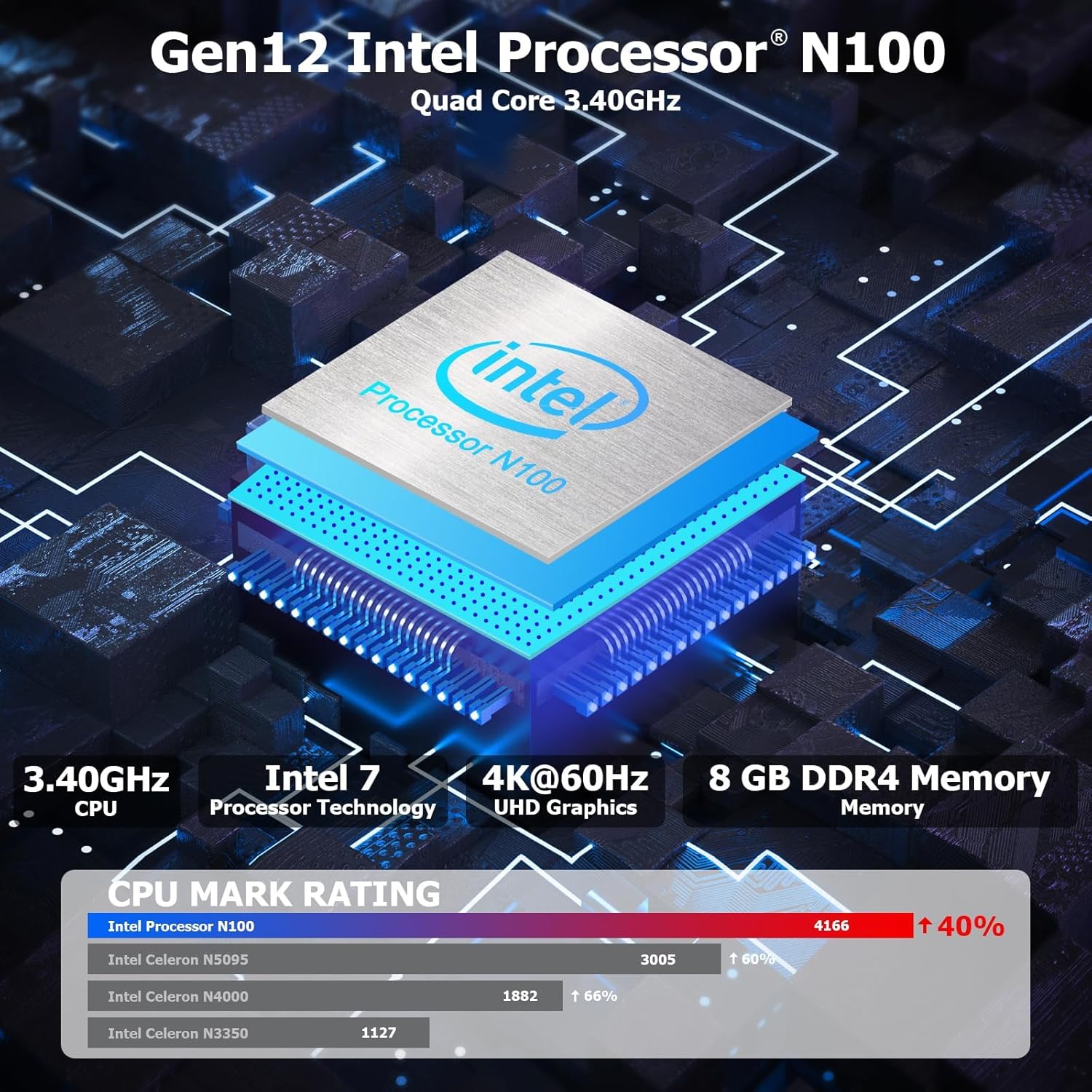
Abbildung 3.1: Intern view highlighting the Intel N100 processor, 4K@60Hz capability, and 8GB DDR4 memory, along with a CPU Mark Rating comparison.
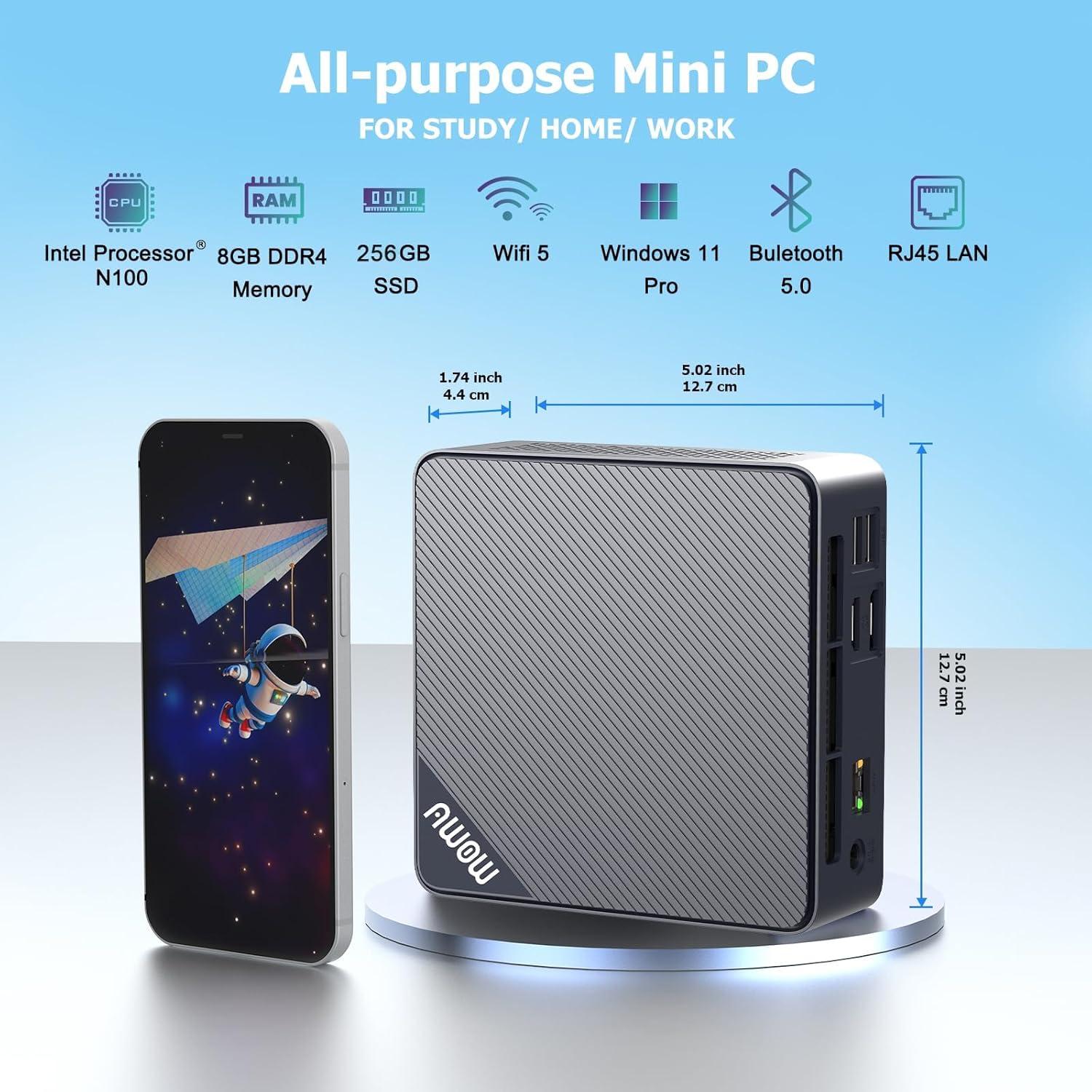
Abbildung 3.2: Vorne und seitlich view of the AWOW Mini PC, illustrating its compact dimensions (4.9 x 4.9 x 1.7 inches) and key features like Intel N100 CPU, 8GB DDR4, 256GB SSD, WiFi 5, and Bluetooth 5.0.

Abbildung 3.3: Detailed diagram of the AWOW Mini PC's ports, including USB 3.2 x2, 2-in-1 Audio, Power Button, CMOS CLR, DC 12V, RJ45, HDMI, DisplayPort, and USB 2.0 x2.
4. Einrichtungsanweisungen
Follow these steps to set up your AWOW AK10 Pro Mini PC:
- An die Stromversorgung anschließen: Insert the DC 12V power adapter into the power input port on the mini PC, then plug the adapter into a power outlet.
- Anschluss an das Display: Connect your monitor(s) to the mini PC using either the HDMI 2.0 port or the DisplayPort 1.4. For dual display setup, use both ports.
- Peripheriegeräte anschließen: Schließen Sie Ihre USB-Tastatur und -Maus an die verfügbaren USB 2.0- oder USB 3.2-Anschlüsse an.
- Netzwerkverbindung (optional): For a wired internet connection, connect an Ethernet cable from your router or modem to the RJ45 Gigabit Ethernet port. For wireless, ensure your WiFi network is available.
- Einschalten: Drücken Sie den Netzschalter an der Vorderseite des Mini-PCs. Die Betriebsanzeigeleuchte leuchtet auf.
- Ersteinrichtung: Follow the on-screen instructions to complete the operating system setup (e.g., Windows 11 initial configuration).
5. Bedienungsanleitung
5.1 Grundlegende Bedienung
- Ein-/Ausschalten: Press the power button to turn on the device. To shut down, use the operating system's shutdown function. A short press on the power button can also put the PC to sleep.
- Neustart: Nutzen Sie die Neustartfunktion des Betriebssystems.
- BIOS-Zugriff: To enter the BIOS settings, press the DEL key repeatedly during startup. To select a boot device, press F7 während der Inbetriebnahme.
5.2 Dual-Display-Setup
The AWOW AK10 Pro supports dual 4K@60Hz displays via its HDMI 2.0 and DisplayPort 1.4 outputs. After connecting both monitors, you can configure display settings within your operating system (e.g., Windows Display Settings) to extend or duplicate your desktop.

Abbildung 5.1: Example of a dual monitor setup, demonstrating extended desktop functionality for increased productivity.
5.3 Speichererweiterung
The mini PC's storage can be expanded. It supports an additional 2.5-inch SATA SSD/HDD (up to 2TB) and an M.2 SSD (up to 2TB). To install an additional drive:
- Stellen Sie sicher, dass der Mini-PC ausgeschaltet und von der Stromversorgung getrennt ist.
- Carefully open the chassis. Refer to the product's official support resources or contact AWOW service for detailed instructions on opening the case to avoid damage.
- Install the 2.5-inch SATA drive or M.2 SSD into the designated slot. Use the provided screws for secure installation.
- Close the chassis and reconnect power. The new drive may need to be initialized and formatted within the operating system's Disk Management utility before use.
6. Wartung
- Reinigung: Regularly clean the exterior of the mini PC with a soft, dry cloth. Use compressed air to clear dust from ventilation grilles to ensure proper airflow and prevent overheating. Do not use liquid cleaners directly on the device.
- Software-Updates: Halten Sie Ihr Betriebssystem und Ihre Treiber auf dem neuesten Stand, um optimale Leistung und Sicherheit zu gewährleisten.
- Speicherverwaltung: Überprüfen Sie regelmäßig Ihren Speicherplatz und entfernen Sie unnötige Speichermengen. files, um die Systemgeschwindigkeit aufrechtzuerhalten.
- Umgebungsbedingungen: Operate the mini PC in a well-ventilated area, away from direct sunlight, heat sources, and excessive moisture.
7. Fehlerbehebung
If you encounter issues with your AWOW AK10 Pro Mini PC, refer to the following common problems and solutions:
- Kein Strom / System startet nicht:
- Stellen Sie sicher, dass das Netzteil sowohl mit dem Mini-PC als auch mit einer funktionierenden Steckdose fest verbunden ist.
- Überprüfen Sie die Funktionsfähigkeit der Steckdose, indem Sie ein anderes Gerät anschließen.
- If the issue persists, try pressing the CMOS CLR button (if available and accessible) to reset BIOS settings.
- Keine Anzeige auf dem Monitor:
- Prüfen Sie, ob das HDMI- oder DisplayPort-Kabel sowohl mit dem Mini-PC als auch mit dem Monitor fest verbunden ist.
- Stellen Sie sicher, dass der Monitor eingeschaltet und auf die richtige Eingangsquelle (HDMI/DP) eingestellt ist.
- Testen Sie es nach Möglichkeit mit einem anderen Kabel oder Monitor.
- Noisy Fan:
- Ensure the mini PC is placed in a well-ventilated area and that the air vents are not obstructed.
- Entfernen Sie jegliche Staubablagerungen aus den Lüftungsschlitzen mit Druckluft.
- If the fan noise is excessive or constant, it may indicate a hardware issue. Contact AWOW support.
- External Drives Not Recognized:
- Ensure the external drive is properly connected and powered (if required).
- Check Disk Management in your operating system to see if the drive is detected but needs initialization or formatting.
- Try connecting the drive to a different USB port or another computer to rule out drive issues.
8. Spezifikationen
| Besonderheit | Detail |
|---|---|
| Modell | AK10 Pro |
| Prozessor | Intel N100 (Quad-Core, up to 3.4 GHz) |
| Grafik-Coprozessor | Intel UHD-Grafik |
| RAM | 8 GB LPDDR4 (3200MHz) |
| Lagerung | 256 GB PCIe 3.0 SSD |
| Erweiterbarer Speicher | Up to 2TB M.2 SSD + Up to 2TB 2.5" SATA Drive |
| Maximale Bildschirmauflösung | 4K (3840 x 2160) |
| Videoausgang | HDMI 2.0, DisplayPort 1.4 (Dual Display Support) |
| Kabellose Konnektivität | 802.11ac WiFi (2.4GHz/5GHz), Bluetooth 5.2 |
| Kabelgebundene Konnektivität | Gigabit-Ethernet (RJ45) |
| USB-Anschlüsse | 2x USB 3.2, 2x USB 2.0 |
| Audio-Anschlüsse | 2-in-1-Audiobuchse |
| Betriebssystem | Betriebssystem (in der Regel Windows 11 Pro vorinstalliert) |
| Abmessungen (LxBxH) | 4.9 x 4.9 x 1.7 Zoll (12.5 x 12.5 x 4.3 cm) |
| Artikelgewicht | 1.74 Pfund (0.79 kg) |
9. Garantie und Support
AWOW is committed to providing excellent customer service and technical support for your product.
- Kundendienst: AWOW bietet einen umfassenden Kundendienst.
- Technische Unterstützung: Rund um die Uhr steht Ihnen technischer Support durch erfahrene Computerexperten zur Verfügung, um Ihnen bei allen technischen Problemen zu helfen.
- Local Customer Service: Der lokale Kundenservice ist während der Geschäftszeiten (9:00 bis 5:00 Uhr EST) erreichbar.
- OEM-Anpassung: Vorverkaufsleistungen für OEM-Anpassungen sind ebenfalls verfügbar.
- Bei Fragen wenden Sie sich bitte an die Ihnen mit Ihrem Kauf mitgeteilten Kontaktinformationen oder besuchen Sie die offizielle AWOW-Website. webWebsite.


