1. Einleitung
This manual provides detailed instructions for the Bikevee Wireless Cycling GPS Computer, a device designed to track and display various cycling data. It features a 2.4-inch LCD display with auto backlight, IPX7 waterproofing, and multi-satellite GPS tracking for accurate data collection.
1.1 Hauptmerkmale
- Verlängerte Akkulaufzeit: Equipped with a 650mAh rechargeable battery, providing up to 28 hours of continuous use.
- Precision GPS Tracking: Utilizes 5-satellite systems (GPS, BDS, GLONASS, Galileo, QZSS) for stable and accurate signal reception.
- Langlebig und wasserdicht: IPX7 waterproof rating ensures resistance to rain and splashes.
- Klare Anzeige: 2.4-inch LCD screen with automatic backlight for visibility in various lighting conditions.
- Umfassende Daten: Tracks speed (MPH/KM/H), distance, time, temperature, altitude, gradient, and more.
1.2 Was ist in der Box?
Überprüfen Sie, ob alle Komponenten im Paket vorhanden sind:
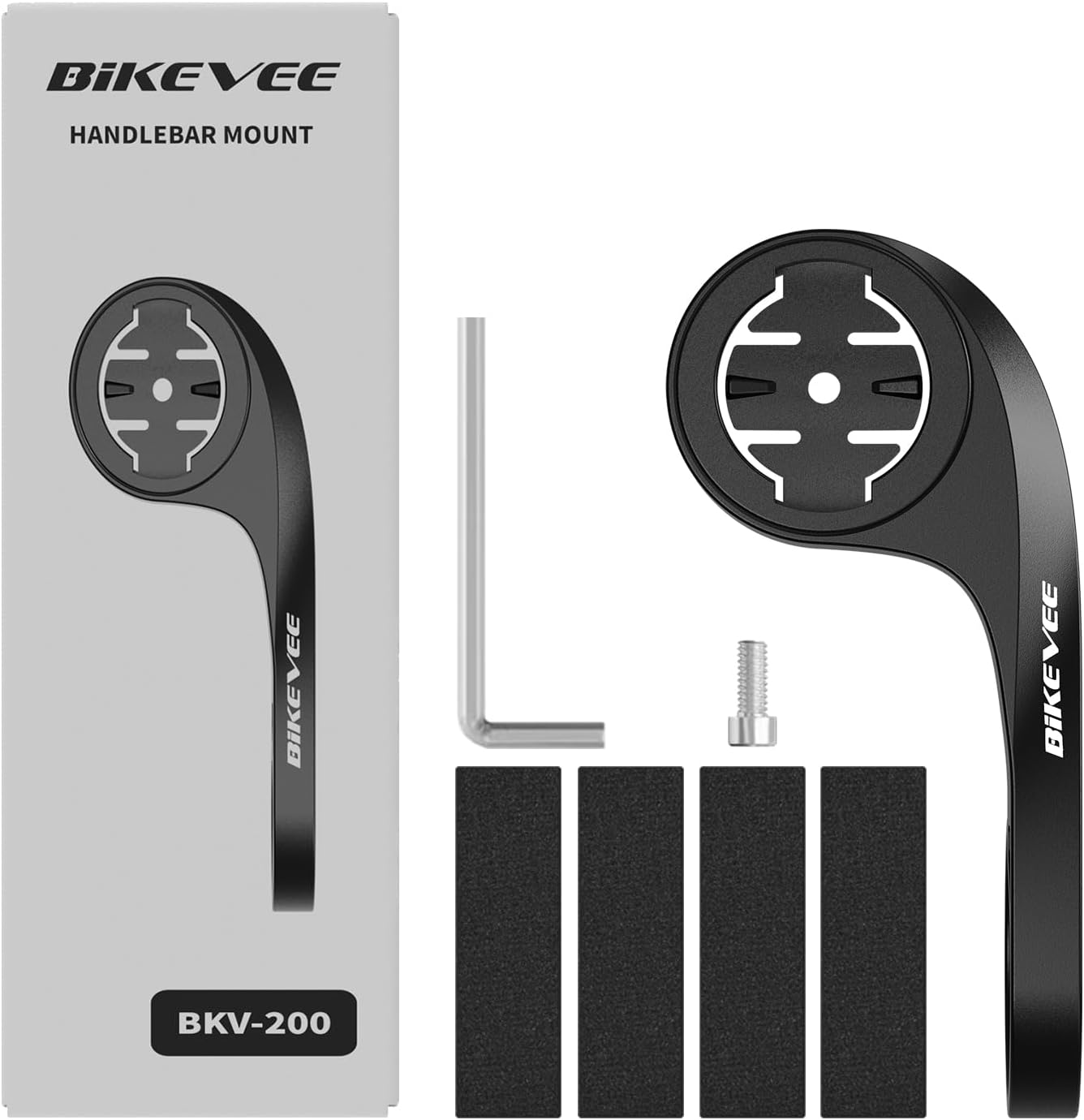
Figure 1.1: Package Contents. Includes Bike Computer, Charging Cable, Rubber Rings, Mount, Rubber Pad, and User Manual.
- Bikevee GPS Cycling Computer
- Standard-Fahrradhalterung
- Out Front Mount
- Gummipads
- Ladekabel (Typ-C)
- Gummiringe für die Montage
- Bedienungsanleitung
2. Einrichtung und Installation
2.1 Aufladen des Geräts
Before first use, fully charge the Bikevee GPS Computer. Connect the provided Type-C charging cable to the device's charging port and a USB power source. The battery indicator on the screen will show charging status.
2.2 Gerät montieren
The Bikevee GPS Computer comes with both a standard bike mount and an out front mount. Choose the mount that best suits your preference and bicycle setup.
2.2.1 Standard Bike Mount Installation
- Platzieren Sie das Gummipad am Lenker oder Vorbau Ihres Fahrrads.
- Positionieren Sie die Standard-Fahrradhalterung auf dem Gummipad.
- Secure the mount using the provided rubber rings, wrapping them around the handlebar/stem and hooking them onto the mount.
- Align the Bikevee GPS Computer with the mount's grooves and twist clockwise until it locks into place.
2.2.2 Out Front Mount Installation

Figure 2.1: Bikevee Out Front Mount.
- Place the rubber pad around your bicycle's handlebar where you intend to install the mount.
- Position the out front mount over the rubber pad.
- Use the provided Allen key to tighten the screw on the mount's clamp around the handlebar until it is secure.
- Align the Bikevee GPS Computer with the mount's grooves and twist clockwise until it locks into place.
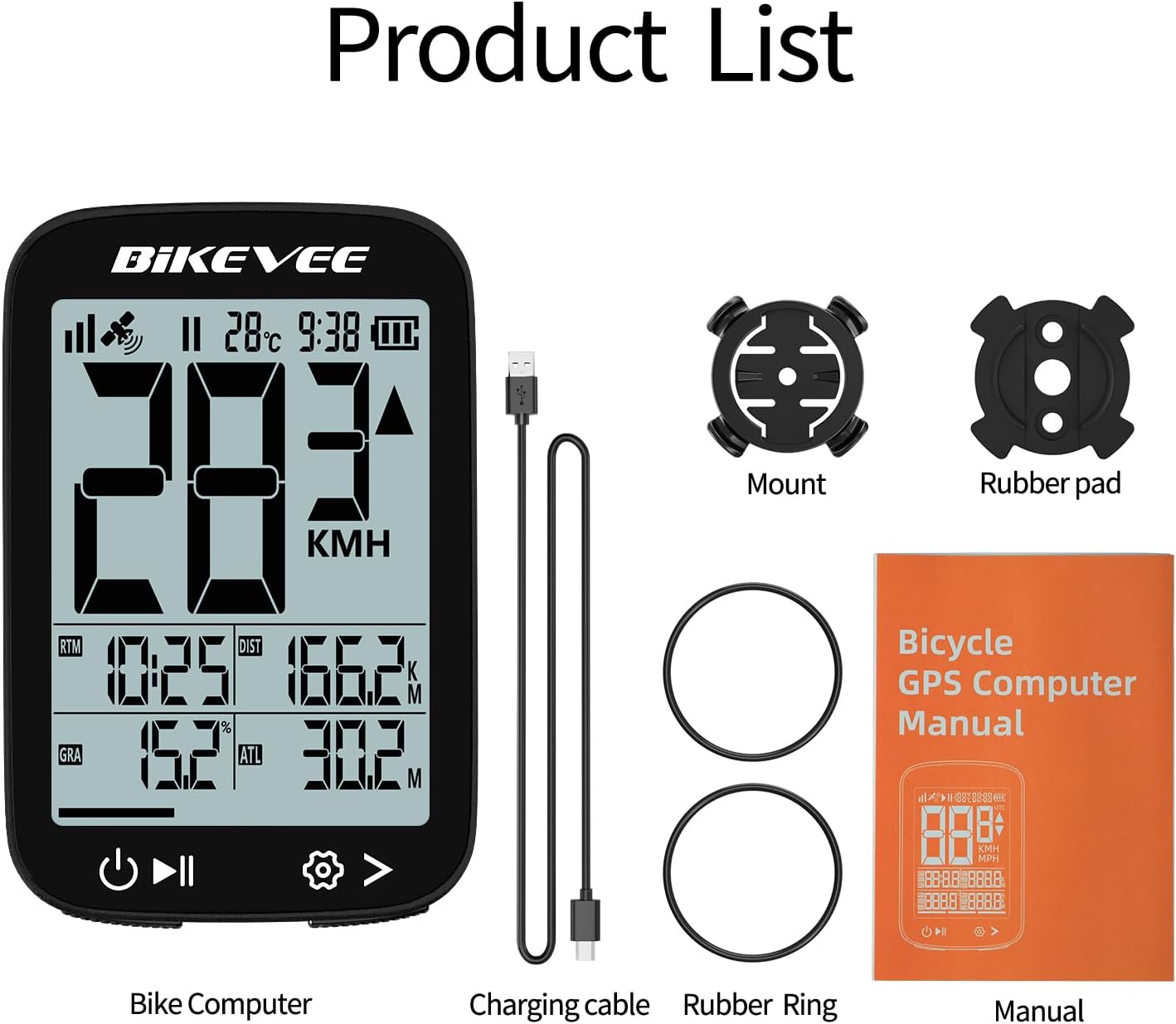
Figure 2.2: Handlebar Mount Components.
2.3 Erstes Einschalten und Einstellungen
- Einschalten: Halten Sie den Ein-/Ausschalter (normalerweise unten links) gedrückt, bis der Bildschirm aufleuchtet.
- Einheitenauswahl: Upon first power-on or after a reset, you may be prompted to select your preferred unit of measurement (MPH or KM/H). Use the navigation buttons to select and confirm.
- GPS-Erfassung: Take the device outdoors to an open area to allow it to acquire GPS satellite signals. This may take a few moments. A stable GPS signal icon will appear once connected.
3. Bedienungsanleitung
3.1 Grundlegende Bedienung
- Ein-/Ausschalten: Zum Ein- oder Ausschalten die linke Taste gedrückt halten.
- Start/Pause/Stop Ride: Press the middle button to start recording a ride. Press again to pause. Press and hold to stop and save the ride data.
- Seitenwechsel: Use the right button to cycle through different data display pages.
- Hintergrundbeleuchtung: The device features an automatic backlight that adjusts based on ambient light conditions.
3.2 Data Display and Interpretation
The Bikevee GPS Computer displays up to 14 types of cycling data, providing comprehensive insights into your ride.
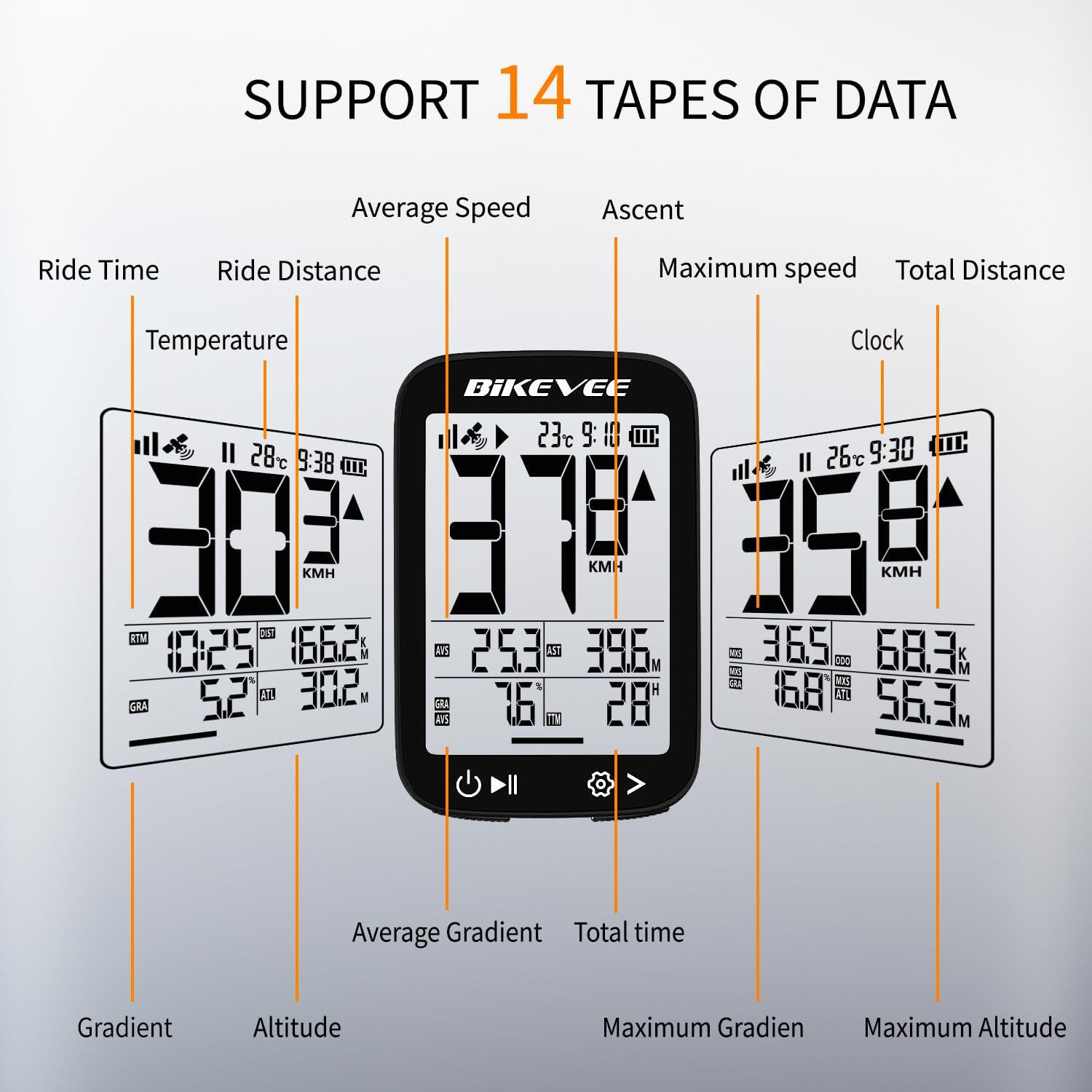
Figure 3.1: Supported Data Types Display.
- Momentane Geschwindigkeit: Displays your real-time speed (MPH or KM/H).
- Durchschnittsgeschwindigkeit: The average speed for the current ride.
- Höchstgeschwindigkeit: The highest speed recorded during the current ride.
- Fahrzeit: Duration of the current active ride.
- Ride Distance: Zurückgelegte Strecke während der aktuellen Fahrt.
- Total Distance (Odometer): Vom Gerät aufgezeichnete Gesamtstrecke.
- Temperatur: Umgebungstemperatur.
- Uhr: Aktuelle Uhrzeit.
- Aufstieg: Total elevation gained during the ride.
- Gradient: Current incline or decline percentage.
- Höhe: Current elevation above sea level.

Figure 3.2: Display Icons and Their Meanings.
- Satellitensignal: Zeigt die GPS-Signalstärke an.
- IPX7: Confirms waterproof rating.
- Batteriestand: Zeigt den verbleibenden Ladezustand des Akkus an.
- Automatische Hintergrundbeleuchtung: Indicates auto backlight feature is active.
- Typ-C: Denotes the charging port type.
- Geschwindigkeitsvergleich: Arrow indicates if current speed is higher or lower than average speed.
4. Wartung und Pflege
4.1 Gerät reinigen
Um optimale Leistung und ein ansprechendes Aussehen zu erhalten, reinigen Sie das Gerät regelmäßig:
- Wischen Sie Bildschirm und Gehäuse mit einem weichen, fusselfreien Tuch ab.amp Tuch.
- Avoid using abrasive cleaners, solvents, or chemical sprays, as these can damage the device's surface or internal components.
- Ensure the charging port cover is securely closed to prevent dust and water ingress.
4.2 Wasserdichtigkeit (IPX7)

Figure 4.1: IPX7 Waterproof Feature.
The Bikevee GPS Computer has an IPX7 waterproof rating, meaning it is protected against temporary immersion in water (up to 1 meter for 30 minutes). However, it is important to note:
- Tauchen Sie das Gerät nicht für längere Zeit in Wasser.
- Vermeiden Sie Hochdruckwasserstrahlen.
- Ensure the charging port cover is sealed before exposure to water.
4.3 Pflege und Lagerung der Batterie
- Bewahren Sie das Gerät bei Nichtgebrauch an einem kühlen, trockenen Ort auf.
- Vermeiden Sie es, das Gerät über längere Zeit extremen Temperaturen (Hitze oder Kälte) auszusetzen.
- For long-term storage, charge the battery to approximately 50% to preserve battery health.
5. Fehlerbehebung
If you encounter issues with your Bikevee GPS Computer, refer to the following common problems and solutions:
| Problem | Mögliche Ursache | Lösung |
|---|---|---|
| Gerät lässt sich nicht einschalten. | Schwache Batterie. | Laden Sie das Gerät vollständig mit dem mitgelieferten USB-C-Kabel auf. |
| No GPS signal or inaccurate readings. | Versperrt view Himmelsaufnahme; erste Signalerfassung. | Move to an open outdoor area. Wait a few minutes for signal acquisition. Avoid dense forests or tunnels. |
| Das Display ist dunkel oder unleserlich. | Auto backlight setting; low battery. | Ensure sufficient battery charge. The backlight adjusts automatically; try moving to a different lighting condition. |
| Das Gerät friert ein oder reagiert nicht mehr. | Softwarefehler. | Führen Sie einen Soft-Reset durch, indem Sie den Netzschalter 10-15 Sekunden lang gedrückt halten, bis das Gerät neu startet. |
6. Spezifikationen
Detailed technical specifications for the Bikevee Wireless Cycling GPS Computer:

Figure 6.1: Device Dimensions and Weight.
- Modell: Bikevee Cycling GPS Computer
- Anzeige: 2.4-inch LCD, Automatic Backlight
- Batterie: Wiederaufladbarer Lithium-Ionen-Akku mit 650 mAh
- Akkulaufzeit: Bis zu 28 Stunden (Dauerbetrieb)
- GPS-Systeme: GPS, BDS, GLONASS, Galileo, QZSS (5-satellite tracking)
- Wasserdichtigkeit: IPX7
- Abmessungen: Approximately 70mm (Height) x 45mm (Width) / 2.76in x 1.77in
- Gewicht: Approximately 50g / 0.11lb
- Ladeanschluss: Typ-C USB
- Data Types Supported: 14 types (e.g., Speed, Distance, Time, Temperature, Altitude, Gradient)
7. Garantieinformationen
The Bikevee Wireless Cycling GPS Computer is covered by a limited manufacturer's warranty. This warranty typically covers defects in materials and workmanship under normal use. Please retain your proof of purchase for warranty claims.
For specific warranty terms and conditions, including duration and coverage details, please refer to the warranty card included with your product or contact Bikevee customer support directly.
8. Kundendienst
If you have any questions, require technical assistance, or need to report an issue with your Bikevee Wireless Cycling GPS Computer, please contact our customer support team.
- Online-Hilfe: Visit the official Bikevee webWebsite mit häufig gestellten Fragen, Anleitungen zur Fehlerbehebung und Kontaktformularen.
- E-Mail-Support: Beachten Sie die Angaben auf Ihrer Produktverpackung oder die offizielle Kennzeichnung. webWebsite für die E-Mail-Adresse des Kundensupports.
When contacting support, please be prepared to provide your product model number (Bikevee Cycling GPS Computer) and a detailed description of the issue.


