1. Einleitung
The ELRO EM1000 is a plug-in energy meter designed to provide immediate insight into the energy consumption and cost of connected electrical appliances. This device accurately measures consumption in kilowatt-hours (kWh) and displays the associated energy costs, helping users understand and manage their electricity usage. It is suitable for a wide range of household appliances up to 3600 W (16 A).
2. Sicherheitshinweise
- Stellen Sie sicher, dass das Gerät an eine ordnungsgemäß geerdete Steckdose angeschlossen ist.
- Do not exceed the maximum load capacity of 3600 W / 16 A. Overloading can cause damage to the device and connected appliances, and poses a fire risk.
- Das Gerät darf nicht auseinandergenommen oder repariert werden. Alle Wartungsarbeiten dürfen nur von qualifiziertem Fachpersonal durchgeführt werden.
- Halten Sie das Gerät von Wasser, Feuchtigkeit und extremen Temperaturen fern.
- Dieses Gerät ist nur für den Gebrauch in Innenräumen vorgesehen.
- If the device displays "OVERLOAD" and shuts off, immediately disconnect the appliance causing the overload.
3. Produktüberschreitungview
The ELRO EM1000 features a large, clear LCD display and intuitive control buttons for ease of use.
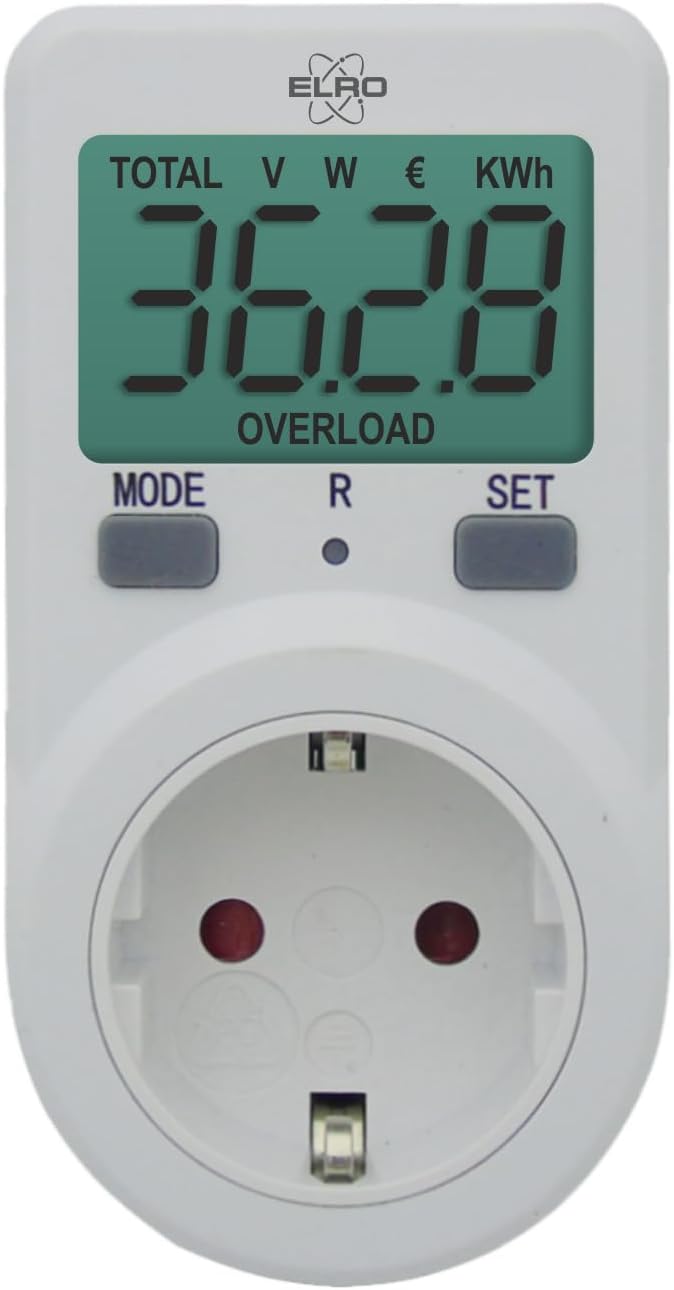
Abbildung 1: ELRO EM1000 Plug-in Energy Meter. The device features a large LCD display at the top, showing various measurements like TOTAL, V (Voltage), W (Wattage), € (Cost), and KWh (Kilowatt-hours). Below the display are three control buttons: MODE, R (Reset), and SET. The lower part of the device contains a standard European type F (Schuko) power socket for connecting appliances.
Komponenten:
- LCD Anzeige: Large screen for displaying various measurement data.
- MODE-Taste: Schaltet verschiedene Anzeigemodi durch (z. B. Lautstärke)tage, Wattage, KWh, Cost).
- R (Reset)-Taste: Resets accumulated data.
- Set-Taste: Used for entering settings, such as setting the electricity price.
- Steckdose: For connecting the appliance to be monitored.
- Netzstecker: For plugging the energy meter into a wall outlet.
4. Einrichtung
- Schließen Sie das Messgerät an: Insert the ELRO EM1000 into a standard wall power outlet. The display will illuminate.
- Gerät anschließen: Plug the appliance you wish to monitor into the power socket on the front of the ELRO EM1000.
- Strompreis festlegen (optional):
- Drücken Sie die SATZ Drücken Sie die Taste. Die Kostenanzeige beginnt zu blinken.
- Verwenden Sie die MODUS Taste zum Einstellen der Ziffer.
- Drücken SATZ again to move to the next digit.
- Repeat until the desired electricity price per kWh is set.
- Drücken SATZ one last time to confirm and exit the setting mode.
5. Bedienungsanleitung
Once set up, the ELRO EM1000 will immediately begin monitoring the connected appliance.
Viewing-Daten:
- Drücken Sie die MODUS button repeatedly to cycle through the various display modes. Each press will show a different measurement parameter.
Daten zurücksetzen:
- To clear all accumulated data (e.g., total kWh, total cost), press and hold the R (Zurücksetzen) Die Taste etwa 3-5 Sekunden lang gedrückt halten, bis die Anzeige auf Null zurückgesetzt wird.
6. Anzeigemodi
The ELRO EM1000 can display several parameters. Press the MODUS button to switch between them:
- GESAMT: Displays the total accumulated energy consumption in kWh and the total cost.
- V (Bdtage): Zeigt die aktuelle Lautstärke antage der Stromversorgung.
- W (Wattage): Indicates the instantaneous power consumption of the connected appliance in Watts.
- € (Cost): Displays the accumulated cost based on the set electricity price.
- KWh (Kilowatt-hours): Shows the accumulated energy consumption in kilowatt-hours.
- Zeit: Displays the duration for which the appliance has been connected and monitored.
7. Überlastschutz
The ELRO EM1000 is equipped with an integrated overload protection feature. If the current drawn by the connected appliance exceeds 16 A or the power exceeds 3680 W, the device will automatically shut off the power to the appliance and display "OVERLOAD" on the screen as a warning. This protects both the energy meter and the connected appliance from potential damage.
If an overload occurs:
- Immediately disconnect the appliance from the ELRO EM1000.
- Check the power rating of the appliance to ensure it is within the EM1000's limits (max 3600 W / 16 A).
- Once the appliance is disconnected, the "OVERLOAD" warning should clear. You can then reconnect a suitable appliance.
8. Wartung
- Reinigung: Reinigen Sie das Gerät mit einem weichen, trockenen Tuch. Verwenden Sie keine Scheuermittel oder Lösungsmittel.
- Lagerung: Bewahren Sie das Gerät bei Nichtgebrauch an einem kühlen, trockenen Ort auf.
- Inspektion: Periodically check the device and its plug/socket for any signs of damage. Do not use if damaged.
9. Fehlerbehebung
| Problem | Mögliche Ursache | Lösung |
|---|---|---|
| Anzeige ist leer. | Der Zähler erhält keinen Strom. | Ensure the ELRO EM1000 is securely plugged into a live wall outlet. Check the wall outlet with another device. |
| Meldung „ÜBERLASTUNG“ wird angezeigt. | Connected appliance exceeds 3600 W / 16 A. | Immediately disconnect the appliance. Use an appliance within the specified power limits. |
| Readings are incorrect or not changing. | Appliance not properly connected or meter malfunction. | Ensure the appliance is fully plugged into the meter. Try resetting the meter by holding the 'R' button. If the issue persists, contact customer support. |
| Cannot set electricity price. | Falsche Tastenfolge. | Refer to Section 4, "Set Electricity Price (Optional)" for correct steps. |
10. Spezifikationen
- Modell: ELRO EM1000
- Maximale Belastung: 3600 W / 16 A
- Messgenauigkeit: +/- 0.5
- Abmessungen (L x B x H): 11 x 7.5 x 7.5 cm
- Gewicht: 130 Gramm
- Anzeige: Großes LCD
- Merkmale: Überlastschutz, Voltage, wattage, kWh, cost, time display.
- Zertifizierung: CE
11. Garantie und Support
For warranty information and customer support, please refer to the documentation provided with your purchase or contact your retailer. ELRO typically offers a 2-year availability for spare parts. Keep your proof of purchase for any warranty claims.
For further assistance, visit the official ELRO webWebsite oder wenden Sie sich an die Kundendienstabteilung.


