Einführung
This manual provides detailed instructions for the assembly, operation, and maintenance of your Cooler Master Elite 502 White ATX High Airflow Minimalist PC Case. Please read this manual thoroughly before beginning installation to ensure proper setup and optimal performance.
Produkt überview
The Cooler Master Elite 502 is an ATX mid-tower PC case designed for high airflow and compatibility with modern components. It features a high-performance mesh front panel and supports a wide range of hardware configurations.
Hauptmerkmale:
- Motherboard-Kompatibilität: Unterstützt ATX- und Micro-ATX-Motherboards.
- GPU-Freigabe: Geeignet für Grafikkarten mit einer Länge von bis zu 410 mm.
- Kühlungsunterstützung: Supports up to a 360mm liquid cooler and seven fans for efficient thermal management.
- Bauteilabstand: CPU coolers up to 170mm height, PSUs up to 170mm length.
- Luftstromdesign: Large, unrestricted intake grill for superior airflow.
- Front I / O: Integrated USB Type-C port.

Figure 1: Motherboard Compatibility. This image illustrates the dimensions for ATX (12.0 in x 9.6 in) and Micro-ATX (9.6 in x 9.6 in) motherboards, demonstrating the case's support for both form factors.

Figure 2: GPU Clearance. Eine interne view of the case showing the maximum GPU length of 410mm, indicating ample space for high-performance graphics cards.

Figure 3: Cooling Support. This image highlights the areas within the case that support liquid coolers up to 360mm and multiple cooling fans for optimal thermal efficiency.
Setup und Installation
Follow these steps for proper assembly of your PC components within the Elite 502 case.
- Bereiten Sie den Fall vor:
Carefully remove the side panels. The tempered glass side panel is typically secured with thumb screws at the rear. The opposite side panel may also use thumb screws or a latch mechanism. Place the case on a stable, flat surface.

Figure 4: Case Interior. An unobstructed view of the case's interior, showing the motherboard tray, drive bays, and cable management cutouts, ready for component installation.
- Install the Power Supply Unit (PSU):
Mount the PSU into its designated compartment at the bottom rear of the case. Secure it with screws. Ensure proper cable routing through the PSU shroud cutouts.

Figure 5: PSU Shroud. This image displays the ventilated PSU cover, designed to efficiently cool the power supply unit regardless of its orientation.
- Installieren Sie das Motherboard:
Align your ATX or Micro-ATX motherboard with the standoffs inside the case. Secure the motherboard with screws. Connect the front panel headers (power, reset, USB, audio) to the motherboard. The case includes a USB Type-C port on the front I/O panel.

Figure 6: Front I/O Panel. Eine detaillierte view of the integrated USB Type-C port and other front panel connectors, facilitating modern connectivity.
- Speicherlaufwerke installieren:
Install 2.5-inch SSDs or 3.5-inch HDDs into the designated drive bays. Refer to the case's internal layout for specific mounting points, often located behind the motherboard tray or within the PSU shroud area.
- Grafikkarte (GPU) installieren:
Insert your graphics card into the appropriate PCIe slot on the motherboard. Secure it with the retention clip and a screw to the case's expansion slots. Ensure the GPU length does not exceed 410mm.
- Kühlkomponenten einbauen:
Install CPU cooler (up to 170mm height) and any additional case fans or liquid cooling radiators. The case supports up to a 360mm liquid cooler. Ensure fans are oriented for optimal airflow (intake at front/bottom, exhaust at rear/top).

Figure 7: Unrestricted Airflow. This image demonstrates the effective airflow through the front mesh panel, highlighting the case's design for optimal cooling performance.

Figure 8: Large Intake Grill. Eine detaillierte view of the front panel's large intake grill, designed to maximize air intake for efficient cooling.
- Kabelmanagement:
Route all cables neatly behind the motherboard tray using the provided cutouts and tie-down points. This improves airflow and aesthetics.
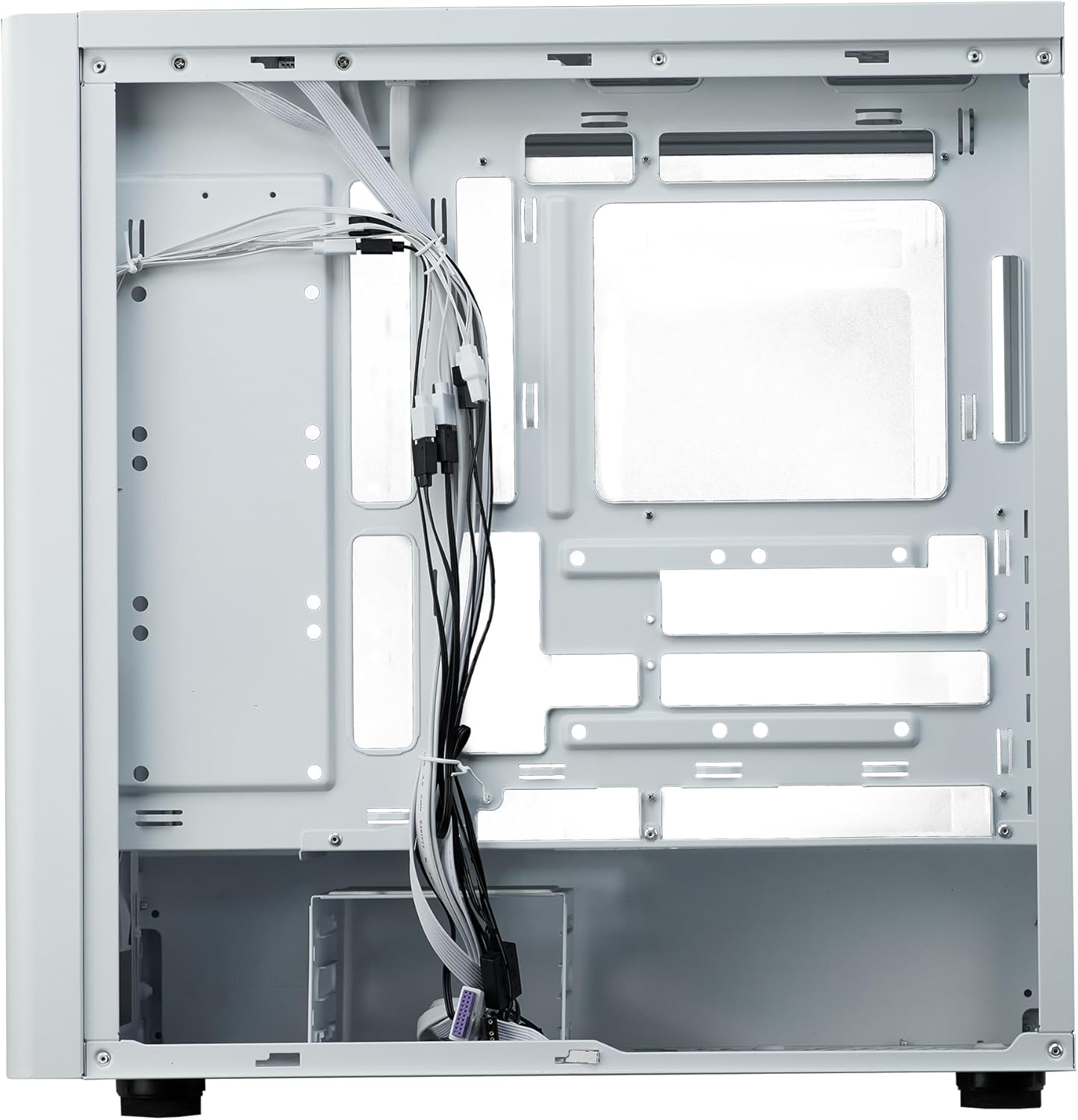
Abbildung 9: Kabelmanagement. Eine interne view from the rear side of the case, illustrating the space and tie-down points available for organized cable routing.
- Schließen Sie den Fall:
Once all components are installed and cables are managed, reattach the side panels. Ensure they are securely fastened.
Bedienungsanleitung
The Cooler Master Elite 502 is designed for continuous operation once components are properly installed. Ensure adequate ventilation around the case to maintain optimal temperatures.
- Einschalten: Press the power button located on the front I/O panel to start your system.
- Luftstrom: The case's design prioritizes high airflow. Ensure the front mesh panel and any top/rear fan exhausts are not obstructed.
- Konnektivität: Utilize the front panel USB ports, including the USB Type-C, for convenient peripheral connections.
Wartung
Regular maintenance helps ensure the longevity and performance of your PC case and components.
- Staubreinigung: Periodically clean dust filters (front, top, bottom) to maintain optimal airflow. The front mesh panel is removable for easy cleaning.
- Innenreinigung: Verwenden Sie Druckluft, um Staub von den internen Bauteilen und Lüfterflügeln zu entfernen. Stellen Sie sicher, dass das System vor der Reinigung ausgeschaltet und vom Stromnetz getrennt ist.
- Kabelmanagement-Check: Occasionally verify that internal cables remain neatly routed and do not obstruct airflow or fan operation.
Fehlerbehebung
Sollten Probleme auftreten, beachten Sie die folgenden gängigen Schritte zur Fehlerbehebung:
- Kein Strom:
Check all power connections, including the PSU to the wall outlet, PSU to motherboard, and front panel power switch header to the motherboard. Ensure the PSU switch is in the 'ON' position.
- Überhitzung:
Verify all case fans and CPU cooler fans are spinning correctly. Clean any dust filters or internal components that may be obstructing airflow. Ensure proper fan orientation (intake/exhaust).
- USB-/Audioanschluss an der Vorderseite funktioniert nicht:
Confirm that the front panel USB and audio headers are correctly connected to the motherboard. Check motherboard manual for correct pin assignments.
- Lose Komponenten:
If experiencing intermittent issues, power down the system and check that all components (GPU, RAM, storage drives) are securely seated in their slots and properly fastened.
Technische Daten
| Besonderheit | Detail |
|---|---|
| Marke | Kühler Meister |
| Modellname | Elite 502 Weiß |
| Artikelmodellnummer | E502-WGNN-SAZ |
| Gehäusetyp | Mittlerer Turm |
| Motherboard-Kompatibilität | ATX, Micro ATX |
| GPU-Freigabe | Bis zu 410 mm |
| Höhe des CPU-Kühlers | Bis zu 170 mm |
| Netzteillänge | Bis zu 170 mm |
| Unterstützung für flüssige Kühlung | Up to 360mm radiator |
| Fan-Unterstützung | Bis zu 7 Fans |
| Front I / O Ports | 1x USB 3.0, 1x USB Typ-C |
| Material | Legierter Stahl, gehärtetes Glas |
| Farbe | Weiß |
| Artikelgewicht | 17.73 Pfund (8.04 kg) |
| Produktabmessungen (L x B x H) | 18.66 x 18.94 x 9.06 Zoll (47.4 x 48.1 x 23.0 cm) |

Abbildung 10: Produktabmessungen. An illustration detailing the length, width, and height of the Cooler Master Elite 502 case.
Garantie und Support
Informationen zur Garantie und zum technischen Support finden Sie auf der offiziellen Cooler Master-Website. webBesuchen Sie die Website oder kontaktieren Sie direkt den Kundenservice. Bewahren Sie Ihren Kaufbeleg für Garantieansprüche auf.
- Offiziell WebWebsite: www.coolermaster.com
- Kundendienst: Siehe den Supportbereich auf der offiziellen Website. webAuf dieser Webseite finden Sie Kontaktdaten und häufig gestellte Fragen.


