Einführung
This manual provides detailed instructions for the safe and efficient use of your artfone G6 Pro 4G Senior Flip Phone. Please read this manual thoroughly before operating the device and keep it for future reference.

Image: The artfone G6 Pro 4G flip phone, showcasing its dual LCD screens and large keypad.
Lieferumfang
Überprüfen Sie, ob alle Artikel im Paket vorhanden sind:
- 1 x artfone G6 Pro Senior Flip Phone
- 1 x 1300 mAh Akku
- 1 x USB-Ladekabel
- 1 x Ladegerät (Netzteil)
- 1 x Ladestation
- 1 x User Manual (English, German, French, Spanish, Italian)

Image: All components included in the artfone G6 Pro package: the phone, battery, USB cable, power adapter, charging dock, and user manual.
Aufstellen
1. Installing the SIM Card, Micro SD Card, and Battery
- Entfernen Sie die hintere Abdeckung des Telefons.
- Legen Sie Ihre Nano-SIM-Karte(n) in den/die dafür vorgesehenen Steckplatz(e) ein. Achten Sie darauf, dass die goldenen Kontakte nach unten zeigen.
- If desired, insert a Micro SD card (up to 64GB) into the Micro SD slot for expanded storage.
- Setzen Sie die 1300-mAh-Batterie ein und achten Sie dabei auf die korrekte Ausrichtung der Kontakte.
- Bringen Sie die Rückseite wieder an, bis sie sicher einrastet.
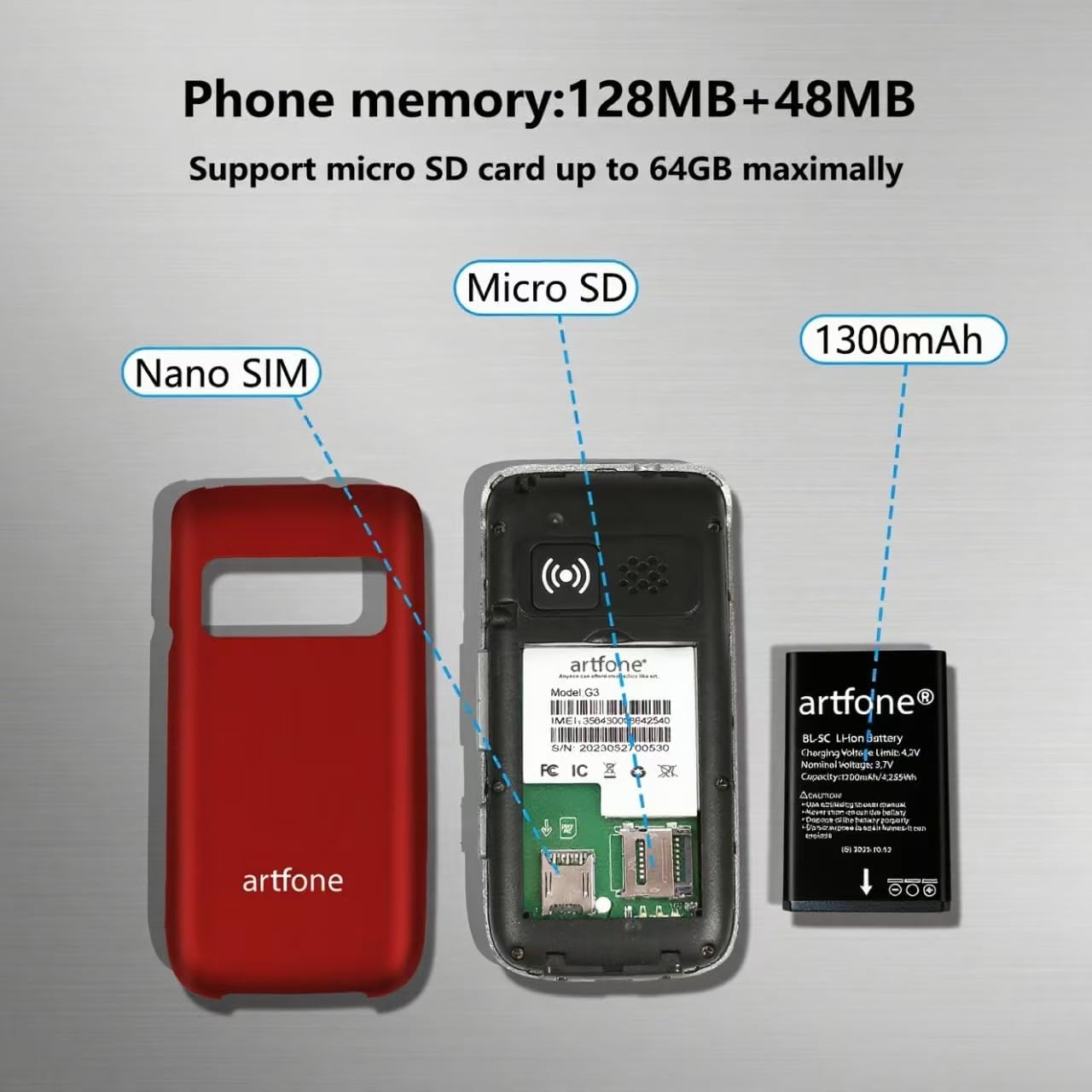
Bild: Eine explodierte view of the artfone G6 Pro, showing the back cover removed, revealing slots for Nano SIM and Micro SD cards, and the 1300mAh battery.
2. Erstes Aufladen
Before first use, fully charge the phone. You can charge it using the provided charging dock or directly via the USB-C cable.
- Verwendung der Ladestation: Connect the USB cable to the charging head, then plug it into a power outlet. Place the phone into the charging dock. The phone will indicate charging status.
- Direktes Laden: Connect the USB-C cable directly to the phone's charging port and the other end to the charging head, then plug into a power outlet.
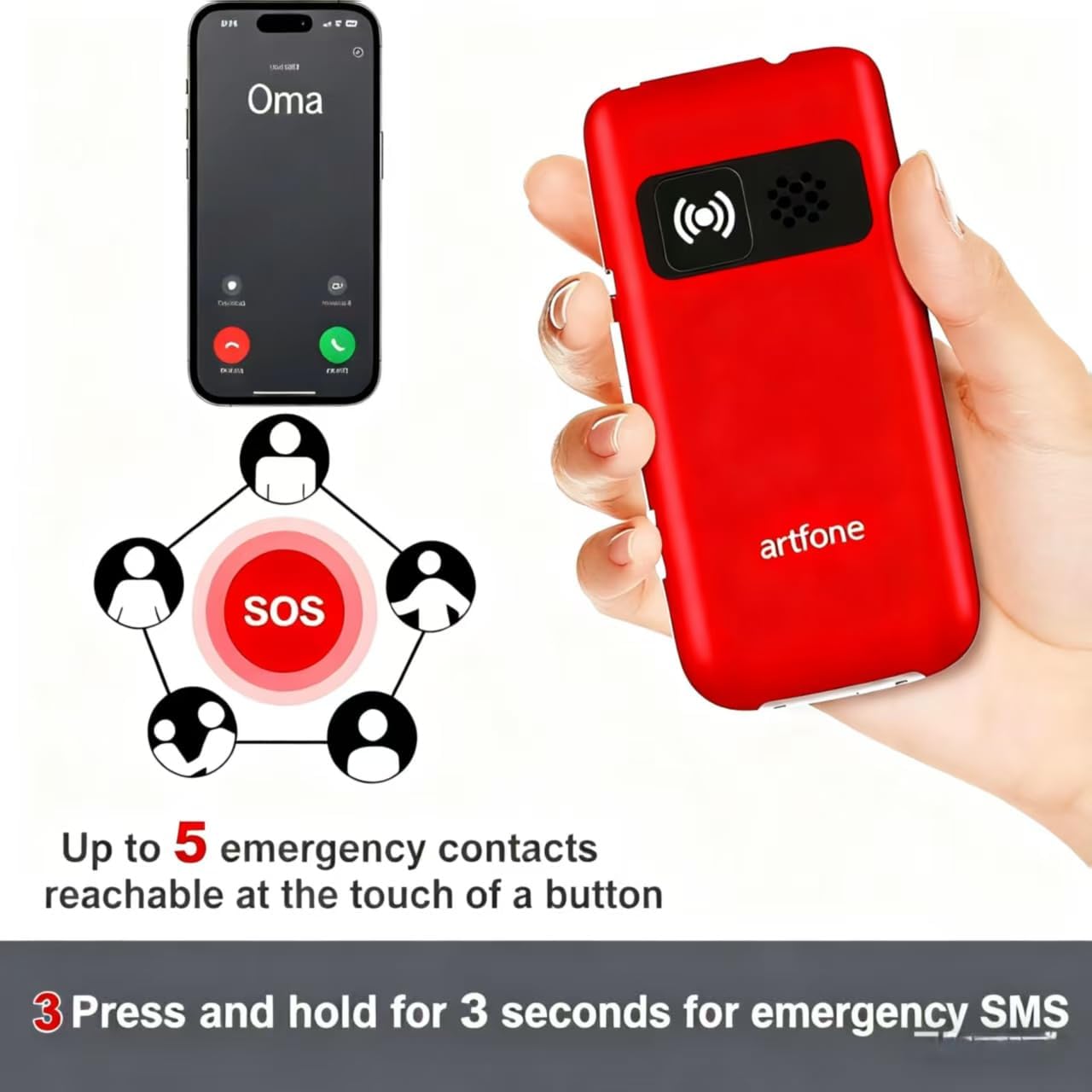
Image: The artfone G6 Pro phone placed in its charging dock, connected to a power source.
Bedienungsanleitung
1. Ein-/Ausschalten
- So schalten Sie das Gerät ein: Drücken und halten Sie die rote Taste „Anruf beenden/Ein/Aus“ (
 bis der Bildschirm aufleuchtet.
 - So schalten Sie das Gerät aus: Halten Sie die rote Taste „Anruf beenden/Ein/Aus“ gedrückt, bis die Ausschaltoptionen erscheinen, und wählen Sie dann „Ausschalten“.
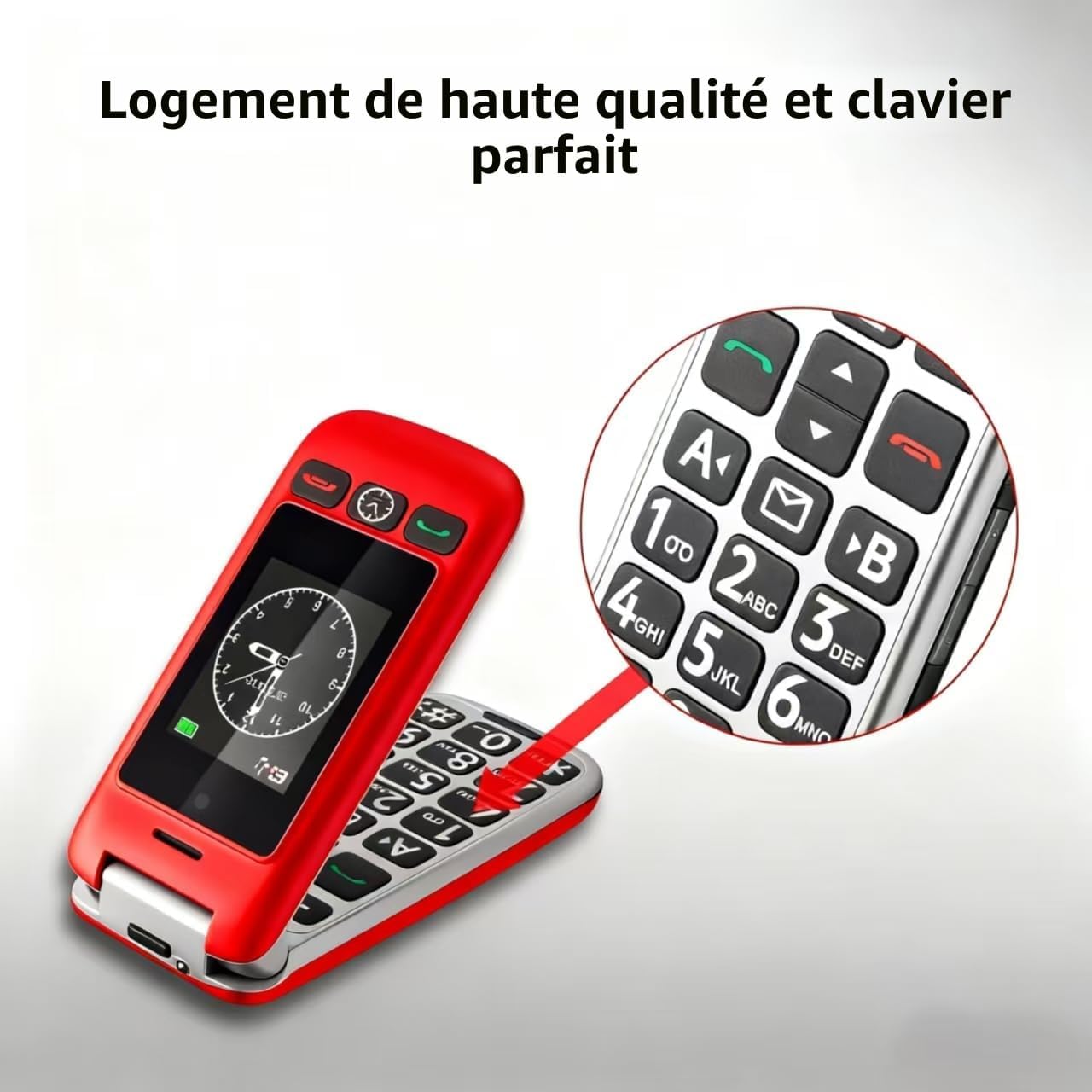
2. Anrufe tätigen und entgegennehmen
- Einen Anruf tätigen: Dial the number using the large keypad and press the green Call button ().
- Empfangen eines Anrufs: Open the flip to answer, or press the green Call button. Close the flip or press the red End Call button to end a call.
- Lautstärke anpassen: Benutzen Sie während eines Anrufs die Lautstärketasten an der Seite des Telefons.

Image: A close-up of the artfone G6 Pro's large, backlit keypad, designed for easy dialing.
3. Dual-Screen-Funktionen
The artfone G6 Pro features a 2.4-inch internal screen and a 1.8-inch external screen.
- The external screen displays time, date, battery status, and caller ID without opening the phone.
- Press and hold the dedicated time announcement button (often located on the side or front) for 2 seconds to hear the current time spoken aloud.

Image: The artfone G6 Pro displaying the time on its external screen, with an illustration of the time announcement feature.
4. SOS-Notruffunktion
The SOS button provides quick access to emergency contacts.
- SOS-Nummern einstellen: Navigate to the 'SOS Settings' in the phone's menu to program up to 5 emergency contact numbers.
- SOS aktivieren: In an emergency, press and hold the SOS button on the back of the phone for 3 seconds. The phone will automatically call the programmed numbers in sequence until one answers. It will also send an emergency SMS to these contacts.

Image: The artfone G6 Pro with its SOS button highlighted, illustrating how it connects to up to 5 emergency contacts.
5. Kurzwahl
Assign frequently called numbers to speed dial keys (A, B, 1-9) for quick access.
- Kurzwahl einstellen: Go to 'Settings' > 'Speed Dial' to assign contacts to specific keys.
- Kurzwahl verwenden: Press and hold the assigned key (e.g., 'A' or '1') to call the stored contact.
6. Weitere Funktionen
- Kamera: Access the camera through the main menu to take basic photos.
- FM Radio: Plug in headphones (3.5mm jack) to use the FM radio function.
- Taschenlampe: Activate the flashlight via a dedicated side switch or through the menu.
- Benutzeroberfläche: The phone features a simple, user-friendly interface with clear icons for easy navigation.

Image: A visual representation of the artfone G6 Pro's menu, showing large, clear icons for Contacts, Tools, Message, SOS, Calendar, Settings, Internet, Multimedia, and Call logs.

Image: A composite image illustrating the flashlight, FM radio, and 3.5mm headphone jack features of the artfone G6 Pro.
Wartung
- Halten Sie das Telefon trocken. Feuchtigkeit kann elektronische Schaltkreise beschädigen.
- Setzen Sie das Telefon keinen extremen Temperaturen aus. Hohe Temperaturen können die Lebensdauer elektronischer Geräte verkürzen und bestimmte Kunststoffe verformen oder schmelzen.
- Verwenden Sie keine scharfen Chemikalien, Lösungsmittel oder aggressive Reinigungsmittel zum Reinigen des Telefons. Wischen Sie es mit einem weichen, trockenen Tuch ab.amp Tuch.
- Behandeln Sie das Telefon vorsichtig. Lassen Sie es nicht fallen, stoßen Sie es nicht an und schütteln Sie es nicht. Unsachgemäße Behandlung kann die internen Schaltkreise und die Feinmechanik beschädigen.
- Only use original or certified compatible batteries, chargers, and accessories.
Fehlerbehebung
| Problem | Mögliche Ursache | Lösung |
|---|---|---|
| Telefon lässt sich nicht einschalten | Die Batterie ist schwach oder nicht richtig eingesetzt. | Laden Sie den Akku auf. Stellen Sie sicher, dass der Akku richtig eingesetzt ist. |
| Anrufe können weder getätigt noch empfangen werden. | Keine SIM-Karte, SIM-Karte nicht richtig eingelegt oder kein Netzwerksignal. | Stellen Sie sicher, dass die SIM-Karte korrekt eingelegt ist. Prüfen Sie die Netzabdeckung. Kontaktieren Sie Ihren Mobilfunkanbieter. |
| Schlechte Gesprächsqualität / Geringe Lautstärke | Schwaches Signal, Lautsprecher blockiert oder Lautstärke zu niedrig. | Move to an area with better signal. Ensure speaker is not obstructed. Adjust call volume using side buttons. |
| Der Akku entlädt sich schnell | Häufige Nutzung, Hintergrundanwendungen oder ein alter Akku. | Reduzieren Sie die Bildschirmhelligkeit. Schließen Sie nicht benötigte Anwendungen. Erwägen Sie einen Akkutausch, falls der Akku alt ist. |
| SOS-Funktion funktioniert nicht | SOS numbers not programmed or incorrect. | Verify and correctly program the emergency contact numbers in SOS settings. |
Wenn das Problem nach dem Ausprobieren dieser Lösungen weiterhin besteht, wenden Sie sich bitte an den Kundensupport.
Technische Daten
- Modell: artfone G6 Pro
- Netzwerktechnologie: 4G, 3G, 2G
- Betriebssystem: artfone Mocor RTOS
- Hauptbildschirm: 2.4 Zoll
- Externer Bildschirm: 1.8 Zoll
- Erinnerung: 128MB + 48MB
- Erweiterbarer Speicher: Micro-SD-Karte bis 64GB
- SIM-Kartentyp: Nano-SIM
- Batterie: 1300mAh Lithium-Ionen
- Gesprächszeit: Bis zu 5-6 Stunden
- Standby-Zeit: Bis zu 10 Tage
- Konnektivität: Bluetooth
- Ladeanschluss: USB Typ C
- Besondere Merkmale: SOS Button, Large Keys, Dual Screen, Charging Dock, FM Radio, Flashlight, Camera
Garantie und Support
Garantieinformationen
The artfone G6 Pro comes with a 2 Jahr Herstellergarantie Diese Garantie gilt ab Kaufdatum und deckt Material- und Verarbeitungsfehler bei normalem Gebrauch ab. Sie deckt keine Schäden ab, die durch Missbrauch, Unfälle, unbefugte Änderungen oder normale Abnutzung verursacht wurden.
Kundenservice
For technical assistance, warranty claims, or further inquiries, please refer to the contact information provided in your product packaging or visit the official artfone webBitte halten Sie Ihre Produktmodell- und Kaufdetails bereit, wenn Sie den Support kontaktieren.


