Einführung
This manual provides detailed instructions for the setup, operation, and maintenance of your GUSTARD R30 Fully-Discrete R2R Network Streamer DAC. Please read this manual thoroughly before using the device to ensure optimal performance and longevity.
Verpackungsliste
Bitte überprüfen Sie nach dem Öffnen des Pakets, ob alle folgenden Artikel enthalten sind:
- GUSTARD R30 Mainframe
- Netzkabel
- USB-Kabel
- Fernbedienung
- Garantiekarte

Frontplatte überview
The front panel of the GUSTARD R30 features essential controls and a display for real-time status and operations.
- Netzschalter: Toggles between standby and active states. The R30 can remain in standby mode when the rear power switch is ON.
- Anzeigebereich: Shows the current input channel, encoding format, and sampling rate. Displays menu items when in the setup menu.
- Volumenanzeige: Indicates the current volume level, ranging from -63.5dB to 0dB. 'FIXED' indicates bypass mode. Displays menu options during configuration.
- '-' Taste: Normally decreases volume. Cycles through options in the menu.
- Gangtaste: Short press switches inputs. Long press enters/exits the menu. Short press navigates items in the menu.
- '+'-Schaltfläche: Normally increases volume. Cycles through options in the menu.

Rückseite überview
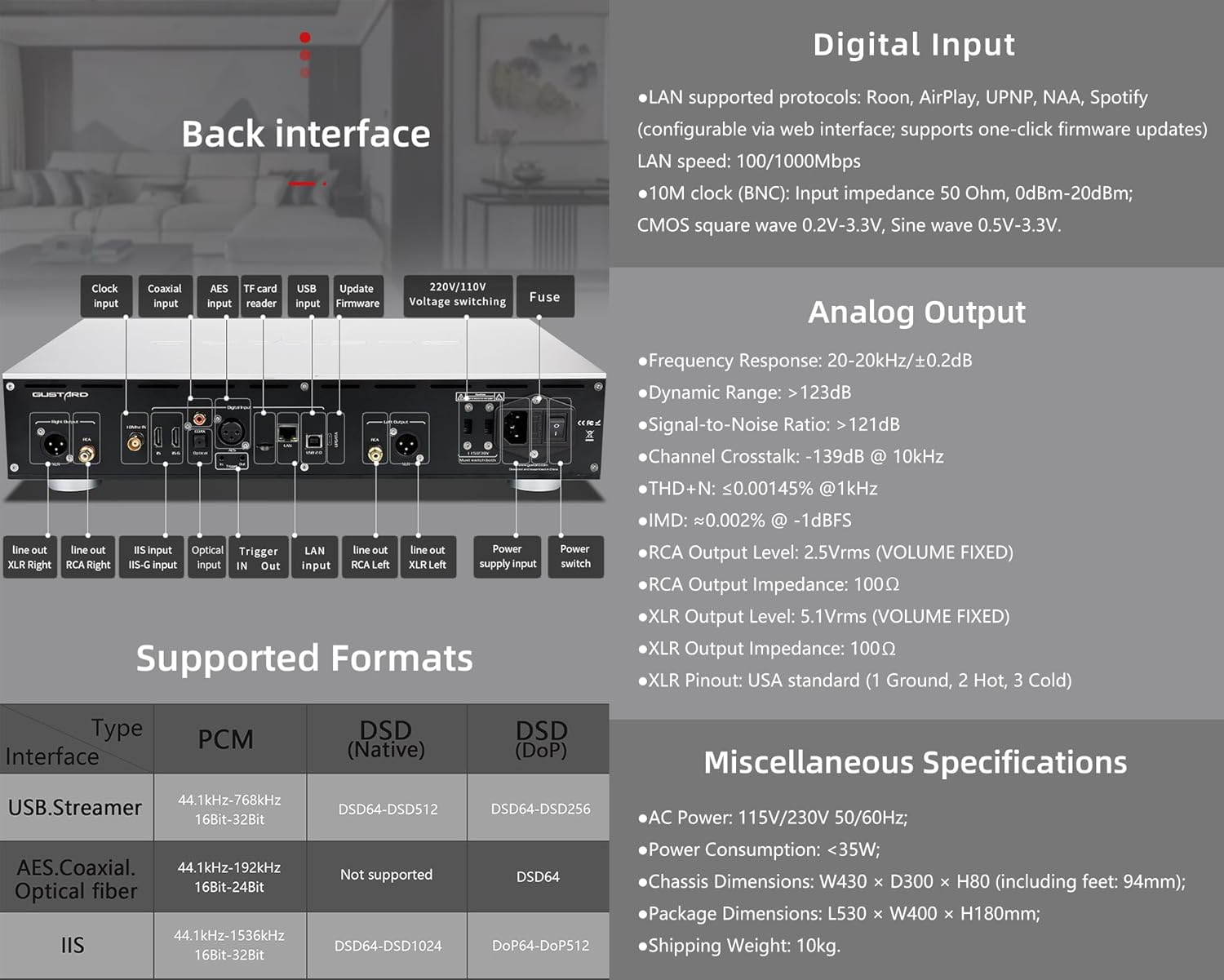
The rear panel provides various input and output connections for the GUSTARD R30.
- Clock-Eingang: For external 10MHz clock synchronization.
- Koaxialer Eingang: Digitaler Audioeingang.
- AES-Eingang: Digitaler Audioeingang.
- USB Eingang: Zum Anschluss an einen Computer oder eine andere USB-Audioquelle.
- LAN-Eingang: For network streaming functionality.
- TF-Kartenleser: Für Firmware-Updates.
- Firmware aktualisieren: USB-Anschluss für Firmware-Updates.
- 220V/110V Lautstärketage Umschalten: Selector for power voltage.
- Sicherung: Stromsicherung.
- Line Out XLR Right/Left: Balanced analog audio outputs.
- Line Out RCA Right/Left: Unbalanced analog audio outputs.
- IIS Input (IIS-G): Digital audio input with Gustard pinout.
- Optischer Eingang: Digitaler Audioeingang.
- Trigger Ein/Aus: For 12V trigger control.
- Stromversorgungseingang: Wechselstromanschluss.
- Stromschalter: Hauptschalter.
Important: Ensure both voltagDie Schalter sind auf die gleiche Lautstärke eingestellttage beim Betrieb des 220V/110V-Volttage switch, otherwise, it may damage the internal transformer upon powering on.
Anzeige- und Bedienfeldsteuerung
The R30 utilizes a large OLED display for real-time status monitoring and functional operations. The diagram below illustrates the main interface display states.
1. OLED-Anzeige
The display shows the input channel, external clock indication, encoding format, sampling rate, and volume.
2. Input Channel Selection
Der R30 verfügt über 7 Eingangskanäle. Auf der Hauptschnittstelle wechselt jeder Druck auf die Zahnradtaste in dieser Reihenfolge durch die verfügbaren Kanäle: COAX → AES → OPT → USB → STREAMER → IIS(G) → IIS(M*).
***Note: IIS(G) is for fixed Gustard pinout configuration and cannot be adjusted. IIS(M*) supports adjustable pinout configuration.
3. Lautstärkeregelung
- When the main interface is displayed, pressing the "+" or "-" buttons directly adjusts the analog volume attenuation function of the passive preampVerstärker. Die Dämpfung reicht von 0 dB bis -63.5 dB (Gesamtdämpfung 63.5 dB).
- Pressing "+" at 0dB activates Fixed Output mode (bypassing attenuation circuit), displaying 'FIXED' indicator.
- When 'FIXED' is displayed, pressing "-" first exits bypass mode before controlling the attenuation level.

Setup-Menü
On the main screen, long press the Gear Button to enter the settings menu (hereinafter referred to as the menu button). In this state, the menu button can sequentially switch the menu items to be modified. "+" and "-" buttons are used to adjust the currently selected menu options. When the screen is in the settings menu, long press the menu button again to return to the main screen.
Menüstruktur:
- PCM-FILTER
- DSD-FILTER
- NOS-MODUS
- REF CLOCK
- IIS MODE
- PHASE
- TRIGGER CH.
- TRIGGER VOL.
- ANZEIGE

Menüfunktionen
Rufen Sie das Menü auf, indem Sie auf der Hauptoberfläche die Menütaste drücken. Die einzelnen Menüoptionen werden unten detailliert beschrieben.
1. PCM FILTER (PCM Digital Filter Adjustment)
Der R30 verwendet ein selbst entwickeltes Hochleistungs-PCM-Oversampling digitales Filtermodul mit drei Filtertypen:
- VIVID (Default): Similar to the FAST roll-off type of traditional digital filter, but with better ringing characteristics, very small pre-ringing, and fast convergence post-ringing. It aims for a broad soundstage and sound restoration. Recommended for most music styles.
- SANFT: Similar to the SLOW roll-off type of traditional digital filter, offering a soft listening experience.
- ZUSAMMENSETZUNG: A hybrid digital filter, balancing characteristics between Vivid and Gentle for a good listening experience.
2. DSD FILTER (DSD Digital Filter Adjustment)
Der DSD-Filter verfügt über 4 integrierte Bandbreitenoptionen: 47K (Default), 50K, 60K, 70K.
3. NOS-MODUS (Keine Oversampling Filter Mode)
When enabled, the PCM signal bypasses the oversampling filter entirely, decoded straight through the R-2R decoder module. This preserves micro-details and timing integrity. When enabled, there may be a slight clicking sound when the playback data format switches between PCM and DSD.
- DISABLE (Default)
- AKTIVIEREN
4. REF CLOCK (Reference Clock Selection)
The GUSTARD-K2, low-noise clock synthesizer, achieves ultra-low jitter performance. The R30 offers two clock options:
- INTERNAL (Default): Uses the built-in OCXO internal reference.
- EXT. 10MHz: Selects an external 10MHz reference source. It is recommended to connect to GUSTARD C16 or C18 reference 10M master clocks.
If the external clock is lost, powered off, or its frequency deviation is greater than +/-150ppm, "EXT ERR" will be displayed and flash.
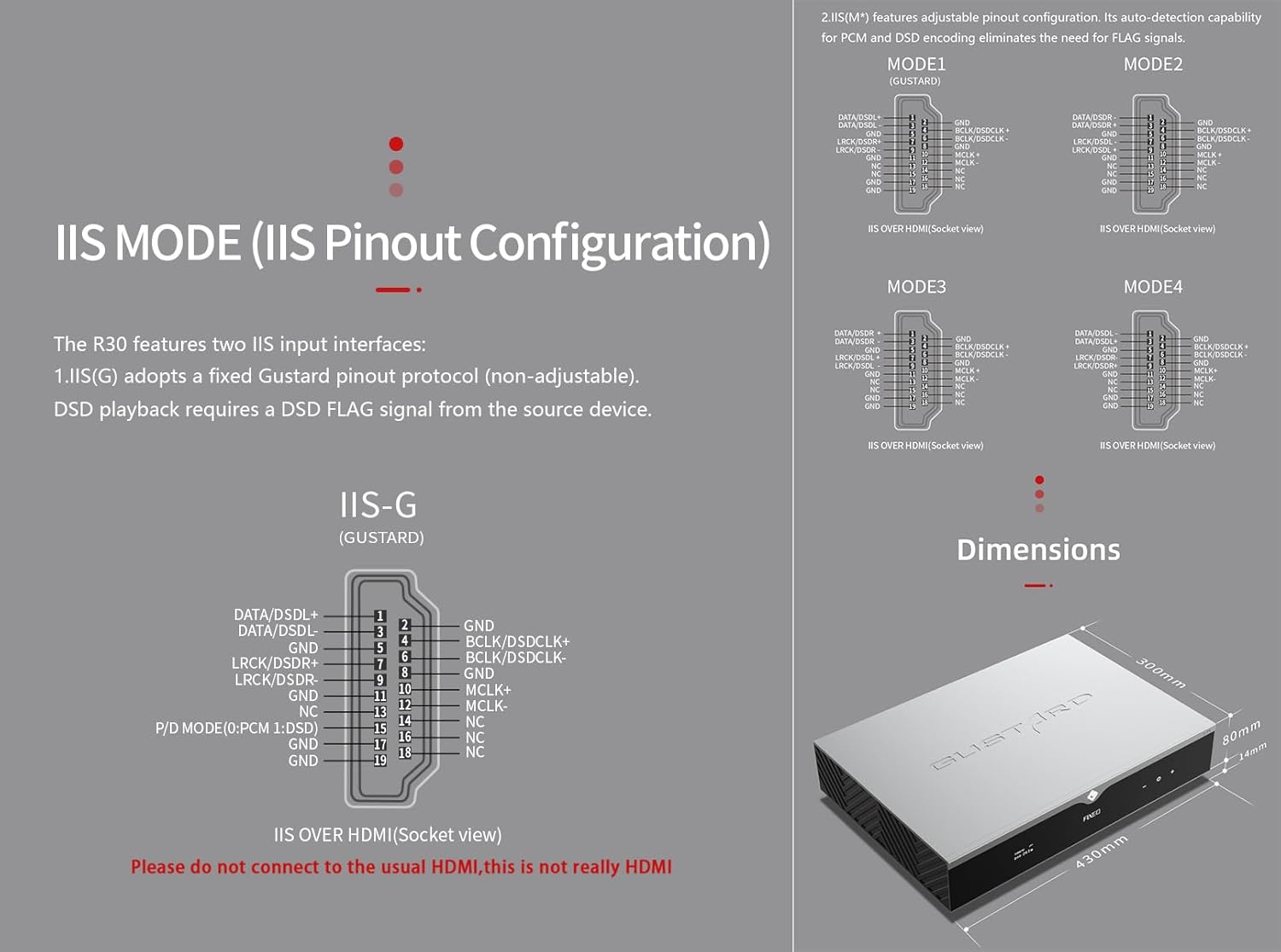
5. IIS MODE (IIS Pinout Mode Selection)
Der R30 verfügt über zwei IIS-Eingangsschnittstellen:
- IIS(G): Fixed Gustard pinout protocol (non-adjustable). DSD playback requires a DSD FLAG signal from the source device.
- IIS(M*): Features adjustable pinout configuration. Its auto-detection capability for PCM and DSD encoding eliminates the need for FLAG signals.
IIS(M*) adjustable Pinout mode IIS input has four Pinouts: MODE1 (Default), MODE2, MODE3, MODE4. MODE1 is compatible with the GUSTARD mode. If you are connecting to a GUSTARD front end such as U12, U16, U18, S16, S26, etc., you can match them with MODE1, which is the former works in the Gustard output mode.
Please do not connect to the usual HDMI, this is not really HDMI.
6. PHASE (Phase Setting)
Diese Funktion bietet zwei Optionen:
- NON-inverted (Default): When non-inverted, the RCA output of R30 is normal phase, and the XLR balanced output is American standard polarity output (1 ground, 2 hot, 3 cold).
- Invertiert: When inverted, only the RCA output is reverse phase, and the XLR balanced output is Japanese/European standard polarity output (1 ground, 2 cold, 3 hot).
7. TRIGGER CH. (Linkage Trigger Start Channel Selection)
The R30 can be triggered by an external 12V linkage signal and automatically turn on from standby mode. When the 12V trigger signal ceases or drops to 0V, automatic standby activation occurs. When the R30 is working, it is switched to the input channel of this setting by the 12V trigger linkage signal.
- LAST (Default): The input channel that was in use before entering standby last time.
- Other options include COAX, AES, OPT, USB, STREAMER, IIS(G), IIS. Selecting any channel activates it upon receiving a 12V trigger signal.
8. TRIGGER VOL. (Link Trigger Boot Volume Selection)
Der R30 kann über ein externes 12-V-Triggersignal aus dem Standby-Modus eingeschaltet und automatisch auf die gewählte Lautstärke eingestellt werden. Alternativ schaltet ein 12-V-Triggersignal im laufenden Betrieb den Ausgang auf die voreingestellte Lautstärke. Mit dieser Option wird die Ausgangslautstärke nach Trigger-Aktivierung konfiguriert.
- LAST (Default): The volume used before entering standby.
- BEHOBEN: Fixed full-scale output bypassing attenuation.
- -20 dB: Output at a volume attenuated to -20dB.
- -30 dB: Output at a volume attenuated to -30dB.
- -40 dB: Output at a volume attenuated to -40dB.
9. DISPLAY (Screen Brightness Settings)
Long-term high-brightness use of OLED screens can cause screen burn-in or ghosting. Therefore, the R30 is designed to always select automatic screen off, or manually select automatic screen off, which can also reduce interference.
- AUTO (Default): Automatically reduce brightness.
- AUTOM. AUS: Automatically turn off the screen.
Infrarot Fernbedienung
Halten Sie beim Bedienen von DAC-Produkten die DAC-Taste länger als 3 Sekunden gedrückt, um in den DAC-Steuerungsmodus zu wechseln. AMP/STREAM-Modi steuern andere Gustard-Produkte.
- Stehen zu: Press once to activate R30 from standby. Press once during operation to enter standby.
- Speisekarte: Press to access R30's setup menu.
- Pad mit 4 Richtungstasten: Up/Down navigates menu items. Left/Right adjusts selected options. Center press activates/deactivates mute.
- Zurück: Returns to main interface.
- Vol-: Decreases output volume on main interface.
- Band+: Increases output volume on main interface.
Hinweise:
- Operational range varies with angle.
- Obstructions between remote and sensor may cause malfunction.
- Remove batteries if unused for more than 1 month.
- Thoroughly clean battery compartment if leakage occurs.
- May accidentally trigger other IR-controlled devices.

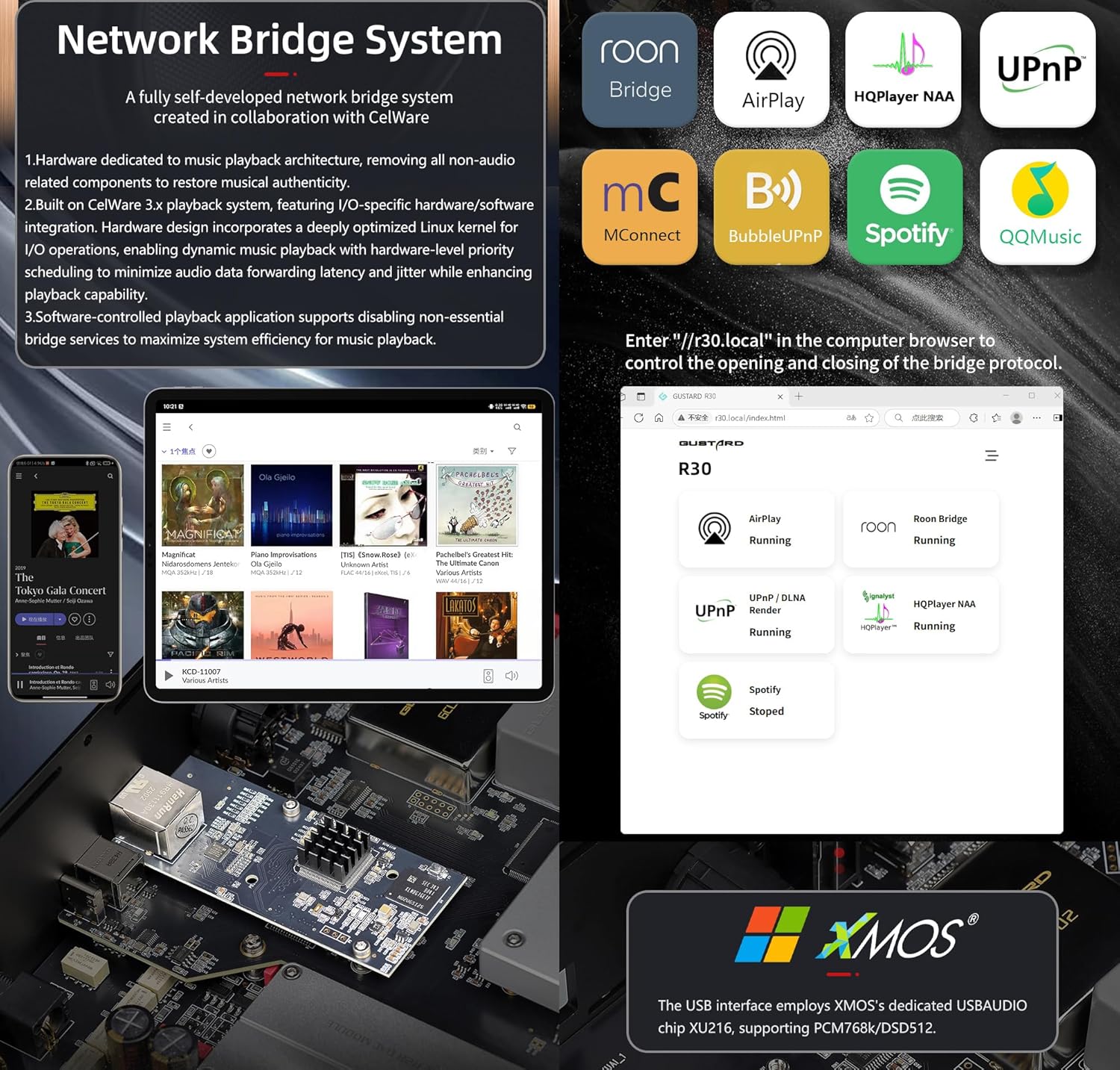
Network Bridge Streamer – Schnellstart
After connecting R30's RJ45 port to your local network:
- Select the STREAMER channel and await system boot (approximately 1 minute, until "DSD 24.5MHz" appears).
- Access R30's configuration page via: http://R30.local (as shown below). Disable unused streaming protocols on the web Schnittstelle zur Maximierung der Systemeffizienz. Auch Firmware-Updates werden hier durchgeführt.
(Mobil-/Tablet-Betrieb steht bis zur Veröffentlichung einer entsprechenden App aus)
You can turn off streaming protocols that are not frequently used through the web page to maximize system music playback performance. At the same time, the online upgrade of the Streamer is also operated on the web Seite.
(Nachdem die dedizierte Streamer-App gestartet wurde, können die oben genannten Vorgänge in der App ausgeführt werden.)
Official Product Video: GUSTARD R30 - User Manual
Produktspezifikationen
Digital Input Support Formats:
| Typ | PCM | DSD (nativ) | DSD (DoP) |
|---|---|---|---|
| USB.Streamer | 44.1kHz-768kHz 16Bit-32Bit | DSD64-DSD512 | DSD64-DSD256 |
| AES.Coaxial.Optical fiber | 44.1kHz-192kHz 16Bit-24Bit | Nicht unterstützt | DSD64 |
| IIS | 44.1kHz-1536kHz 16Bit-32Bit | DSD64-DSD1024 | DoP64-DoP512 |
Analogausgang:
- Frequenzgang: 20–20 kHz/±0.2 dB
- Dynamikbereich: > 123 dB
- Signal-Rausch-Verhältnis:> 121 dB
- Kanalübersprechen: -139 dB bei 10 kHz
- THD+N: ≤ 0.00145 % bei 1 kHz
- IMD: ≈0.002 % bei -1 dBFS
- RCA-Ausgangspegel: 2.5 Vrms (LAUTSTÄRKE FEST)
- RCA-Ausgangsimpedanz: 100 Ω
- XLR-Ausgangspegel: 5.1 Vrms (LAUTSTÄRKE FEST)
- XLR-Ausgangsimpedanz: 100 Ω
- XLR-Pinbelegung: USA-Standard (1 Masse, 2 heiß, 3 kalt)
Weitere Spezifikationen:
- AC Power: 115V/230V 50/60Hz
- Stromverbrauch: <35 W
- Chassis Dimensions: W430 × D300 × H80 (including feet: 92mm)
- Package Dimensions: L530 × W400 × H180mm
- Shipping Weight: 10kg (with package)
- 10MHz BNC Input: Input impedance 50 Ohm, 0dBm-20dBm; CMOS square wave 0.2V-3.3V, Sine wave 0.5V-3.3V.
- Trigger: IN- 12V Typ. OUT- 12V Typ.
Garantiebedingungen
Thank you for choosing GUSTARD HIFI products. To safeguard your rights and interests, please read the following warranty terms carefully. You can promptly obtain comprehensive after-sales service provided by GUSTARD.
Produktgarantie
You will enjoy a 2-year free warranty and lifetime maintenance after the date of purchasing GUSTARD's HIFI product.
* Der Hersteller trägt nur die Frachten vom chinesischen Festland. Ein Teil der aus Übersee anfallenden Fracht und Steuern wird vom Benutzer mit den Händlerverhandlungen gelöst.
Kostenloser Garantieservice
GUSTARD R30 from the purchasing Datum innerhalb der kostenlosen Garantiezeit, der Benutzer verwendet das Produkt bei normalem Gebrauch, und das Produkt versagt aufgrund von Bauteilqualitäts- oder Herstellungsproblemen.
Über den Garantieservice hinaus
Belonging to one of the following circumstances, products are no longer provided warranty service:
- Produkte ab Kaufdatum haben eine vorgegebene Garantiezeit überschritten.
- Modell, Barcodes und Kaufdatum stimmen nicht mit dem tatsächlichen Produkt und der Garantiekarte überein.
- Without GUSTARD technician permission, unauthorized modifications to the circuit, components or self-repaired product.
- Schäden durch unwiderstehliche Naturgewalten.
- Über die erlaubte Nutzung hinaus Umweltschäden.
- Beschädigung durch falschen Gebrauch oder unsachgemäße Lagerung. Einschließlich, aber nicht beschränkt auf: die voltage ist zu hoch, um die Schaltungen oder Komponenten zu verbrennen; Stoßen und daraus resultierende Beschädigung der Schale oder des Inneren; Beschädigung durch Wasser, Öl, Flüssigkeiten und übermäßigen Staub; Produktoxidation oder -korrosion usw.
- Über die Garantiezeit hinaus führen z. B. Schäden an einzelnen Komponenten, Erscheinungsbild aufgrund menschlicher Beschädigung, Firmware-Modifikationen dazu, dass nicht autorisierte Benutzer nicht arbeiten können. GUSTARD verpflichtet sich, angemessene Wartungsgebühren zu übernehmen (ausgenommen großflächige Komponenten oder irreparabel verbrannte Leiterplatten). Fracht- und Wartungskosten, Materialkosten sind vom Benutzer zu tragen.
Kontaktinformationen
Hersteller: Shenzhen Goshide Technology Co., LTD
Adresse: Room 302, Building 1, No. 28, Huimin 1st Road, Guanlan Sub-district, Longhua District, Shenzhen City, Guangdong Province
Tel: +86-18682080102
WebWebsite: http://www.gustard.com
E-Mail: service@gustard.com


