1. Einleitung
This manual provides detailed instructions for the Bikevee GPS Bike Computer. This device is designed to track various cycling data, including speed, distance, time, and altitude, with features like auto start/stop, auto backlight, and IPX7 waterproofing. Please read this manual thoroughly before using the product to ensure proper operation and maintenance.
2. Lieferumfang
Überprüfen Sie, ob alle Komponenten in Ihrem Paket vorhanden sind:
- Fahrradcomputer (Haupteinheit)
- Ladekabel (USB-C)
- Vorne verlängerte Halterung
- Innensechskantschraube
- Sechskantschlüssel
- Schwamm
- Bedienungsanleitung

Image: All components included in the Bikevee GPS Bike Computer package.
3. Einrichtung und Installation
3.1 Montage des Fahrradcomputers
The Bikevee GPS Bike Computer uses a wireless design for easy installation. Follow these steps to mount the device:
- Attach the Out Front Extended Mount to your bicycle's handlebar. Use the provided Hexagon Socket Screw and Hexagon Wrench to secure it firmly.
- Slide the Bike Computer onto the mount until it clicks securely into place.

Image: Simple installation of the wireless GPS bike computer on the handlebar mount.
3.2 Erstes Einschalten und GPS-Empfang
After mounting, press the power button to turn on the device. The computer will automatically search for GPS signals. It utilizes a 5-satellite system (GPS, BDS, Glonass, Galileo, QZSS) for accurate and stable positioning. The initial connection time may be longer, but subsequent connections will be faster.

Image: The bike computer's 5-satellite positioning system for enhanced accuracy.
3.3 Spracheinstellungen
The device supports 9 languages. Refer to the user manual for specific instructions on how to navigate to the language settings and select your preferred language.

Image: The bike computer displaying data in multiple languages.
4. Bedienungsanleitung
4.1 Display Pages and Data Types
The Bikevee GPS Bike Computer features a 2.4" LCD screen that displays various cycling data across 6 functional pages. You can cycle through these pages using the device's buttons. The data types include:
- GPS-Höhe
- Uhr
- Speed (MPH and KM/H)
- Reisezeit
- Reisedistanz
- Gesamtzeit
- Gesamtstrecke
- Durchschnittsgeschwindigkeit
- Maximalgeschwindigkeit
- Status der Hintergrundbeleuchtung

Bild: Examples of the 6 functional data display pages.
4.2 Auto Start/Stop Function
The device automatically starts recording data when you begin cycling and pauses when you stop, conserving battery life and ensuring accurate trip data.
4.3 Automatische Hintergrundbeleuchtung
To turn the backlight on or off, press both the left and right buttons simultaneously. Once activated, the backlight remains on throughout your ride. You can turn off the backlight during the day to save battery power, or keep it on for clear visibility at night.
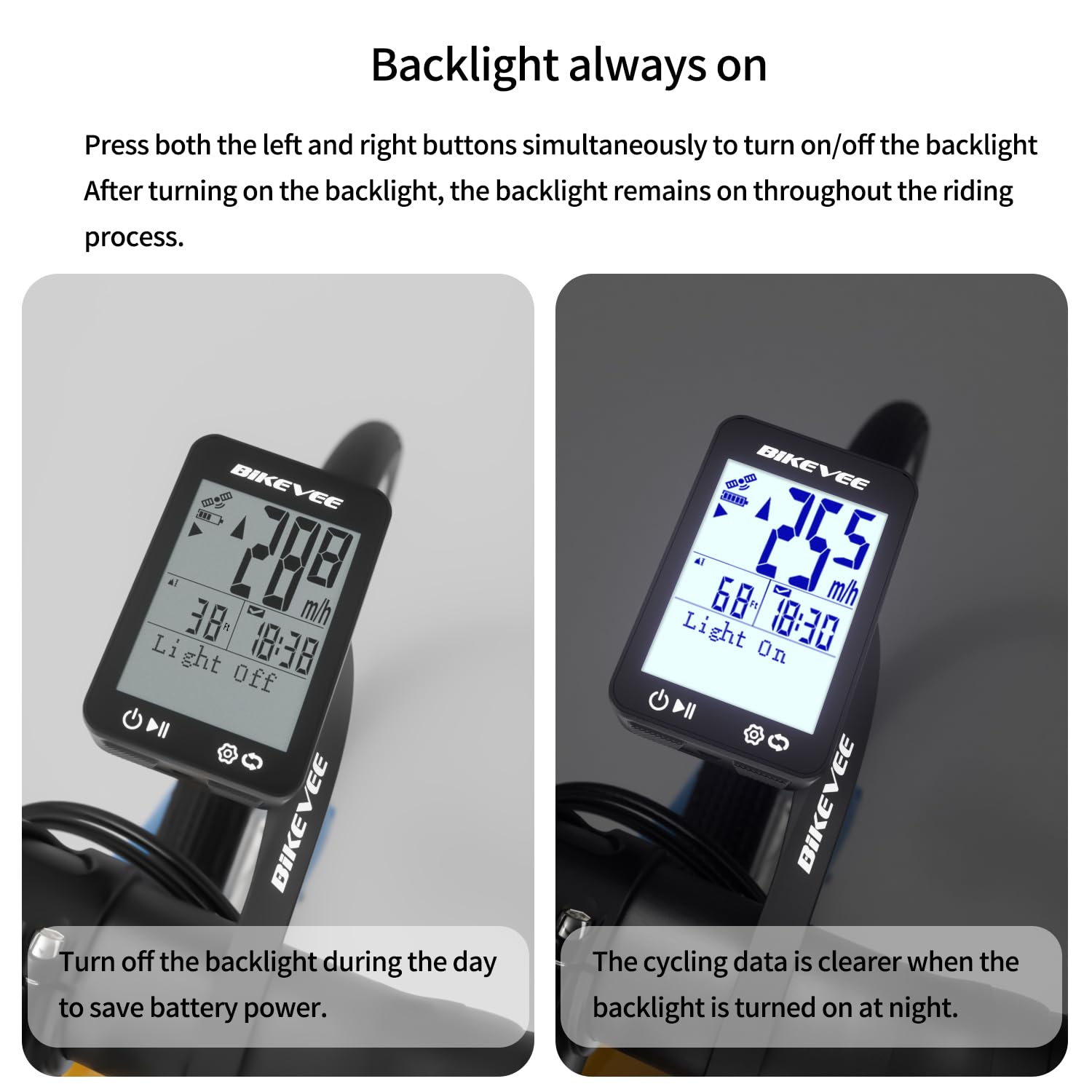
Image: Backlight functionality, showing display with backlight off and on.
5. Wartung und Pflege
5.1 Reinigung
Wischen Sie das Gerät mit einem weichen, damp Verwenden Sie keine Scheuermittel oder Lösungsmittel, da diese den Bildschirm oder die Elektronik beschädigen können.asing.
5.2 Abdichtung
The Bikevee GPS Bike Computer has an IPX7 waterproof rating, meaning it can withstand immersion in water up to 1 meter for 30 minutes. This protects it from rain and splashes during your rides. However, avoid prolonged submersion or high-pressure water jets.
5.3 Laden der Batterie
The device is equipped with a 650mAh Lithium Ion battery, providing up to 28 hours of continuous use. Charge the device using the provided USB-C charging cable when the battery indicator is low.
6. Fehlerbehebung
If you encounter issues with your Bikevee GPS Bike Computer, consider the following:
- Gerät lässt sich nicht einschalten: Stellen Sie sicher, dass der Akku geladen ist. Schließen Sie das Gerät an das Ladekabel an und lassen Sie es mindestens 30 Minuten lang laden, bevor Sie versuchen, es wieder einzuschalten.
- GPS-Signal nicht empfangen: Stellen Sie sicher, dass Sie sich in einem offenen Bereich mit freier Sicht befinden. view of the sky. Initial GPS acquisition can take longer. If indoors or under heavy tree cover, signal acquisition may be difficult.
- Ungenaue Daten: Ensure the device is securely mounted and has a clear GPS signal. Verify that the correct units (MPH/KM/H) are selected in the settings.
- Bildschirm nicht sichtbar: Check the backlight setting. If the backlight is off, press both left and right buttons simultaneously to activate it.
Weitere Unterstützung erhalten Sie über die Kontaktinformationen im Abschnitt Garantie und Support.
7. Spezifikationen
| Besonderheit | Spezifikation |
|---|---|
| Marke | Fahrradvee |
| Modellnummer | SF20250929B0FN818NDK |
| Farbe | Schwarz |
| Technische Daten | 45 mm (L) x 16 mm (B) x 70 mm (H) |
| Artikelgewicht | 50 Gramm |
| Bildschirmgröße | 2.4 Zoll |
| Anzeigetyp | LCD |
| Akkulaufzeit | 28 Stunden |
| Zusammensetzung der Batteriezellen | Lithium-Ionen |
| Internationale Schutzbewertung | IPX7 |
| Montagetyp | Lenkerhalterung |
| Eingabe der menschlichen Schnittstelle | Schaltflächen |
| Ursprungsland | China |

Image: Summary of key product features and specifications.
8. Garantie und Support
8.1 Qualitätssicherung
Bikevee is committed to providing dependable products. This GPS Bike Computer is designed for lasting satisfaction.
8.2 Kundendienst
For any questions, technical support, or warranty claims, please contact Bikevee customer service through the retailer where you purchased the product or visit the official Bikevee webWebsite für Kontaktinformationen.


