1. Einleitung
Thank you for choosing the Parsonver PSSW8 Smart Watch. This manual provides essential information for setting up, operating, and maintaining your device. The PSSW8 Smart Watch is designed to enhance your daily life with features such as built-in GPS, Bluetooth calling, comprehensive health monitoring, and a wide array of sports modes.

Figure 1: Parsonver PSSW8 Smart Watch (Black 43mm)
2. Sicherheitshinweise
- Kein Medizinprodukt: This device is not intended for medical use and should not be used to diagnose or treat any medical condition. Consult a medical professional for any health concerns.
- Wasserbeständigkeit: The device is IP68 water- and dust-resistant, suitable for splashes, hand washing, and rain. It is not recommended for showering, swimming, or sauna use. Prolonged exposure to water may cause damage.
- Batteriesicherheit: Versuchen Sie nicht, den Akku selbst auszutauschen. Verwenden Sie ausschließlich das mitgelieferte Ladekabel. Vermeiden Sie extreme Temperaturen.
- Erstickungsgefahr: Bewahren Sie das Gerät und sein Zubehör außerhalb der Reichweite von Kleinkindern auf.
- Fahrsicherheit: Avoid interacting with the device while driving to prevent distractions.
3. Einrichtung
3.1. Auspacken und Packungsinhalt
Carefully unbox your Parsonver PSSW8 Smart Watch. The package should contain the following items:
- 1x Parsonver PSSW8 Smart Watch
- 1x Ladekabel
- 1x Benutzerhandbuch
- Additional interchangeable bands (color may vary)
Video 1: Unboxing und erster Eindruckview of the Parsonver Smart Watch and its accessories.
3.2. Attaching/Changing Bands
The watch bands are designed for easy attachment and removal, allowing you to customize your watch's appearance. To remove a band, locate the small release button on the underside of the watch where the band connects. Push this button and slide the band out. To attach a new band, align it with the watch body and slide it in until it clicks securely into place.

Figure 2: Close-up of the watch band attachment mechanism.
3.3. Aufladen der Smartwatch
Connect the magnetic charging cable to the charging points on the back of the watch. The magnets will ensure proper alignment. Connect the USB end of the cable to a power source. A full charge typically takes about 2 hours and provides up to 7 days of typical use or 30 days of standby time.

Abbildung 3: Magnetisches Ladekabel, das mit der Uhr verbunden ist.
3.4. App-Installation und Gerätekopplung
Download the companion app (InfoWear) from your smartphone's app store (compatible with Android 5.0+ and iOS 12.0+). Open the app and follow the on-screen instructions to pair your watch. This usually involves scanning a QR code displayed on the watch screen. Ensure Bluetooth is enabled on your phone.
Video 2: Demonstrates the pairing process between the smartwatch and the companion app.
3.5. Unit Settings and Watch Face Customization
Within the app, navigate to the settings to customize units (metric/imperial) for weight, length, and temperature. You can also browse over 100 watch faces in the "Watch Face Center" or create your own custom DIY watch face using your photos.

Figure 4: Watch Face Center in the companion app showing various customization options.
4. Bedienung der Smartwatch
4.1. Navigation und Benutzeroberfläche
The watch features a 1.27-inch 360x360 Ultra HD display with responsive touch controls. Swipe left/right to access quick widgets like activity data, heart rate, sleep, music control, and weather. Swipe down for quick settings (brightness, water lock, etc.). Press the side button to access the main app menu.
4.2. Gesundheitsüberwachung
The PSSW8 Smart Watch offers 24/7 wellness monitoring:
- Herzfrequenz: Tracks heart rate continuously with customizable alerts.
- Blutsauerstoffsättigung (SpO2): Überwacht den Sauerstoffgehalt im Blut.
- Stressniveau: Provides insights into emotional fluctuations.
- Schlafüberwachung: Analysiert Tief-, Leicht- und REM-Schlafphasentages.
- Frauengesundheits-Tracking: Unterstützt datengestütztes Zyklusmanagement.

Abbildung 5: Überview of 24-hour health monitoring features.
4.3. Sportmodi und Aktivitätsverfolgung
Choose from over 100 sports modes, including running, cycling, yoga, and strength training. The watch automatically detects workouts and records stats like heart rate, calories, distance, and pace. Built-in GPS accurately tracks routes without needing your phone.

Figure 6: Built-in GPS tracking for outdoor activities.
4.4. Bluetooth Calling and Smart Alerts
With dual Bluetooth support (BT 3.0 + BLE 5.3) and a premium microphone, you can make and answer calls directly from your wrist. Receive instant notifications for calls, texts, and popular apps like WhatsApp and Facebook. Quick call replies are available for Android users.

Figure 7: Bluetooth calling and smart notifications on the watch.
4.5. Funktionen des intelligenten Lebensassistenten
The watch includes various assistant features:
- Erinnerungen: Drink water, move, take medication, wash hands.
- Werkzeuge: Weather updates, music control, remote camera trigger, alarms, timers, stopwatch, calculator, calendar, find my phone.
- Wellness: Guided breathing sessions.
- KI-Funktionen: AI Voice Assistant and AI Smart Watch Face generation.

Abbildung 8: Überview zusätzliche smarte Funktionen, die auf der Uhr verfügbar sind.
4.6. IP68 Water and Dust Resistance
The watch is IP68 rated, meaning it is resistant to dust and can withstand immersion in water up to 1.5 meters for 30 minutes. It is suitable for daily use like hand washing, rain, and splashes. However, it is not recommended for showering, swimming, or sauna use.

Figure 9: The watch is IP68 waterproof, suitable for splashes but not prolonged water immersion.
5. Wartung
- Reinigung: Regularly wipe the watch screen and bands with a soft, dry cloth. If necessary, use a slightly damp Mit einem Tuch und milder Seife behandeln, anschließend gründlich ausspülen und trocknen.
- Laden: Always use the provided magnetic charging cable. Ensure the charging points are clean and dry before charging.
- Lagerung: Bewahren Sie die Uhr bei Nichtgebrauch an einem kühlen, trockenen Ort fern von direkter Sonneneinstrahlung und extremen Temperaturen auf.
- Software-Updates: Periodically check the companion app for available software updates to ensure optimal performance and access to new features.
6. Fehlerbehebung
- Uhr schaltet sich nicht ein: Stellen Sie sicher, dass die Uhr vollständig aufgeladen ist. Schließen Sie sie an das Ladegerät an und warten Sie einige Minuten, bevor Sie versuchen, sie wieder einzuschalten.
- Verbindungsprobleme:
- Stellen Sie sicher, dass Bluetooth auf Ihrem Smartphone aktiviert ist.
- Stellen Sie sicher, dass sich die Uhr in Reichweite Ihres Smartphones befindet.
- Starten Sie sowohl Ihr Smartphone als auch die Uhr neu.
- Das Gerät wird über die Begleit-App entkoppelt und anschließend wieder gekoppelt.
- Inaccurate Readings (Heart Rate, SpO2, etc.):
- Achten Sie darauf, dass die Uhr eng am Handgelenk sitzt, aber nicht zu eng.
- Halten Sie den Sensorbereich auf der Rückseite der Uhr sauber.
- Bleiben Sie während der Messungen ruhig.
- Bildschirm reagiert nicht/eingefroren: Try restarting the watch by pressing and holding the side button. If unresponsive, allow the battery to fully drain and then recharge. A factory reset option is available in the app settings.
7. Spezifikationen
| Besonderheit | Detail |
|---|---|
| Modellnummer | PSSW8 |
| Anzeigegröße | 1.27 Zoll |
| Bildschirmauflösung | 360x360 Pixel |
| Wasserbeständigkeit | IP68 |
| Batteriekapazität | 270 Milliamp Std |
| Akkulaufzeit (typisch) | Bis zu 7 Tage |
| Standby-Zeit | Bis zu 30 Tage |
| Ladezeit | Ca. 2 Stunden |
| Konnektivität | Bluetooth 5.3 (BT 3.0 + BLE 5.3) |
| Betriebssystem | Compatible with iOS 12.0+/Android 5.0+ |
| Eingebautes GPS | Ja |
| Artikelgewicht | 40 Gramm |
| Technische Daten | 11.02 x 3.35 x 0.71 Zoll |
8. Garantie und Support
Your Parsonver PSSW8 Smart Watch comes with dedicated customer service. For any questions, technical support, or warranty claims, please contact our 24/7 customer service team. Refer to the product packaging or the official Parsonver webWebsite für Kontaktdaten.
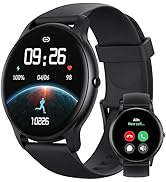
Figure 10: 24/7 Online Support available.


