1. Einleitung
This manual provides detailed instructions for the safe and effective operation of your Ourlife M40TR 5K WiFi Action Camera. Please read this manual thoroughly before using the device and retain it for future reference. This camera is designed to capture high-quality video and photos in various environments, including underwater, with features such as dual screens, Electronic Image Stabilization (EIS), and remote control capabilities.
2. Packungsinhalt
Bitte prüfen Sie, ob alle unten aufgeführten Artikel in Ihrem Paket enthalten sind. Sollten Artikel fehlen oder beschädigt sein, kontaktieren Sie bitte unseren Kundenservice.
- Ourlife M40TR Action-Kamera
- Wasserdichtes Gehäuse
- 32GB-Speicherkarte
- 2.4G Drahtlose Fernbedienung
- USB-Kabel
- Lenker-/Stangenhalterung
- Various Mounts (Mount1, Mount2, Mount3, Mount4, Mount5)
- Clip 1
- Bandagen
- 3M Klebepads
- Drahtseil
- Bedienungsanleitung

Bild: Ourlife M40TR Action Camera, waterproof housing, 32GB memory card, remote control, and various mounting accessories.
3. Produktüberschreitungview
Das Ourlife M40TR features a compact design with dual screens for versatile shooting. The main screen is a 2-inch touchscreen, complemented by a 1.3-inch front display for easy selfies and vlogging. It supports 5K Ultra HD video recording and 50MP photos, enhanced by Electronic Image Stabilization (EIS) and a 170° ultra-wide-angle lens with 5X digital zoom.

Bild: Das Ourlife M40TR Action Camera showcasing its dual color screens and 5K 30FPS capability.

Image: Icons illustrating key features: 5K Video, Dual Color Screen, EIS, 50MP Photos, Dashcam Mode, 170° Wide Angle Lens, Time Lapse, 100FT Waterproof, WiFi Connect, Remote.
4. Einrichtung
4.1. Einlegen der Batterie
The camera uses a rechargeable Lithium Ion battery. Ensure the battery is fully charged before first use. To install the battery:
- Öffnen Sie die Batteriefachabdeckung an der Unterseite der Kamera.
- Setzen Sie die Batterie mit der richtigen Ausrichtung ein und achten Sie dabei auf die korrekte Kontaktierung.
- Schließen Sie den Batteriefachdeckel fest.
4.2. Installation der SD-Karte
A 32GB Micro SD card is included. The camera supports Micro SD cards up to 256GB.
- Suchen Sie den Micro-SD-Kartensteckplatz an der Seite der Kamera.
- Legen Sie die Micro-SD-Karte so ein, dass die Kontakte zur Vorderseite der Kamera zeigen, bis sie einrastet.
- Zum Entfernen die Karte vorsichtig herausdrücken.
4.3. Verwendung des wasserdichten Gehäuses
The included waterproof housing allows the camera to be used at depths of up to 30 meters (100 feet). Ensure the camera is securely placed inside the housing and the latch is firmly closed before submerging.
Video: Demonstration of the Ourlife M40TR Action Camera's waterproof capabilities, showing it submerged in water.

Bild: Das Ourlife M40TR Action Camera in its waterproof housing, submerged in water with a diver in the background, illustrating its 30M (100FT) waterproof depth.
5. Bedienungsanleitung
5.1. Ein-/Ausschalten
- To power on: Press and hold the Power/Mode button until the screen lights up.
- Zum Ausschalten: Halten Sie die Ein-/Aus-Taste gedrückt, bis sich der Bildschirm ausschaltet.
5.2. Dual Screen Operation
The camera features a 2-inch main touchscreen and a 1.3-inch front display. You can switch between the front and rear screens for different shooting perspectives.
- To switch screens: Press and hold the 'M' button on the side of the camera.
- Note: Only one screen is active at a time to conserve battery.

Bild: Das Ourlife M40TR Action Camera displaying its dual screens, with the front screen showing a selfie view and the rear screen showing the main camera view.
5.3. Modusauswahl
The camera offers multiple shooting modes accessible via the touchscreen interface.
Video: A user navigating through the mode selection menu on the Ourlife M40TR Action Camera's touchscreen.
Verfügbare Modi sind:
- Normales Video
- Langsames Video
- Video in Endlosschleife
- Zeitraffer-Video
- Normales Foto
- Auto Timer Foto
- Serienfotos
- Zeitrafferfoto
- Dashcam Mode
5.4. Video and Photo Resolution Settings
Adjust video and photo resolutions to suit your needs. Access these settings through the camera's menu.

Bild: Das Ourlife M40TR Action Camera highlighting its 5K Ultra HD video display, supporting various resolutions including 4K 60fps/30fps, 2.7K 30fps, 1080P 60fps/30fps, and 720P 120fps/60fps/30fps.

Bild: Das Ourlife M40TR Action Camera demonstrating its 50MP photo capability, with options for 50MP, 30MP, 24MP, 20MP, 12MP, and 8MP.
5.5. Elektronische Bildstabilisierung (EIS)
The built-in EIS technology helps to stabilize video footage, reducing blur and shakiness, especially during active movements.

Image: A split image showing the difference between EIS off (blurry) and EIS on (stable) during a cycling activity.

Image: Visual representation of EIS Anti-Shake Technology, ensuring crystal-clear photos and videos devoid of blurriness or ghosting.
5.6. Wide Angle & Zoom
The 170° ultra-wide-angle lens captures expansive scenes, and the 5X digital zoom allows for closer shots.
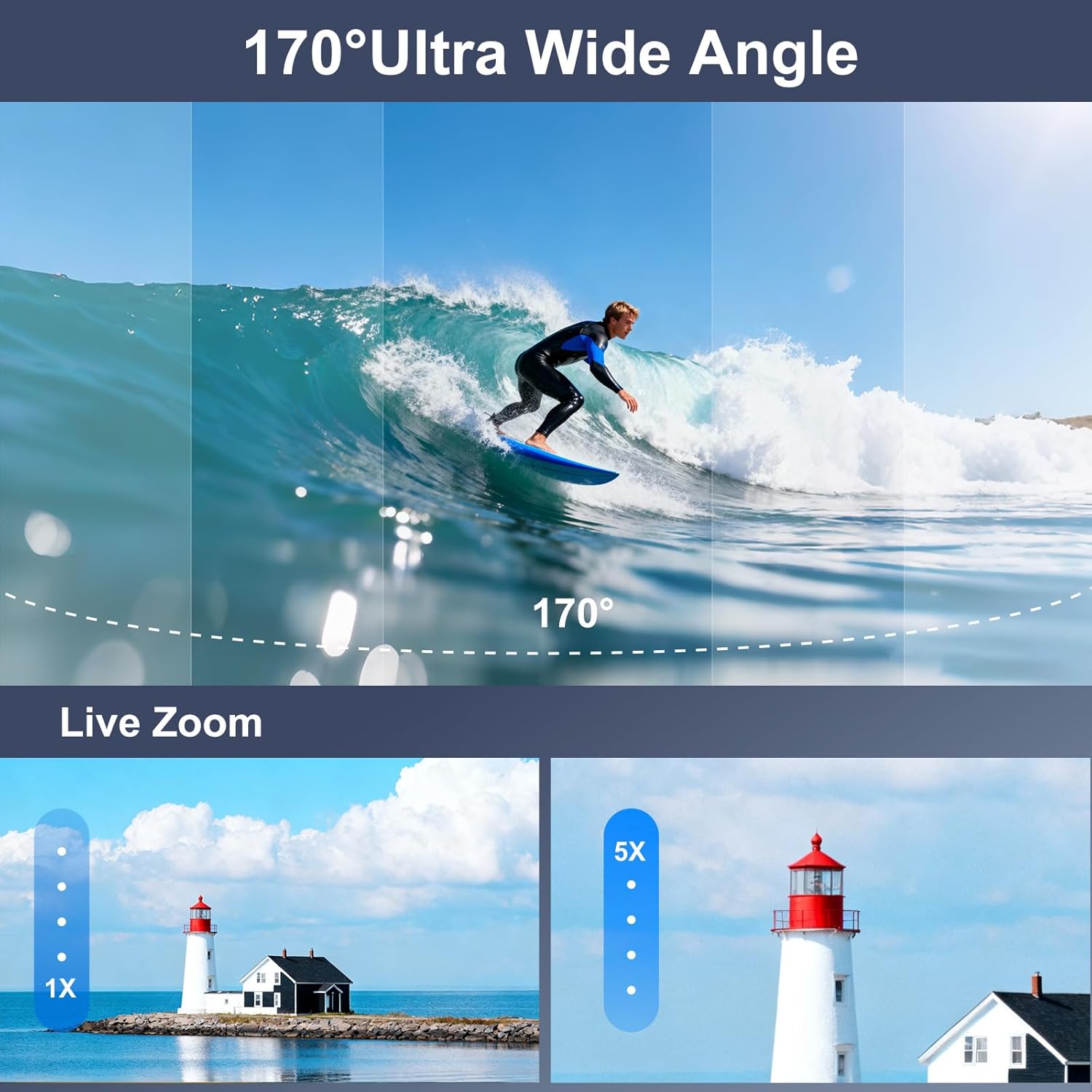
Image: A visual comparison of a 170° ultra-wide-angle shot of a surfer and a demonstration of 5X digital zoom on a lighthouse.

Image: A paraglider captured with the Ourlife M40TR Action Camera, illustrating the expansive 170° ultra-wide view Winkel.
5.7. Verwendung der Fernbedienung
The 2.4G wireless remote control allows you to operate the camera from up to 15 meters away, switching between video and photo modes with a single button.

Image: A cyclist using the 2.4GHz wireless remote control on their wrist to operate the Ourlife M40TR Action Camera, highlighting its 15m range.
5.8. Wi-Fi Connection & App
Connect your camera to the SupCam Pro app via Wi-Fi for live preview, remote control, and instant sharing of content.

Bild: Das Ourlife M40TR Action Camera wirelessly connected to a smartphone, showing instant sharing of photos and videos to social media platforms.

Image: Step-by-step guide on how to connect the Ourlife M40TR Action Camera to Wi-Fi using the SupCam Pro App, including a QR code for app download. Download the SupCam Pro App: https://qr04.cn/Acp9lo
5.9. Datenübermittlung
Transfer your photos and videos to your computer using Wi-Fi, USB cable, or a card reader.

Image: Visual guide demonstrating three methods for downloading pictures and videos from the Ourlife M40TR Action Camera to a computer: via Mobile App (Wi-Fi), USB Connection, and Card Reader.
6. Wartung
6.1. Reinigung
- Verwenden Sie ein weiches, fusselfreies Tuch, um die Kameralinse und die Bildschirme zu reinigen.
- For the waterproof housing, rinse with fresh water after each use in saltwater and allow to air dry.
6.2. Speicherung
- Bewahren Sie die Kamera an einem kühlen, trockenen Ort ohne direkte Sonneneinstrahlung auf.
- Wenn die Kamera längere Zeit nicht verwendet wird, entnehmen Sie die Batterie.
7. Fehlerbehebung
If you encounter any issues with your Ourlife M40TR Action Camera, please refer to the following common solutions:
- Kamera lässt sich nicht einschalten: Stellen Sie sicher, dass der Akku vollständig geladen und richtig eingelegt ist.
- SD-Kartenfehler: Format the SD card in the camera's settings menu. If the issue persists, try a different compatible SD card.
- Probleme mit der Wi-Fi-Verbindung: Ensure the camera's Wi-Fi is enabled and you are within range. Restart both the camera and your smartphone.
- Schlechte Video-/Fotoqualität: Check the selected resolution settings. Ensure the lens is clean and free from smudges.
- Wasseraustritt im Gehäuse: Before each use, inspect the waterproof housing for any cracks or damage. Ensure the rubber seal is clean and properly seated.
Für weitere Unterstützung wenden Sie sich bitte an den Kundendienst.
8. Spezifikationen
| Besonderheit | Detail |
|---|---|
| Markenname | Ourlwenn |
| Modellnummer | AT-M40R |
| Auflösung der Videoaufnahme | 5K |
| Fotosensor-Technologie | CMOS |
| Besondere Merkmale | EIS, 170° Adjustable View Angle, Anti-Shake, Remote Control, Speakers, Time Lapse, Timer, Car Mode |
| Wasserdichte Tiefe | Up to 30 meters (100FT) with waterproof case |
| Konnektivitätstechnologie | WLAN, Kabellos |
| Bildschirmgröße | 2 Inches (main), 1.3 Inches (front) |
| Flash-Speichertyp | Micro-SD-Karte (unterstützt bis zu 256 GB) |
| Batterien | 1 Lithium-Ionen-Akku erforderlich (im Lieferumfang enthalten) |
| Artikelgewicht | 14.9 Unzen |
| Verpackungsabmessungen | 11.34 x 7.52 x 3.11 Zoll |
9. Garantie und Support
Ourlife offers the following support for your product:
- 30-day Guarantee & Refunds: For initial purchase satisfaction.
- 1-year Exchange: Bei Produktmängeln oder Funktionsstörungen.
- 24-hour Official Support: Kontakt per E-Mail unter info@ourlifesmart.com für Fragen oder Hilfe.

Bild: Ourlife customer support details, including email address (info@ourlifesmart.com), 24-hour official support, 30-day guarantee & refunds, and 1-year exchange policy.