Einführung
Thank you for choosing the VANBAR CP03pro Display Audio Dock Suction Cup Mount. This product is designed to provide a secure and highly adjustable mounting solution for your portable car displays, GPS monitors, and dash cams. Please read this manual carefully before installation and use to ensure proper operation and longevity of the product.
Produkt überview
The VANBAR CP03pro mount features a robust design for versatile positioning and secure device holding. Key features include:
- Breite Kompatibilität: Supports 6.86, 7, 9.3, 10.26, 11.4, and 11.5-inch portable wireless CarPlay stereos, GPS monitors, and dash cams.
- Mehrwinkeleinstellung: Equipped with a foldable telescopic arm that extends up to 15 cm for optimal reach.
- 360-Grad-Drehung: A dual-axis ball joint design allows for full 360-degree rotation (clockwise/counter-clockwise) and 180-degree vertical angle adjustment.
- Secure Device Grip: Features a silicone clip material to firmly secure your device, preventing movement due to vehicle vibrations.

Image 1: The VANBAR CP03pro mount demonstrating its telescopic arm extension and multi-directional rotation for flexible positioning.
Installationsanweisungen
- Bereiten Sie die Montagefläche vor: Choose a clean, flat, and smooth surface on your dashboard or windshield. Ensure it is free from dust, grease, or moisture. Clean the surface thoroughly with an alcohol wipe if necessary, and let it dry completely.
- Befestigen Sie den Saugnapf: Place the suction cup firmly onto the prepared surface. Press down on the center of the suction cup to expel air, then push the locking lever down to create a strong vacuum seal.
- Schließen Sie Ihr Gerät an: Open the silicone clip on the mount and carefully insert your portable display, GPS monitor, or dash cam. Ensure the device is securely seated within the clip.
- Passen Sie die Position an: Loosen the adjustment knobs on the telescopic arm and ball joint. Extend the arm to your desired length (up to 15 cm) and rotate/tilt your device to the optimal viewing-Winkel.
- Secure the Adjustments: Once the desired position is achieved, firmly tighten all adjustment knobs to lock the mount and your device in place.
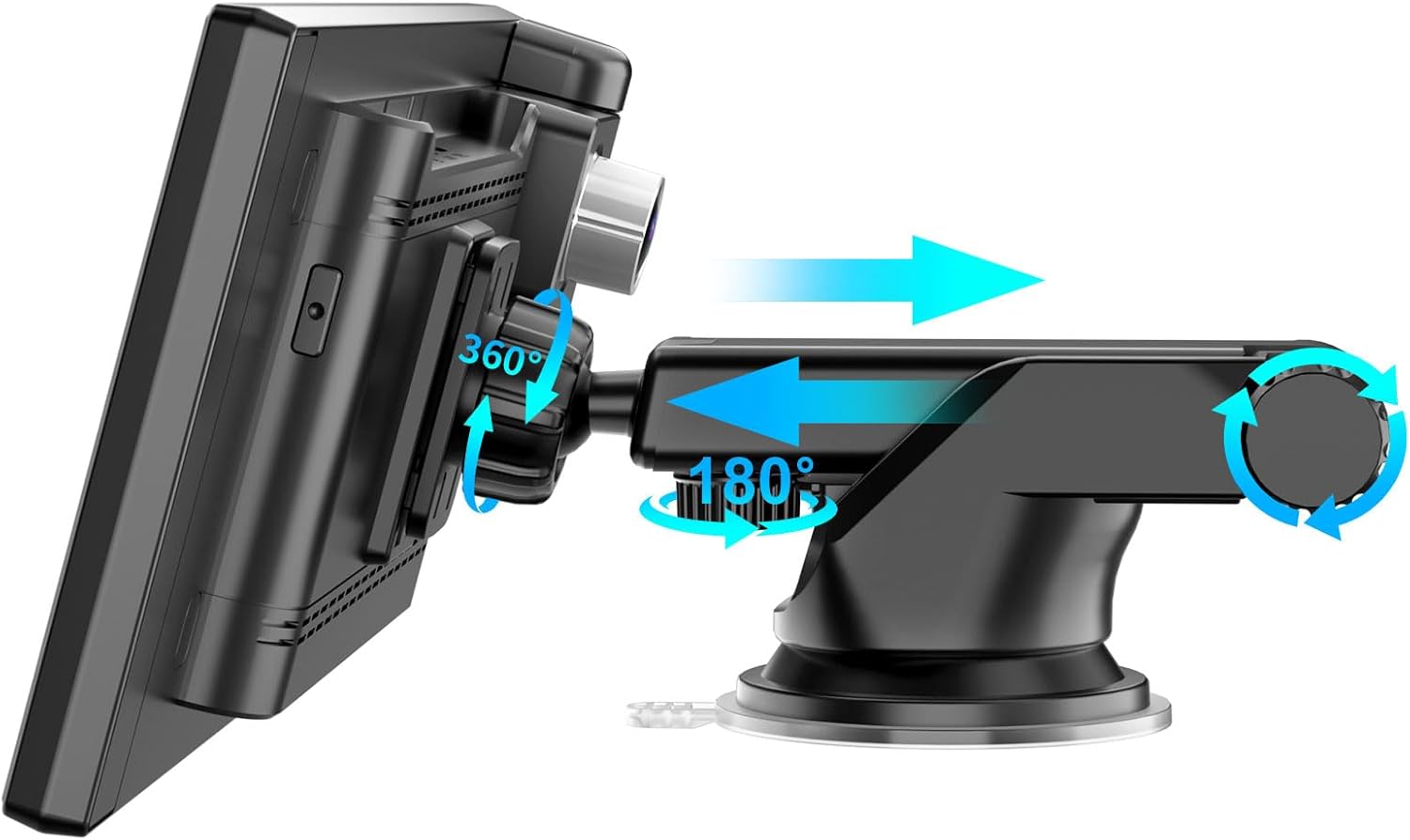
Image 2: The VANBAR CP03pro mount holding a portable display, illustrating how the device can be positioned and adjusted.
Bedienungsanleitung
The CP03pro mount offers intuitive adjustments for optimal viewing:
- Telescopic Arm Extension: To extend or retract the arm, loosen the knob on the arm, slide it to the desired length, and then tighten the knob. The arm extends up to 15 cm.
- Winkeleinstellung: The dual-axis ball joint allows for precise angle adjustments. Loosen the knob near the device clip to rotate your device 360 degrees or tilt it up to 180 degrees vertically. Tighten the knob firmly once the desired angle is set.
- Geräteentfernung: To remove your device, gently open the silicone clip and carefully lift the device out.
- Entfernung der Halterung: To remove the entire mount, lift the locking lever on the suction cup to release the vacuum seal, then gently pull the tab on the suction cup to detach it from the surface.
Wartung
Regular maintenance ensures the longevity and performance of your VANBAR CP03pro mount:
- Reinigung des Saugnapfs: If the suction cup loses its grip, rinse it with warm water and allow it to air dry completely. Do not wipe it with a cloth, as this can leave lint.
- Reinigung der Halterung: Wipe the mount body and silicone clip with a soft, damp cloth. Avoid using abrasive cleaners, solvents, or harsh chemicals, as these can damage the materials.
- Lagerung: When not in use for extended periods, remove the mount from the surface and store it in a cool, dry place away from direct sunlight.
Fehlerbehebung
| Problem | Mögliche Ursache | Lösung |
|---|---|---|
| Mount does not stick to the surface. | Surface is dirty, uneven, or porous. Suction cup is dirty or damaged. | Clean the mounting surface thoroughly. Ensure the surface is flat and smooth. Clean the suction cup with warm water and air dry. Press firmly on the suction cup before engaging the locking lever. |
| Device is not held securely or moves during driving. | Device not properly seated in the clip. Adjustment knobs are loose. | Ensure your device is fully inserted into the silicone clip. Firmly tighten all adjustment knobs on the telescopic arm and ball joint after positioning. |
| Ball joint feels loose and cannot maintain position. | Adjustment knob for the ball joint is not tightened sufficiently. | Ensure the adjustment knob for the ball joint is tightened as much as possible. If the issue persists, contact customer support. |
Technische Daten
- Modell: CP03pro (Product Model Number: Da-2023)
- Montageart: Saugnapfhalterung
- Compatible Device Sizes: 6.86, 7, 9.3, 10.26, 11.4, 11.5-inch portable displays (e.g., wireless CarPlay stereos, GPS monitors, dash cams)
- Armstreckung: Bis zu 15 cm
- Drehung: 360 degrees (ball joint)
- Neigung: 180 degrees (ball joint)
- Material: Silicone clip, durable plastic/metal construction
- Farbe: Schwarz
- Produktgewicht: 120 g
- Paketabmessungen: 23.7 x 10.2 x 7.1 cm
Garantie und Support
Specific warranty information for the VANBAR CP03pro mount is not provided in the product data. Please refer to the seller's website or contact VANBAR customer service for details regarding warranty coverage and support.
For further assistance or inquiries, please visit the official VANBAR store on Amazon: VANBAR Amazon Store


