1. Installationsanleitung
This section provides instructions for the initial setup of your OPPO A6 Pro 5G CPH2781 smartphone.
1.1 Auspacken und erste Inspektion
Nehmen Sie alle Komponenten vorsichtig aus der Verpackung. Prüfen Sie, ob folgende Teile vorhanden sind:
- OPPO A6 Pro 5G CPH2781 device
- 80W SUPERVOOC Flash Charge adapter
- USB Type-C Kabel
- SIM-Auswurfwerkzeug
- Schnellstartanleitung und Sicherheitshinweise
Überprüfen Sie das Gerät auf sichtbare Schäden, bevor Sie fortfahren.
1.2 Installation der SIM-Karte und des Speichers
The OPPO A6 Pro 5G supports Dual SIM functionality. Follow these steps to install your SIM cards:
- Suchen Sie das SIM-Kartenfach an der Seite des Geräts.
- Führen Sie das SIM-Auswurfwerkzeug in die kleine Öffnung neben dem Fach ein und drücken Sie vorsichtig, bis das Fach herausspringt.
- Legen Sie Ihre Nano-SIM-Karten in die dafür vorgesehenen Schlitze des Kartenfachs ein. Achten Sie darauf, dass die goldenen Kontakte nach unten zeigen.
- Carefully reinsert the SIM card tray into the device until it clicks into place.
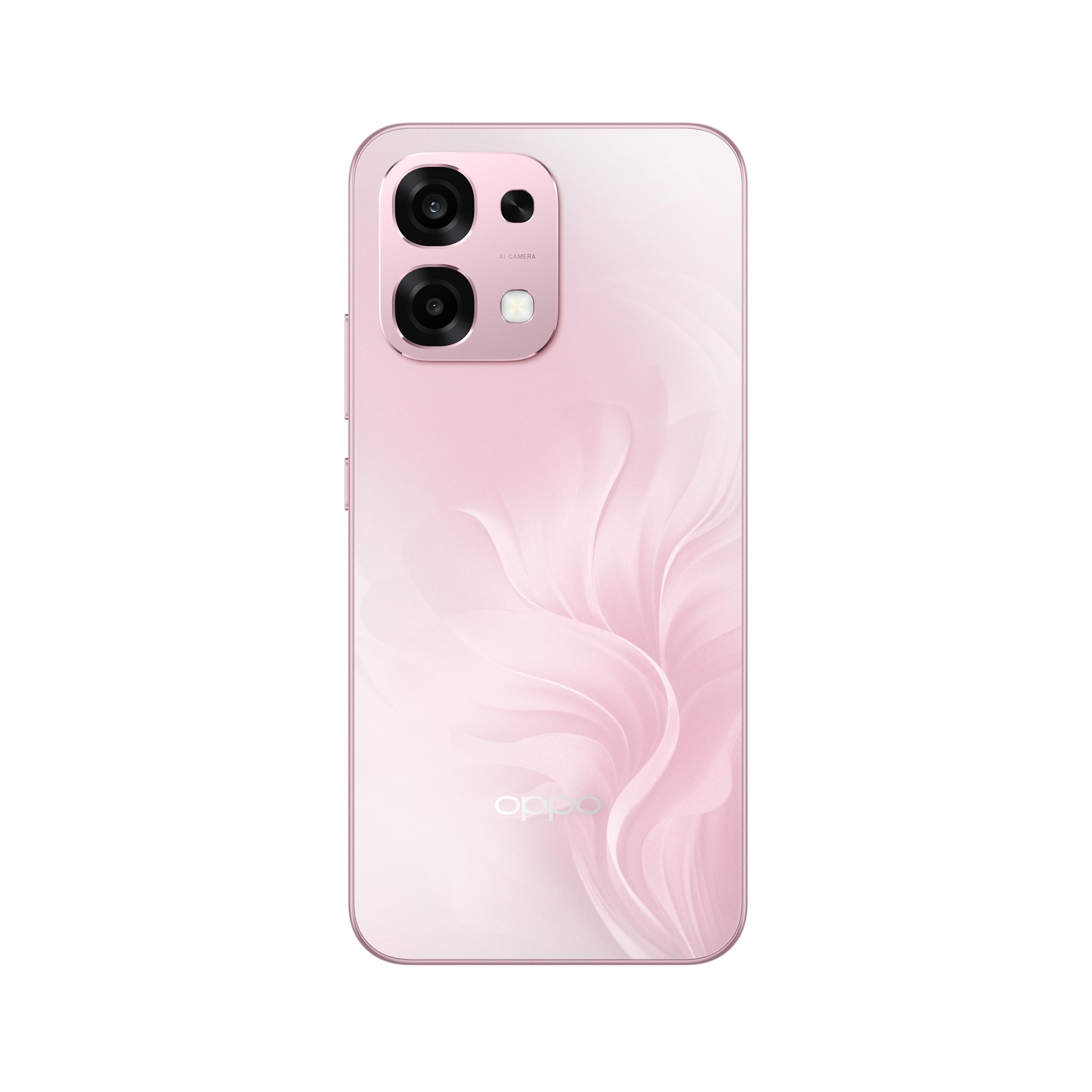
Abbildung 1: Rückseite view of the OPPO A6 Pro 5G CPH2781, highlighting the camera array and device color.
1.3 Einschalten und Erstkonfiguration
So schalten Sie Ihr Gerät zum ersten Mal ein:
- Halten Sie die Ein-/Ausschalttaste (auf der rechten Seite) gedrückt, bis das OPPO-Logo auf dem Bildschirm erscheint.
- Folgen Sie den Anweisungen auf dem Bildschirm, um Ihre Sprache und Region auszuwählen und eine Verbindung zu einem WLAN-Netzwerk herzustellen.
- Melden Sie sich mit Ihrem Google-Konto an oder erstellen Sie ein neues, um auf Google-Dienste und den Play Store zuzugreifen.
- Complete the setup wizard, including setting up screen lock methods (PIN, pattern, password, or Face Recognition).
1.4 Aufladen des Geräts
Your OPPO A6 Pro 5G is equipped with 80W SUPERVOOC Flash Charge technology for rapid charging. Use the provided 80W SUPERVOOC adapter and USB Type-C cable for optimal charging performance.
- Verbinden Sie das USB-Typ-C-Kabel mit dem Ladeanschluss an der Unterseite des Telefons.
- Connect the other end of the cable to the 80W SUPERVOOC adapter.
- Stecken Sie den Adapter in eine Steckdose.
- Die Ladeanzeige wird auf dem Bildschirm angezeigt.
2. Bedienungsanleitung
This section covers the basic operation and key features of your OPPO A6 Pro 5G CPH2781.
2.1 Navigating ColorOS
Your device runs on ColorOS, OPPO's customized Android operating system. Common navigation gestures include:
- Nach oben wischen: Access the app drawer (if enabled) or return to the home screen.
- Nach unten wischen: Öffnen Sie das Benachrichtigungsfeld und die Schnelleinstellungen.
- Nach links/rechts wischen: Navigate between home screen pages.
- Klopfen: Wählen Sie ein Element aus oder öffnen Sie eine App.
- Lange drücken: Kontextmenüs aufrufen oder App-Symbole verschieben.
2.2 Anzeigefunktionen
The OPPO A6 Pro 5G features a 6.57-inch 120Hz AMOLED Ultra Bright Display, providing vivid colors and smooth scrolling. You can adjust display settings such as brightness, color mode, and refresh rate in the Settings menu under "Display & Brightness".
2.3 Kameranutzung
The device is equipped with an advanced camera system. To open the camera, tap the Camera app icon on your home screen or lock screen. Key features include:
- Fotomodi: Standard, Portrait, Night, Pro, Panorama.
- Videoaufnahme: Supports various resolutions and frame rates.
- KI-Kamera: Utilizes artificial intelligence for scene recognition and optimal photo settings.

Figure 2: Detail of the OPPO A6 Pro 5G CPH2781 camera module.
2.4 KI-Funktionen
The OPPO A6 Pro 5G integrates several AI-powered features to enhance user experience:
- AI Eraser 2.0: For intelligent object removal in photos.
- AI Assistance for Documents: Helps in scanning and managing documents.
- AI Assistant for Notes: Enhances note-taking capabilities.
2.5 Konnektivität
Your device supports 5G cellular technology, Bluetooth, and LTE. AI LinkBoost 3.0 automatically optimizes network performance for stable connections.
- W-lan: Stellen Sie die Verbindung zu drahtlosen Netzwerken über Einstellungen > WLAN her.
- Bluetooth: Koppeln Sie andere Bluetooth-Geräte über Einstellungen > Bluetooth.
- Mobilfunknetz: Manage 5G/LTE settings via Settings > Mobile Network.
3. Wartung und Pflege
Proper maintenance ensures the longevity and optimal performance of your OPPO A6 Pro 5G CPH2781.
3.1 Batteriepflege
Das Gerät ist mit einem 6500-mAh-Akku ausgestattet. Um die Akkulaufzeit zu maximieren:
- Vermeiden Sie extreme Temperaturen.
- Use the provided 80W SUPERVOOC Flash Charge adapter and cable.
- Vermeiden Sie häufiges vollständiges Entladen des Akkus.
- Enable power-saving modes when necessary.
3.2 Wasser- und Staubbeständigkeit
The OPPO A6 Pro 5G CPH2781 has an IP69 rating, indicating resistance to dust and high-pressure water jets. While resistant, it is not waterproof under all conditions. To maintain resistance:
- Ensure the SIM tray is fully closed and sealed.
- Vermeiden Sie das Eintauchen des Geräts in Wasser.
- Do not expose the device to saltwater, chlorinated water, or other liquids.
- If the device gets wet, wipe it dry with a clean, soft cloth before charging.
3.3 Physischer Schutz
The device is certified to military standards for durability. It also comes with a built-in screen protector. For additional protection:
- Consider using a protective case.
- Avoid dropping the device or exposing it to severe impacts.
- Reinigen Sie Bildschirm und Gehäuse mit einem weichen, fusselfreien Tuch.
4. Fehlerbehebung
This section addresses common issues you might encounter with your OPPO A6 Pro 5G CPH2781.
4.1 Gerät lässt sich nicht einschalten
- Stellen Sie sicher, dass der Akku geladen ist. Schließen Sie das Gerät für mindestens 10 Minuten an das Ladegerät an.
- Perform a forced restart by pressing and holding the Power button and Volume Up button simultaneously for about 10-15 seconds.
4.2 Schlechte Netzwerkverbindung
- Prüfen Sie, ob Ihre SIM-Karte richtig eingelegt ist.
- Überprüfen Sie, ob die mobilen Daten in den Einstellungen aktiviert sind.
- Versuchen Sie, das Gerät neu zu starten.
- Reset network settings (Settings > System settings > Back up and reset > Reset phone > Reset network settings).
- Stellen Sie sicher, dass Sie sich im Netzempfang befinden.
4.3 Abstürzende oder einfrierende Apps
- Schließen Sie die App und öffnen Sie sie erneut.
- Clear the app's cache and data (Settings > Apps > App management > [App Name] > Storage usage > Clear cache/Clear data).
- Aktualisieren Sie die App auf die neueste Version aus dem Google Play Store.
- Ensure your ColorOS is up to date (Settings > About device > Up to date).
4.4 Schneller Akkuverbrauch
- Unter Einstellungen > Batterie können Sie den Akkuverbrauch prüfen, um stromfressende Apps zu identifizieren.
- Reduziere Bildschirmhelligkeit und Bildschirm-Timeout.
- Deaktivieren Sie unnötige Funktionen wie GPS, Bluetooth oder WLAN, wenn Sie diese nicht benötigen.
- Enable power-saving mode.
5. Spezifikationen
Below are the key technical specifications for the OPPO A6 Pro 5G CPH2781.
| Besonderheit | Spezifikation |
|---|---|
| Marke | OPPO |
| Modellname | A6 Pro (CPH2781) |
| Betriebssystem | FarbeOS |
| RAM-Speicher | 8 GB (erweiterbar auf 16 GB) |
| Speicherkapazität | 256 GB |
| CPU Modell | MediaTek Helio G100 |
| Bildschirmgröße | 6.57 Zoll |
| Anzeigetyp | AMOLED |
| Bildwiederholrate | 120 Hz |
| Batteriekapazität | 6500 mAh |
| Ladetechnik | 80W SUPERVOOC Blitzladung |
| Zellulartechnologie | 5G |
| Anzahl der SIM-Kartensteckplätze | Dual-SIM |
| Wasserbeständigkeit | IP69 (wasserdicht) |
| Biometrische Sicherheit | Gesichtserkennung |
| Steckertyp | USB Typ C |
| Integrierte Medien | Displayschutz |
6. Garantieinformationen
Your OPPO A6 Pro 5G CPH2781 comes with a 2 Jahr Herstellergarantie. Diese Garantie deckt Material- und Verarbeitungsfehler bei normalem Gebrauch ab.
Please retain your proof of purchase for warranty claims. The warranty does not cover damage caused by misuse, accidents, unauthorized modifications, or normal wear and tear. For detailed terms and conditions, please refer to the warranty card included in your product packaging or visit the official OPPO webWebsite.
7. Kundendienst
For further assistance, technical support, or service inquiries regarding your OPPO A6 Pro 5G CPH2781, please contact OPPO customer service through the following channels:
- Offizielles OPPO-Zertifikat WebWebsite: Besuchen OPPO-Unterstützung Für häufig gestellte Fragen, Anleitungen zur Fehlerbehebung und Kontaktinformationen.
- OPPO Store: Sie können auch die offizielle OPPO Store on Amazon für Produktinformationen und zugehöriges Zubehör.
- Servicezentren: Locate authorized OPPO service centers in your region for in-person support.
When contacting support, please have your device model (CPH2781) and serial number ready.


