Wichtige Sicherheitsinformationen
Please read this manual carefully before using the Yihou F320 Smart Watch. Keep this manual for future reference. This device is designed to assist in monitoring certain health metrics and providing emergency alerts, but it is not a medical device and should not be used for diagnostic or treatment purposes. Consult a healthcare professional for any health concerns.
- Versuchen Sie nicht, das Gerät zu öffnen oder zu zerlegen.
- Halten Sie das Gerät von extremen Temperaturen und direkter Sonneneinstrahlung fern.
- Setzen Sie das Gerät keinen starken Stößen oder Vibrationen aus.
- Verwenden Sie ausschließlich das mitgelieferte Ladekabel und den Adapter.
- Sollten Hautreizungen auftreten, stellen Sie die Anwendung ein und konsultieren Sie einen Arzt.
Produkt überview
The Yihou F320 Fall Detection Smart Watch is designed to provide essential health monitoring and safety features, particularly for seniors. Key functionalities include fall detection with automatic alerts, SOS emergency calling, remote family monitoring, heart rate tracking, sleep monitoring, pedometer, and Bluetooth calling capabilities.
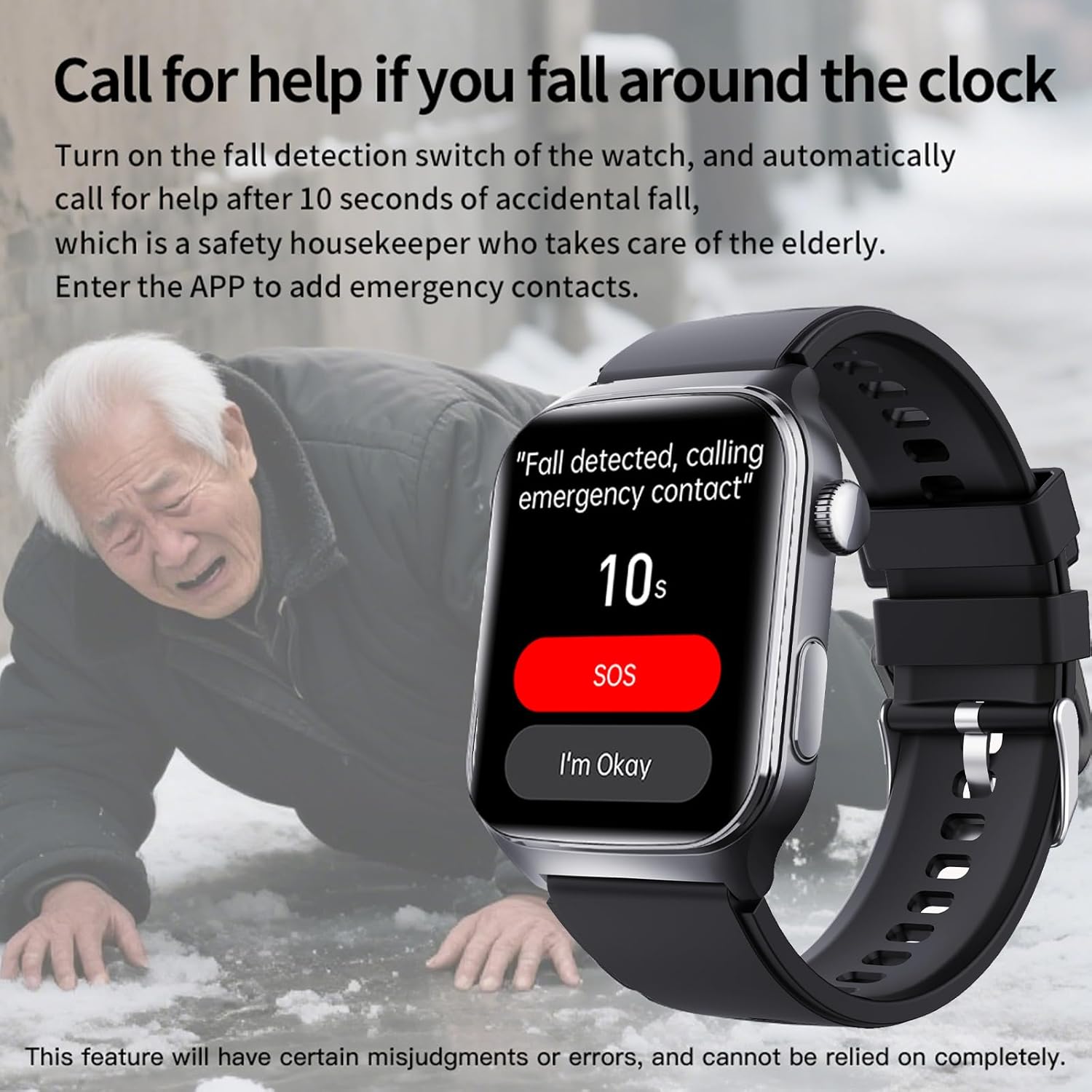
Image: Yihou F320 Smart Watch displaying time and various health metrics on its screen.
Lieferumfang
Your Yihou F320 Smart Watch package includes the following items:
- Yihou F320 Smart Watch
- Ladekabel
- Bedienungsanleitung
Aufstellen
1. Anbringen des Uhrenarmbands
The watch band may come detached from the watch body. To attach, align the pins on the band with the holes on the watch casing. Gently push the pin inwards and slide the band into place until the pin clicks securely into the hole. Repeat for the other side of the band.
Video: Demonstration of adjusting and attaching a watch band. Note: This video shows a metal band, but the principle of attachment is similar for silicone bands.
2. Aufladen des Geräts
Before first use, fully charge your smart watch. Connect the magnetic charging cable to the charging points on the back of the watch. Plug the USB end of the cable into a compatible USB power adapter (not included) or a computer USB port. The watch screen will indicate charging status.
3. Koppeln mit Ihrem Smartphone
To unlock the full potential of your Yihou F320 Smart Watch, pair it with your smartphone using the dedicated app (e.g., Joeme Fit app, as indicated in some visuals). Follow these general steps:
- Download and install the recommended companion app from your phone's app store (Android or iOS).
- Stellen Sie sicher, dass Bluetooth auf Ihrem Smartphone aktiviert ist.
- Öffnen Sie die App und folgen Sie den Anweisungen auf dem Bildschirm, um ein Konto zu erstellen oder sich anzumelden.
- Navigieren Sie in der App zum Abschnitt „Gerät“ oder „Gerät hinzufügen“.
- Select your Yihou F320 Smart Watch from the list of available devices.
- Confirm the pairing on both your phone and the watch if prompted.

Image: Visual guide showing the four steps to enable Fall Detection within the companion app, starting with opening the app and navigating to device settings.
Hauptmerkmale und Bedienung
1. Navigating the Watch Interface
The watch features a responsive touchscreen display. Swipe left, right, up, or down to access different functions and menus. Tap on icons to select applications or confirm actions. The side button typically serves as a home button or to wake the screen.
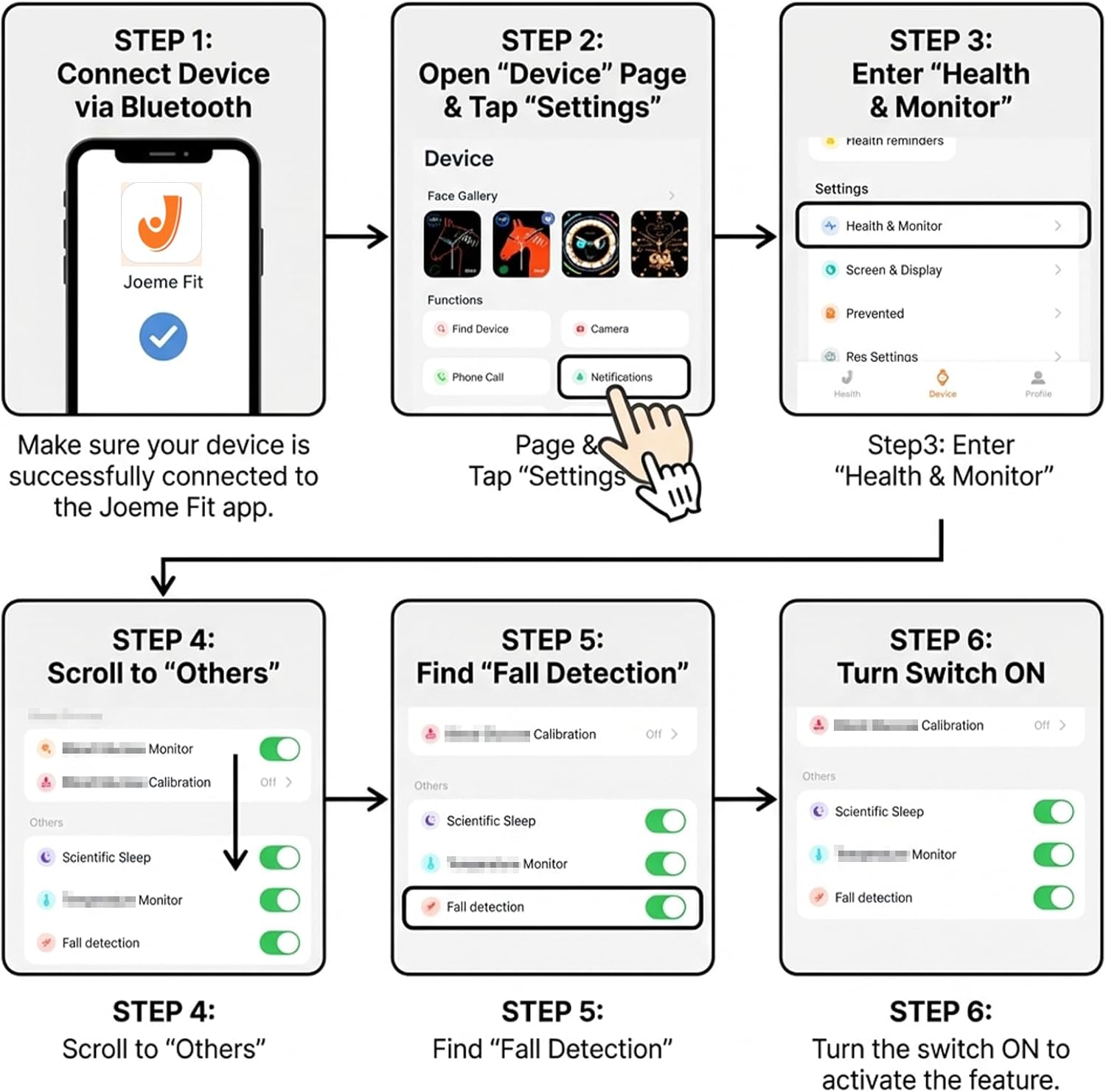
Image: The smart watch screen showing a grid of colorful application icons, including health, communication, and utility apps.
2. SOS-Notruf
The SOS feature allows for immediate contact with pre-set emergency contacts. In an emergency, press and hold the designated SOS button (or follow specific on-screen prompts) to initiate a call or send an alert. This feature provides peace of mind for both users and their families.

Image: An elderly person activating the SOS function on their smart watch, with a smartphone displaying an incoming emergency call from the watch.
3. Fall Detection with Automatic Alerts
The watch is equipped with fall detection technology. If a fall is detected, the watch will initiate a countdown. If the user does not respond within the countdown period (e.g., by pressing 'I'm Okay'), an automatic alert will be sent to pre-set emergency contacts. This ensures a rapid response in critical situations.

Image: An elderly person on the ground after a fall, with their smart watch screen showing a 'Fall detected, calling emergency contact' message and a countdown.
To enable Fall Detection:
- Tap the 'Settings' icon on your watch.
- Select 'Switches' from the menu.
- Find 'Fall Detection' and toggle the switch ON.

Image: A four-step visual guide demonstrating how to enable the Fall Detection feature directly on the smart watch interface.
4. Remote Family Monitoring
Through the companion app, designated family members can monitor the user's health data, including steps, heart rate, and sleep patterns. This feature allows families to stay informed about the well-being of elderly members, even from a distance.

Image: A split image showing an elderly person wearing the smart watch on one side, and a younger person viewing the elderly person's health data on a smartphone on the other side, illustrating remote monitoring.
5. Health Tracking (Heart Rate, Sleep, Pedometer)
Die Uhr überwacht kontinuierlich verschiedene Gesundheitsdaten:
- Herzfrequenz: Provides round-the-clock heart rate monitoring, helping users track their cardiovascular health.
- Schlafüberwachung: Tracks sleep duration and stages, offering insights into sleep quality.
- Schrittzähler: Counts steps taken throughout the day, encouraging physical activity.

Image: A smart watch displaying sleep duration and a smartphone showing detailed sleep stage analysis, with an elderly person sleeping in the background.

Image: A smart watch displaying a heart rate reading of 88 beats per minute (bpm) with a graph of heart rate over time.
6. Bluetooth Calling & Daily Reminders
The watch supports Bluetooth calling, allowing you to answer or dial calls directly from your wrist when connected to your smartphone. It also provides daily reminders such as alarms, sedentary alerts, and notifications for enhanced convenience.
Wartung
Reinigung der Uhr
Regularly clean your smart watch to ensure optimal performance and hygiene. Use a soft, lint-free cloth to wipe the screen and body. For stubborn dirt, dampBefeuchten Sie das Tuch leicht mit Wasser. Vermeiden Sie die Verwendung von scharfen Chemikalien oder scheuernden Materialien.
Batteriepflege
To prolong battery life, avoid fully discharging the watch frequently. Charge the device regularly, ideally before the battery level drops too low. Store the watch in a cool, dry place when not in use for extended periods.
Fehlerbehebung
Health Measurement Failures
If the watch displays "Failed to Measure" or provides inconsistent readings for heart rate, blood oxygen, or body composition, consider the following:
- Auf die richtige Passform achten: The watch should be worn snugly on your wrist, but not uncomfortably tight. The sensors on the back need good contact with your skin.
- Keep Still: Remain still during measurements. Movement can interfere with sensor accuracy.
- Sensoren reinigen: Ensure the sensors on the back of the watch are clean and free from dirt, sweat, or lotions.
- Finger Placement (for Body Composition): For body composition measurements, ensure your finger is correctly placed on the electrode as instructed by the watch.
Verbindungsprobleme
If the watch is not connecting to your smartphone via Bluetooth:
- Geräte neu starten: Restart both your smart watch and your smartphone.
- Bluetooth prüfen: Stellen Sie sicher, dass Bluetooth auf Ihrem Telefon aktiviert ist und sich die Uhr im Kopplungsmodus befindet.
- App-Status: Verify that the companion app is running and has the necessary permissions.
- Distanz: Keep the watch and phone within Bluetooth range (typically 10 meters or 33 feet).
Technische Daten

Image: A detailed diagram illustrating the dimensions of the Yihou F320 Smart Watch and its product parameters.
| Besonderheit | Detail |
|---|---|
| Modellname | F320 |
| Marke | Yihou |
| Bildschirmgröße | 1.9 Zoll |
| Bildschirmauflösung | 280*320 |
| Batteriekapazität | 260 Milliamp Std |
| Ausdauer | 10-12 Tage |
| Konnektivitätstechnologie | Bluetooth |
| Betriebssystem | Proprietäres Betriebssystem |
| Besondere Merkmale | Fall Detection, SOS Emergency Call, Remote Family Monitoring |
| Material | Silicone (for rosegold-silicone variant) |
| Abmessungen des Artikelpakets | 8.66 x 3.07 x 1.26 Zoll |
| Paketgewicht | 135 Gramm |
Garantie und Support
Garantieumfang
We stand behind the quality of our products. This product comes with a 12-month limited warranty from the date of purchase, covering manufacturing defects and hardware failures under normal use.
Warranty Includes:
- Material- oder Verarbeitungsfehler.
- Malfunctions caused by normal use.
Nicht unter die Garantie fallen:
- Damage caused by misuse, accidents, or unauthorized repairs.
- Normal wear and tear (e.g., scratches, dents).
- Water damage beyond the specified waterproof rating.
Kundenservice
For any questions, technical assistance, or warranty claims, please contact our customer support team. Refer to the product packaging or the official brand webWebsite für Kontaktdaten.


