Einführung
This manual provides detailed instructions for the safe and efficient use of your artfone CS181 senior mobile phone. Please read this manual carefully before using the device and keep it for future reference. The artfone CS181 is designed for ease of use, featuring large buttons, clear display, and essential functions for reliable communication.
Packungsinhalt
- artfone CS181 Mobile Phone
- Akku (800mAh)
- USB-C-Ladekabel
- Bedienungsanleitung
- Schlüsselband (kann je nach Verpackung variieren)
Gerät überview
Familiarize yourself with the main components and design of your artfone CS181 phone.
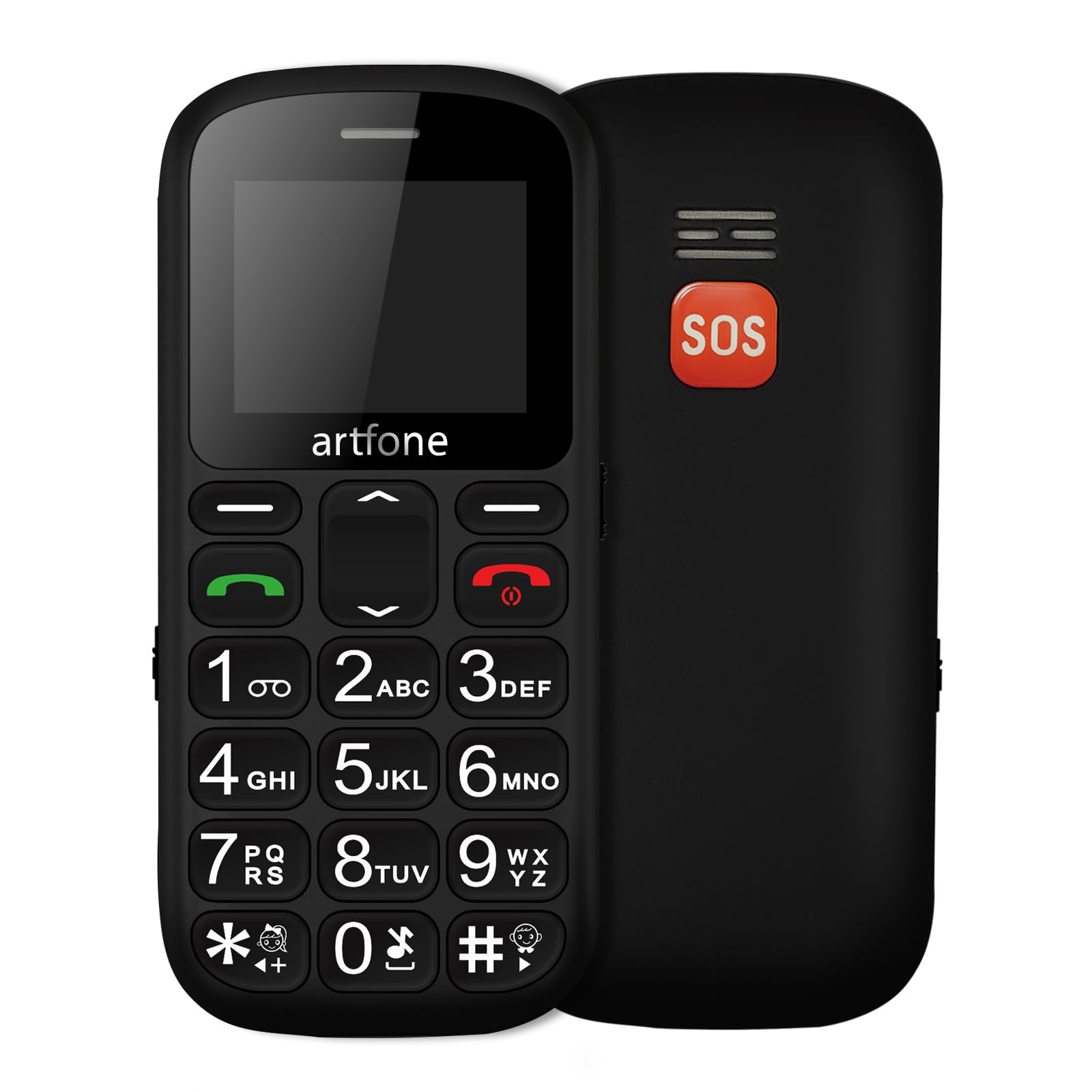
Bild: Vorder- und Rückseite view of the artfone CS181 mobile phone, showcasing its large keypad and the SOS button on the rear.

Bild: Diagram illustrating the dimensions of the artfone CS181 phone from various angles.
Aufstellen
1. Installing the Battery and SIM Cards
The artfone CS181 supports dual SIM cards (2G GSM network). Ensure the phone is powered off before installation.
- Entfernen Sie die Rückseite des Telefons, indem Sie sie vorsichtig an der Aussparung aufhebeln.
- Insert the 800mAh Lithium-ion battery into its compartment, ensuring the contacts align correctly.
- Locate the SIM card slots. Insert your 2G GSM SIM card(s) into the designated slots, ensuring the gold contacts face downwards and the cut corner aligns correctly.
- (Optional) If using a memory card, insert it into the memory card slot.
- Bringen Sie die Rückseite wieder an, bis sie sicher einrastet.

Bild: Intern view of the artfone CS181 showing the battery compartment, dual SIM card slots, and memory card slot.
2. Aufladen des Telefons
Vor der ersten Benutzung muss der Akku des Telefons vollständig aufgeladen werden.
- Connect the USB-C charging cable to the charging port on the phone.
- Verbinden Sie das andere Ende des Kabels mit einem kompatiblen USB-Netzteil (nicht immer im Lieferumfang enthalten) oder einem USB-Anschluss Ihres Computers.
- The charging indicator on the phone's screen will show the charging status. Disconnect the charger once the battery is full.
3. Ein-/Ausschalten
- Zum Einschalten: Die Taste gedrückt halten Strom-/Endanruf Drücken Sie die rote Taste so lange, bis der Bildschirm aufleuchtet.
- Zum Ausschalten: Die Taste gedrückt halten Strom-/Endanruf Drücken Sie die Taste so lange, bis die Ausschaltoptionen erscheinen, und wählen Sie dann „Ausschalten“.
4. Grundeinstellungen
Beim ersten Einschalten werden Sie möglicherweise aufgefordert, Sprache, Datum und Uhrzeit einzustellen. Folgen Sie den Anweisungen auf dem Bildschirm.
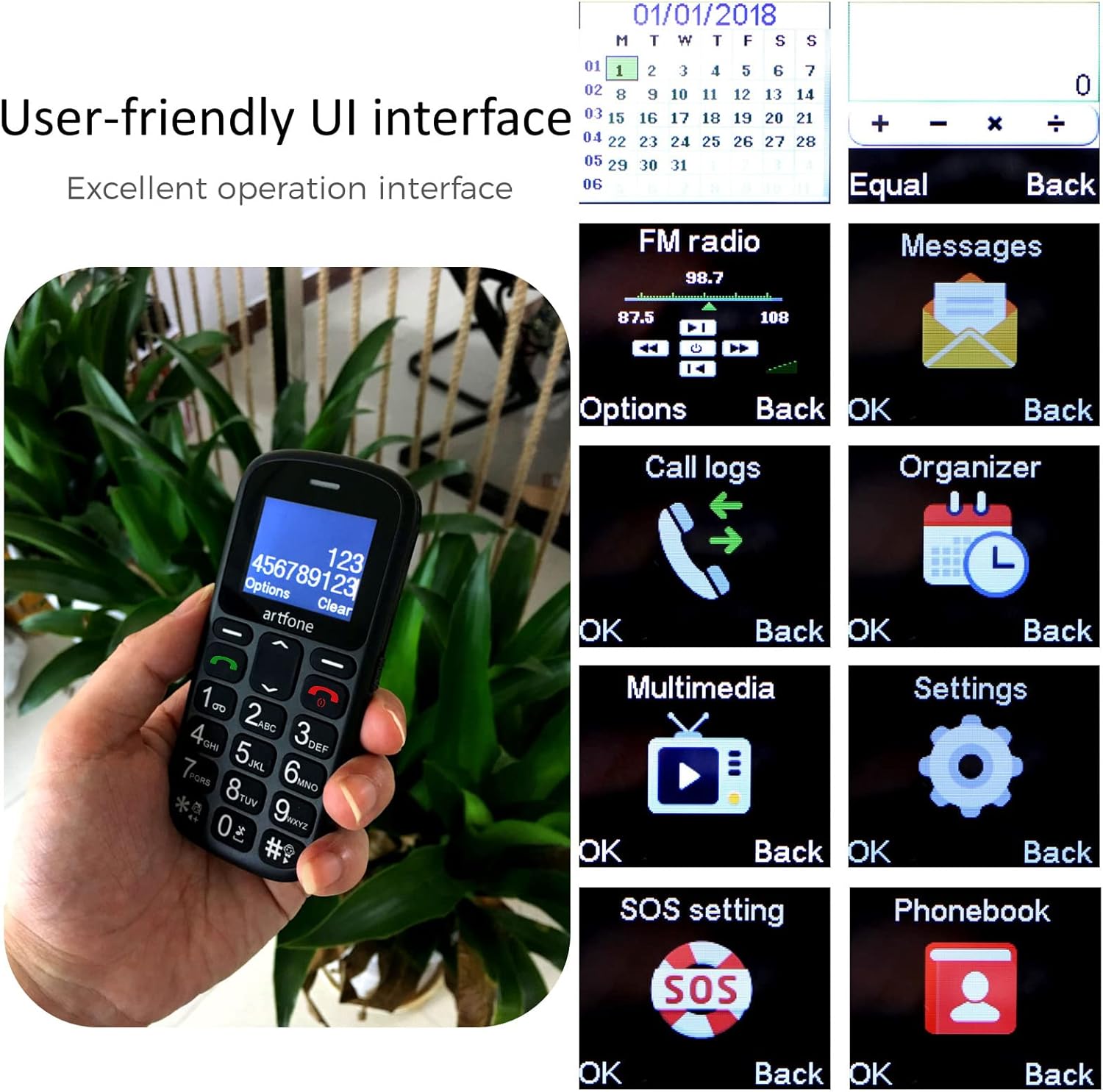
Bild: The artfone CS181's user-friendly interface with large, clear menu icons for functions like FM radio, messages, call logs, and settings.
Bedienungsanleitung
1. Anrufe tätigen und entgegennehmen
- So tätigen Sie einen Anruf: Geben Sie die Telefonnummer über die Tastatur ein und drücken Sie die Taste. Anruf Knopf (grüner Knopf).
- So nehmen Sie einen Anruf entgegen: Drücken Sie die Anruf button (green button) when the phone rings.
- So beenden Sie einen Anruf: Drücken Sie die Anruf beenden Knopf (roter Knopf).
- Sprachansage: The phone can announce dialed numbers in English, German, French, Spanish, and Italian. This feature can be enabled or disabled in the settings menu.
2. Senden und Empfangen von SMS-Nachrichten
- Navigieren Sie zum Menü „Nachrichten“.
- Wählen Sie „Nachricht schreiben“, um eine neue SMS zu verfassen.
- Geben Sie die Nummer des Empfängers ein oder wählen Sie ihn aus den Kontakten aus und tippen Sie dann Ihre Nachricht.
- Drücken Sie auf „Senden“, um die Nachricht zu übermitteln.
3. SOS-Notruffunktion
Die SOS-Taste befindet sich auf der Rückseite des Telefons und ist für den schnellen Zugriff auf Notfallkontakte konzipiert.
- Einrichtung von SOS-Nummern: Gehe zu Menu > Settings > SOS Settings. You can pre-program up to five emergency numbers and an emergency SMS message.
- SOS aktivieren: Im Notfall die Taste gedrückt halten SOS-Taste for 3 seconds. The phone will automatically dial the pre-programmed numbers in sequence and send the emergency SMS.
- Canceling SOS: If activated by mistake, you can cancel the SOS call within 3 seconds by pressing any key.

Bild: A finger pressing the prominent orange SOS button located on the back of the artfone CS181 phone.
4. Taschenlampe
Das Telefon verfügt über eine helle Taschenlampe für mehr Komfort.
- To turn on/off: Press the dedicated flashlight button on the left side of the phone.

Bild: The artfone CS181 phone with its flashlight illuminated, showing the light beam and the location of the flashlight LED.
5. UKW-Radio
Hören Sie Ihre Lieblings-FM-Radiosender.
- Navigieren Sie zum Menü „FM-Radio“.
- Verwenden Sie die Navigationstasten, um nach Sendern zu suchen oder manuell einzustellen.
6 Bluetooth
Verbinden Sie Ihr Telefon mit Bluetooth-Headsets oder anderen Geräten.
- Gehe zu Menü > Einstellungen > Bluetooth.
- Schalten Sie Bluetooth ein und suchen Sie nach verfügbaren Geräten.
- Select the desired device to pair.
7. Keypad Lock/Unlock
Prevent accidental key presses by locking the keypad.
- To lock: Press the dedicated keypad lock button on the right side of the phone.
- To unlock: Press the dedicated keypad lock button again.
8. Speed Dial Setup
Assign frequently called numbers to speed dial keys (1-9, *, #).
- Gehe zu Menu > Settings > Speed Dial.
- Select a key (e.g., "1") and assign a contact from your phonebook.
- To use: Press and hold the assigned speed dial key to call the contact.
Wartung
1. Batteriepflege
- Use only the original or approved charger and battery.
- Setzen Sie den Akku keinen extremen Temperaturen aus.
- Die Batterie nicht durchstechen, auseinandernehmen oder kurzschließen.
- If the phone will not be used for an extended period, charge it partially and store it in a cool, dry place.
2. Reinigung und Lagerung
- Clean the phone with a soft, dry cloth. Do not use liquid cleaners.
- Keep the phone away from dust, moisture, and direct sunlight.
- Vermeiden Sie es, das Telefon fallen zu lassen oder starken Stößen auszusetzen.
Fehlerbehebung
| Problem | Mögliche Ursache | Lösung |
|---|---|---|
| Das Telefon lässt sich nicht einschalten. | Die Batterie ist leer oder nicht richtig eingesetzt. | Laden Sie den Akku auf. Stellen Sie sicher, dass der Akku richtig eingesetzt ist. |
| Ich kann keine Anrufe tätigen oder empfangen. | Kein Netzwerksignal, SIM-Karte nicht eingelegt oder Problem mit der SIM-Karte. | Check network coverage. Reinsert SIM card. Contact your service provider. |
| SOS button activated by mistake. | Accidental press. | Press any key within 3 seconds of activation to cancel. |
| Schlechte Gesprächsqualität. | Schwaches Signal oder Umwelteinflüsse. | Begeben Sie sich in ein Gebiet mit besserem Empfang. Vermeiden Sie Hindernisse. |
| Die Tastatur reagiert nicht. | Tastatur ist gesperrt. | Unlock the keypad using the dedicated side button. |
Technische Daten
| Besonderheit | Detail |
|---|---|
| Marke | artfone |
| Modellname | CS181 |
| Betriebssystem | artfone OS |
| Bildschirmgröße | 2.4 Zoll |
| Konnektivität | 2G, GSM (850/900/1800/1900 MHz) |
| SIM-Karten-Unterstützung | Dual-SIM |
| Batteriekapazität | 800 mAh Lithium-Ionen- |
| Standby-Zeit | Bis zu 7 Tage |
| Gesprächszeit | Bis zu 5 Stunden |
| Interner Speicher | 32MB + 24MB (RAM + ROM) |
| Ladeanschluss | USB Typ C |
| Besondere Merkmale | SOS Button, Large Keys, FM Radio, Bluetooth, Flashlight, Voice Announcement |
| Abmessungen (L x B x T) | 121.6 mm x 55.4 mm x 14.3 mm (4.78 Zoll x 2.18 Zoll x 0.56 Zoll) |
Garantie und Support
Your artfone CS181 mobile phone comes with a standard manufacturer's warranty. Please refer to the warranty card included in your package for specific terms and conditions. For technical support, troubleshooting assistance, or warranty claims, please contact artfone customer service through their official webWebsite oder der Einzelhändler, bei dem Sie das Produkt gekauft haben.
Weitere Informationen finden Sie im artfone Brand Store.


