1. Einleitung
The Audizio Desio is a versatile digital radio that combines classic aesthetics with modern audio technology. It features DAB, DAB+, and FM tuning for clear radio reception, along with Bluetooth 5.0 for wireless streaming, a USB port for media playback, and a 3.5mm AUX input for wired connections. The radio is equipped with a 2.4-inch color LCD display and integrated stereo speakers, making it suitable for various environments such as living rooms, kitchens, or bedrooms.
This manual provides detailed instructions for setting up, operating, and maintaining your Audizio Desio radio. Please read it thoroughly before use to ensure proper functionality and to maximize your listening experience.
2. Sicherheitshinweise
- Stellen Sie sicher, dass die Lautstärke des NetzteilstagPrüfen Sie vor dem Anschließen, ob die Stromversorgung mit Ihrem lokalen Netzteil kompatibel ist.
- Das Gerät darf weder Regen, Feuchtigkeit noch extremen Temperaturen ausgesetzt werden.
- Vermeiden Sie es, das Gerät in der Nähe von Wärmequellen oder in direktem Sonnenlicht aufzustellen.
- Öffnen Sie nicht das casing; alle Wartungsarbeiten sind qualifiziertem Personal zu überlassen.
- Halten Sie das Gerät von starken Magnetfeldern fern.
- Reinigen Sie das Gerät nur mit einem weichen, trockenen Tuch.
3. Packungsinhalt
Bitte überprüfen Sie beim Auspacken, ob alle Artikel vorhanden sind:
- Audizio Desio DAB/DAB+/FM Radio
- Netzteil (DC 5 V)
- Fernbedienung
- Bedienungsanleitung
4. Bedienelemente und Anschlüsse
Bedienelemente auf der Vorderseite
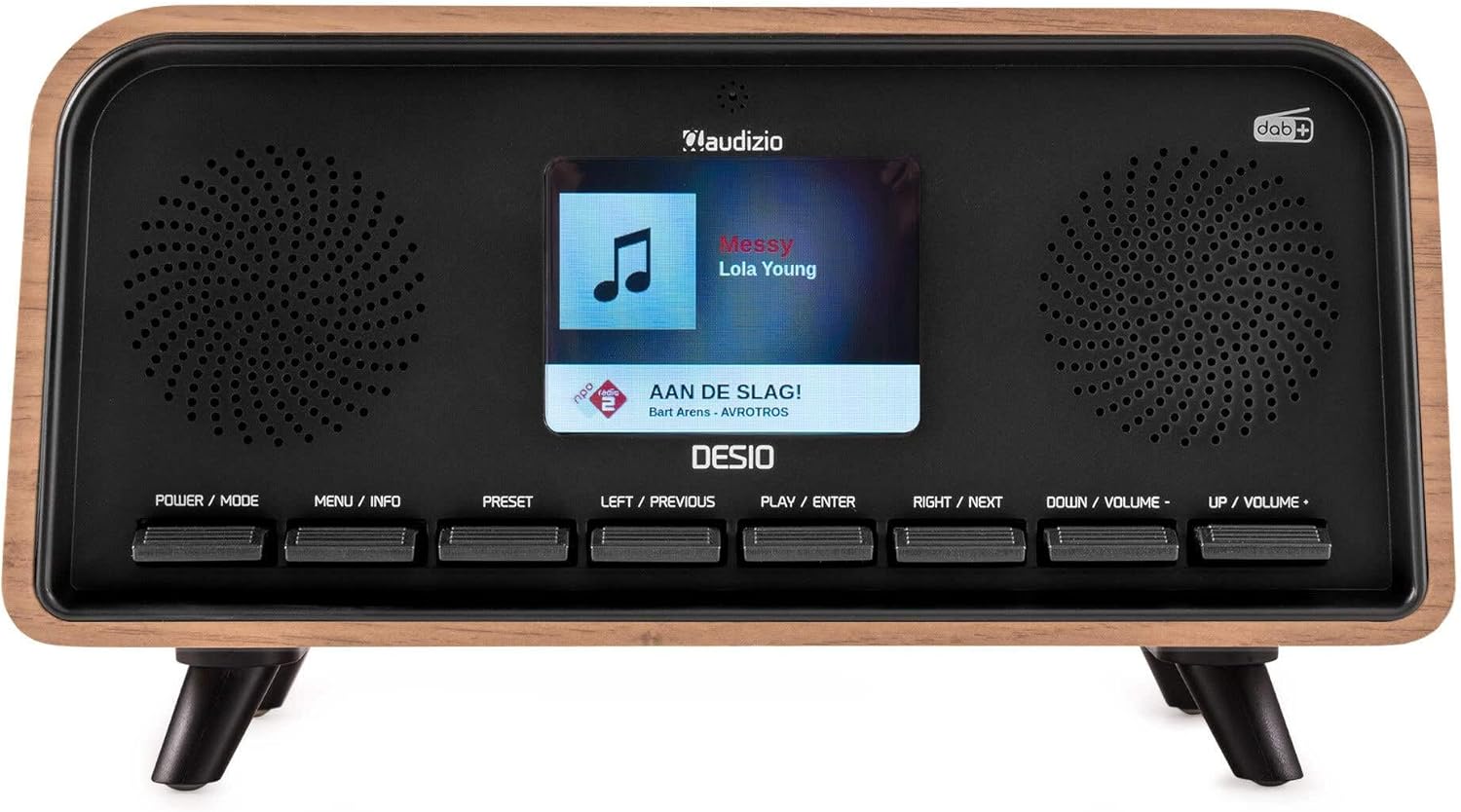
Front view of the Audizio Desio radio, showing the display playing music with artist and track information. The control buttons are visible below the screen.
- POWER / MODE: Press to turn on/off. Press and hold to switch between DAB, FM, Bluetooth, USB, and AUX modes.
- MENU / INFO: Press to access menu options. In playback mode, press to cycle through information display.
- VOREINSTELLUNG: Press to recall saved stations. Press and hold to save current station.
- LEFT / PREVIOUS: Navigate left in menus, or skip to previous track/station.
- PLAY / ENTER: Confirm selection in menus, or play/pause media.
- RIGHT / NEXT: Navigate right in menus, or skip to next track/station.
- DOWN / VOLUME -: Decrease volume, or navigate down in menus.
- UP / VOLUME +: Increase volume, or navigate up in menus.
Anschlüsse auf der Rückseite
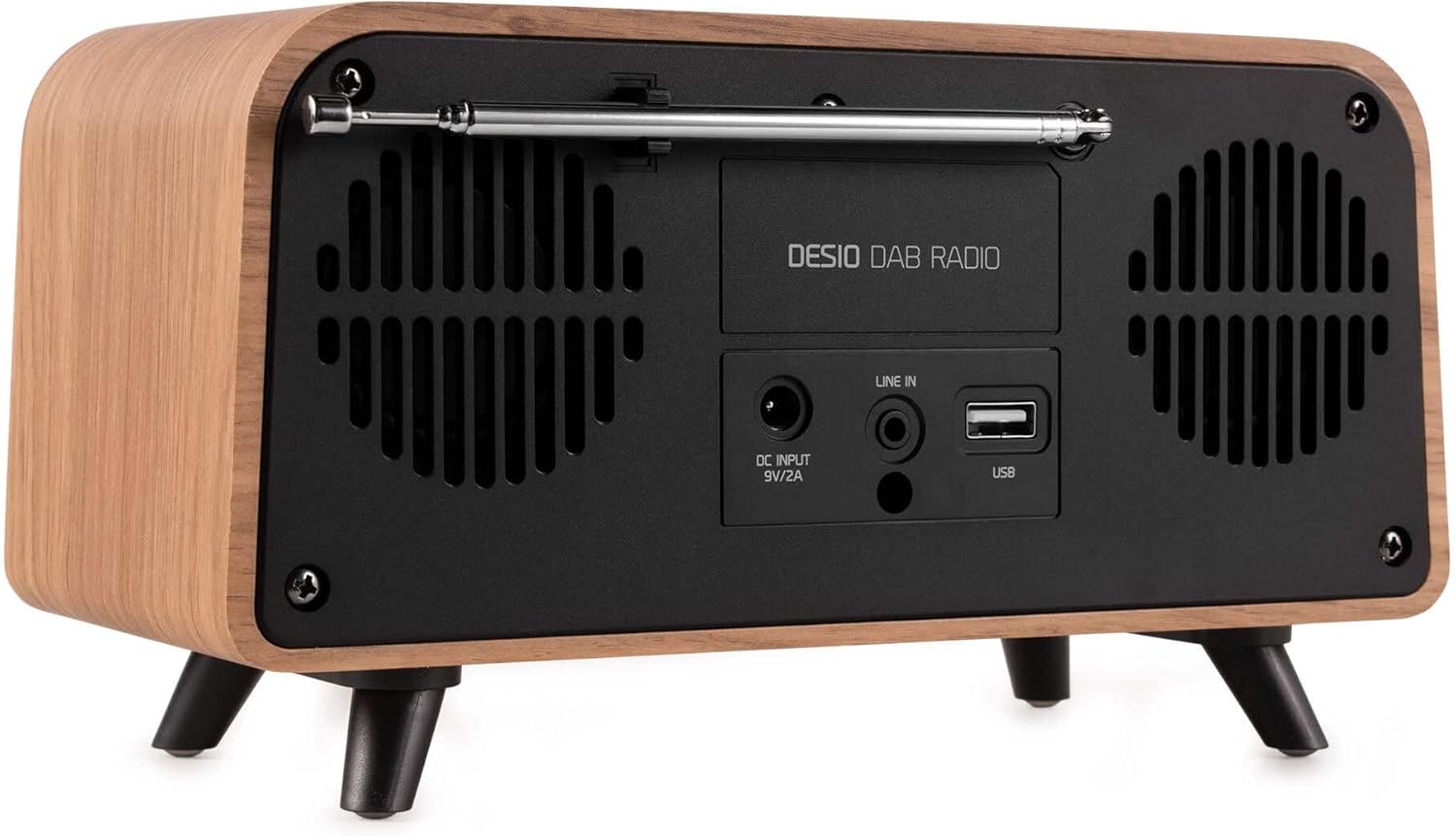
Hinteren view of the Audizio Desio radio, highlighting the DC INPUT 9V/2A, LINE IN (3.5mm AUX), and USB ports. The telescopic antenna is extended.
- DC INPUT 9V/2A: Schließen Sie hier das mitgelieferte Netzteil an.
- LINE IN (3.5mm AUX): Schließen Sie externe Audiogeräte mit einem 3.5-mm-Audiokabel an.
- USB: Schließen Sie einen USB-Stick zur MP3-Wiedergabe an.
- Teleskopantenne: Extend fully for optimal DAB/DAB+ and FM reception.
5. Ersteinrichtung
- Strom anschließen: Plug the provided DC 5V power adapter into the DC INPUT port on the rear of the radio, then plug the adapter into a wall outlet.
- Antenne ausfahren: Fully extend the telescopic antenna located on the rear of the unit for best reception.
- Einschalten: Drücken Sie die POWER-MODUS Taste, um das Radio einzuschalten.
- First-time DAB Scan: Upon first power-on, the radio will automatically perform a full scan for DAB/DAB+ stations. This may take a few minutes. The display will show the scanning progress.
- Uhrzeit/Datum einstellen: The time and date will usually be set automatically via DAB signal. If not, you can manually set them via the menu.
6. Bedienungsanleitung
6.1 DAB/DAB+ Radiobetrieb

Front view of the Audizio Desio radio, displaying a DAB radio station ('NPO Klassiek') and current time.
- Select DAB Mode: Drücken Sie die POWER-MODUS Drücken Sie die Taste so oft, bis „DAB“ angezeigt wird.
- Sender suchen: If no stations are found or you wish to rescan, press MENÜ / INFO, dann verwenden Sie LEFT / PREVIOUS or DIREKT DIE NÄCHSTE to select 'Full Scan' and press PLAY / ENTER.
- Sender auswählen: Verwenden Sie die LEFT / PREVIOUS or DIREKT DIE NÄCHSTE Tasten zum Durchsuchen der verfügbaren Sender. Drücken PLAY / ENTER um einen Sender auszuwählen.
- Voreinstellung speichern: Um einen Sender zu speichern, halten Sie die Taste gedrückt. VOREINSTELLUNG Taste. Benutzen LEFT / PREVIOUS or DIREKT DIE NÄCHSTE to choose a preset number (1-50), then press PLAY / ENTER zur Bestätigung.
- Preset abrufen: Um einen gespeicherten Sender aufzurufen, drücken Sie die Taste VOREINSTELLUNG button (do not hold). Use LEFT / PREVIOUS or DIREKT DIE NÄCHSTE Um die gewünschte Voreinstellung auszuwählen, drücken Sie anschließend PLAY / ENTER.

Front view of the Audizio Desio radio, showing the 'Preset Recall' menu on the display, indicating empty preset slots.
6.2 FM-Radiobetrieb
- FM-Modus auswählen: Drücken Sie die POWER-MODUS Drücken Sie die Taste so oft, bis „FM“ angezeigt wird.
- Automatischer Scan: Drücken und halten PLAY / ENTER to automatically scan for and save available FM stations.
- Manuelle Abstimmung: Verwenden LEFT / PREVIOUS or DIREKT DIE NÄCHSTE um die Frequenz feinabzustimmen.
- Save/Recall Presets: Follow the same procedure as for DAB radio (Section 6.1).
6.3 Bluetooth (BT) Operation

Front view of the Audizio Desio radio, with the display showing 'BT' (Bluetooth) mode and 'Connected' status.
- BT-Modus auswählen: Drücken Sie die POWER-MODUS button repeatedly until 'BT' is displayed. The radio will enter pairing mode, indicated by a flashing Bluetooth icon.
- Gerät koppeln: On your smartphone, tablet, or laptop, enable Bluetooth and search for available devices. Select 'Audizio Desio' from the list.
- Verbinden: Once paired, the display will show 'Connected'. You can now stream audio from your device to the radio.
- Wiedergabesteuerung: Nutzen Sie Ihr angeschlossenes Gerät oder die Funktion des Radios. PLAY / ENTER, LEFT / PREVIOUS, Und DIREKT DIE NÄCHSTE Tasten zur Steuerung der Wiedergabe.
6.4 USB-Wiedergabe

Front view of the Audizio Desio radio, with the display showing 'USB' mode, current time, and details of an MP3 file gespielt wird.
- USB-Laufwerk einstecken: Stecken Sie einen USB-Stick (formatiert mit FAT32) mit MP3-Dateien ein. files into the USB port on the rear of the radio.
- USB-Modus auswählen: Drücken Sie die POWER-MODUS button repeatedly until 'USB' is displayed. The radio will automatically start playing the first compatible audio file.
- Navigieren Files: Verwenden LEFT / PREVIOUS or DIREKT DIE NÄCHSTE to skip tracks. Press PLAY / ENTER um die Wiedergabe anzuhalten/fortzusetzen.
6.5 AUX-Eingang
- Gerät verbinden: Connect an external audio device (e.g., MP3 player, smartphone) to the 'LINE IN' (3.5mm AUX) port on the rear of the radio using a 3.5mm audio cable (not included).
- AUX-Modus auswählen: Drücken Sie die POWER-MODUS button repeatedly until 'AUX' is displayed.
- Wiedergabe steuern: Playback is controlled directly from your connected external device. Adjust volume using the radio's volume controls.
6.6 Alarm- und Timerfunktionen
- Alarme einstellen: Sie können die Alarmeinstellungen über die MENÜ / INFO button. You can set multiple alarms with customizable sources (DAB, FM, Buzzer), volume, and recurrence (daily, weekdays, weekends).
- Schlaf-Timer: The sleep timer allows the radio to turn off automatically after a set period. Access this function via the MENÜ / INFO Klicken Sie auf die Schaltfläche und wählen Sie die gewünschte Dauer aus.
- Schlummerfunktion: When an alarm sounds, press any button (except Power) to activate the snooze function for a short period.
7. Wartung
- Reinigung: Reinigen Sie die Oberfläche des Radios mit einem weichen, trockenen und fusselfreien Tuch. Verwenden Sie keine Scheuermittel, Wachse oder Lösungsmittel.
- Antennenpflege: Behandeln Sie die Teleskopantenne vorsichtig, um ein Verbiegen oder Brechen zu vermeiden.
- Lagerung: Wenn Sie das Radio über einen längeren Zeitraum lagern, trennen Sie es vom Netzteil und bewahren Sie es an einem kühlen, trockenen Ort auf.
8. Fehlerbehebung
| Problem | Mögliche Ursache | Lösung |
|---|---|---|
| Kein Strom | Netzteil nicht angeschlossen oder Steckdose defekt. | Überprüfen Sie den Anschluss des Netzteils und versuchen Sie es mit einer anderen Steckdose. |
| Schlechter DAB/FM-Empfang | Antenne nicht vollständig ausgefahren oder schlechte Signallage. | Fully extend the antenna. Try repositioning the radio. Perform a full scan. |
| Bluetooth stellt keine Verbindung her | Radio not in BT mode, device not in pairing mode, or too far away. | Ensure radio is in BT mode. Put your device in pairing mode. Move device closer to the radio (within 10m). |
| USB-Wiedergabe funktioniert nicht | USB-Laufwerk nicht korrekt eingesteckt, wird nicht unterstützt file format, or drive not FAT32. | USB-Laufwerk wieder einstecken. Sicherstellen files are MP3. Check USB drive format (FAT32). |
| Kein Ton über AUX | Radio not in AUX mode, cable faulty, or external device volume low. | Select AUX mode. Check 3.5mm cable. Increase volume on both radio and external device. |
9. Technische Daten
- Marke: Audizio
- Modell: Desio
- Tuner-Technologie: UKW, DAB+
- Bluetooth: Version 5.0 (Range: 10m)
- Wiedergabeoptionen: Bluetooth, USB, 3.5mm AUX input
- Voreingestellte Sender: 50
- Anzeige: 2.4-Zoll-Farb-LCD
- Funktionen: Alarm, Sleep Timer, Snooze, Dimming, Week/Weekend Alarm
- Max Speaker Power: 30 Watt
- Stromversorgung: DC 5V (Power Adapter)
- Produktabmessungen (H x B x T): 32 x 16 x 18 cm
- Gewicht: 1.66 kg
10. Garantie und Support
This product comes with a standard manufacturer's warranty. For detailed warranty terms and conditions, please refer to the documentation provided at the time of purchase or contact your retailer.
For technical support, troubleshooting assistance, or service inquiries, please contact the Audizio customer support team or your local dealer. Please have your product model number (Desio) and purchase information ready when contacting support.


