1. Einleitung
This manual provides detailed instructions for the installation, operation, and maintenance of your LASER TREE 5W (5000mW) Optical Power Laser Module, model LT-5W-F45. This module is designed for upgrading 3018 and 3018 Pro CNC machines, offering capabilities for laser engraving and cutting various materials. Please read this manual thoroughly before use to ensure safe and efficient operation.

Image 1.1: LASER TREE 5W Laser Module LT-5W-F45 with key features.
2. Sicherheitshinweise
WARNUNG: This is a Class 4 laser product. Direct exposure to the laser beam can cause severe eye and skin damage. Always wear appropriate laser safety goggles (OD4+ or higher) when operating this device. Never look directly into the laser beam or its reflection. Ensure the work area is properly ventilated and free of flammable materials.
- Tragen Sie während des Betriebs stets eine zertifizierte Laserschutzbrille.
- Do not operate the laser module without the protective cover.
- Halten Sie Kinder und Haustiere vom Betriebsbereich fern.
- Ensure proper ventilation to remove fumes generated during engraving/cutting.
- Never leave the laser module unattended while in operation.
- Be aware of reflective surfaces that could cause unintended laser exposure.

Image 2.1: Laser module with eye protective cover design.
3. Packungsinhalt
Bitte überprüfen Sie, ob alle unten aufgeführten Artikel in Ihrem Paket enthalten sind:
- LASER TREE 5W Laser Module
- Spare Protective Lens (Φ13*1.1mm)
- Focus Fixing Plates (3mm, 4mm, 5mm) x3
- Eye Protection Design (Red Protective Cover)
- 3-PIN Input Cable (VCC, GND, PWM)
- Luftleitung

Image 3.1: Complete package contents of the LT-5W-F45 Laser Module.

Abbildung 3.2: Detailansicht view of the 3018 Pack list and outline dimensions.
4. Einrichtung und Installation
4.1 Kompatibilität
This laser module is specifically designed for upgrading 3018 and 3018 Pro CNC machines. It is also compatible with other CNC machines that have mounting brackets similar in size to the CNC 3018 series.

Image 4.1: Laser module compatible with 3018 CNC machines.
4.2 Mounting the Laser Module
- Ensure your CNC machine is powered off and disconnected from the power source.
- Carefully remove any existing spindle or laser module from your CNC machine.
- Align the cylindrical body of the LASER TREE module with the mounting brackets of your 3018/3018 Pro CNC machine.
- Secure the module firmly in place using the appropriate fasteners provided with your CNC machine or the laser module.
4.3 Elektrischer Anschluss
The module uses a 3-pin connector (XH2.54-3P) for power and PWM control. Connect the cable to the corresponding port on your CNC control board. The pins are typically labeled VCC (Power), GND (Ground), and PWM (Pulse Width Modulation).
- VCC: DC 12V 2A input
- Masse: Boden
- PWM: 5V PWM modulation support
4.4 Air Assist Connection
For optimal cutting and engraving results, connect the air pipe to the air assist nozzle on the laser module. If using an external air pump (not included), connect the air pipe from the module to your air pump. The air tube suggestion is an outer diameter of 6mm and an inner diameter of ≥4mm.
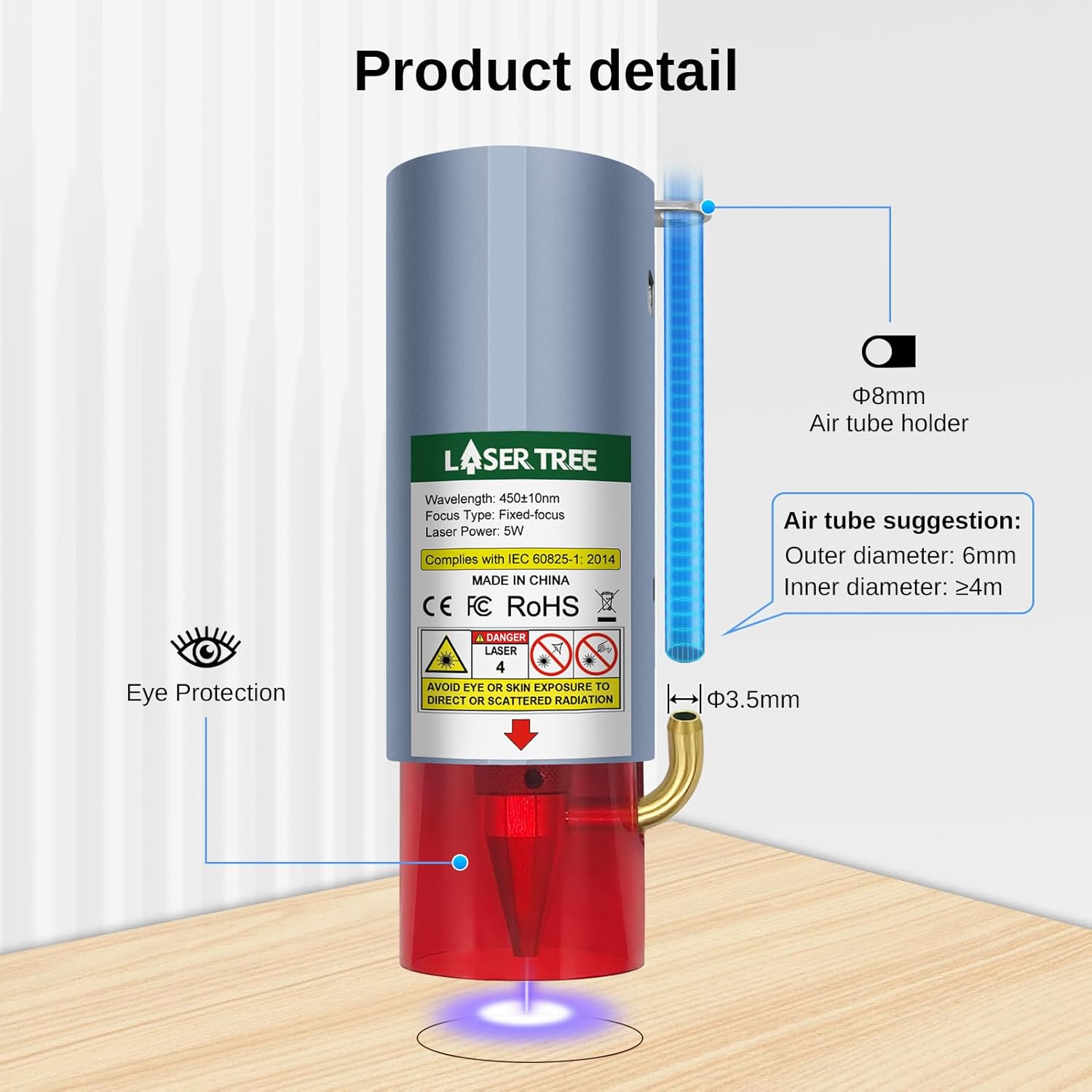
Image 4.2: Air tube connection point and specifications.
4.5 Fokussieren des Lasers
The module features a fixed-focus design with a built-in FAC lens for a small spot size (0.08*0.08mm). Use the provided focus fixing plates (3mm, 4mm, 5mm) to set the optimal working distance for different materials. Place the appropriate plate on the material surface, lower the laser module until it touches the plate, then remove the plate. This sets the correct focal length.
5. Bedienungsanleitung
5.1 Allgemeine Bedienung
- Ensure all connections are secure and safety goggles are worn.
- Place the material to be processed on the CNC machine's workbed.
- Set the laser focus as described in Section 4.5.
- Laden Sie Ihr Design file into your CNC control software (e.g., GRBL, LightBurn).
- Adjust laser power and speed settings according to the material and desired effect. Start with lower power and higher speed for testing.
- Starten Sie den Gravur- oder Schneidevorgang. Überwachen Sie den Vorgang genau.
5.2 Materialverträglichkeit und Leistung
This 5W laser module can be used on a variety of materials, including:
- Holz
- MDF-Platte
- Leder
- Bambus
- Schwarzes Acryl
- Stainless Steel (direct engraving without black paint)
Schneidleistung:
- 3mm plywood: Cut in one pass at approximately 1.5mm/s (90mm/min) with 45mm focus length. (Note: Image shows 200mm/min for 3mm plywood, use as a guideline).
- 5mm pinewood: Cut in one pass at approximately 80mm/min.
- 5mm acrylic: Cut in one pass at approximately 25mm/min.

Image 5.1: Cutting capabilities on various materials.
6. Luftunterstützungsfunktion
The integrated air assist system significantly improves cutting and engraving quality. It directs a stream of air onto the focal point, which helps to:
- Remove smoke and debris from the cutting path, resulting in cleaner edges.
- Prevent charring and discoloration of materials.
- Increase cutting efficiency and speed.
- Extend the lifespan of the laser lens by keeping it clear of residue.

Image 6.1: Comparison of results with and without air assist.
7. Wartung
7.1 Cleaning the Protective Window Glass
The laser module's protective window glass must be kept clean. Fingerprints, dust, or debris on the window can significantly affect the laser's cutting ability and cause power decrease. Regularly inspect and gently clean the window with a soft, lint-free cloth and a suitable lens cleaning solution (e.g., isopropyl alcohol) if necessary. Avoid abrasive materials.
7.2-Kühlsystem
The module features a built-in fan cooling system (Fan Speed 10000 rpm). Ensure the fan vents are not obstructed to maintain optimal heat dissipation. A well-maintained cooling system contributes to the module's long lifespan (up to 20,000 hours).
8. Fehlerbehebung
| Problem | Mögliche Ursache | Lösung |
|---|---|---|
| Laser power is weak or inconsistent. |
|
|
| Der Laser schaltet sich nicht ein. |
|
|
| Poor cutting/engraving quality (e.g., charring, incomplete cuts). |
|
|
9. Spezifikationen
| Modellnummer | LT-5W-F45 |
| Optische Ausgangsleistung | 5 W (5000 mW) |
| Laserwellenlänge | 450 nm |
| Fokustyp | Fixed-focus with Built-in FAC |
| Punktgröße | 0.08*0.08mm (at focus) |
| Eingangslautstärketage | Gleichstrom 12 V |
| Eingangsstrom | 2A |
| PWM-Modulation | Supports 5V PWM |
| Steckertyp | XH2.54-3P |
| Laserklasse | Klasse 4 |
| Technische Daten | 1.72 x 1.72 x 5.04 Zoll |
| Artikelgewicht | 1.16 Pfund |
| Hersteller | LASERBAUM |
| Lebensdauer | Bis zu 20,000 Stunden |
10. Garantie und Support
LASER TREE is committed to providing high-quality products and excellent customer service. If you require pre-sale consultation, encounter any problems during installation or operation, or have questions regarding your laser module, please contact our professional engineer team directly.
For support, please refer to the contact information provided with your purchase or visit the official LASER TREE website. Our team is available to troubleshoot and resolve issues efficiently.
Notiz: The product has a standard return policy of 30 days for refund/replacement as per Amazon's policy.


