1. Einleitung
The KONNWEI MAXOBD OBD2 Scanner is a professional diagnostic tool designed to read and clear diagnostic trouble codes (DTCs) from your vehicle's engine control unit (ECU). It provides access to various vehicle systems, allowing users to monitor live data, perform I/M readiness tests, and retrieve vehicle information. This manual provides detailed instructions for the proper use and maintenance of your MAXOBD scanner.
2. Sicherheitshinweise
Before operating the MAXOBD OBD2 Scanner, please read and understand all safety messages and instructions in this manual. Failure to do so may result in personal injury or damage to the vehicle or the scanner.
- Führen Sie Fahrzeugtests immer in einer sicheren Umgebung durch.
- Tragen Sie einen Augenschutz, der den ANSI-Standards entspricht.
- Halten Sie Kleidung, Haare, Hände, Werkzeuge, Prüfgeräte usw. von allen beweglichen oder heißen Motorteilen fern.
- Betreiben Sie das Fahrzeug in einem gut belüfteten Arbeitsbereich; Abgase sind giftig.
- Stellen Sie das Getriebe auf PARK (bei Automatikgetriebe) oder NEUTRAL (bei manuellem Getriebe) und stellen Sie sicher, dass die Feststellbremse angezogen ist.
- Halten Sie einen für Benzin-/elektrische Brände geeigneten Feuerlöscher in der Nähe bereit.
- Schließen Sie keine Testgeräte an oder trennen Sie sie nicht, während die Zündung eingeschaltet ist oder der Motor läuft.
3. Produktüberschreitungview
The MAXOBD scanner features a clear display and intuitive button layout for easy navigation and operation. It connects directly to your vehicle's OBD-II port to retrieve diagnostic information.
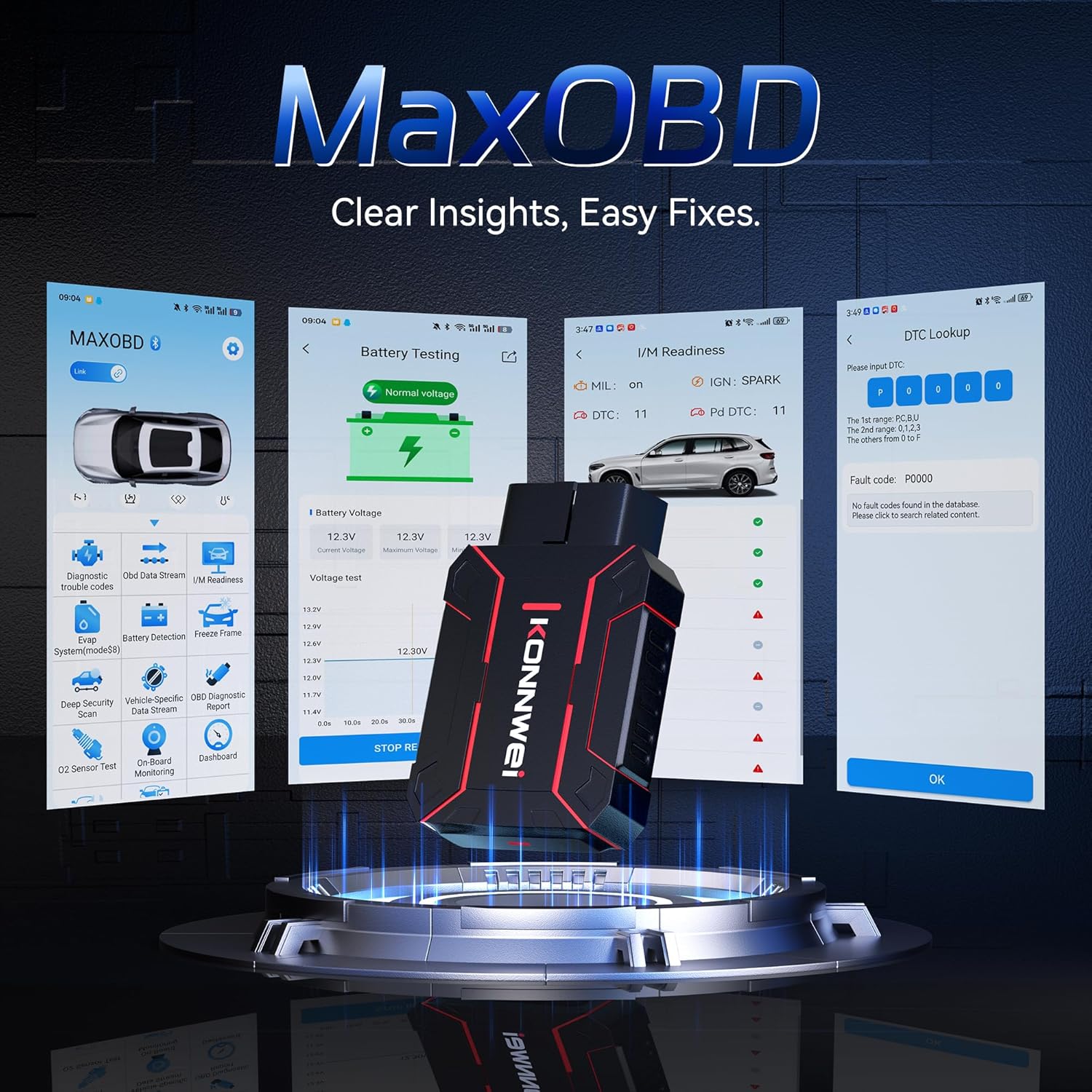
Image: The KONNWEI MAXOBD OBD2 Scanner device, illustrating its physical form and various diagnostic screen interfaces such as battery testing, I/M readiness, and DTC lookup.
Schlüsselkomponenten:
- OBD-II-Anschluss: Connects to the vehicle's Data Link Connector (DLC).
- LCD Anzeige: Zeigt Testergebnisse und Menüoptionen an.
- Navigationstasten: Dient zum Durchblättern von Menüs und Auswählen von Optionen.
- Enter/Exit Buttons: Confirm selections or return to previous screens.
4. Einrichtung
Follow these steps to set up your MAXOBD OBD2 Scanner:
- Suchen Sie den OBD-II-Anschluss des Fahrzeugs: Der 16-polige Datenlink-Anschluss (DLC) befindet sich üblicherweise unter dem Armaturenbrett auf der Fahrerseite. Sollten Sie ihn nicht finden, konsultieren Sie bitte die Bedienungsanleitung Ihres Fahrzeugs, um den genauen Standort zu ermitteln.
- Schließen Sie den Scanner an: Plug the MAXOBD scanner's OBD-II connector firmly into the vehicle's DLC. Ensure a secure connection.
- Einschalten: Once connected, the scanner will automatically power on. If it does not, turn the vehicle's ignition to the 'ON' position (engine off).
5. Bedienungsanleitung
The MAXOBD scanner offers various diagnostic functions. Use the navigation buttons to move through menus and the Enter button to select options.

Image: A visual representation of a vehicle highlighting various systems (Engine, ABS, SAS, SRS, DPF, TPMS) that the MAXOBD scanner can perform a full system scan on.
Hauptmenüfunktionen:
- Codes lesen: Retrieves Diagnostic Trouble Codes (DTCs) from the vehicle's ECU. These codes indicate specific issues detected by the vehicle's onboard diagnostic system.
- Codes löschen: Clears all DTCs from the vehicle's ECU and turns off the Malfunction Indicator Lamp (MIL). Stellen Sie sicher, dass das zugrunde liegende Problem behoben ist, bevor Sie die Fehlercodes löschen.
- I/M-Bereitschaft: Prüft den Status emissionsbezogener Überwachungssysteme, um festzustellen, ob sie für einen Emissionstest bereit sind.
- Datenstrom: Displays real-time operational parameters from the vehicle's sensors and components. This can include engine RPM, vehicle speed, oxygen sensor readings, and more.
- Freeze Frame: Captures a snapshot of sensor data at the moment a DTC was set. This data can help identify the conditions under which a fault occurred.
- O2-Sensortest: Retrieves O2 sensor monitoring test results for the most recently completed tests from the vehicle's onboard computer.
- On-Board-Monitor-Test: Ruft Ergebnisse für emissionsrelevante Antriebskomponenten und -systeme ab, die nicht kontinuierlich überwacht werden.
- EVAP-Systemtest: Leitet einen Dichtigkeitstest für das Verdunstungsemissionskontrollsystem des Fahrzeugs ein.
- Fahrzeuginfo: Zeigt die Fahrzeugidentifikationsnummer (VIN), die Kalibrierungs-ID (CALID) und die Kalibrierungsprüfnummer (CVN) an.
Durchführung eines Diagnosescans:
- Connect the scanner to the vehicle's DLC and turn the ignition to 'ON'.
- From the main menu, select 'Read Codes' and press Enter.
- Der Scanner kommuniziert mit dem Fahrzeug und zeigt alle erkannten Fehlercodes (DTCs) an.
- Use the navigation buttons to scroll through the codes and their descriptions.
- To clear codes, return to the main menu, select 'Erase Codes', and confirm.
6. Wartung
Proper maintenance ensures the longevity and reliable operation of your MAXOBD scanner.
- Reinigung: Verwenden Sie ein weiches,amp Verwenden Sie ein Tuch, um die Außenseite des Scanners zu reinigen. Verwenden Sie keine Scheuermittel oder Lösungsmittel.
- Lagerung: Store the scanner in a dry, clean environment away from extreme temperatures and direct sunlight. Keep it in its original packaging or a protective case when not in use.
- Software-Updates: Überprüfen Sie regelmäßig die offiziellen KONNWEI-Websites. website for available software updates to ensure your scanner has the latest vehicle compatibility and features. Follow the instructions provided on the website for updating the device.
7. Fehlerbehebung
If you encounter issues with your MAXOBD scanner, refer to the following common problems and solutions:
| Problem | Mögliche Ursache | Lösung |
|---|---|---|
| Der Scanner lässt sich nicht einschalten. | Loose connection; vehicle ignition off; faulty OBD-II port. | Ensure the scanner is securely plugged into the DLC. Turn vehicle ignition to 'ON'. Test on another vehicle if possible. |
| Fehlermeldung „Verbindungsfehler“ oder „Kommunikationsfehler“. | Loose connection; vehicle not OBD-II compliant; ignition off; communication protocol issue. | Verify connection. Ensure vehicle is OBD-II compliant (most vehicles 1996 and newer). Turn ignition to 'ON'. Try a different vehicle if available. |
| Der Bildschirm ist leer oder eingefroren. | Softwarefehler; Stromausfall. | Disconnect and reconnect the scanner. If the issue persists, contact customer support. |
If the problem persists after attempting these solutions, please contact KONNWEI customer support for further assistance.
8. Spezifikationen
- Marke: KONNWEI
- Modell: maxobdTM
- Energiequelle: Batteriebetrieben (über OBD-II-Anschluss)
- Betriebssystem: Linux
- Bildschirmgröße: 2.8 Zoll
- Fahrzeugpassform: Universal Fit (for OBD-II compliant vehicles)
- Paketabmessungen: 10.04 x 7.28 x 2.76 Zoll
9. Garantie und Support
KONNWEI products are designed for reliability and performance. For warranty information, please refer to the documentation included with your purchase or visit the official KONNWEI website. For technical support, troubleshooting assistance, or any other inquiries, please contact KONNWEI customer service through their official channels.
KONNWEI Official WebWebsite: Visit the KONNWEI Store on Amazon