1. Einführung und Endeview
The SINOTIMER TM922 is a versatile dual-channel programmable digital timer switch designed for precise control of electrical equipment. It features two independent relay outputs, allowing simultaneous control of two separate devices or systems. With up to 8 ON/OFF programs per day and 15 combinations per week, this timer provides flexible scheduling options. Its accurate-to-the-second control ensures reliable operation according to preset programs, cycling weekly or daily from one second to 168 hours. Programs are saved by a battery backup in case of power failure, and the replaceable battery ensures long-term usage. The device is designed for DIN standard 35mm mounting, making it easy to install in DB boxes.
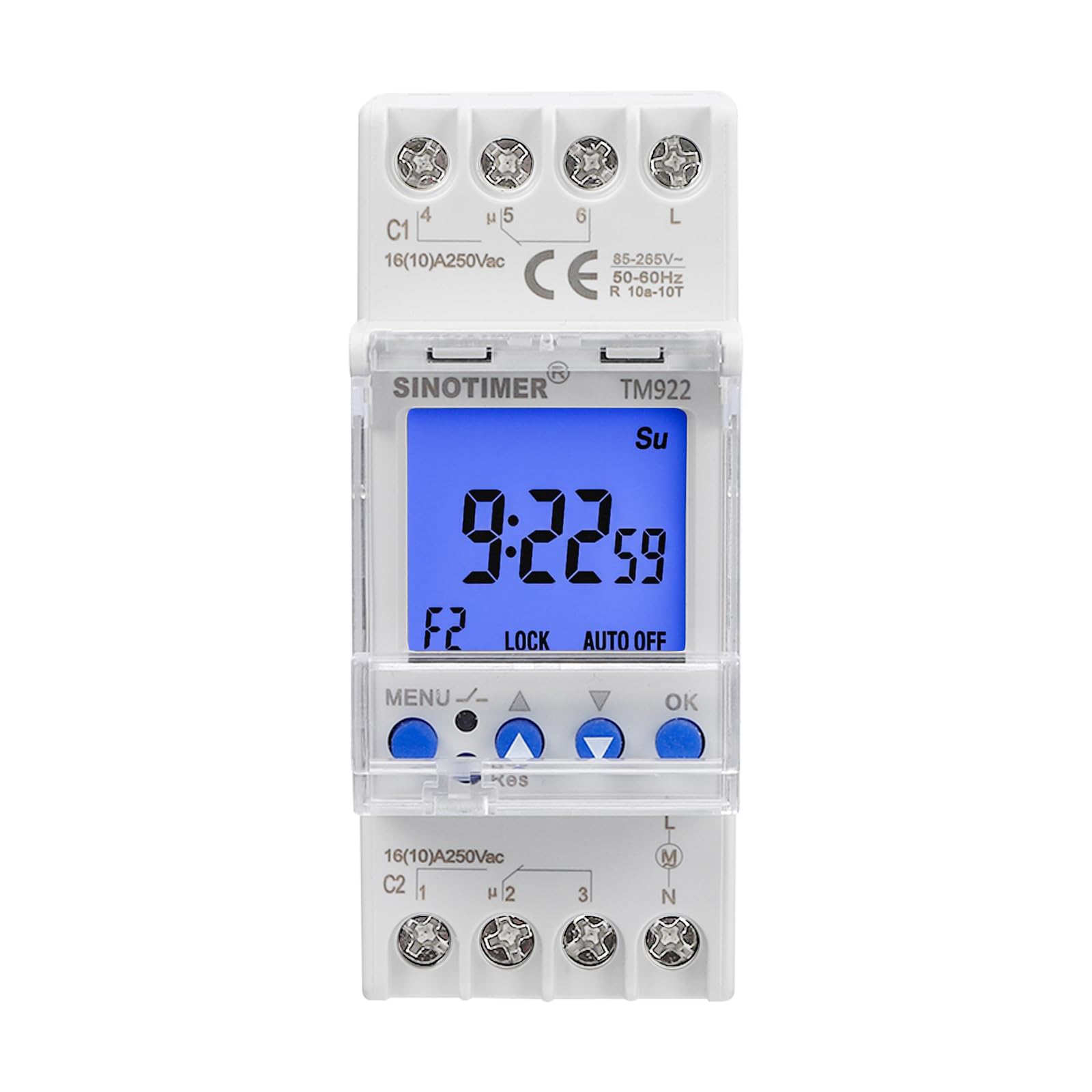
Abbildung 1: Vorderseite view of the SINOTIMER TM922 Digital Timer Switch.
2. Sicherheitshinweise
Please read all instructions carefully before installation and operation. Incorrect installation or use can lead to electric shock, fire, or damage to the device. Ensure power is disconnected before any wiring or maintenance. This device should be installed by a qualified electrician in accordance with local electrical codes. Do not expose the device to moisture or extreme temperatures. Keep out of reach of children.
3. Produktmerkmale
- Dual Independent Relays: Two separate 16A outputs for controlling two distinct devices.
- Programmierbare Zeitpläne: Up to 8 ON/OFF programs per day, with 15 weekly combinations.
- Precise Timing: Accurate to the second, with cycles from 1 second to 168 hours.
- Speichersicherung: Built-in battery saves programs during power outages.
- Austauschbare Batterie: Gewährleistet eine lange Produktlebensdauer.
- DIN-Schienenmontage: Standard 35mm design for easy installation in electrical panels.
- Großes LCD-Display: Clear blue backlight for easy readability.

Figure 2: Close-up of the TM922's LCD display and control buttons.
4. Packungsinhalt
- SINOTIMER TM922 Digital Timer Switch
- One screwdriver
- Benutzerhandbuch (dieses Dokument)
5. Spezifikationen
| Attribut | Wert |
|---|---|
| Technische Daten | 3.54 x 1.42 x 2.68 Zoll |
| Artikelgewicht | 5.9 Unzen |
| Eingangslautstärketage | 85-265 V Wechselspannung |
| Ausgangsrelais | Two independent 16A outputs |
| Material | Plastik |
| Farbe | Weiß |
| Anzahl der Einstellungen | 23 (programs) |
6. Einrichtung und Installation
6.1 DIN-Schienenmontage
The TM922 is designed for standard 35mm DIN rail mounting. To install, align the timer with the DIN rail and press firmly until it clicks into place. Ensure it is securely fastened.

Abbildung 3: Seite view Abbildung des DIN-Schienen-Montagemechanismus.
6.2 Schaltplan
WARNUNG: Disconnect all power before wiring. Wiring should be performed by a qualified professional.
The TM922 features terminals for power input (L, N) and two independent relay outputs (C1, C2). Each output has common (C), normally open (NO), and normally closed (NC) contacts. Refer to the labels on the device for precise terminal identification.
- Leistungsaufnahme: Connect your 85-265VAC power supply to the 'L' (Live) and 'N' (Neutral) terminals.
- Channel 1 Output (C1): Connect your first load to the C1 terminals. For normally open operation, connect the load between the common (C1-4) and normally open (C1-5) terminals. For normally closed operation, connect between common (C1-4) and normally closed (C1-6) terminals.
- Channel 2 Output (C2): Connect your second load to the C2 terminals. For normally open operation, connect the load between the common (C2-1) and normally open (C2-2) terminals. For normally closed operation, connect between common (C2-1) and normally closed (C2-3) terminals.

Figure 4: Wiring terminals for power input and dual relay outputs.
7. Bedienungsanleitung
7.1 Tastenfunktionen

Figure 5: Control button functions for the TM922.
- SPEISEKARTE: Unlock/Lock buttons, Enter program settings.
- ▲ (Pfeil nach oben): Increase value, Navigate up.
- ▼ (Pfeil nach unten): Decrease value, Navigate down.
- OK: Select, Confirm settings.
- Res (Zurücksetzen): Channel selection, Sleep mode, Remove programs. (Requires a pointed object like a pen or the provided screwdriver).
7.2 Locking/Unlocking the Timer
To prevent accidental changes, the timer can be locked. Press and hold the SPEISEKARTE button for more than 3 seconds to lock or unlock the timer. The 'LOCK' indicator on the display will show the current status.
7.3 Einstellen der aktuellen Uhrzeit
- Ensure the timer is unlocked.
- Drücken Sie die OK button repeatedly to cycle through and select the minute, hour, second, and day of the week.
- Verwenden Sie die ▲ Und ▼ buttons to adjust the selected number.
- Drücken OK um jede Einstellung zu bestätigen.
7.4 Manual Control (Working Status)
To manually override the programmed settings for a channel, press the SPEISEKARTE Und ▲ buttons together. This will cycle the working status through: ON, ON AUTO, OFF, AUTO OFF. The current status will be displayed (e.g., F1 ON, F2 OFF).
7.5 Kanalwechsel (F1/F2)
To switch between Channel 1 (F1) and Channel 2 (F2) for programming or manual control, press the recessed Res button using a pointed object. The display will show 'F1' or 'F2' to indicate the active channel.
7.6 Programmierung von Ein-/Ausschaltzyklen
The TM922 supports up to 8 ON/OFF programs for each channel (F1 and F2), totaling 16 ON/OFF events per channel. Each program can be set for specific days of the week.
- Ensure the timer is unlocked.
- Select the desired channel (F1 or F2) by pressing the Res Taste.
- Drücken Sie die SPEISEKARTE button to enter the program setting mode. The display will show '1 ON' (for the first ON program).
- Drücken OK to select the time setting for '1 ON'. Use ▲ Und ▼ to adjust the hour, minute, and second. Press OK nach jeder Anpassung.
- After setting the time, you can select the days of the week for this program. Use ▲ Und ▼ to cycle through various day combinations (e.g., Mo Tu We Th Fr Sa Su, Mo-Fr, Sa Su, etc.). Press OK zur Bestätigung.
- The display will then show '1 OFF'. Repeat steps 4 and 5 to set the OFF time and days for the first program.
- Drücken Sie weiter SPEISEKARTE to cycle through '2 ON', '2 OFF', up to '8 ON', '8 OFF' for the current channel, setting each as needed.
- Once all programs are set, press and hold SPEISEKARTE to exit programming mode and return to the main clock display.
Video 1: Official SINOTIMER guide on setting up the TM922's channels and programs.
8. Wartung
8.1 Batteriewechsel
The TM922 uses a replaceable battery to maintain program settings during power outages. If the display becomes dim or settings are frequently lost, the battery may need replacement. Refer to the device's internal compartment for battery type and replacement instructions. Ensure power is disconnected before replacing the battery.
8.2 Reinigung
Clean the device with a soft, dry cloth. Do not use abrasive cleaners or solvents, as these can damage the casing oder Anzeige.
9. Fehlerbehebung
- Timer schaltet nicht:
- Check if the timer is in 'AUTO ON' or 'AUTO OFF' mode. Use manual control to switch to 'AUTO ON' for programmed operation.
- Verify that the ON/OFF programs are correctly set for the desired times and days.
- Stellen Sie sicher, dass das Gerät mit Strom versorgt wird.
- Einstellungen nach Stromausfall verlorentage:
- The internal backup battery may be depleted or faulty. Replace the battery.
- Schaltflächen reagieren nicht:
- Ensure the timer is unlocked (press and hold MENU for 3 seconds).
- If the 'Res' button is stuck, gently try to release it. Avoid pressing too hard.
- Das Display ist dunkel oder leer:
- Stromversorgung prüfen.
- Replace the internal backup battery.
10. Garantie und Support
This SINOTIMER product comes with a standard manufacturer's warranty. For specific warranty details, please refer to the documentation included with your purchase or contact SINOTIMER customer support. For technical assistance, troubleshooting, or spare parts, please visit the official SINOTIMER webBesuchen Sie die Website oder kontaktieren Sie den Kundendienst. Bewahren Sie Ihren Kaufbeleg für Garantieansprüche auf.
Besuchen Sie die SINOTIMER Store für weitere Informationen.


