1. Einleitung
The FL·ESPORTS OG104 is a full-size mechanical keyboard designed with a retro aesthetic combined with modern technology. It features a gasket mount design, hot-swappable switches, and versatile tri-mode connectivity. This manual provides instructions for setting up, operating, and maintaining your keyboard.

Image: The FL·ESPORTS OG104 keyboard in a typical desktop setup, showcasing its retro design and full-size layout.
Zu den Hauptmerkmalen gehören:
- Retro-Design: Blends a classic aesthetic with modern mechanical performance.
- 5-Layer Acoustic Design: Incorporates sound-absorbing materials like sandwich cotton and bottom foam to reduce hollow noise and provide a solid typing feel.
- Dreimodus-Konnektivität: Supports 2.4GHz wireless, Bluetooth 5.0, and wired USB-C connections for broad compatibility.
- Hot-Swap-fähige Leiterplatte: Allows for easy customization of 3-pin and 5-pin switches without soldering.
- 4000mAh Akku: Provides extended usage time, with up to 400 days in power-saving mode.
2. Packungsinhalt
Überprüfen Sie, ob alle Artikel im Paket vorhanden sind:
- FL·ESPORTS OG104 Mechanical Keyboard
- USB-C-Kabel
- 2.4G Empfänger
- Benutzerhandbuch (dieses Dokument)
3. Einrichtung
3.1 Erstaufladung
Before first use, connect the keyboard to a USB power source using the provided USB-C cable to ensure it is fully charged. The charging indicator will show the charging status.
3.2 Verbindungsmodi
The OG104 keyboard supports three connection modes: wired USB-C, 2.4GHz wireless, and Bluetooth 5.0. Use the physical mode toggle switch located on the keyboard to select your desired connection type.

Image: Visual representation of the keyboard's three versatile connection modes.
3.2.1 Kabelgebundene USB-C-Verbindung
- Ensure the mode toggle switch on the keyboard is set to the wired (USB) position.
- Verbinden Sie das mitgelieferte USB-C-Kabel mit dem USB-C-Anschluss der Tastatur und das andere Ende mit dem USB-Anschluss Ihres Computers.
- Die Tastatur wird von Ihrem Betriebssystem automatisch erkannt.
3.2.2 2.4-GHz-Funkverbindung
- Locate the 2.4G receiver (dongle) in its hidden storage compartment on the keyboard.
- Ensure the mode toggle switch on the keyboard is set to the 2.4GHz wireless position.
- Schließen Sie den 2.4-GHz-Empfänger an einen freien USB-Anschluss Ihres Computers an.
- Die Tastatur sollte sich automatisch verbinden.
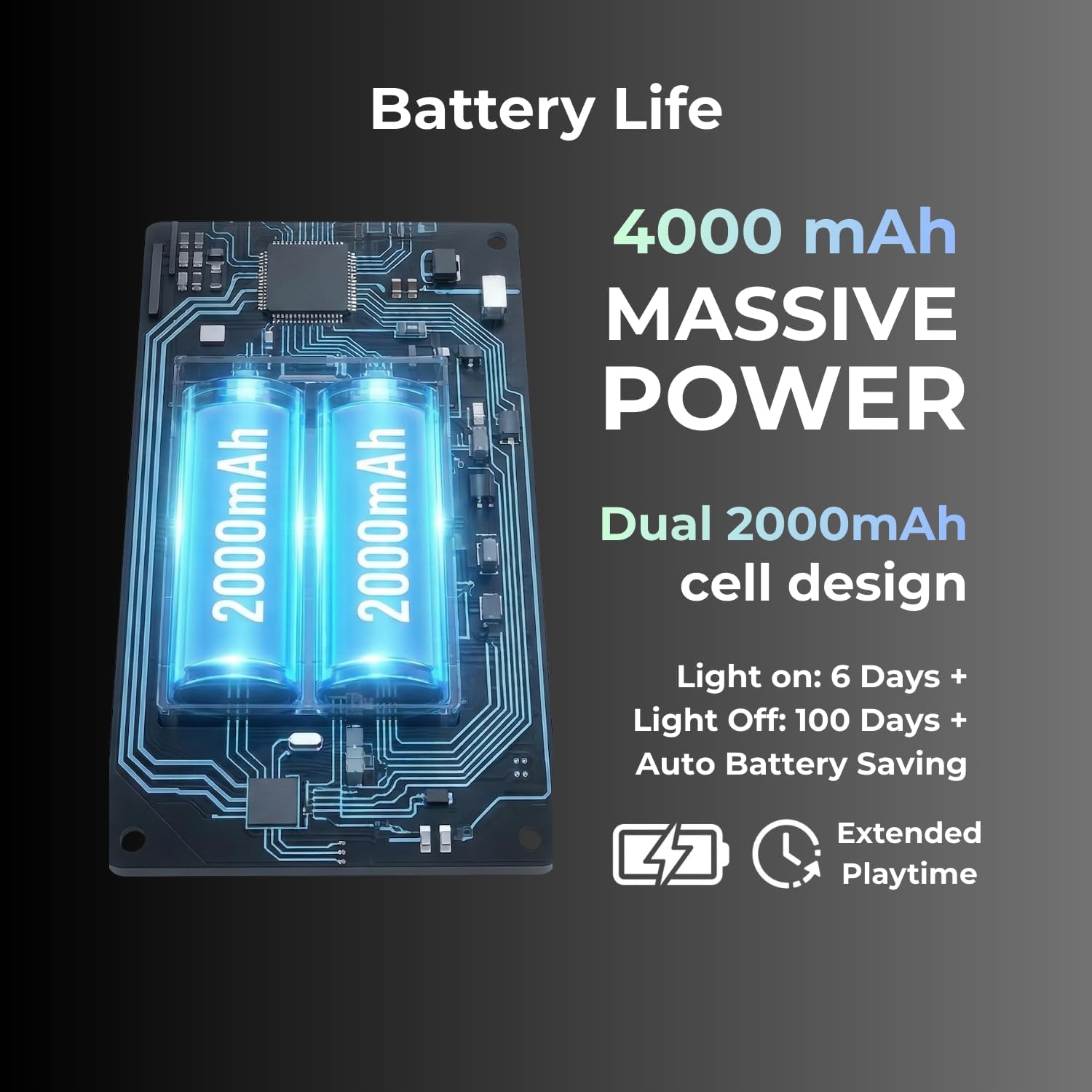
Bild: Detailliert view of the keyboard's physical mode toggle and the anti-loss dongle storage slot.
3.2.3 Bluetooth 5.0-Verbindung
- Ensure the mode toggle switch on the keyboard is set to the Bluetooth (BT) position.
- Aktivieren Sie Bluetooth auf Ihrem Computer oder Gerät und suchen Sie nach neuen Geräten.
- Select "FL·ESPORTS OG104" from the list of available devices to pair.
- Befolgen Sie die Anweisungen auf dem Bildschirm, um den Kopplungsvorgang abzuschließen.
4. Bedienungsanleitung
4.1 RGB-Hintergrundbeleuchtungssteuerung
The OG104 keyboard features dynamic 16.8 million color RGB backlighting. Specific key combinations (usually Fn + a designated key) control lighting effects, brightness, and color. Refer to the quick start guide included with your keyboard for detailed key combinations.

Image: The keyboard's keys illuminated with vibrant RGB backlighting, demonstrating the customizable lighting options.
4.2 Hot-Swap-fähige Schalter
The keyboard's PCB supports hot-swappable 3-pin and 5-pin mechanical switches, allowing for switch replacement without soldering. This enables customization of typing feel and sound.
- Ausbau eines Schalters: Use the provided switch puller tool to carefully grip the top and bottom of the switch. Gently pull upwards until the switch detaches from the PCB.
- Installation eines Schalters: Align the pins of the new switch with the holes on the PCB. Ensure the pins are straight. Gently press the switch down until it clicks into place. Do not force the switch; bent pins can damage the PCB.
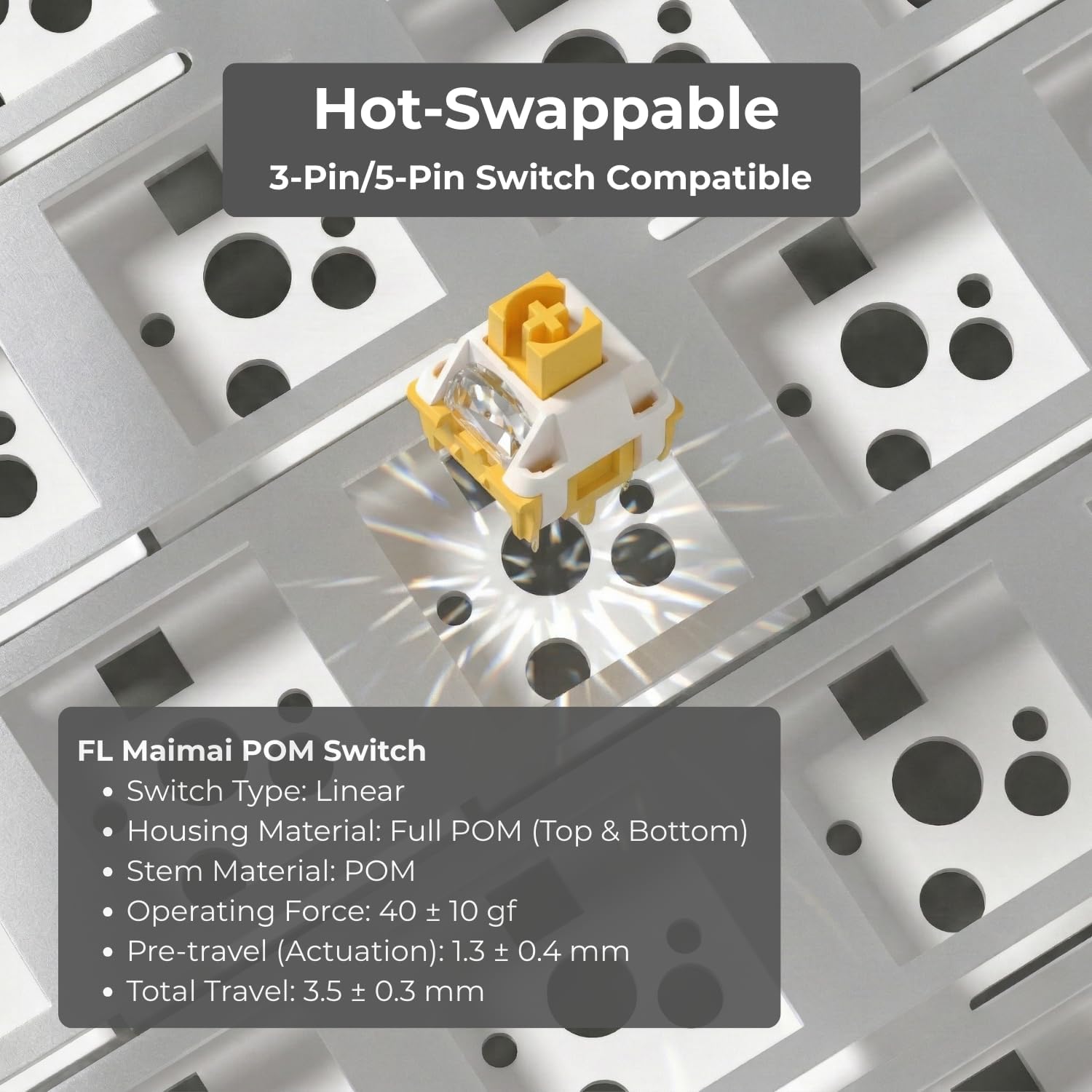
Image: Illustration of the hot-swappable feature, showing a switch being installed into the keyboard's PCB.
4.3 verstellbare Füße
Die Tastatur verfügt über zwei Tasten.tage adjustable feet on the underside, allowing you to set the typing angle to your preference for ergonomic comfort.
4.4 Batteriemanagement
The OG104 is equipped with a 4000mAh battery. To maximize battery life, the keyboard includes an auto battery-saving mode. Recharge the keyboard when the battery indicator shows low power.

Bild: Intern view highlighting the dual 2000mAh battery cells, indicating the keyboard's substantial power capacity.
4.5 Acoustic Design
The keyboard's 5-layer acoustic design, including Poron foams, IXPE switch pads, and a PET voice pad, is engineered to eliminate hollow resonance and provide a concentrated, satisfying typing sound.

Image: An exploded diagram illustrating the internal 5-layer acoustic structure, designed for optimal sound and feel.
5. Wartung
- Reinigung der Tastenkappen: Verwenden Sie ein weiches,amp cloth to wipe down keycaps. For deeper cleaning, keycaps can be removed using a keycap puller and washed with mild soap and water, then thoroughly dried before reattaching.
- Reinigen des Gehäuses: Wipe the keyboard case with a soft, dry cloth. Avoid abrasive cleaners or solvents.
- Staubentfernung: Verwenden Sie Druckluft, um Staub und Schmutz zwischen den Tastenkappen und Schaltern zu entfernen.
- Schalterpflege: If switches feel sluggish, they can be carefully lubricated using specialized switch lubricant. This is an advanced maintenance step and should only be performed if comfortable.
6. Fehlerbehebung
- Tastatur reagiert nicht:
- Stellen Sie sicher, dass die Tastatur aufgeladen ist.
- Check the connection mode (wired, 2.4GHz, Bluetooth) and ensure it matches your computer's connection.
- Bei kabelgebundener Verbindung versuchen Sie es mit einem anderen USB-Anschluss oder Kabel.
- For 2.4GHz, ensure the dongle is securely plugged in and try a different USB port.
- For Bluetooth, ensure the keyboard is in pairing mode and your device's Bluetooth is enabled. Try unpairing and re-pairing the device.
- Bluetooth pairing issues with MacBook: Some users have reported difficulties pairing with MacBooks. Ensure your MacBook's Bluetooth drivers are up to date. Try restarting both the keyboard and the MacBook. If issues persist, consider using the 2.4GHz wireless dongle or wired connection.
- Tasten werden nicht registriert oder es werden Doppeleingaben getätigt:
- Dies könnte auf einen defekten Schalter hindeuten. Nutzen Sie die Hot-Swap-Funktion, um den problematischen Schalter auszutauschen.
- Stellen Sie sicher, dass der Schalter vollständig in der Leiterplatte eingerastet ist.
- RGB-Beleuchtung funktioniert nicht:
- Check if the lighting is turned off via key combination.
- Stellen Sie sicher, dass die Tastatur über ausreichend Akkuladung verfügt.
7. Spezifikationen
| Besonderheit | Detail |
|---|---|
| Modellnummer | OG104 |
| Technische Daten | 18.39 x 6.65 x 1.57 Zoll |
| Artikelgewicht | 4.11 Pfund |
| Konnektivitätstechnologie | Bluetooth 5.0, 2.4-GHz-Funkverbindung, USB-C-Kabelverbindung |
| Tastaturbeschreibung | Mechanisch |
| Kompatible Geräte | Laptop, PC, Smart TV, Smartphone, Tablet (Windows, Mac, Android) |
| Besondere Merkmale | Backlit (RGB), Hot-Swappable, Integrated Stand, Rechargeable |
| Batterie | 4000mAh (1 Nonstandard Battery included) |
| Tastenkappenmaterial | PBT (Dye-Sub) |
| Schaltertyp | Pre-lubed Creamy Linear Switches (variant specific) |
8. Garantie und Support
FL ESPORTS products are covered by a manufacturer's warranty. For specific warranty details, please refer to the warranty card included with your product or visit the official FL ESPORTS website. For technical support, troubleshooting assistance, or warranty claims, please contact FL ESPORTS customer service through their official channels.
Bitte bewahren Sie Ihren Kaufbeleg für Garantiezwecke auf.


