Einführung
The Havit H2015PRO is a versatile gaming headset designed for multi-platform compatibility and immersive audio experiences. Featuring five distinct connection modes, this headset offers flexibility for various gaming setups and entertainment needs. It delivers high-fidelity sound with 360° spatial audio and low latency, ensuring a competitive edge in gaming. This manual provides essential information for setting up, operating, maintaining, and troubleshooting your Havit H2015PRO headset.
Produkt überview
The Havit H2015PRO headset includes the following components:
- Havit H2015PRO Gaming Headset
- Abnehmbares Mikrofon
- 2.4 GHz USB Wireless Dongle
- USB-C-Ladekabel
- 3.5-mm-Audiokabel
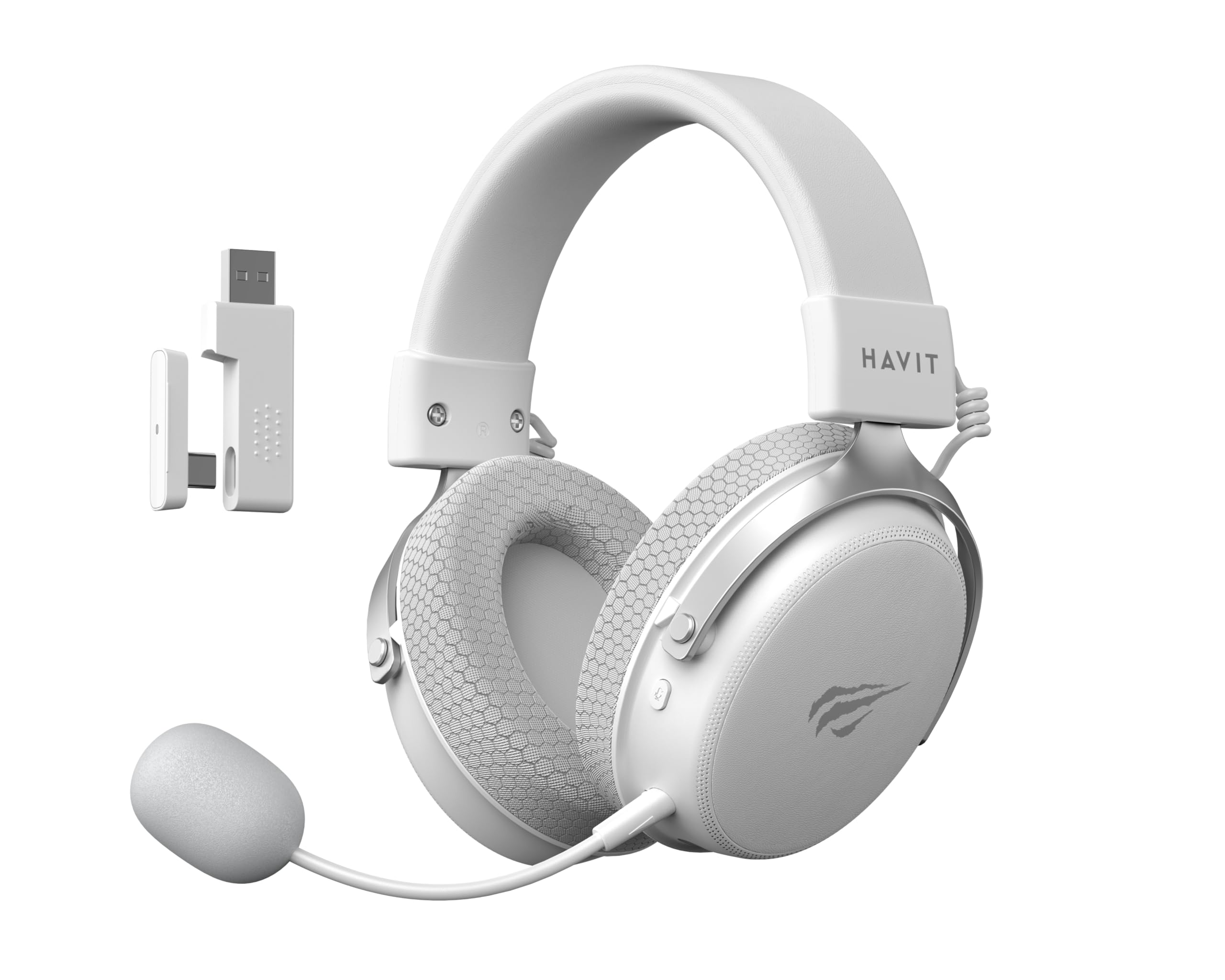
Image: The Havit H2015PRO headset in white, showcasing the main unit, detachable microphone, and the 2.4 GHz USB wireless dongle. This image provides a clear view of the primary components included with the product.
Aufstellen
The Havit H2015PRO offers five connectivity options to suit various devices and preferences.
1. 2.4 GHz Wireless Connection (USB Dongle)
- Insert the 2.4 GHz USB wireless dongle into an available USB port on your PC, PlayStation, or Nintendo Switch (in docked mode).
- Schalten Sie das Headset ein. Das Headset sollte sich automatisch mit dem Dongle verbinden.
- Stellen Sie sicher, dass das Headset in Ihren Systemeinstellungen als Audioausgabe- und -eingabegerät ausgewählt ist.
2. Bluetooth-Verbindung
- Power on the headset and switch it to Bluetooth mode (refer to the headset controls for mode selection).
- On your device (smartphone, tablet, PC with Bluetooth), go to Bluetooth settings and enable Bluetooth.
- Select "Havit H2015PRO" from the list of available devices to pair.
3. Kabelverbindung (3.5-mm-Audiokabel)
- Verbinden Sie ein Ende des 3.5-mm-Audiokabels mit dem 3.5-mm-Anschluss des Headsets.
- Connect the other end to the 3.5mm audio jack on your PC, console controller, or mobile device.
- This mode does not require the headset to be powered on.
4. Wired Connection (USB-C Cable)
- Connect the USB-C cable to the headset's USB-C port.
- Connect the other end to a compatible USB-C port on your PC or device.
- This connection can be used for both audio and charging.

Bild: Ein schräger view of the Havit H2015PRO headset, highlighting the earcups, headband, and visible controls on the side. This perspective helps in identifying connection ports and buttons.
Bedienungsanleitung
Ein-/Ausschalten
- Zum Einschalten den Netzschalter gedrückt halten, bis die Kontrollleuchte aufleuchtet.
- Zum Ausschalten die Ein-/Aus-Taste gedrückt halten, bis die Kontrollleuchte erlischt.
Lautstärkeregelung
- Use the volume roller or buttons located on the earcup to adjust the audio level.
Mikrofonnutzung
- Schließen Sie das abnehmbare Mikrofon an den dafür vorgesehenen Anschluss am Headset an.
- Adjust the microphone's flexible arm for optimal voice pickup.
- Use the microphone mute button (if available) on the headset to toggle mute on/off.
Aufladen des Headsets
- Connect the USB-C charging cable to the headset's USB-C port and the other end to a USB power source.
- Die Kontrollleuchte zeigt den Ladestatus an (z. B. rot für Ladevorgang, aus oder grün für vollständig geladen).
- Eine vollständige Aufladung dauert in der Regel etwa 2-3 Stunden.
Wartung
Proper care ensures the longevity and performance of your Havit H2015PRO headset.
- Reinigung: Verwenden Sie ein weiches, trockenes Tuch, um das Headset abzuwischen. Für die Ohrmuscheln ein leicht trocknendes Tuch verwenden.amp Ein Tuch mit milder Seife kann verwendet werden, achten Sie aber darauf, dass keine Feuchtigkeit in die Lautsprechergitter eindringt.
- Lagerung: Bewahren Sie das Headset an einem kühlen, trockenen Ort fern von direkter Sonneneinstrahlung und extremen Temperaturen auf.
- Batteriepflege: Um die Akkulaufzeit zu verlängern, sollte das Headset nicht häufig vollständig entladen werden. Laden Sie es regelmäßig auf, auch wenn es längere Zeit nicht benutzt wird.
- Vermeiden Sie Flüssigkeiten: Do not expose the headset to water or other liquids, as it is not water-resistant.
Fehlerbehebung
If you encounter issues with your Havit H2015PRO headset, refer to the following common solutions:
| Problem | Lösung |
|---|---|
| Kein Ton aus dem Headset |
|
| Mikrofon funktioniert nicht |
|
| Headset verbindet sich nicht drahtlos |
|
| Ladeprobleme |
|
Technische Daten
Detailed technical specifications for the Havit H2015PRO headset:
- Modellname: HAVIT H2015PRO
- Konnektivitätstechnologie: Hybrid (2.4 GHz Wireless, Bluetooth, 3.5mm Jack, USB-C)
- Treibergröße: 53 mm
- Impedanz: 64 Ohm
- Frequenzgang: 20.2 Hz (Specific value provided, typical range is 20Hz-20kHz)
- Batteriekapazität: 1500 mAh
- Geringe Latenz: 24 ms
- Audio-Features: 360° Spatial Audio, Virtual 7.1 Surround Sound
- Mikrofon: Abnehmbar und verstellbar
- Steuerungstyp: Integrated (Touch controls)
- Material: Plastik
- Produktgewicht: 500 Gramm
- Kompatibilität: Desktops, PC, PlayStation, Xbox, Nintendo Switch, Mobile Devices
- Wasserbeständigkeit: Nicht wasserbeständig

Bild: Eine Frontansicht view of the Havit H2015PRO headset, clearly showing the earcups, headband, and the attached microphone. This view emphasizes the ergonomic design and microphone placement.
Garantie und Support
Garantieinformationen
The Havit H2015PRO headset comes with a 1 Jahr HerstellergarantieDiese Garantie deckt Material- und Verarbeitungsfehler bei normalem Gebrauch ab. Bitte bewahren Sie Ihren Kaufbeleg für Garantieansprüche auf.
Kundenservice
For technical assistance, warranty claims, or further inquiries, please contact Havit customer support through their official website or the retailer where the product was purchased. Provide your product model number (H2015PRO) and proof of purchase when seeking support.


