📘 Studiohandbücher • Kostenlose Online-PDFs
Studio logo

Studio-Handbücher & Benutzerhandbücher

Studio encompasses a diverse range of professional equipment, including advanced Dante audio interfaces, DMX LED lighting panels, and modular studio furnishings.

Tipp: Geben Sie für eine optimale Übereinstimmung die vollständige Modellnummer an, die auf Ihrem Studio-Etikett aufgedruckt ist.

Über Studio-Handbücher auf Manuals.plus

Studio is a versatile brand category representing a wide array of professional and consumer equipment. The product lineup features high-quality audio and media networking tools from manufacturers like Studio Technologies, which produces industry-leading Dante audio interfaces, intercom engines, and line outputs.

In addition to professional audio equipment, the Studio brand covers high-performance LED lighting panels equipped with advanced DMX controls, multi-platform wireless headsets, and modular wall unit systems tailored for functional workspace organization. Whether outfitting a broadcast facility, designing a creative workspace, or setting up a recording environment, you can find the essential installation and operating instructions here.

Studiohandbücher

Neueste Handbücher von manuals+ Für diese Marke zusammengestellt.

Studio PANEL300TW LED-Panel-Benutzerhandbuch

1. Juni 2024
Produktinformationen zum Studio-LED-Panel PANEL300TW: Das PANEL300TW ist ein Studio-LED-Panel, das für eine leistungsstarke und vielseitige Beleuchtung in verschiedenen Anwendungsbereichen entwickelt wurde. Es verfügt über Sicherheitsmerkmale und -vorkehrungen…

Studio 543D IFB-Schnittstellen-Benutzerhandbuch

20. März 2024
Studio 543D IFB-Schnittstelle Produktinformationen Spezifikationen: Modell: 543D IFB-Schnittstelle Unterstützt Dante Audio-over-Ethernet-Technologie SampAbtastrate: 48 kHz Bittiefe: 16, 24 oder 32 Bit Vier 5-Segment-LED-Audiopegelanzeigen…

Studio 374A Intercom Beltpack-Benutzerhandbuch

26. Dezember 2023
Studio 374A Intercom Beltpack – Produktinformationen Spezifikationen Seriennummern: M374A-04001 bis 04500 Anwendungs-Firmware: 2.1 und höher Stromversorgung: Power-over-Ethernet (PoE) Betriebsparameter: Konfigurierbar über die STcontroller-Software Audio…

STUDIO Laminatboden Benutzerhandbuch

12. Januar 2023
Pflege und Wartung von Studio-Laminatböden Quick-Step Studio-Laminatböden benötigen, wie andere hochwertige Einrichtungsgegenstände in Ihrem Zuhause, die richtige Pflege, um optimal auszusehen. Wenn Sie unsere…

Studio 2 OTG USB Audio Interface Benutzerhandbuch

4. Januar 2023
Studio 2 OTG USB-Audio-Interface – Einführung Vielen Dank, dass Sie sich für das Studio 2 OTG Audio-Interface entschieden haben. Das Studio 2 OTG ist ein USB-Audio-Interface mit 2 Eingängen und 2 Ausgängen und integrierten…

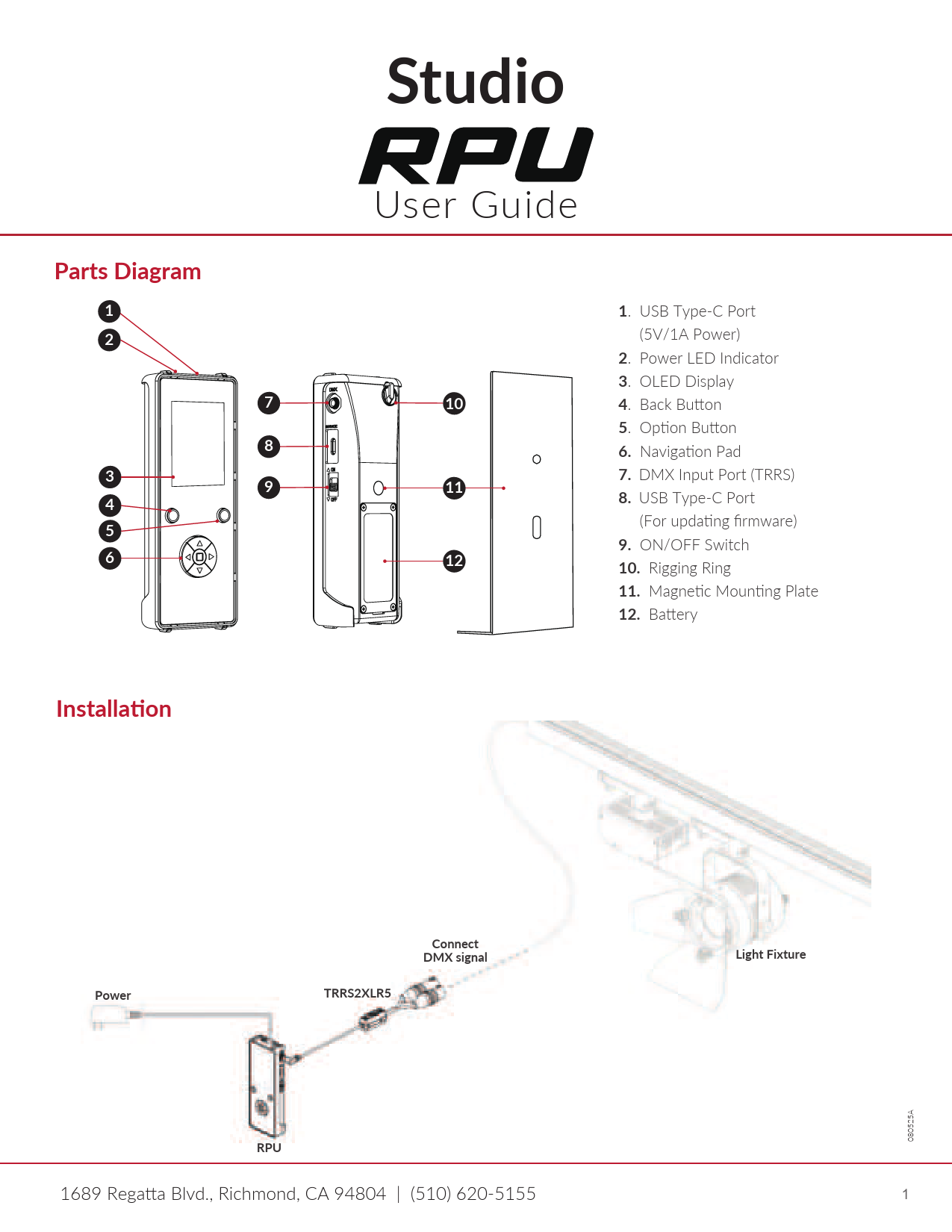
Studio RPU Benutzerhandbuch

Benutzerhandbuch
Benutzerhandbuch für die Studio RPU, einschließlich Installation, Tastenfunktionen, DMX-Steuerung (Manueller Modus und Szenenmodus), Firmware-Updates, DMX-Tests, Gerätetests, RPU-Einstellungen und Fehlerbehebung.

Studiohandbücher von Online-Händlern

Mont Blanc to Everest Instruction Manual

B0000CJD1J • January 13, 2026
Instruction manual for the book Mont Blanc to Everest by Gaston REBUFFAT, covering its content, author, specifications, and care guidelines.

Asien: 2 Bedienungsanleitung

0670137960 • 27. Juli 2025
Eine Bedienungsanleitung zum Buch „Asien: 2“ von Martin H.urlimann, herausgegeben von Studio. Dieser Leitfaden umfasst überview, Verwendung, Wartung, Fehlerbehebung und Spezifikationen für die Hardcover-Ausgabe.

Studio support FAQ

Häufig gestellte Fragen zu Handbüchern, Registrierung und Support für diese Marke.

  • Where can I find the DMX configuration for my Studio LED panel?

    The DMX channel modes and addressing instructions are detailed in the specific LED panel's user manual under the DMX control menu map.

  • How do I assign Dante channels on my Studio audio interface?

    Dante-compliant Studio devices use the Dante Controller software application to route audio signals, configure sample rates, and assign Dante flows.

  • Do Studio modular wall units require assembly?

    Many Studio modular wall units come pre-assembled and only require securing the keyhole mounts to wall screws according to the manual's installation guide.

  • How can I update the firmware on my Studio Dante equipment?

    Firmware updates for Studio Dante interfaces (like ones using the UltimoX integrated circuit) can be applied via your local network's Ethernet connection using the designated update utility.